

Forum Replies Created
-
AuthorPosts
-
Cliff
MemberWe posted an update 4 hours ago on Twitter:
FYI: If you had trouble accessing the latest PRO update from the downloads page earlier, plz try again. Should be smooth sailing now.
— The Events Calendar (@TheEventsCal) October 2, 2015
Please try again and let me know if still not working for you.
Thanks for you understanding!
October 2, 2015 at 12:40 pm in reply to: Error downloading new Version – 503 ( Invalid Key ) #1011057MemberI’m glad you could all try helping each other. Good job, MT Community!
We posted an update 4 hours ago on Twitter:
FYI: If you had trouble accessing the latest PRO update from the downloads page earlier, plz try again. Should be smooth sailing now.
— The Events Calendar (@TheEventsCal) October 2, 2015
Thanks for you understanding!
MemberHi Jeff. If I understood your issue correctly, the form field isn’t appearing.
I created this gif for you to review and compare to your wp-admin > Events > Import > Import: iCal settings. I used The Events Calendar Version 3.12.3 and iCal Importer Version 3.12.1
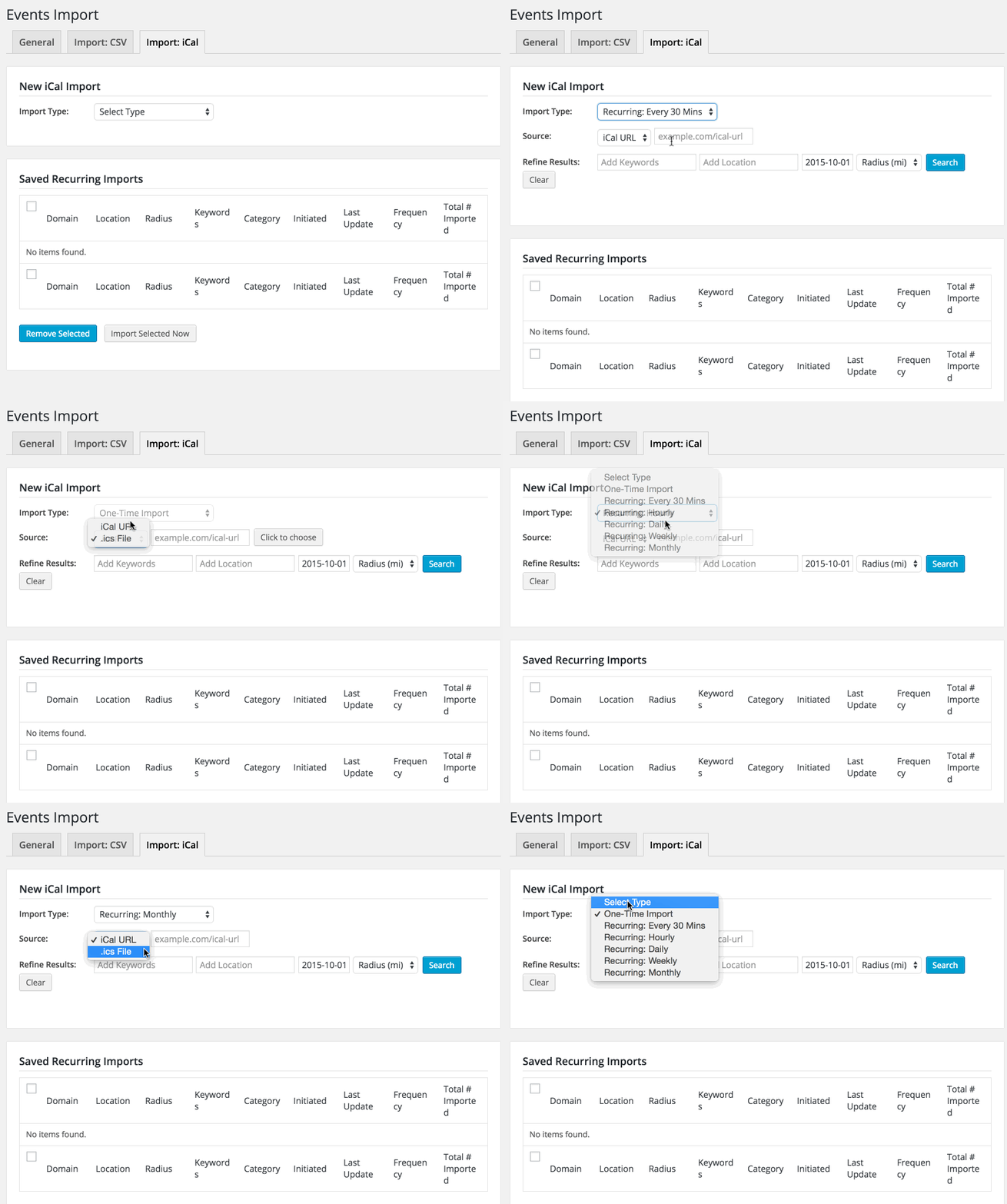
I tried all the options and the field didn’t disappear.
If this isn’t what you’re seeing, please make sure you have the latest version of all the Modern Tribe plugins, which you can obtain from your Downloads page.
Another idea is to try a different browser.
If you have the latest versions already and you’re experiencing the same issue in multiple browsers, there may be a theme or plugin conflict at play here.
Could you try temporarily activating the default Twenty Fifteen theme, and seeing if the issue persists.
If disabling the theme fixes it, we have narrowed the issue down to a theme conflict. Do you have any theme overrides for the Events Calendar? If so could you try disabling them by renaming your [themename]/tribe-events/ folder to ‘tribe-events-bak’. Did that fix it?
If the issue persists in the default Twenty Fifteen theme, then we have a different set of debugging steps. Please keep the Twenty Fifteen theme enabled, and also disable any plugins other than the ones from Modern Tribe to see if that fixes it. If it does, please try re-enabling the plugins one at a time until the issue resurfaces. When it does resurface, can you let me know which plugin caused that to happen?
Thanks.
MemberHi Anthony. I’m very sorry to hear the WooCommerce Tickets add-on didn’t meet your expectations upon first impression.
We have quite a few happy customers using it, but it does take a little bit of setting up to get things ready to go.
If you’d like, you can ask each of your “how-to” questions (tell me what you’re wanting to accomplish), and I’d love to assist you in getting the basics setup so you can enjoy using the plugin for a long time.
If, however, you’re not wanting such assistance, you can reference our Refund Policy to figure out how to pursue a refund.
I look forward to hearing back from you soon.
Thanks!
MemberHi Maxine. Thanks for your inquiry.
- Our Community Events add-on is built just for letting users add their own events to the site-wide calendar.
- You can test our free core Events Calendar plugin to get a feel for its HTML code, which can be targeted via CSS to adapt colors and similar styling. There are even options for our plugin to load minimal CSS, some CSS, or the full “regular look” CSS. So you could play with those options. I know someday in the future (not next week or anything that soon, but someday) we’ll have a much easier way to change the colors of the calendar. So you can get started with the free plugin now and tweak its styling right away.
- Since the calendar displays inside a WordPress page, you can just have your company logo as part of your site-wide header or footer. If you want to display it only on the Events page(s), you’d need to use one of our hooks to insert the proper HTML code necessary to display your image. If you’re great with CSS but not PHP, you technically could use CSS to output an image of your choice (e.g. logo) on the Events page.
I know that information is pretty general, but hopefully it gets you thinking down the right paths you decide to take.
Last but not least, we have a pretty great Refund Policy so you can buy one or many of our add-ons and thoroughly test them.
If you have any follow-up questions, please let me know.
MemberHi again, fifteen15studios.
I tested both the PRO’s search and Filter Bar’s search and the query string parameters don’t get lost when switching views (e.g. from Month to Day).
Here’s a gif of my testing in Firefox with PRO v3.12.2 and Filter Bar v3.12:
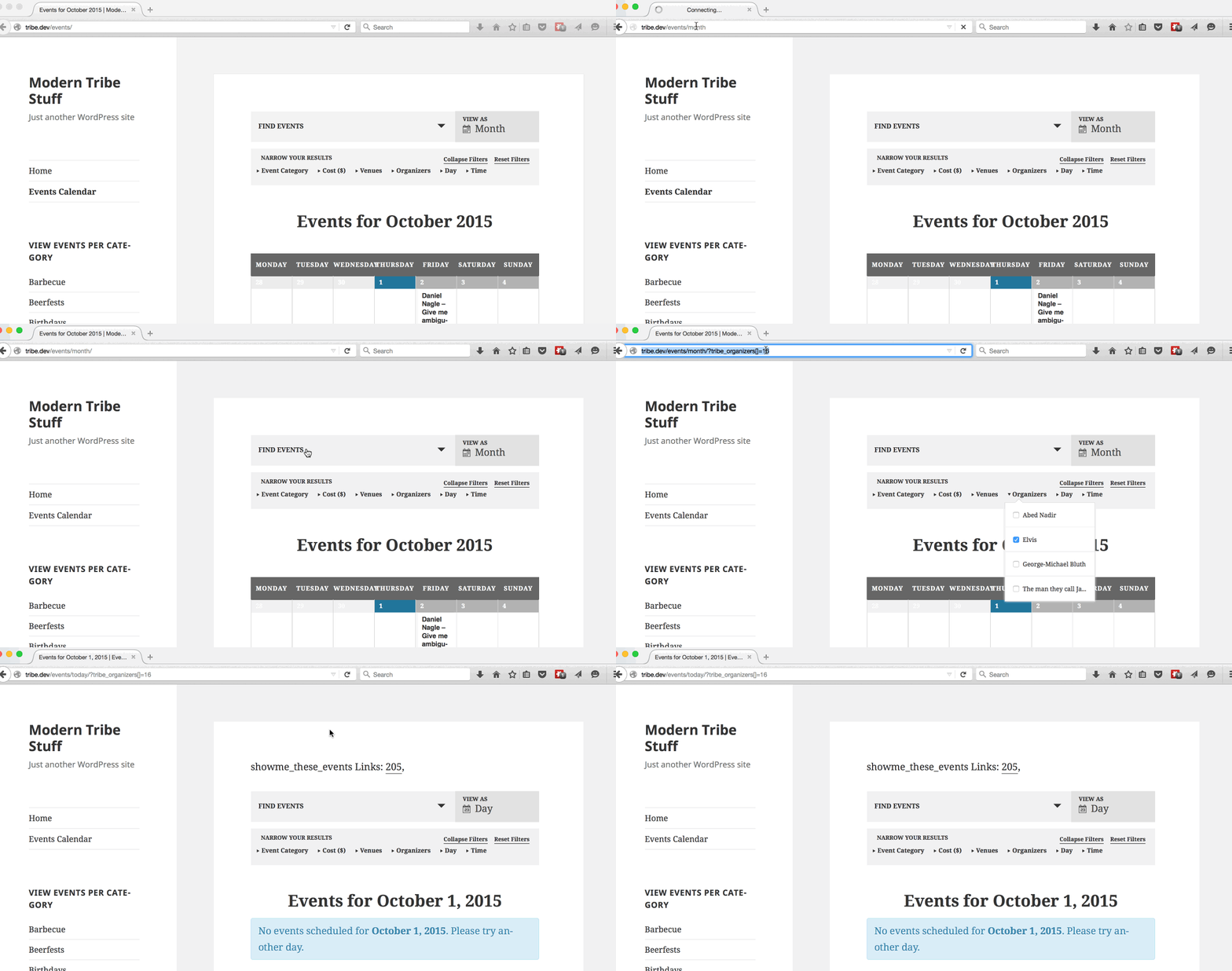
If you’re not able to replicate this, maybe your Modern Tribe plugin(s) aren’t at the latest version(s) or there could be a theme or plugin conflict. Or if you have some custom functionality going on, maybe it’s not letting the MT plugin(s) behave in their normal manner.
I’m looking forward to hearing back from you soon. Thanks.
MemberHi. Thanks for your detailed question.
FilterBar isn’t “shortcode-ized” or widgetized (i.e. modular) in a way that there are built-in settings to display pieces of it multiple places around the site.
I definitely want to support you as much as I can. Unfortunately, we would have to charge a lot more for our plugin if it included a year’s worth of customizations/modifications in the price. As we outline in our Scope of Support, support includes assistance with bug fixes and guidance on how to perform modifications. However, it is up to you to actually make the modifications yourself.
If you’d like, you could add it as a feature request at our plugins’ UserVoice page.
This allows others who are interested in that feature to easily voice their support. We frequently review suggestions there to find out which ones are popular, then we implement as many of them as we can.
If you do post it, feel free to link to it from here in case anyone comes across this forum thread in the future.
I hope that makes sense. I am very glad to further assist you to the extent outlined in our support agreement. Please let me know if you have any questions.
MemberHi Karrie.
You can learn about our import options at https://theeventscalendar.com/knowledgebase/using-the-events-calendars-csv-importer/
But, no, you cannot import events as recurring events from a CSV at this time. You may be able to find an existing feature request at our UserVoice site that you’d like to vote for — or you could submit your own new idea if you don’t find an existing one.
Another option may be to import from iCal instead of CSV, for which we have a separate product: https://theeventscalendar.com/product/ical-importer/
If you try it and it doesn’t work for you, we do have a pretty great Refund Policy so you can buy one or many of our add-ons and thoroughly test them.
Please let me know if there’s anything else I can do for you.
October 1, 2015 at 4:13 pm in reply to: Error downloading new Version – 503 ( Invalid Key ) #1010715MemberHi Thomas. The current PRO add-on version is 3.12.2 (released earlier today).
Please visit https://theeventscalendar.com/my-account/downloads/ and let me know if you’re getting any download errors there. I just tried the download and it worked for me. Maybe 3.12.1 wasn’t available at the time you were trying since it was getting replaced with 3.12.2…
I hope it works for you now. 🙂
MemberHi Laura. Sorry you’re having issues with your download.
You can visit https://theeventscalendar.com/my-account/downloads/ and download the latest releases for any plugins you purchased.
Note on the left-hand side of that page you can also view your account and your license key(s). It might be a good idea to double-check you have the correct one(s) entered in your wp-admin > Events > Settings > Licenses.
Let me know if you need any further help.
October 1, 2015 at 3:55 pm in reply to: Countdown Timer in Top Bar not working in Church Event Theme #1010706MemberThanks for the link. Here are some items you may want to check to see if you can determine a cause for your issue:
- Are you referring to the countdown at the top of your home page?
- What time zone is set in WordPress General Settings?
- What time zone is your Events > Settings set to?
- What time zone is the “next event” (whichever one it happens to be by the time you reply) set to? I assume it’s the same as your Events > Settings, but please double-check.
Additionally, I’ve seen some theme/plugin conflicts affect the countdown timer functionality in a way that makes the countdown incorrect.
Could you try temporarily activating the default Twenty Fifteen theme, and seeing if the issue persists.
If disabling the theme fixes it, we have narrowed the issue down to a theme conflict. Do you have any theme overrides for the Events Calendar? If so could you try disabling them by renaming your [themename]/tribe-events/ folder to ‘tribe-events-bak’. Did that fix it?
If the issue persists in the default Twenty Fifteen theme, then we have a different set of debugging steps. Please keep the Twenty Fifteen theme enabled, and also disable any plugins other than the ones from Modern Tribe to see if that fixes it. If it does, please try re-enabling the plugins one at a time until the issue resurfaces. When it does resurface, can you let me know which plugin caused that to happen?
MemberIt sounds like you might want to use the custom menu links I mentioned before.
Here’s more information about WordPress menus: https://codex.wordpress.org/Appearance_Menus_Screen
Don’t miss the “Custom Links” section! That’s where you can add a link to yoursite.com/my-events (or whatever your chosen URL turns out to be).
I hope that helps you finalize your calendar / menu setup! 🙂
MemberTommy, sorry the post I linked to wasn’t clear enough for you.
That post provided a code snippet and screenshot of it in action and specified which hook it used to output it to the page.
It’s already a bit beyond our scope of support Terms so I won’t be able to provide you with how-to information beyond what was included in that post.
If needed, a developer of your choice should be able to quickly implement the code available at the link I provided you.
If there’s something else I can help you with, please update this ticket or create a new ticket if it’s a separate issue.
Thank you very much for your understanding. You are a valued customer.
October 1, 2015 at 3:33 pm in reply to: ng: sprintf(): Too few arguments in …../wp-content/plugins/the #1010689MemberOliver, I appreciate you sharing your additional info.
===
Christian,
Yes, I believe this is an issue with translations. The developers told me that sometimes the code can get updated (e.g. add an additional sprintf argument) but the language pack doesn’t keep up.
As such, if you switch back to English, the message(s) should go away.
Translation information (including if/how language packs can get updated) can be viewed at https://theeventscalendar.com/knowledgebase/changing-the-language-on-your-calendar/
September 30, 2015 at 4:29 pm in reply to: Countdown Timer in Top Bar not working in Church Event Theme #1010284MemberHi Charmaine.
So that I can take a closer look into your specific situation, could you please send me a link to the site with the countdown timers and a link to that site’s main Events Calendar page? If you prefer, you can choose to send as a Private Reply.
Once I get that information, I’ll take a peek and we’ll go from there. Thanks!
-
AuthorPosts