Forum Replies Created
-
AuthorPosts
-
February 4, 2016 at 8:01 am in reply to: Event Details don't popup when you hover over title in Calendar View #1067702
Cliff
MemberHi Beth. Could you please provide some links and screenshots of what you’re experiencing and share your System Information.
Also, do you have any custom code?
That will give me a lot of extra information to help diagnose the problem.
Thank you.
February 4, 2016 at 7:46 am in reply to: Help setting up PayPal API for split payments in Community Tickets #1067693MemberHi kindergartener Andrea. 😉
Thanks for your question.
The Community Tickets New User Primer is a helpful guide.
For PayPal-specific settings like where to get your API keys or other details, please contact PayPal support. This may be helpful: https://developer.paypal.com/docs/classic/api/apiCredentials/
Sorry we can’t do all your setup for you. It can be a bit more complicated than our other plugins’ settings because it enables complex functionality.
If after speaking with PayPal you still need assistance with Community Tickets, please provide screenshots of whatever you have from our plugin and from PayPal. Make sure those replies are set to Private.
I hope this info helps you get going with it! 🙂
MemberHi Greg. Thanks for your question.
I didn’t go through all steps of that JotForm, but you might want this setup:
- PRO for adding custom fields
- Community Events for users to create new events (and edit their own events) via front-end form (including supporting custom fields added via PRO add-on)
Also, all “ticketing” functionality is handled via Event Tickets. If you want paid tickets (not just free RSVPs) functionality, you’d need Event Tickets Plus and a plugin like WooCommerce.
If you want your users to add their own tickets via the front-end form, you’d also need Community Tickets.
I hope this information helps. Please let me know if you have any follow-up questions.
MemberHi. Sorry you’re having this issue.
You have a Personal license for PRO (i.e. 1 site).
You can run it in the environment you described (multisite WP install with 1 site)
As far as network-activated, I believe a non-Multisite-specific license should only be activated at the single-site level, not at the network level, but I’m uncertain if it really matters. I would suggest trying that to see if it works for you.
If it doesn’t help (it may not matter if network-activated and it really should NOT be affecting your ability to enter data like a price field), then I’d ask you to please follow our Testing for Conflicts Guide and see if that helps narrow down the cause of this.
Let us know what you find out.
Thanks.
February 4, 2016 at 5:49 am in reply to: Timezone incorrect for events imported with iCal Importer #1067460MemberHi. Sorry you’re having this issue.
Could you please change your WordPress timezone from UTC-5 to New York and see if that gets things working correctly (e.g. create test event in Gcal and import it in your site’s next 30 minute import)?
The issue is with WordPress’ timezone setting, not with any settings in Google Calendar so please don’t edit those just for the purpose of testing here.
Please let me know how things go for you.
Thanks!
February 4, 2016 at 5:40 am in reply to: Events Calendar not displaying unless user is logged in #1067454MemberHi. Sorry you’re experiencing this.
Our plugin doesn’t have any access restrictions/controls so I’m guessing it’d be something with your settings.
Please follow our Testing for Conflicts Guide and see if that helps narrow down the cause of this.
Let us know what you find out.
Thanks.
MemberThanks for the update about X Theme. Generally, we say that if a theme follows WordPress coding standards, it should work, but I’ve heard good things about X and would like to give it the benefit of the doubt regarding coding standards so please let us know if you discover any specifics that’d help us get compatible with it.
MemberMorten, I think my previous reply would apply to you as well.
If your events are more regular (e.g. monthly) with a few exceptions, you could create an event that recurs monthly and then click “Add Exception” to make April’s event not happen.
If you have follow-up questions, please open up a new topic of your own, detailing in your own words exactly what your problem is (instead of just linking here). We have just found it serves our users best to keep threads to one user’s issue.
Thanks!
===
Paul, please let me know how things go for you.
February 4, 2016 at 5:01 am in reply to: Tickets SKUs no longer auto generating in Event Tickets / Plus #1067441MemberI tested and <span class=”s1″>CE Tickets did lose that functionality from 3.12.1 to 4.0.2 so I’ll file a bug report to get it back in.</span>
I’ll ping Mr. Z for you about it too.
Thanks! (please let me know if I got everything correct for you)
February 4, 2016 at 4:53 am in reply to: "events_get_listview_link" leads to "Page Not Found" #1067439MemberI added this to my local testing site — notice 1==1 instead of wp_is_mobile() just for testing — and when I visited /events/month, it redirected me to /events/list, which I believe is correct behavior for the code:
add_action( 'template_redirect', 'tec_mobile_template_redirect' );
function tec_mobile_template_redirect() {
if( tribe_is_month() && 1==1 ) {
wp_redirect( tribe_get_listview_link() );
exit();
}
}
Please try it with the 1==1 instead of wp_is_mobile(). If that solves it, you’ll need to troubleshoot why the issue with wp_is_mobile() — possibly needing earlier add_action priority?
If the 1==1 code does NOT work, please keep it in your child theme’s functions.php and then follow our Testing for Conflicts Guide (basically deactivating all active plugins besides ones from Modern Tribe) and see if that helps narrow down the cause of this.
Let us know what you find out.
Thanks.
February 4, 2016 at 4:30 am in reply to: Tickets SKUs no longer auto generating in Event Tickets / Plus #1067434MemberGot ya. Sorry, I thought we were talking about Event Tickets Plus. I now know we’re talking about Community Tickets (which requires Event Tickets Plus).
Event Tickets Plus definitely has a SKU field when entering new tickets via wp-admin (although not auto-generated).
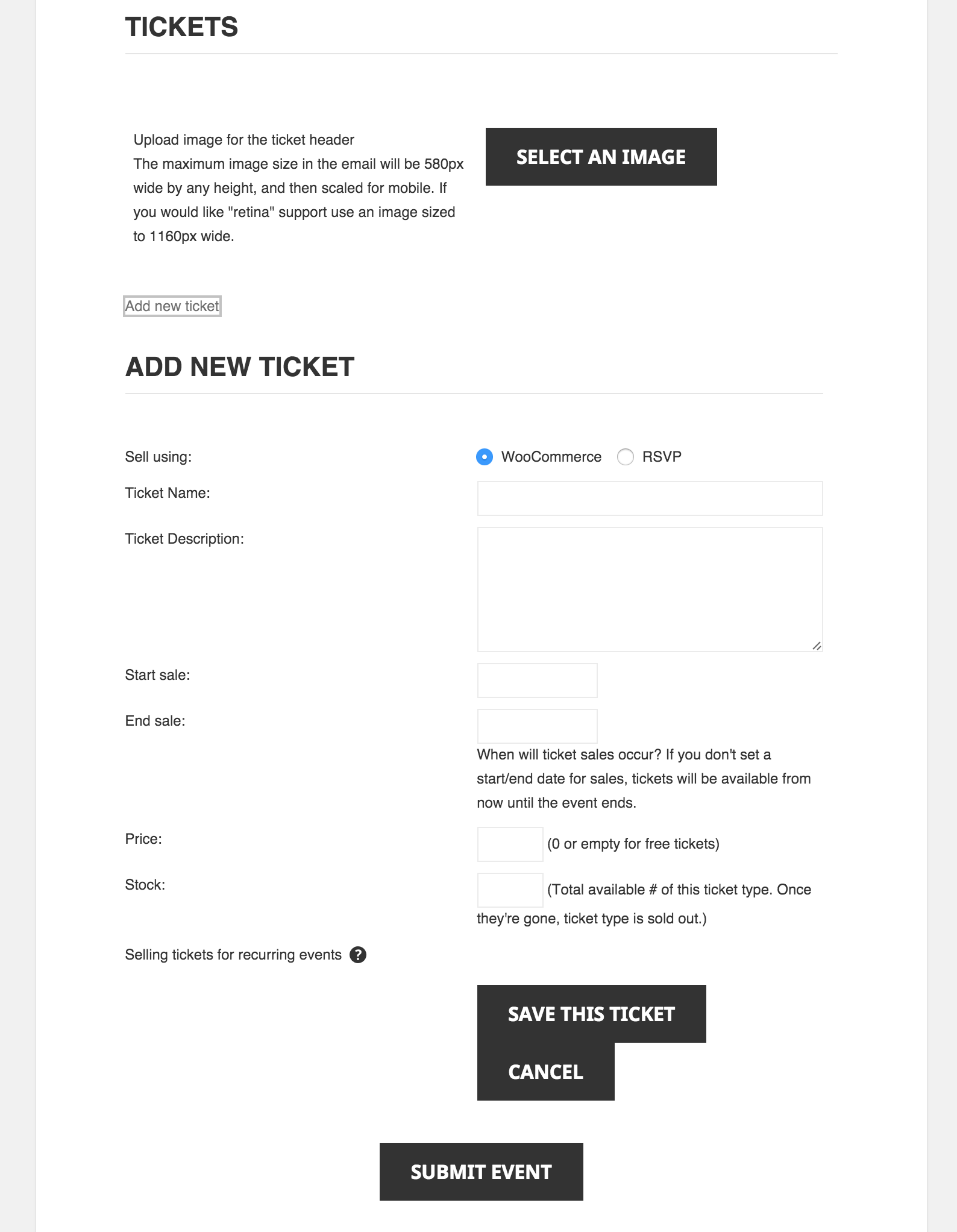
I checked v3.12.x and v4.x and the Community Events front-end form doesn’t have a SKU field:
[caption id="attachment_1067432" align="aligncenter" width="665"]
 Community Events front-end form on Twenty Fifteen theme[/caption]
Please correct me if I’m wrong: You want an auto-generated SKU assigned when a Community Events front-end form submission has tickets, and the SKU is only visible to site admins (not the front-end Community Events event edit form) — it was there in v3.12.x and you want it back in for v4.x?
(I hope I got all that right for you! 🙂
MemberI understand your request better now and have confirmed that the ability to have specific dates for your recurrence pattern is not currently available in any version of our PRO add-on. Sorry to disappoint.
The only way to technically string these together as a recurring event is to enter a recurrence pattern (e.g. daily) and then enter a bunch of exclusions (way too many in this case), so I’d say our recurrence pattern functionality doesn’t work for that scenario at this time, although it is an open feature request in our bug tracker.
I’d suggest creating the March 3, 2016, event (non-recurring) and trying Duplicate Post. Then edit the copy to be July 6. Then repeat 3 more times.
They won’t be tied to each other in any way as far as a recurring series of events goes, but it’d make initial data entry easier.
I hope this works for you for now. I’ve added your request to our bug tracker to try to get more momentum toward it.
Please report back your experience with Duplicate Post if you do try it out.
Thanks for your understanding and patience.
MemberThanks for your detailed testing, Piccia.
The option there definitely should be working. However, since it’s not please follow our Testing for Conflicts Guide and see if that helps narrow down the cause of this.
Obviously, if you switch to Twenty Fifteen theme, the problem should go away so I’d suggest following that guide looking for plugin conflicts (basically disable all plugins but keep your theme and see if that makes things better).
If you determine it to be only a theme conflict (still happens with all plugins disabled), I can try to help a little but please know that we don’t provide support for all third party themes, per our Scope of Support Terms.
If it is a theme conflict, please share your System Information. That will give me a lot of extra information to help diagnose the problem.
Let us know what you find out.
Thanks.
February 3, 2016 at 9:35 pm in reply to: "events_get_listview_link" leads to "Page Not Found" #1067357MemberHi Erik.
If I understand your question correctly, you’ve moved from The Events Calendar v3 to v4.
In the current version of our plugins, tribe_get_listview_link() is the correct function to use instead of events_get_listview_link(), which has been deprecated.
Could you please update your code and if it’s still happening, please tell me the URL that is a 404?
Thank you.
MemberHi. Thanks for your question.
If I understand your question correctly, you want a widget area on the Event Single page/view but not on the Event Archive views (Month, List, etc)?
If you don’t want to get into coding, you might want to try a plugin like Custom Sidebars or Jetpack Widget Visibility (our KB article about it).
Please let me know how things go for you.
Thanks.
-
AuthorPosts