Forum Replies Created
-
AuthorPosts
-
Cliff
MemberHi, Iorna. Sorry you’re experiencing this.
I visited http://lovewimbledon.org/whatson/, which defaults to Photo View. I saw it did have the events out of order. I visited your List View and Month View as well, and they seemed to be in the correct order.
You can see our demo site’s Photo View is not displaying the events out of order: http://wpshindig.com/events/photo/
I suspect your Photo View issue has to do with your theme or a code customization, if you’ve made any.
Since this isn’t currently a known issue, I’d suggest following these recommended troubleshooting steps for your own site:
Please follow our Testing for Conflicts Guide (basically switch to Twenty Seventeen theme and deactivate all plugins and custom code other than Modern Tribe plugins) and see if that helps narrow down the cause of this.
If it doesn’t, please enable WP_DEBUG and WP_DEBUG_LOG (which will create a file on your server at /wp-content/debug.log if there are any WP_DEBUG messages) and share any debug messages you see while trying to replicate this issue and doing other things on your site relevant to this ticket (such as visiting your site’s home page, events page, single-event pages, and anything else you can think to do).
Then, please re-share your System Information (while in Testing for Conflicts Mode) in a Private Reply. That will give me a lot of extra information to help troubleshoot this.
Let us know what you find out.
Thanks.
May 16, 2017 at 9:09 pm in reply to: reocurring events "view all" shows up in list mode, not photo #1284744MemberHi, Roger.
This happens due to this code:
Search “tribe_is_showing_all” in /wp-content/plugins/events-calendar-pro/src/Tribe/Main.php, which is what is used to leverage the tribe_events_current_view_template filter.
You could request this as a new feature (or maybe search to see if the idea was already posted by someone else) at our plugins’ UserVoice page.
This allows others who are interested in that feature to easily voice their support. We frequently review suggestions there to find out which ones are popular, then we implement as many of them as we can.
If you post it / find it, feel free to link to it from here in case anyone comes across this forum thread in the future.
MemberHi, Michael.
Yes, the discount we were previously providing for renewals was changed.
If you have any follow-up questions, feel free to submit billing questions to
 or to continue the conversation here. You can use Private Replies if you prefer.Member
Hi, Lauren.
You can reference our CSV documentation at https://theeventscalendar.com/knowledgebase/csv-files-options-and-examples/
It does not support recurring events.
I believe you’re requesting the same thing as one of our existing feature requests: https://tribe.uservoice.com/forums/195723-feature-ideas/suggestions/17434264-add-csv-recurring-import-to-aggregator
Please do add your vote there.
This allows us to gauge interest in this particular feature request, which helps us prioritize our development efforts.
Thank you.
MemberHi, Jason.
Sorry you’re experiencing this.
That previous thread you linked to was attached to a bug report regarding non-specific messaging when an error does occur.
Could you please provide a link to the iCal URL you’re trying to import at this time?
Also, are you experiencing errors importing new events from the iCal feed or just updating previously-imported events to the latest information?
MemberHi, Kyle.
It just supports the iCal spec. Your iCal file or URL should validate (e.g. via http://severinghaus.org/projects/icv/).
When you actually go to run the import via wp-admin, it’ll ask you if you also want to assign a category manually.
Please let me know if you have any follow-up questions on this topic.
MemberThis reply is private.
MemberHi, Sarah.
Please make sure the calendar you’re trying to import validates. I personally like to use http://severinghaus.org/projects/icv/
Please let me know what you find out. If it does validate and still Event Aggregator is throwing an error, please provide me the full URL to the iCal you’re trying to import.
May 16, 2017 at 8:04 pm in reply to: Categories not Submitting – tribe_create_event function #1284717MemberWhy are you using cid_71645129?
Here’s a video showing how you find the Event Category’s ID: https://cl.ly/3d3e411s0z0L
If using an actual number, as demonstrated in my video, still doesn’t work, you may need to hard-code “tribe_events_cat”, but I wouldn’t guess this is the case.
MemberNo worries at all. Thanks for understanding. Have a great rest of your week.
May 16, 2017 at 7:57 pm in reply to: Clicking (See All) link on recurring events leads to a past event at top of page #1284713MemberGeralynn, there is not an update yet, and I do not have an ETA. Sorry this has been lingering. Our strategy and development teams have a lot of bug and feature tickets to prioritize and complete.
MemberSorry for the delayed reply, here.
I’ve passed all your feedback onto our developers to take a closer look and see what they can reproduce and to determine the best way forward with your findings.
I’ll mark this ticket as Pending Fix, which means this thread should receive a reply once there’s an update from them. I cannot guarantee when it will be fixed as it’s in the development team’s hands now.
I apologize for this issue and appreciate your understanding and patience.
MemberHuiwen, thanks so much for helping us help others!
I’ve added 3 months to each of your licenses as a big thank you and sorry for the troubles and time spent here.
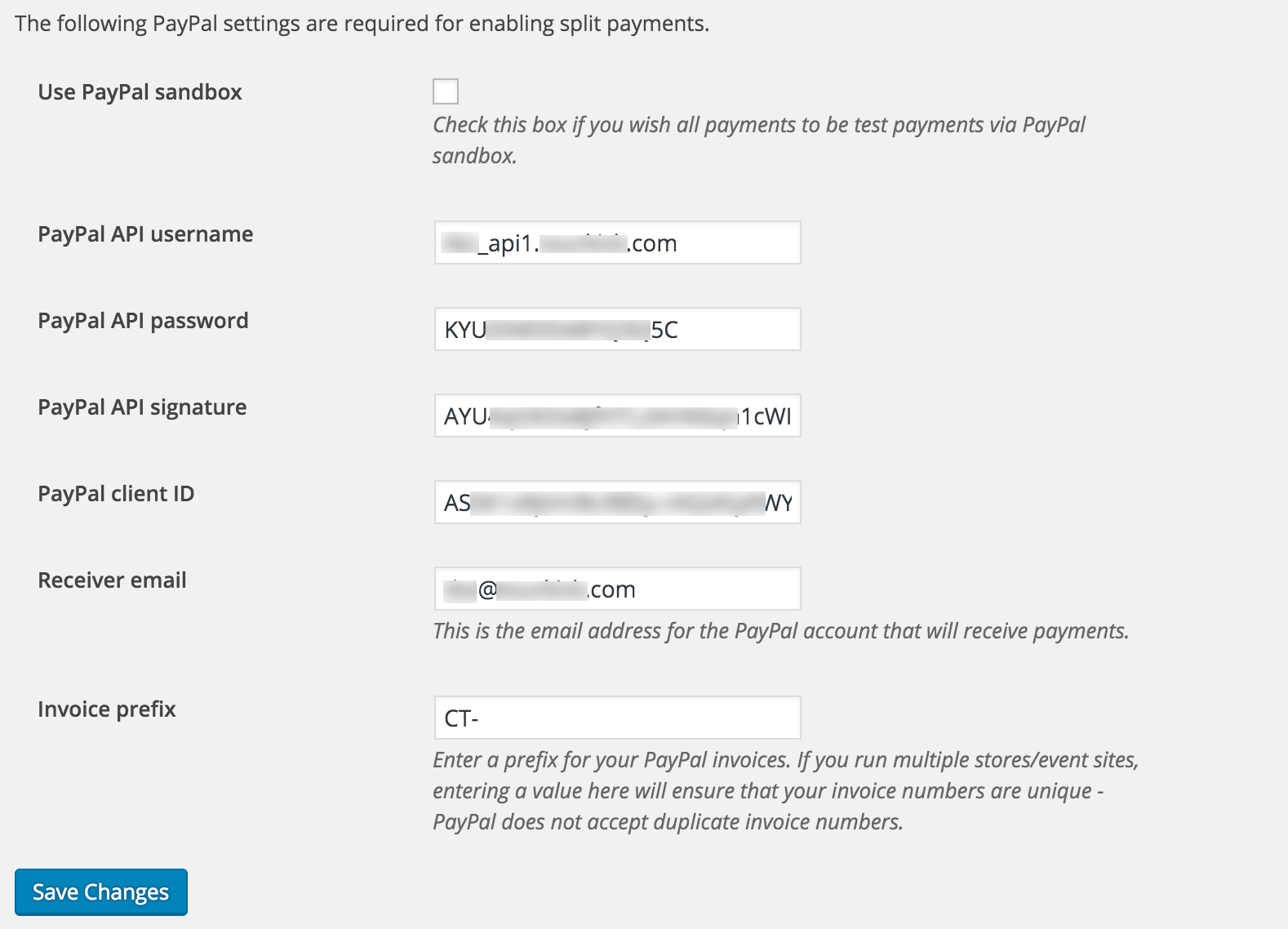
Please look at these two screenshots:
- Before / old / incorrect:

- After / new / hopefully correct:

I’ve also updated the KB at https://theeventscalendar.com/knowledgebase/community-tickets-configuring-paypal-split-payments/. Please review it for accuracy based on your experience and let me know if there’s anything to improve, either for accuracy or clarity.
And for your other issue regarding duplicates, please start a new thread for that issue so each issue can be handled separately. It’ll likely have to be turned into a bug report, which our strategy and development team will probably have to decide if it’s just not going to be implemented (more of a feature) or if it truly is a mission-critical bug that needs to be fixed. Thanks for your understanding about creating a separate thread for each issue.
Please let me know if you think our KB is fully accurate now. Thanks again!
May 16, 2017 at 3:29 pm in reply to: events are showing up accurate in website but not in Google search #1284634MemberThis reply is private.
MemberThis reply is private.
- Before / old / incorrect:
-
AuthorPosts