
Home › Forums › Ticket Products › Community Tickets › Split Payment (live mode)
- This topic has 24 replies, 4 voices, and was last updated 9 years, 5 months ago by
Cliff.
-
AuthorPosts
-
May 4, 2017 at 9:46 am #1278674
Huiwen
ParticipantHi,
I just wonder, Modern Tribe / Events Calendar, have you tested the split payment live mode yourself? I am using the live ID from paypal and I tested again today, I’m pretty sure that the plugin works only in Sandbox mode.
More importantly, I think Modern Tribe / Events Calendar should really test this functionality in Live Mode yourself and update your knowledge base properly. The current knowledge base is too misleading. For example, I believe that we should enter the live ID from Paypal, instead of the ID in the Rest APP / Live as Client ID, right? I suggested this already back in my last troubleshooting end of 2016 but it seems that it is still not being taken care of, with this problem of split payment not working in live lingering around for long…
If there is no alternative, you should really take care of this issue seriously as I believe lots of people bought your plugin because of the split payment function.
May 5, 2017 at 12:21 pm #1279515MemberHi, Huiwen. Sorry you’re experiencing this.
We’ve helped numerous customers who are using it in live mode.
PayPal states their sandbox works just like their live mode, but their live mode requires their approval for it to work.
If you have PayPal’s approval for live mode and are unsuccessful getting it or sandbox mode to work, please let us know more specifics so we can help.
If you do, please implement this snippet and share the log’s content once populated:
https://gist.github.com/cliffordp/aa9a01c1935e2b2c0b3c5ee788416fdf
May 8, 2017 at 2:25 pm #1280485ParticipantThis reply is private.
May 9, 2017 at 6:40 am #1280804MemberChained payments = Split payments.
The [message] says “User is not allowed to perform this action”.
Therefore, I’d suggest contacting PayPal to make sure your account has the proper permissions enabled to use chained/split payments.
Please let me know what you find out from them.
Thank you.
May 9, 2017 at 7:18 am #1280835ParticipantThis reply is private.
May 9, 2017 at 2:34 pm #1281301MemberPlease reference https://theeventscalendar.com/support/forums/topic/help-setting-up-paypal-api-for-split-payments-in-community-tickets/#post-1068501 and let me know if you have any follow-up questions on this topic before contacting PayPal.
May 9, 2017 at 3:25 pm #1281312ParticipantI’ve read all your knowledge base AND the relevant threads including this one and it didn’t answer my questions. I’d appreciate you read my questions again and please confirm, in particular, the second one regarding Paypal Client ID. Thanks.
May 9, 2017 at 4:31 pm #1281350MemberThank you for confirming you read it.
To answer your question:
- When in Sandbox mode, all Sandbox credentials should be used.
- When in Live mode, all Live credentials should be used.
May 10, 2017 at 2:51 pm #1282011ParticipantBut there are two Live IDs: one is the one in Sandbox Live mode, as described in your knowledge base; the other one is the Live App ID approved by Paypal. Which one should I use?
May 10, 2017 at 3:58 pm #1282042Barry
MemberHi Huiwen,
It sounds like there’s been some confusion somewhere along the line – sorry about that!
I’m not quite sure what you mean by “Sandbox Live mode” or in which knowledgebase article you are seeing this — but if you you are ready to sell and have been approved by PayPal to do so, you should use the live credentials that correspond to your Live App ID.
These are absolutely distinct from your Sandbox credentials. Please also note that you cannot perform testing on your live account through the use of sandbox testing accounts.
Does that clarify things?
May 11, 2017 at 1:21 am #1282202ParticipantOk thanks Barry for the clarification. I used the Paypal Live App ID that approved by them, and still had the 550001 error message. I haven’t heard back from Paypal yet.
Note that in your knowledge base (or the thread that Cliff referred to), under “How to obtain Live credentials (for real money)”, 6.1 and 6.2 state the following:
6.1 Look in the upper-right corner for the “Sandbox” / “Live” toggle, and make sure you’re in Live mode
6.2 Enter this Client ID in the wp-admin settings: PayPal client IDThat’s where the confusion is and that’s why I kept saying that your knowledge base is misleading.
May 11, 2017 at 9:46 am #1282416MemberHuiwen, I reviewed https://theeventscalendar.com/knowledgebase/community-tickets-configuring-paypal-split-payments/ and didn’t find any typos/discrepancies… there are very similar steps for Sandbox and Live modes and maybe they were misread… or maybe I’m not seeing the typo there.
Please let me know if this is the KB article you found the typo in.
May 12, 2017 at 1:46 am #1282822ParticipantCliff, in “Obtaining Sandbox Credentials for Live Mode”, you have the following:
4. Visit your PayPal Developer Dashboard
5. Click to your REST API app
6.1. Look in the upper-right corner for the “Sandbox” / “Live” toggle, and make sure you’re in Live mode
6.2. Enter this Client ID in the wp-admin settings: PayPal client IDAnd this is not the same as the Live App ID that Paypal sent you after approval.
May 12, 2017 at 5:45 am #1282885Member6.1 says “…and make sure you’re in Live mode” so that looks good to me.
This is what I see in Sandbox: https://cl.ly/3D1u0x3g2B3c
and Live: https://cl.ly/1k110M1d0d2t
There’s a different Client ID for each mode.
Please let me know what I’m misunderstanding.
May 12, 2017 at 5:59 am #1282888ParticipantCliff, I understand but I’m referring to Live Mode only.
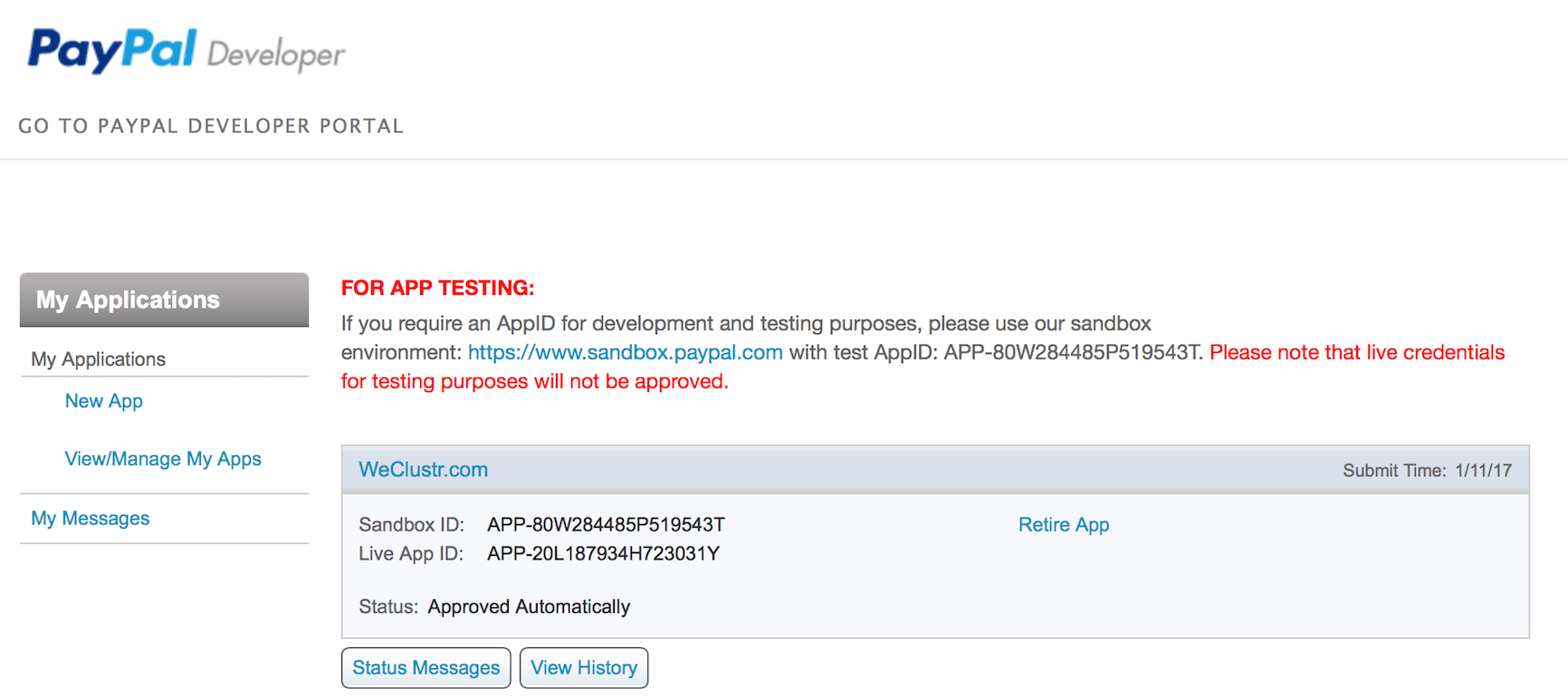
That’s exactly where the confusion is: there are two possibilities for entering Client ID in Live Mode. One is taken from Sandbox Live Mode (as shown in your second link); the other option is to use the Live App ID sent by Paypal (as I showed in my earlier thread: https://theeventscalendar.com/content/uploads/2017/05/f6bb88d117b04b8d.png). These two are different.
-
This reply was modified 9 years, 5 months ago by
-
AuthorPosts
- The topic ‘Split Payment (live mode)’ is closed to new replies.