

Forum Replies Created
-
AuthorPosts
-
Brian
MemberHI,
Thanks for the interest in our plugins.
We do not have any licenses for limited trial periods.
You can try the core version of the Events Calendar found for free on WordPress.org: https://wordpress.org/plugins/the-events-calendar/
That is the basis for all our plugins and is required to run all the add ons including Pro.
So if you can get it to work with the core version it will work with Pro.
We do have a 30 day refund policy as well for the paid plugins.
Let me know if you have any follow up questions.
Thanks
MemberHI,
Thanks for the interest in our plugins.
However, they only work with WordPress.
Cheers
December 3, 2015 at 6:54 am in reply to: Moving new "Event Tickets" box before Meta & Other Considerations #1034624MemberHi,
Thanks for experimenting with Event Tickets. I can help out here. See my answers below.
1) When you leave the ticket # blank, it does not default to unlimited. When you try to RSVP without a set number of tickets, you get an error message saying.
I see what you mean if you do not add a stock it sets it to 0. I am not sure if that is intended or not and looking into it.
2) Ticket header, when you insert an image, does not show up in event posts. Wondering if you have to undo the “featured image” for the event post for the ticket header to show. Can’t figure out why it’s not showing up.
Like our other ticketing plugin this image only shows on the ticket sent by email.
3) Is there any way to export check-in and port the data to be used with some sort of app on your phone? Going through WP-Admin is a little tricky if you don’t have a computer or laptop. Was wondering if there was an alternative way to check-in RSVP’s on mobile devices.
Right now it is just the wp-admin we are working on a QR code feature, but it was not ready in time for this release.
Let me know if you have any follow up questions.
Thanks
MemberHi,
I can try to help out here, but I am limited in supporting customizations.
I believe all the recurring instances have the first event’s id in the parent id field.
Could you query by that parent id to get all the instances?
Does that work?
MemberHi,
Sorry for the issues here. I can help troubleshoot this with you.
In an order that does not send a ticket email what do the notes say? This is the section I am referring too:
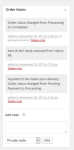
Can you also in a private reply add your system information:
https://theeventscalendar.com/knowledgebase/sharing-sys-info/
Let me know.
Thanks
MemberMemberHi,
Sorry for the issues with the updates.
That should not cause you to lose any events.
Although that seems overly complicated with those steps.
You could just got into the plugin directory and delete community events and then it should bring back your site.
Then you could manually upload the latest version (4.0) and that should resolve the issue.
Let me know how that works out.
Thanks
MemberHi,
What is your setting here:
Events > Settings > Community Tab > “Community rewrite slug”
And below that what does it say the url is for community:
http://events.org/events/community/add
http://events.org/events/community/listThanks
MemberGreat, glad it helps, I am going to go ahead and close this ticket, but if you need help on this or something else please post a new ticket.
Thanks!
December 3, 2015 at 6:17 am in reply to: Tickets are selling when they should be out of stock #1034594MemberHi,
Thanks for the information.
In an order that does not reduce stock what do the notes say from Paypal. This is the section I am referring too:
Do you see any error like this in any of the order notes:
“Validation error: PayPal IPN response from a different email address”
In the past that has caused this issue.
Let me know.
Thanks
December 2, 2015 at 6:11 pm in reply to: WooTickets/WooCommerce Stock increasing, not reducing #1034249MemberOk thanks for the information, but what about the order notes in the order itself?
Is Paypal sending the correct information can you copy a couple of those? Is there any errors?
Is the stock increasing in WooCommerce or is it increasing only in the attendees list?
Thanks
MemberOk thanks. I was able to access the site, but no errors are showing and I was unable to reproduce in my test site.
Can you please follow our testing for conflicts guide:
And see if that can narrow down the cause of this.
Thanks
December 2, 2015 at 3:46 pm in reply to: Set United States Time Zone in community events add event page #1034198MemberHi,
Thanks for using our plugins.
I can try to help out here.
We use the WordPress function wp_timezone_choice()
To generate the list of timezones. For United States timezones you have to select a city the timezone is in.
If you want to change the out put you could follow our themer’s guide:
https://theeventscalendar.com/knowledgebase/themers-guide/
to modify this file in your theme:
the-events-calendar-community-events/src/views/community/modules/datepickers.php
I do not have any other information on this beyond this, but can try to answer some questions.
Thanks
MemberHi,
Sorry for the issues. I can help out here.
First the license key is not needed for Pro to work. That is just for automatic updates.
Also, Pro is an add on for the free version and both need to be active.
Please verify you have both the core and Pro version active in WordPress.
Also, we have this guide that starts with the installation of Pro to help you out:
New User Primer: The Events Calendar and Events Calendar Pro
It then goes through all the settings for core and Pro.
Thanks
MemberOk I just tried and I am not still seeing the login.
So maybe I am on the wrong site?
Can you provide the link in a private reply and verify it will allow me in?
Thanks
-
AuthorPosts