
Home › Forums › Calendar Products › Community Events › community event not working
- This topic has 14 replies, 3 voices, and was last updated 10 years, 8 months ago by
Support Droid.
-
AuthorPosts
-
December 2, 2015 at 8:05 am #1033883
kit
Participanthi, I have enabled my community event plugin, but it seems not working, plz check URL below: http://sportsagenda.info/community/add/ , it just shows 404.
the plugin is activated with code
December 2, 2015 at 2:03 pm #1034155Brian
MemberHi,
Sorry for the issues you are having.
I can help out here.
The link should look something like this:
http://sportsagenda.info/events/community/add/
Although that did not work either.
Have you change the default slug for community events in the settings?
And can you try our 404 error guide to see if that helps:
Let me know and we can go from here.
Thanks
December 2, 2015 at 6:20 pm #1034253ParticipantI have tried the test:
– Flush permalinks
– Less common solutions
– Further diagnostic stepsall of these is not working.
plz check debug mode link: http://sportsagenda.info/events/community/add?tribe_query_debug=true
================following the system info ======================
URL
http://sportsagenda.infoWORDPRESS VERSION
4.3.1
PHP VERSION
5.3.29
PLUGINS
LayerSlider WP version 5.3.2 by Kreatura Media(http://kreaturamedia.com/)
Akismet version 3.1.5 by Automattic(http://automattic.com/wordpress-plugins/)
The Events Calendar PRO version 4.0 by Modern Tribe, Inc.(http://m.tri.be/20)
Fusion Core version 1.6.2 by ThemeFusion(http://www.theme-fusion.com)
Google XML Sitemaps version 4.0.8 by Arne Brachhold(http://www.arnebrachhold.de/)
Revolution Slider version 4.6.5 by ThemePunch(http://themepunch.com)
The Events Calendar: Community Events version 4.0 by Modern Tribe, Inc.(http://m.tri.be/21)
The Events Calendar: Filter Bar version 4.0 by Modern Tribe, Inc.(http://m.tri.be/25)
The Events Calendar version 4.0 by Modern Tribe, Inc.(http://m.tri.be/1x)
Upload Url and Path Enabler version 1.0.3 by Grégory Viguier(http://www.screenfeed.fr/greg/)
NETWORK PLUGINS
–
MU PLUGINS
–
THEME
Avada
MULTISITE
–
SETTINGS
recurring_events_are_hidden = exposed
tribeEventsTemplate =
tribeEventsBeforeHTML =
tribeEventsAfterHTML =
previous_ecp_versions = Array
(
[0] => 0
[1] => 3.9.1
[2] => 3.9.2
[3] => 3.9.3
[4] => 3.10
[5] => 3.11.2
[6] => 3.12
[7] => 3.12.1
[8] => 3.12.3
[9] => 3.12.4
[10] => 3.12.5
[11] => 3.12.6
)
latest_ecp_version = 4.0
disable_metabox_custom_fields = hide
pro-schema-version = 4.0
last-update-message = 4.0
earliest_date = 2015-04-26 06:15:00
latest_date = 2016-06-25 17:00:00
viewOption = month
stylesheetOption = full
tribeEnableViews = Array
(
[0] => list
[1] => month
[2] => week
[3] => day
[4] => map
[5] => photo
)
tribeDisableTribeBar =
hideLocationSearch =
hideRelatedEvents =
monthEventAmount = 3
dateWithYearFormat = Y-m-d
dateWithoutYearFormat = F j
monthAndYearFormat = F Y
weekDayFormat = D jS
dateTimeSeparator = @
timeRangeSeparator = –
datepickerFormat = 0
custom-fields = Array
(
[2] => Array
(
[name] => _ecp_custom_2
[label] => 截止日期
[type] => text
[values] =>
)
[4] => Array
(
[name] => _ecp_custom_4
[label] => 報名日期
[type] => text
[values] =>
))
custom-fields-max-index = 4
schema-version = 4.0
events_filters_layout = horizontal
events_filters_default_state = closed
WORDPRESS TIMEZONE
–
SERVER TIMEZONE
UTC
COMMON LIBRARY DIR
/home/sportsag/public_html/wp-content/plugins/the-events-calendar/common/src/Tribe
COMMON LIBRARY VERSION
3.12a1December 3, 2015 at 6:21 am #1034600MemberHi,
What is your setting here:
Events > Settings > Community Tab > “Community rewrite slug”
And below that what does it say the url is for community:
http://events.org/events/community/add
http://events.org/events/community/listThanks
December 4, 2015 at 12:38 am #1035267ParticipantEvents > Settings > Community Tab > “Community rewrite slug” = community
And below that what does it say the url is for community: =
http://sportsagenda.info/events/community/add
http://sportsagenda.info/events/community/listDecember 4, 2015 at 11:25 am #1035681MemberOk thanks for the information so we are working with the correct url.
I am not able to reproduce this.
Can you please follow our testing for conflicts guide:
And see if that can narrow down the cause of this.
Thanks
December 7, 2015 at 7:12 pm #1037286ParticipantI have tested according to https://theeventscalendar.com/knowledgebase/testing-for-conflicts/
problem still exist
thx
December 8, 2015 at 8:56 am #1037698MemberYou changed themes and resaved permalinks and it still did not work?
How strange, we have not seen that happen before.
Have you tried changing the Events Template in the settings?
Head to this page:
Events > Settings > Display Tab
Then change this setting:
Events Template to Default Page Template
Or to another setting and see if that helps.
Thanks
December 9, 2015 at 7:16 pm #1038555ParticipantThis reply is private.
December 10, 2015 at 8:19 am #1038908MemberThis reply is private.
December 11, 2015 at 6:26 am #1039604ParticipantThis reply is private.
December 11, 2015 at 8:09 am #1039658MemberHi,
So the issue is the events slug was not being used so the urls were looking like this:
http://sportsagenda.infocommunity/add
When it should be this:
http://sportsagenda.info/events/community/add
I disabled the Event Rocket
And that resolved the issue it in English. I do not believe the Event Rocket can be used with the latest versions of the Events Calendar and should be removed.
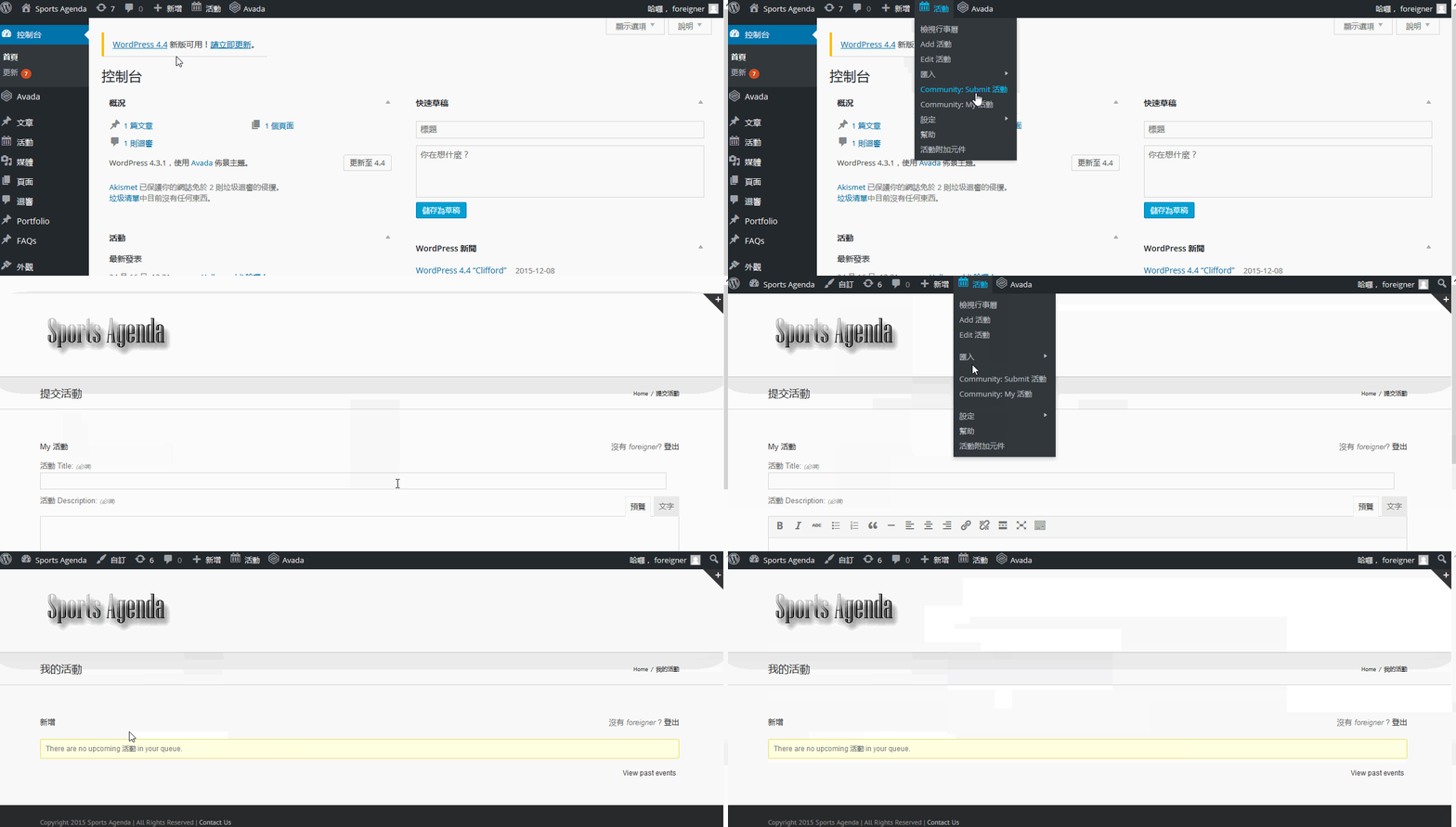
As for the Community Links
I got them working by following these links:
 December 23, 2015 at 6:47 am #1045942Participant
the link you are showing is in chinese. however the link in english is not working
and u may check this two link:
http://sportsagenda.info/events/community/%e6%96%b0%e5%a2%9e
http://sportsagenda.info/events/community/%E6%96%B0%E5%A2%9Ethey are different in capitalized , they are actually representing the same chinese, however only one of them is working. when I put the link in the menu, it is not working.
so, may be the plugin is not able to support fully the chinese wp version. what should I do?
January 3, 2016 at 7:58 am #1049440MemberHi,
You could try changing the transalted string in the po file to make it work correctly.
Using a program like poedit can modify the file.
You can also suggest a change for the string following this guide:
https://theeventscalendar.com/knowledgebase/adding-or-updating-a-translation/
February 18, 2016 at 8:33 am #1076430KeymasterThis topic has not been active for quite some time and will now be closed.
If you still need assistance please simply open a new topic (linking to this one if necessary)
and one of the team will be only too happy to help. -
AuthorPosts
- The topic ‘community event not working’ is closed to new replies.