

Forum Replies Created
-
AuthorPosts
-
Brian
MemberI have gone ahead and refunded that purchase.
Please allow 5 to 10 business days for it to return to your account.
Thanks
MemberHi,
Thanks for using our plugins. I can help out here.
Do you have the order number you would like to refund?
If so please let me know in a reply and I can refund it.
Cheers
MemberHi,
Sorry for the issues you are having.
I can try to help out here.
I looked up the orders and only seeing this message:
Order cancelled by customer. Order status changed from Pending payment to Cancelled.
There has been other successful PayPal orders since you tried to make yours.
I found a couple mentions of this from searching on other sites, but no one had presented a solution and it looks to be rare.
One person said it was an issue with not sending the Shipping Information, but as it is a downloadable product that is typically not needed.
I changed a setting that might help.
Please try again.
I also, extended your license a week so we have some time to figure this out.
Thanks
MemberHi,
I am glad to see it is working now.
I am going to go ahead and close this ticket. If you have a similar issue or another in the future, please do not hesitate to create a new ticket.
Thanks!
MemberGreat, glad it helps, I am going to go ahead and close this ticket, but if you need help on this or something else please post a new ticket.
Thanks!
MemberHi,
You can change that with a WordPress setting.
Go to WordPress Settings > General > “Week Starts On”
Then change that to Sunday and the month view will now start on Sunday.
Thanks
MemberHi,
You can change that with a WordPress setting.
Go to WordPress Settings > General > “Week Starts On”
Then change that to Sunday and the month view will now start on Sunday.
Thanks
MemberHi,
Thanks for using our plugins. I can help out here.
You should be good for WooCommerce 3.0.
I have updated the known issues and removed it as we have had 8 releases since 3.0 has been released and will believe all major issues have been taken care of.
It is still recommended you update a staging site before updating a production site just in case there is something unique about your site that might cause a conflict.
If something does come up please create a new ticket with your issue and we can help out.
Cheers
MemberHi Ronilo,
Looks like you do not have Event Tickets active.
Please download and activate Event Tickets to get Event Tickets Plus Working:
Then let us know how that works out.
Cheers
MemberHi,
You can change that with a WordPress setting.
Go to WordPress Settings > General > “Week Starts On”
Then change that to Sunday and the month view will now start on Sunday.
Thanks
May 22, 2017 at 9:29 am in reply to: JavaScript required when collecting Participant Information #1287138MemberHi,
Thanks for using our plugins. I can help out here.
We are working on a feature where the ticket form will have an overlay and prevent people from using the form if Javascript is disabled.
It is going to look something like this:
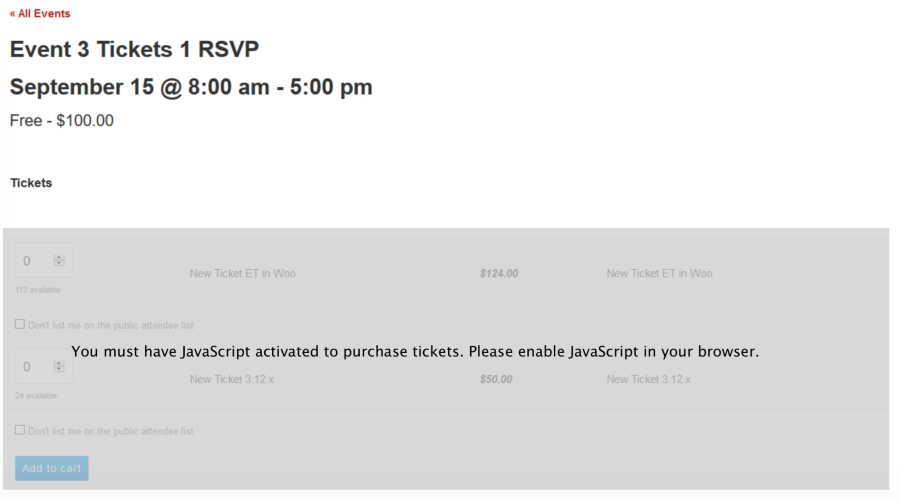
I finished coding the solution and we hope to have it in a release within the next couple of weeks.
Let me know if you have any follow up questions.
Cheers
MemberHi Andras is out for the weekend.
Sorry for your frustrations.
I have gone a head and refunded your purchase.
It will take 5 to 10 business days for the payment processor to put it back on your card.
Cheers
MemberSince this is marked resolved I am going to close this ticket, but if you need anything else related to this topic or another please post a new topic on the forum and we can help you out.
Thanks
MemberHi,
Sorry for the issues you are having. I can help out.
I see you are using the Divi theme and it is their archive settings causing this as the Event Views are archives.
Please follow this guide to resolve the issue with a plugin:
https://theeventscalendar.com/knowledgebase/divi-pagination-problems/
That should fix the issue.
Let me know how that works out.
Thanks
MemberHi Adam,
I see two orders under a gmail email account with your name in the email.
Is that correct?
One went through on our system and one did not.
I extended your Pro license for another year from today, so it is active again.
It might have sent the receipt to your sideways8 email as that is what the account is under.
Do you see it there?
Let me know.
Thanks
-
AuthorPosts