

Forum Replies Created
-
AuthorPosts
-
June 15, 2018 at 1:58 pm in reply to: Checkout using Ticket Plus stopped working (no e-comerce) #1554582
Barry
MemberHi Micha,
We’re trying our best to help here, but this is a somewhat unusual problem (the fact that it suddenly stopped working even though there were no changes on the site to trigger a breakage speaks to that) and so it may take us a little longer to piece this one together.
What I would like to do next of all is circle back to the IPN history. In relation to recent ticket transactions can you or your client click through and inspect the IPN message in more detail? That looks something like this:
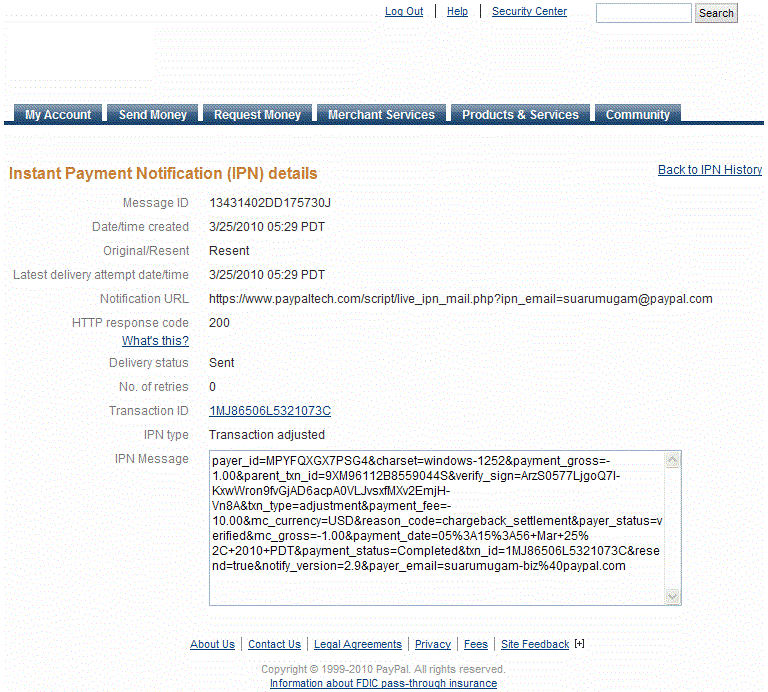
The message (in the final textarea field) is what we’re particularly interested in here. If you could share this, that may be useful.
I would also ask that you install and activate the Log HTTP Requests plugin. Next time there is a failed ticket transaction, please view the log (found in Settings ‣ Log HTTP Requests) and look for any entries that reference paypal.com. If you can click through and capture the corresponding request and response data that again could be useful for us.
If you find there are no requests relating to paypal.com following a customer transaction, that would also be useful information.
Last but not least, though we’ve focused on IPN for some of this thread can you confirm that PDT (Payment Data Transfer) has also been configured, as recommended in this article?
Thank you 🙂
Memberactually i pasted it in the functions.php and for me it doesnt change something at all
You definitely need to amend it to the correct string and ensure the dash character is correct … if those things are correct I’m not sure why it wouldn’t work.
im wondered that you dont have a solution yet to make registrations but let users pay for it directly at the event? that might be something you could think about with your team
With WooCommerce and Event Tickets Plus, as an example, this is effectively possible. Payment gateways like “cash on delivery” can be used for this sort of scenario. Might that work for you?
Member…One last note which may not have been covered earlier: we make extensions available in the hope that they will be helpful and of course we try our best to maintain them but, to be clear, they are not as actively supported and developed as our core/premium offerings.
That to say, we’ll certainly take your feedback and consider modifying the extension in a future release – but we cannot commit to a specific timeframe.
MemberUnderstood!
1) i set the currency of the extension in the events form to CHF. as soon as i press the save button it gets resetted to USD. (note: in TEC Settings the “CHF” has been successfully saved) => but the form problem seems to be a bug and hope i get a quick fix now?
Though the extension exposes the cost field, it doesn’t otherwise interfere with the logic in our core plugins.
In this case, if an event has tickets (as does yours), Event Tickets will override the choice of currency symbol according to some rules of its own: that’s deliberate and aims to ensure consistent formatting when working with various ecommerce plugins (or with the “baked in” Tribe Commerce system, which is a part of Event Tickets itself).
I do see that that isn’t desirable for you here but – again coming back to the original purpose of the extension (which was to be able to specify a price if there are no tickets for a particular event) – this is a pretty specific edge case.
This is all useful information, though, and I’ll update the report Andras filed 🙂
Actually i use it to sell tickets and my client collects the cash directly at the event. so for me i’m searching a solution to actually delete the “Free – ” part and only show the amount i typed in.
Perhaps a short snippet like this one would help in the interim:
add_filter( 'tribe_get_cost', function( $cost ) {
	# Change the language to suit (ie "kostenlos –")
	# and be sure to use the correct dash character
	return str_replace( 'Free –', '', $cost );
} );
This could be added either to a custom plugin (preferred) or else to your theme’s functions.php file.
MemberHi Brian,
Thanks for your patience so far 🙂
On review, I’m actually unsure that what you have described is a bug in the extension but wanted to collect your thoughts and ensure that I am understanding the problem as you see it.
First, some background: as you know, the event cost field disappears from the event editor if you install and activate one of our ticketing plugins, which is by design.
That also means the cost field is unavailable even for events that have no tickets, which is not always ideal and our extension set out to solve that problem specifically. Now, in your case, I think you are trying to place a value in the cost field and you have tickets (RSVP tickets).
That’s fine, but it creates an ambiguous situation. If as I think is true in the event you linked to you have a free (RSVP-type) ticket and you have also manually set a cost of $20 then it is expected that a range of “Free – $20” would display.
Here’s another example to illustrate:
- You have an event with two tickets, costing Ð30 and Ð50
- The cost will show as a range: “Ð30 – Ð50”
- If after activating our extension you manually populate the cost field with Ð75 the range becomes and will display as “Ð30 – Ð75”
This is basically the same process and is expected, but it’s not a bug in the extension itself – it’s more that you are hoping to use the cost field as something the overrides all other cost data.
Is that correct?
MemberYou’re welcome 🙂
MemberFantastic, glad things are working for you 🙂
I’ll go ahead and close this topic but, if you’re happy with our plugins and can spare a minute or two to post a review over on our wordpress.org page, we’d greatly appreciate it. Thank you!
MemberExcellent — glad you’re all sorted!
As a sidenote, if you’re happy with our product and can spare just a couple of minutes it would be greatly appreciated if you could leave us a review over on our wordpress.org page. Thank you 🙂
MemberHi Michael,
It’s been a while but I wanted to share an update. We plan to solve this in the future via a free extension, which users can optionally install (not everyone is impacted by this problem and, after review, it was decided that it did not make sense to make the required changes from within our core plugins).
I’m going to close this topic for the time being, but once the new extension is ready we will re-open this and let you know.
Thanks!
MemberUnfortunately, to accurately replicate this, we’d need a more complete database dump including at least the core database tables (though we probably don’t need the tables for every subsite).
Can you provide that?
MemberHi Gesine,
Andras is mostly unavailable this week but I wanted to stop by and offer you a response to your last set of questions 🙂
Right now you cannot detect any issues that are solvable by the developer team.
Exactly. We believe this should not be a problem with new imports now and in the future – the cause of the issues you experienced have, we think, been resolved.
After closing the ticket, will I still be able to read ourdiscussion in the future?
Absolutely. This will remain accessible and if you create a new help desk conversation in the future you can easily link and refer back to this one.
MemberSounds good – we’ll do our best to share an update once we’ve made some further headway on this.
MemberHi Value WordPress,
Would you mind breaking out further questions unrelated to the initial issue into a fresh topic? We try hard to stick to one problem or question per topic/thread: this helps us to ensure fair service for everyone and avoids confusion in a lot of cases.
Thanks! (…I will go ahead and close this one out 🙂 )
MemberI’m sorry for the delay, Albert ‒ we’re poking at this and will get back to you as quickly as we can 🙂
MemberUnderstood!
I can’t guarantee anything, but our next release should address this and the setting will become available to you (and not just those users who also have WooCommerce activated).
We appreciate your patience and support in the meantime 🙂
-
AuthorPosts