

Forum Replies Created
-
AuthorPosts
-
Barry
MemberThanks for trying (and confirming). This may in that case be a different problem. In my next reply I will share a new license key with you (for Event Aggregator, rather than Eventbrite Tickets).
Please add this to the Event Aggregator field in the Events ‣ Settings ‣ License Keys admin screen (but don’t change anything else) and let me know if that works for you.
MemberNancy,
I realize this is inconvenient but when you enter a URL like eventbrite.com.au/e/some-name-123456 can you try changing it slightly, to eventbrite.com/e/some-name-123456?
In other words, replace .com.au with .com … in my own testing, this worked for various other locales (and is a known bug). If that works for you, do let me know and we can then link this ticket with the bug report (which will help us to provide you with updates once a fix is available).
Thanks!
MemberHi there, @hiro0913jp 🙂
The following screenshot shows the sort of rule you probably want to set up here. Does that help?
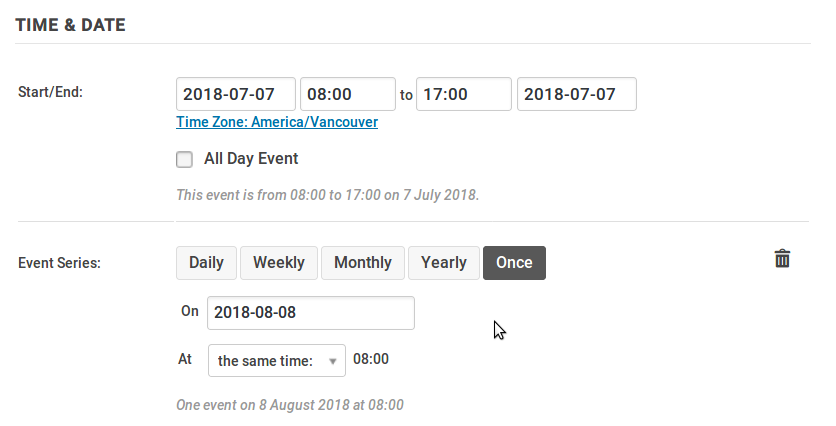
(You can find these settings in the Event Editor.)
June 27, 2018 at 4:01 pm in reply to: Network activated plugin randomly deactivating – multisite #1563148MemberHi, Daniel.
Let’s start with getting the network wide debug log to turn on. Should there be a “save” button that is not showing up for me, or if I choose “Full debug” should it save the setting via ajax?
It should update via ajax. In the context of the network admin environment this seems to be broken, unfortunately. We’ll log a bug ticket for the team to look into this.
Will the debug log show errors or plugin deactivations?
These specific logging facilities aim to capture event (or ticket) specific problems/events, they won’t necessarily trap more general issues so may not be useful here.
Since there are no fatal errors being logged which may cause wordpress to deactivate the plugin, it seems most likely that it is deactivating itself deactivate_plugins( plugin_basename( __FILE__ ) )
We don’t have code in place to do this (and I’d expect to see a few more reports were this a general issue affecting usage of The Events Calendar on all multisite networks).
This is slightly new territory for us, but a possible starting point could be to install and activate User Activity Log. This apparently tracks plugin activation and deactivation and perhaps if it successfully records this, we can match the date/time with other events and figure out the underlying cause.
Can you give that a try?
June 27, 2018 at 3:00 pm in reply to: The events calendar "select2" conflict with woocommerce membership plugin #1563086MemberHi there, Nuno.
Are you running the latest “WooCommerce Memberships” premium plugin? I have just tried on 3 fresh WordPress Installations and I can replicate the error.
So just to clarify – in case there was any confusion – Jaime was noting that she could replicate and that a bug report has been submitted. The dev team will address this as quickly as they can.
My client has pay for The Events Calendar PRO, Event Tickets Plus and now he can’t update the plugin(The Events Calendar PRO) to the latest version because of this error, this is not really good his paying for the license and he can’t get the latest version of the plugin.
We understand this and we’re working on a fix. Do note, however, that it is not necessarily a problem on our side – it’s possible a shortcoming or oversight within WooCommerce Memberships has triggered this (we don’t know just yet).
MemberHi @planatstudio,
Just checking in to see if I can help as Jaime is out today 🙂
When you create a venue, Events Calendar PRO will try to determine the precise coordinates for the provided address (which it does by sending a request to Google’s geocoding service). Sometimes, though, it won’t be able to establish a set of coordinates:
- This may happen if you don’t have a valid Google Maps API key
- It could happen if the street address is not one Google recognizes
- A communication failure could also stop this from working as expected
This is important because if the coordinates of a venue are not known, it is not possible to include it in map view. Ways you can fix this:
- Do you see an admin notice at the top of the event editor suggesting there is venue data that can be fixed? If so, follow the link and use the tool
- Alternatively, edit each venue and click the Use latitude + longitude checkbox … if you don’t see any numbers in the relevant fields it means the coordinates are missing … try modifying the address slightly, save, then change it back and save again: this may trigger a refresh of the coordinates
Does that help at all?
MemberI’d love to pause and ensure we have an accurate view of this problem since it’s not something we see ourselves.
So, to be clear, you are finding if a customer purchases just one ticket then, on occasion, they are receiving an email with two (or more) tickets? Can you dig out an example (it doesn’t need to be a recent one) and share screenshots of:
- The WooCommerce order screen, for the relevant order
- The attendee admin screen, showing the two duplicates
I have this snippet in my child theme…
We no longer recommend using this snippet; is the reason you are using it related to tickets? If so and you do not require it for anything else, could you consider removing it and instead adjust the settings documented in the following article?
theeventscalendar.com/knowledgebase/woocommerce-specific-ticket-settings
Configured correctly, you can ensure customers receive tickets even if the order has not yet been completed. Is it possible to give that a try?
Thanks!
June 27, 2018 at 7:41 am in reply to: Checkout using Ticket Plus stopped working (no e-comerce) #1562627MemberHave a great day, Micha … and, yes, we’ve certainly identified a number of areas in our process where we can improve.
I’ll go ahead and close this topic, but of course please don’t hesitate to post new ones as needed should any other issues arise.
MemberGreat!
June 21, 2018 at 8:33 am in reply to: Checkout using Ticket Plus stopped working (no e-comerce) #1558320MemberThanks – do let us know 🙂
June 20, 2018 at 6:41 am in reply to: Checkout using Ticket Plus stopped working (no e-comerce) #1557012MemberMicha,
Our intention is to release a fix this week — I can assure you we’re working hard to accomplish this and everything is on track at this time. However, despite our best efforts, there is always a possibility that unexpected events may delay the release.
Right now there’s no reason to think that will happen and my expectation is that the fix will be available within the next couple of days, but the fact is that releases are susceptible to delay (and individual features or fixes can at times be postponed). Infrequent though things like this may be, it still means I cannot offer you a cast-iron guarantee of resolution this week.
Again, to be clear, things in relation to this bug are progressing well and if they continue to do so you and your client will have a fix available shortly.
On this same note, you should really have a priority system like low, medium, high, etc. to classify these tickets and this one, should be high since it’s effecting revenue.
Bugs are indeed prioritized and the ticket associated with this conversation is at the highest priority.
June 19, 2018 at 2:02 pm in reply to: Checkout using Ticket Plus stopped working (no e-comerce) #1556607MemberWe can’t guarantee anything, but our plan is to deliver a fix along with a set of other updates by the end of this week.
If for some reason we can’t include it in our next release, we’d aim to follow up as quickly as we can with a further release to address this specific issue.
June 18, 2018 at 3:23 pm in reply to: Checkout using Ticket Plus stopped working (no e-comerce) #1555741MemberThis reply is private.
June 18, 2018 at 3:19 pm in reply to: Checkout using Ticket Plus stopped working (no e-comerce) #1555736MemberMicha,
Thanks for your patience.
You’re absolutely right, we could have done better here.
After some further testing we have verified a bug and we’re now prioritizing a fix.
your setting in the tickets tab for “Decrease available ticket stock as soon as a Pending order is created.” and “Only decrease available ticket stock if an order is confirmed as Completed by PayPal.” do not make a difference … because even if the IPN is having an issue, the first option should decrease the stock and book the event as soon as the pay now button is clicked
When the button is clicked the user has not yet committed to purchase – they could still navigate elsewhere without making a payment.
The order is only created once the plugin receives a message from PayPal indicating that the transaction was made. In some cases, depending on the mode of payment, the status will not immediately be “complete” but may still be “pending” – and that is what this setting is for.
Of course, the current bug means it has no effect, however we still wouldn’t expect the order to be created until after the customer initiates payment on PayPal’s site.
MemberCheers, Brian.
-
AuthorPosts