Forum Replies Created
-
AuthorPosts
-
Andras
KeymasterSorry to hear that.
Things are getting a blurry here, so let’s take a step back to make sure we are talking about the same thing.
Based on my understanding you would like to
- Remove the clickability / url from the venue name
- from the day view (e.g. this page)
Is that right? Thanks for confirming / clarifying.
A.
KeymasterThis reply is private.
KeymasterThis reply is private.
KeymasterIf it works well with semicolons for you, that’s good, no need to change. Might be that it is affected by an operating system setting. Not sure.
The maintenance release is planned to come on Tuesday. So only a little to go. We’ll keep you posted.
Cheers,
AndrasKeymasterThis reply is private.
KeymasterHello Steven,
Thanks for getting in touch with us. I’d be happy to answer your questions.
On the private and public event:
The password protected will still show up. But if you set the event to Private, then it will only show up to the author, and to whoever has a higher admin level.
These are the admin levels in order:
- not-logged in / guest
- subscriber
- contributor
- author
- editor
- admin
So if you create a private event and set up an author for it who has ‘author’ level (this can be a fake user) then that user, all the editors and all the admins will see that event, if they are logged in to the site.
I assume I will need the pro version to setup reoccurring events
That is correct.
I also need event tickets to be able to use for the public and memberonly area of events that offer sales to our comedy night for example.
Well, you need ET to sell tickets and you need to set up the events as private or public, which is independent of ET.
If we can add a password to the main events page it would be a good idea?
There is no build in option for this. You will either need a 3rd party plugin or custom coding for this.
Let me know if this helps of if you have any further questions.
Cheers,
AndrasKeymasterHi Charles,
Thanks for reaching out!
I believe that is because you might have had some scheduled imports from Facebook in the past. We had to remove that option from the plugin due to the changes Facebook has made to their API, but the data is still in your database. And that is probably causing the issue.
We are aware of this and a fix is already on the way. If all goes well, then the fix goes out early next week.
Hang in there, the solution is coming.
I am going to set the status of this ticket to “pending fix” and we will update it once the fix is released.
If you have any new questions or issues please create a new ticket and we’ll help you out.
Thanks and cheers,
AndrasSeptember 27, 2018 at 1:41 pm in reply to: Filter Categories with radio buttons instead of checkboxes #1632611KeymasterHi Dominik,
There are no radio buttons, but if you select the ‘Dropdown’ then your users will only be able to select one option.
We chose to do it this way b/c if a user has for example 30 categories, then listing 30 radio buttons takes up a lot of space. Hence the dropdown with one option to select.
Hope this helps.
Cheers,
AndrasSeptember 27, 2018 at 1:36 pm in reply to: Error – Site Not Loading – Presenting Error Message Re: Event Tickets Plus #1632610KeymasterHi Will,
Thanks for reaching out!
I’m really sorry to hear about that issue, as well as about the long waiting for an answer. We are receiving an unusually high number of questions and we try to go through them as fast as possible without compromising on support quality. Thanks for your patience so far.
It’s been almost a year since this plugin has seen an update.
I’m not quite sure why you have this perception. We our pushing out maintenance releases every three weeks, and Event Tickets Plus is almost always included. The last two MRs/ updates went out on August 22 and September 12, and we are just getting ready to ship the coming one next week.
Anyhow, I would recommend you to try doing a manual update of the plugin. First delete your current version. Then get a fresh copy downloaded from your account, unzip it and upload it via FTP to your server to the wp-content folder of your installation.
Please check if this helps and let me know the results.
Thanks and cheers,
AndrasKeymasterHi tracylove,
Thanks for getting in touch!
Sorry about the delay. I’m not quite sure what could have happened here. We do go over the tickets in a first-come-first-answer way. Yours came now.
Submission time of ticket before you: September 26, 2018 at 6:39 am
Submission time of your ticket: September 26, 2018 at 7:34 am
Submission time of ticket after you: September 26, 2018 at 7:42 am
I’m really sorry for the somewhat longer waiting time. So let’s do this.
Sad to hear about this eventbrite issue.
I would recommend setting up the eventbrite connection again.
First, go to Events > Settings > APIs tab and try if the ‘Refresh your connection to Eventbrite’ does the trick.
If not, then
- disconnect Eventbrite
- Log in to Eventbrite and go to Account Settings > Developer Links > App management, chose the connected App and click on ‘Key Details’, scroll to the bottom of the page and click on ‘Delete Key’
After that’s done, go back to your WP admin, Events > Settings > APIs tab and set up / authorize the connection to Eventbrite again.
Let me know if that helps fix this.
Thanks and cheers,
AndrasKeymasterHey comtech,
Thanks for reaching out!
Sorry to hear about this issue. I ran a quick test on my local installation and didn’t encounter that issue with php 7.2. That of course doesn’t mean there is no issue, it just means we need to investigate, and I will need your help for that.
The issue outlined in the other topic has been fixed earlier this year.
Now, about your issue… I will need a couple of things from you.
First, please make sure you are using the latest versions of our plugins.
Second, please share your system information with me in a private reply.
Third, when on 7.2 please do a quick conflict test to see if it is not any of the other plugins or the theme you use that are interfering somehow. The quick version is: switch to twentyseventeen and deactivate all plugins, except for The Events Calendar and check if you can reproduce.
Four: when trying to add / change venue or organizer, check in your browser’s console* if you get any error messages. (* Open webdev tools (F12 or Ctrl + Shift + I on Chrome / Firefox, Option + Cmd + J on Safari) and there’s a console tab)
Five: enable debugging on your site and check if you get any error messages when trying to add / change a venue or organizer.
Six: could you create a screen recording of the issue? 🙂
I think this is it for a start.
Looking forward to helping you fix this.
Cheers,
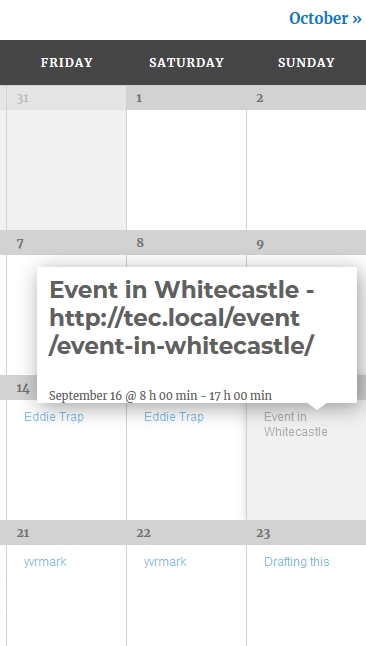
AndrasSeptember 27, 2018 at 4:07 am in reply to: Month View: All events have same permalink in tooltip using [[=raw permalink]] #1631929KeymasterHi,
Hmmm… I just did a test and it worked.
I took the tooltip.php file and added the raw permalink after the title like this.
<h3 class="entry-title summary">[[=raw title]] - [[=raw permalink]]<\/h3>and it shows up properly, like this:
https://dl.dropbox.com/s/7xdghaeq7o06akn/shot_180927_130020.jpg
Please double check for typos in the file and folder name, as well as in the code.
Personal tip: when I do a template override, then first I just add an ‘X’ character to the override file to see if the override works. If it does, then I do what I need.
Cheers,
AndrasKeymasterThis reply is private.
September 27, 2018 at 3:46 am in reply to: Re-naming Buy Now to Book Now on Events Calendar List plus changing the link #1631920KeymasterHey Stephen,
That’s a very good start! I used your code and it worked for me. Just make sure that you use straight quotes (“) and (‘) and not curly ones (“) and (‘)
Here is my final code for also not making it jump to the tickets.
[code language=”php”]
add_filter( ‘tribe_tickets_buy_button’, ‘changes_button_text’, 10, 2 );function changes_button_text( $html ) {
$html = str_replace("Buy Now", "Book Now", $html);
$html = str_replace("#buy-tickets", "", $html);
return $html;
}[/code]Hope this helps.
Cheers,
AndrasKeymasterHey,
that line should look like this
[code language=”php”]
<dd class="tribe-venue"> <?php echo strip_tags( tribe_get_venue() ) ?> </dd>
[/code]I checked and this gave me the expected result.
A.
-
AuthorPosts