Forum Replies Created
-
AuthorPosts
-
Andras
KeymasterThis reply is private.
September 27, 2018 at 2:49 am in reply to: CSV import creates error 500 when starting preview #1631904KeymasterHallo Paul,
Thanks for sharing that!
The errors are likely related to a bug we are aware about. It is related to Facebook imports. Since Facebook changed their API it is not possible any more to import events from there the ‘old’ way, so we had to remove that functionality in order not to confuse people, and not to make them think it still works. After the change in the code, in some rare edge cases errors like you shared appear.
A fix for that is already on the way, if all goes well we are going to publish it next week with the maintenance release. Hang in there.
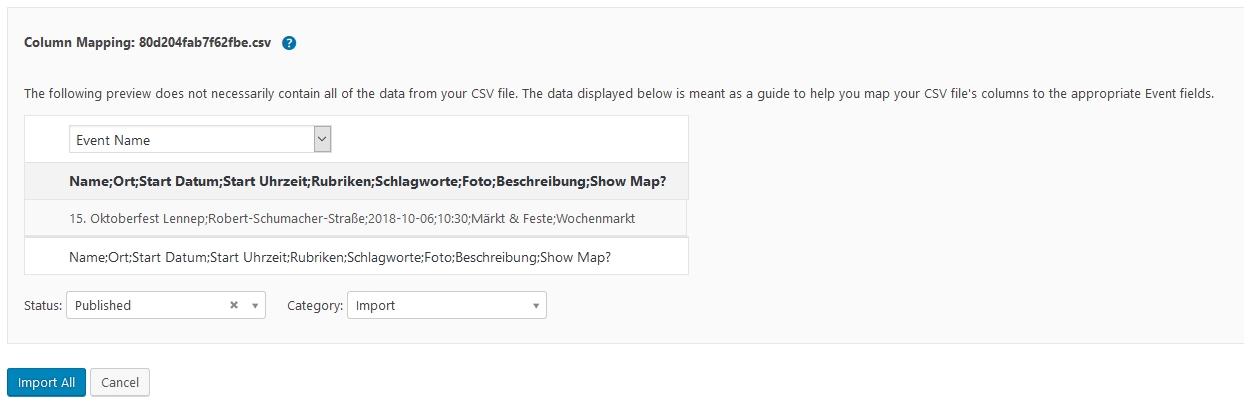
As for the csv import, when you do the preview do you get a view similar to this screenshot?
The preview shows only one column. That happens because the file uses semi-colon (;) to separate the different columns. The import cannot work with that, it would need a comma (,) as a separator.
Cheers,
AndrasKeymasterThis reply is private.
KeymasterThis reply is private.
KeymasterAllright, thanks for reporting back.
Since this is marked resolved I am going to close this ticket, but if you need anything else related to this topic or another please create a new ticket and we’ll be happy to help.
Cheers,
AndrasPS: We’d be grateful if you would give us feedback on your satisfaction with support. Just click on one of the classy looking emojis below. 🙂 If you can spare a few words, that’s even better. Thanks!
PS2: If you like our plugins, and you didn’t yet do so 🙂 we would also be happy to receive a review in the wordpress.org repository. Much appreciated!
https://wordpress.org/support/view/plugin-reviews/the-events-calendar/
https://wordpress.org/support/view/plugin-reviews/event-tickets/KeymasterSalut edenweb,
Hey, thanks for getting in touch!
For the page title I believe this article will be useful for you.
Country filter
A country filter should show up if 1) you have venues and the addresses (country) of the venues filled out; AND 2) you have events with those venues.
If any of that is missing, you will not see the countries.
When you make changes in the filters under Events > Settings > Filters tab make sure to click on ‘Save Changes’.
On your screenshot with your filters I see different one selected then the ones displaying on https://www.swiss-academic-network.com/camps/ . Also, in the back-end I see them in French, while on the front-end in English. Seems like as if they were from two different sites.
need to buy the version PRO to display past events
I just would like to make a clarification here. If you would like to display past events on a page with a shortcode, then yes, you need the PRO version.
Alternatively you can access past events with a URL like this:
https://www.swiss-academic-network.com/camps/list/?tribe_paged=1&tribe_event_display=past
You get to this URL when you go back one page from the current events.
Let me know if this helps or if you have further questions.
Cheers,
AndrasKeymasterHi Shradha Dhar,
Thanks for getting in touch with us!
Not quite sure how you imagine ” in tabular form with custom fields”…
Out of the box there is no option to view the events like that, but I believe with a template override / customization it should be possible.
Please note however that our team is limited in doing and supporting customizations of this magnitude. We can give you some pointers and guide you to the right direction but you will need to do most of the coding yourself. (Or you can hire an external developer.)
On our demo site you can check out all the different functionalities of our plugins.
Let me know if you have any further questions.
Cheers,
AndrasKeymasterHey Tony,
Thanks for reaching out!
Yeah, it is possible to do a manual install, I just wanted to recommend you to try it.
Download the plugins from your account.
Unzip them on your PC. You should have 2 folders, ‘event-tickets’ and ‘event-tickets-plus’.
Go to your file manager and navigate to wp-content/plugins
Completely delete the folders ‘event-tickets’ and ‘event-tickets-plus’.
Upload these 2 folders from your PC.
Go to your WP dashboard > Plugins, and activate them.
Let me know how that works out.
Cheers,
AndrasKeymasterHey Dawg,
Thanks for getting in touch!
So if I understand correctly you want a week view where the events are ‘stacked’ on each other without following the time grid. Sorta like having a list view for 7 days next to each other?
I guess that could be possible with creating a template override for the week view. After going through our Themer’s Guide I would check out the files in this folder:
wp-content/plugins/events-calendar-pro/src/views/pro/week
My hunch is most of the work needs to be done in ‘loop-grid-hourly.php’
Let me know if this helps.
Cheers,
AndrasSeptember 26, 2018 at 1:34 pm in reply to: Prevent Ticket Email being sent for specific products #1631565KeymasterSome more from the team:
“If it’s for WooCommerce , I’d veer toward hooking in (early) on
wootickets-send-tickets-email, working back from the order_id to discover if it relates to an event and then detecting the category and so on.”A.
September 26, 2018 at 1:32 pm in reply to: Prevent Ticket Email being sent for specific products #1631563KeymasterHi gsna,
Thanks for getting in touch.
That is a very interesting question. I will need some time to look into that, but I cannot promise I will be able to give you a solution.
If you totally want to disable the emails, then this article will help.
We do need to prioritize support requests from other customers at this time but I’ll certainly flag this with the team and – although we can’t make any promises – if we have time and space to come back and help, we’ll be happy to do so. Please let us know if you’d like to go this route so that you can be added to this queue.
If you urgently need help with this, however, you may instead wish to consider working with a suitably skilled developer or designer who can offer the additional level of support you require.
Cheers,
AndrasKeymasterHi again,
A colleague was kind enough to take a look at this and came up with the following snippet:
[code language=”php”]add_action( ‘pre_get_posts’, function( WP_Query $query ) {
if ( ! $query->is_feed() || ‘tribe_events’ !== $query->get( ‘post_type’ ) ) {
return;
}if ( empty( $_REQUEST[ ‘tribe_event_categories’ ] ) ) {
return;
}$categories = [];
foreach ( (array) $_REQUEST[ ‘tribe_event_categories’ ] as $event_category_id ) {
$event_category_id = absint( $event_category_id );if ( $event_category_id ) {
$categories[] = $event_category_id;
}
}if ( empty( $categories ) ) {
return;
}$tax_query = (array) $query->get( ‘tax_query’ );
$tax_query[] = [
‘taxonomy’ => ‘tribe_events_cat’,
‘terms’ => $categories,
];$query->set( ‘tax_query’, $tax_query );
}, 1000 );[/code]Copy it into your child theme’s functions.php file.
The above snippet would support URLs following this sort of format:
/events/feed/?tribe_event_categories[]=123&tribe_event_categories[]=456Hope this helps.
Cheers,
AndrasKeymasterHi tallmeerkat,
Thanks for reaching out to us!
With events calendar pro you will be able to set up an event that has more occasions. You will however not have a dropdown where you can choose the date. Instead you will have the event show up on the different dates in the calendar.
You can check out our demo site here: https://wpshindig.com/
If you want to see a recurring event, then check this one specifically: https://wpshindig.com/event/womens-javascript-study-group/2018-09-12/
Note, that Events Calendar Pro doesn’t yet give you the option to sell tickets. What you can do is add a url to the WooCommerce ticket product to the event description so users can jump there.
Alternatively you can use our Event Tickets and Event Tickets Plus plugins for a full ticketing solution.
Note though that Event Tickets Plus doesn’t fully support recurring events yet.
I hope this helps. Let me know if you have any further questions.
Cheers,
AndrasSeptember 26, 2018 at 2:02 am in reply to: CSV import creates error 500 when starting preview #1630862KeymasterDo you, did you by chance have any scheduled imports set up from Facebook?
A.
September 26, 2018 at 1:57 am in reply to: CSV import creates error 500 when starting preview #1630857KeymasterHey Paul,
Sorry to hear about this.
Could you please share with me the file / feed you are trying to import so I can take a look?
Thanks!
Andras
-
AuthorPosts