Forum Replies Created
-
AuthorPosts
-
October 1, 2018 at 12:29 pm in reply to: Best method of check-in attendees on desktop using QR code. #1634632
Andras
KeymasterHi Ibrahim,
Thanks for reaching out!
I’m not sure we have a solution for that specifically.
If you want to check in people for an event on your PC, then you can go to the Attendee list of the event and click on the ‘Check In’ button next to their ticket.
Alternatively, you can try to use a QR code reader app for PC. If you have Windows and a webcam then this might work:
If you are not tied to the PC then you can use our QR code scanning app built specifically for this.
Hope this helps. Let me know.
Cheers,
AndrasKeymasterHi Jose,
I would be happy to check the status of your application. Could you share with me an organization name so I can look it up?
Thanks,
AndrasOctober 1, 2018 at 12:21 pm in reply to: Adding a Community Add event button/link to the Tribe Events Calendar? #1634621KeymasterIf you want to exclude some views, then you can use this function:
Like
[code language=”php”]
if ( tribe_is_view( ‘list’ ) ) {
// do something here
}
[/code]A.
October 1, 2018 at 12:19 pm in reply to: Adding a Community Add event button/link to the Tribe Events Calendar? #1634618KeymasterHi Dave,
I see two ways of doing this:
Either you can add a menu / sub-menu entry that points to ‘http://wcn.spinmodern.co/events/community/add’
or you can create template overrides or our views and include the url there.
The first is definitely easier. The amount of work for the second depends on where exactly you want it to show up.
I just figured a third way. If you copy the following code in your child theme’s functions.php file, then it will add the link at the top and / or bottom of your calendar.
[code language=”php”]// This will add it above the calendar
add_action ( ‘tribe_events_before_template’, ‘add_community_events_link’ );
// This will add it below the calendar
add_action ( ‘tribe_events_after_template’, ‘add_community_events_link’ );function add_community_events_link() {
echo ‘<a href="http://wcn.spinmodern.co/events/community/add/">Submit an event to the calendar</a>’;
}[/code]Hope this helps.
Cheers,
AndrasKeymasterHi again,
Yes, there is a way. You will need to create a template override for the month view.
Please read through our Themer’s Guide – https://theeventscalendar.com/knowledgebase/themers-guide/ – to learn more about template overrides.
And here are some details on what you will need to do:
Create an override for this file:
wp-content/plugins/the-events-calendar/src/views/month/single-event.php
In the header of the file you will find the location where the override needs to go.
Edit the override and use the following function at the desired place to show the start time:
I hope this can get you started. Let me know if you need further assistance.
Cheers,
AndrasKeymasterHi Arnau,
Thanks for getting in touch!
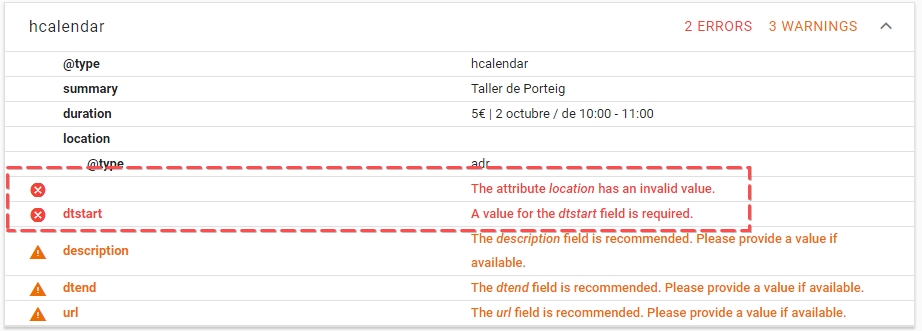
You are getting those error messages because Google is missing 2 pieces of information that is required for it to be a valid markup. One is the event starting time, which is missing, the other is the location, which seems to be missing or it is an invalid value based on the structured data testing tool.
Check out the screenshot:
And this is the whole test:
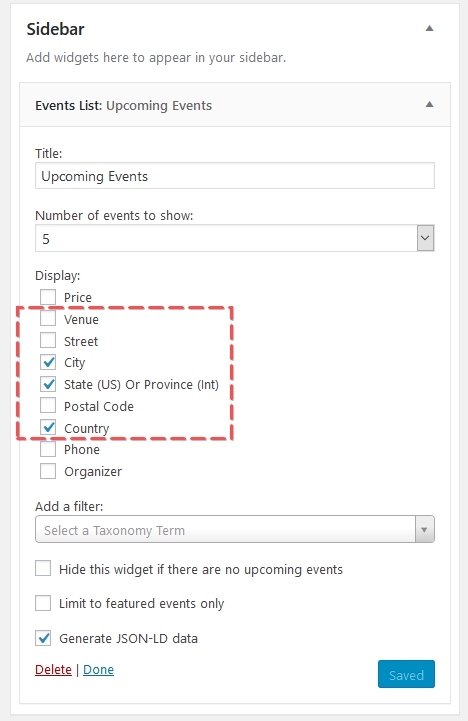
I see you are using the Event List widget there. By default the event start time should be included there. I guess that is either changed by the theme you are using or you created a template override and removed that piece of information.
You can check if it is the theme if you switch to twentyseventeen and check if the time shows up then.
As for the location there is an option in the widget to show that info.
Let me know if this helps and if you have any further questions.
Cheers,
AndrasOctober 1, 2018 at 4:09 am in reply to: Text in Calendar View with Calendar Customizer extension #1634298KeymasterHi there,
Thanks for getting in touch!
I’m happy to hear the you like the Calendar Customizer!
It is possible to change (almost) anything, if not with the Customizer, then with some CSS. 🙂
To be fully clear on what you would like could you please send me a screenshot with some notes and arrows on it so I see what exactly you are wanting to change?
What I understand you would like to change in month view the color of the event title (which is also a link), while leaving the color of other links unchanged.
If this is what you need, then the following css should help you:
[code language=”css”]
.events-gridview h3.tribe-events-month-event-title a {
color: red !important;
}
[/code]Of course, you will need to change the color to what you need. 🙂
colors on the search bar
As for the search bar, there are no options for that in the Customizer yet, but it is on the roadmap for version 1.2.
Until then you can find some solutions in this snippet:
https://gist.github.com/barryhughes/90d1f64eccfce9a0c841
The title of this page should be bold
I guess we are still talking about the month view. Then this is your thing:
[code language=”css”].events-gridview .tribe-events-page-title {
font-weight: 700;
}[/code]This will also be implemented in the Customizer in the future.
Hope this helps. Let me know.
Cheers,
AndrasOctober 1, 2018 at 3:53 am in reply to: Same issue – event tags for google search console missing #1634297KeymasterHallo Uwe,
Thanks for your message!
As a first, please check my colleague’s answer on that ticket to give you a bit of an overview.
I realize that you are having issues with a different field, which is location.
Please check the details of the issue. It should give you URLs where the issue was found.
Then check those events / pages whether the location / venue is really missing from them.
Let me know what you find.
Cheers,
AndrasKeymasterSorry to hear that didn’t help.
In this case I recommend you to get in touch with the theme developers and report this to them.
Here is the full error message I get on my site when I have Create active:
You can share this with them.
Cheers,
AndrasOctober 1, 2018 at 2:57 am in reply to: Re-naming Buy Now to Book Now on Events Calendar List plus changing the link #1634273KeymasterYou’re welcome Stephen!
Is there anything else I can help you with, before we close this?
Cheers,
AndrasOctober 1, 2018 at 2:55 am in reply to: Two addresses showing up when importing events from Google Calendar #1634272KeymasterThis reply is private.
KeymasterThis reply is private.
October 1, 2018 at 2:36 am in reply to: Filter Categories with radio buttons instead of checkboxes #1634262KeymasterHi Dominik,
Thanks for sharing your thoughts with us. I can see where this might be useful.
If you think that is something you would like as a feature I encourage you to visit our User Voice Page and either upvote an existing request or make a new request there.
Is there anything else I can help you with or can we close this as resolved?
Cheers,
AndrasKeymasterProbably after the re-connection the plugin ran a check / update for the events from Eventbrite.
How many Eventbrite events are we talking about? Is that message still visible after the weekend?
A.
October 1, 2018 at 2:25 am in reply to: Error – Site Not Loading – Presenting Error Message Re: Event Tickets Plus #1634253KeymasterHi William,
Thanks for clarifying.
the downloads section of my website show a release date of December 2017.
This is really curious. Could you please share a screenshot of that?
Thanks,
Andras -
AuthorPosts