Forum Replies Created
-
AuthorPosts
-
October 2, 2018 at 1:23 pm in reply to: Not able to change the Color of my Events calendar Widget #1635779
Andras
KeymasterHi Prem,
I think I can help you here.
What colors exactly would you like to change?
What did you try so far?
Cheers,
AndrasOctober 2, 2018 at 1:13 pm in reply to: Hiding remaining tickets until stock levels are low #1635768KeymasterHey Justin,
Thanks for reaching out!
Yeah, that option exists in WooCommerce, and has an effect on the WooCommerce product pages.
However we don’t use those pages to show the tickets. Nonetheless, what you want should be possible with a template override.
You will need to create an override for this file:
wp-content/plugins/event-tickets-plus/src/views/wootickets/tickets.php
Line 145 is the one that prints out the availability. You could surround that with an ‘if’ check and check if the ‘$readable_amount’ is above / below the value the need, and then output the required text.
Does this help you get started on this customization? I hope it does. 🙂
Cheers,
AndrasKeymasterHey Jeremy, how are you!
We just met at WordCamp Lausanne. 🙂
Not quite sure what could be causing this.
So, if I understand correctly, if you deactivate and use an earlier version, the same thing happens.
Looking at the error message:
- What is the user level you are trying to use? (I guess you tried logging out and in.)
- Did you make any changes to user permissions?
Normally if the user can create / edit a post, they should also be able to create / edit an event as well.
Can you try what happens if you deactivate all plugins and activate only The Events Calendar?
Cheers,
AndrasOctober 2, 2018 at 12:25 pm in reply to: Show only first instance of recurring event for a specific list/category #1635734KeymasterHi ad-elit,
Thanks for reaching out!
Apart from the setting you mentioned there is no built in option to hide recurrences in specific views only. That will either require some css / javascript magic or custom development.
If you can share more details on where you want to hide recurrences and where not I might be able to help you further. Do note however that we cannot develop a full fledged customization for you as it is beyond the scope of our support.
Cheers,
AndrasOctober 2, 2018 at 4:27 am in reply to: Having Issues with Submissions / Asking for Required Fields when Filled out #1635254KeymasterHello plantpurecommunities,
Thanks for reaching out!
Sorry to hear about the issues. I’d be happy to try and help solve this.
I went to the URL you shared and created a test event. In the process I chose and existing test venue and organizer, and selected / entered values for the required fields.
Afterwards the event successfully submitted.
I did encounter some issues when I tried to create a new venue and organizer.
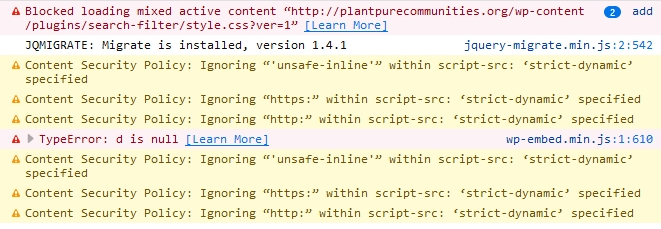
I looked at the web developer tools console of your site (F12 or Ctrl + Shift + I on Chrome / Firefox, Option + Cmd + J on Safari) and saw some errors there:
Based on that there might be a conflict with one or more of the plugins that you use.
To check this please go through our conflict testing guide and let me know if you find anything.
Thanks and cheers,
AndrasKeymasterHi Laura,
Thanks for getting in touch with us!
I just tested this and it worked for me without issue.
This is what I did:
- Under Events > Settings > Tickets tab > WooCommerce Support section check what options are checked. Make sure that whatever you will set your order status to, that needs to be checked here for generating the records and / or the tickets.
- I have ‘Completed’ checked for both
- Go to WooCommerce > Orders > Add order
- Set status to Completed
- Select customer from the list, or leave as Guest
- When choosing Guest, make sure to fill out at least an email address if you want the ticket emailed.
- Click on ‘Add Items’, then ‘Add product(s)’, and choose the ticket. Click on ‘Add’
- When the ticket appears in the item list, click on the blue ‘Recalculate’ button to refresh the total amount.
- If you want to add a coupon code or more tickets, you can do so
- Click on the blue ‘Create’ button.
- Once the order is saved go over to the attendee page of the event and check if the attendee appeared there.
Are you doing anything different than this?
Let me know.
Cheers,
AndrasOctober 2, 2018 at 3:43 am in reply to: Community Calendar Required for submission without Login? and Customizing a Form #1635229KeymasterHi Doug,
Thanks for your questions!
create a customized form which will populate information to automatically go live on a calendar once approved
I’m sorry I don’t fully understand this part.What information do you want to populate where and when?
must you have the community calendar plug in to let non-logged in users submit an event
Yes, allowing non-logged in users to submit an event to your calendar can be done only through Community Events. This is not possible with TEC or Pro only.
Does this clarify?
Cheers,
AndrasKeymasterThanks Jose!
I’ll check with my colleague and will get back to you.
A.
October 2, 2018 at 3:29 am in reply to: Script that triggers and listens for event named resize hijacking global setting #1635215KeymasterHi Andrew,
That private thread contains the back-and-forth between that user and our team doing conflict testing and trying to uncover the source of the issue.
It looks like this bug happens if you have a calendar widget added in one of your widget areas. Once you remove that the issue is gone.
We have ticketed this issue earlier and our developers will get a fix out as soon as we can. Please hang in there.
You will be notified in this ticket once the fix is released.
Cheers,
AndrasKeymasterOkay, that is a bit different then.
Copy this file:
wp-content/plugins/the-events-calendar/src/views/day/single-event.php
here:
wp-content/themes/twentysixteen-child/tribe-events/day/single-event.php
Add one line after line 49. It will look like this afterwards:
$address_delimiter = empty( $venue_address ) ? ' ' : ', ';
$venue_details['linked_name'] = strip_tags( $venue_details['linked_name'] );
Hopefully this will fix it.
Cheers,
AndrasOctober 2, 2018 at 2:36 am in reply to: Please verify your API key is correctly entered on the settings page #1635196KeymasterHi David,
Thank you for your patience so far!
We are investigating the issue.
I would like to ask for some additional information from you, which might help us.
Where is your site hosted and what kind of package do you have?
What is your server running, Windows or Linux?
Which ‘program’ do you use to sell tickets on your website? WooCommerce or the built-in Tribe Commerce or both?
Thanks,
AndrasOctober 2, 2018 at 1:41 am in reply to: Text in Calendar View with Calendar Customizer extension #1635166KeymasterHappy to hear all is solved! Great job on figuring that ‘!important’ out!
Since this is marked resolved I am going to close this ticket, but if you need anything else related to this topic or another please create a new ticket and we’ll be happy to help.
Cheers,
AndrasPS: We’d be grateful if you would give us feedback on your satisfaction with support. Just click on one of the classy looking emojis below. 🙂 If you can spare a few words, that’s even better. Thanks!
PS2: If you like our plugins, and you didn’t yet do so 🙂 we would also be happy to receive a review in the wordpress.org repository. Much appreciated!
https://wordpress.org/support/view/plugin-reviews/the-events-calendar/
https://wordpress.org/support/view/plugin-reviews/event-tickets/October 2, 2018 at 1:40 am in reply to: Re-naming Buy Now to Book Now on Events Calendar List plus changing the link #1635161KeymasterAwesome, happy to hear!
I am going to close this ticket, but if you need anything else related to this topic or another please create a new ticket and we’ll be happy to help.
Cheers,
AndrasPS: We’d be grateful if you would give us feedback on your satisfaction with support. Just click on one of the classy looking emojis below. 🙂 If you can spare a few words, that’s even better. Thanks!
PS2: If you like our plugins, and you didn’t yet do so 🙂 we would also be happy to receive a review in the wordpress.org repository. Much appreciated!
https://wordpress.org/support/view/plugin-reviews/the-events-calendar/
https://wordpress.org/support/view/plugin-reviews/event-tickets/October 1, 2018 at 12:39 pm in reply to: Add to cart is WAY down the page. Can I move it up? #1634640KeymasterHi marktrav,
Thanks for reaching out!
There is a setting under Events > Settings > Tickets tab > Location of Tickets form which gives you some options to move around the tickets box. Screenshot: https://dl.dropbox.com/s/sghzajtc4q3lnyd/shot_181001_213649.jpg
I see that you are not using a default theme. I’m not quite sure how it will work out with that, but give it a try.
Cheers,
AndrasKeymasterHi Marc,
If you would like users to be able to edit events through the front-end, then you will need Community Events – http://m.tri.be/lu
With that users will be able to modify events that they have submitted. They will not be able to modify events of others.
I’m not sure, but with custom development it might be possible to achieve what you want. That is beyond our scope of support however.
Let me know if you have further questions.
Cheers,
Andras -
AuthorPosts