Forum Replies Created
-
AuthorPosts
-
Andras
KeymasterThat is weird. I haven’t seen this issue before.
After some searching I found similar reports when users did some changes in security with Defender. I see you do not have that, but you have iThemes Security Pro. Did you make some changes through that plugin maybe, after which this appeared? You could try disabling all the options there (basically as if the plugin wasn’t there) and check if that helps. I know that simply disabling iThemes Security will not help, as some of the settings will still be active, e.g. changes made to the .htaccess file.
The .htaccess file can be another source. Try setting that back to the default state (I think renaming the current one should be enough, it will be recreated automatically.) and check if that helps.
Of course, creating a backup before is recommended.
To make sure there is no change in the permissions, you can use a plugin like WPFront User Role Editor to check if Admin still has the privileges to create and change tribe_events.
Until you try these I will look around for some other possible causes and solutions.
Cheers,
AndrasKeymasterAwesome! Thanks for the followup!
A.
October 3, 2018 at 1:21 pm in reply to: Not able to change the Color of my Events calendar Widget #1636719KeymasterHi, thanks for the details. And thanks for the login offer. As per our current support policy we cannot accept logins to customer sites and creating customizations is beyond the scope of our support.
You can change the colors of the widget with adding the appropriate css rules to your child theme’s style.css file.
To find out the needed css selectors you can use the built-in Inspect tool of your browser. Here is a guide for Firefox and Chrome:
- https://developer.mozilla.org/en-US/docs/Tools/Page_Inspector/How_to/Examine_and_edit_CSS
- https://developers.google.com/web/tools/chrome-devtools/inspect-styles/
To give you some examples:
To change the background color of the cells:
.tribe-mini-calendar td {
background-color: blue;
}
To change the bg color of cells that have events:
.tribe-mini-calendar td.tribe-events-has-events {
background-color: red;
}
To change the color of the header row with the days:
.tribe-mini-calendar th {
background-color: green;
}
Hope this helps you get started.
Cheers,
AndrasKeymasterHi Ryan,
Thanks for sharing those.
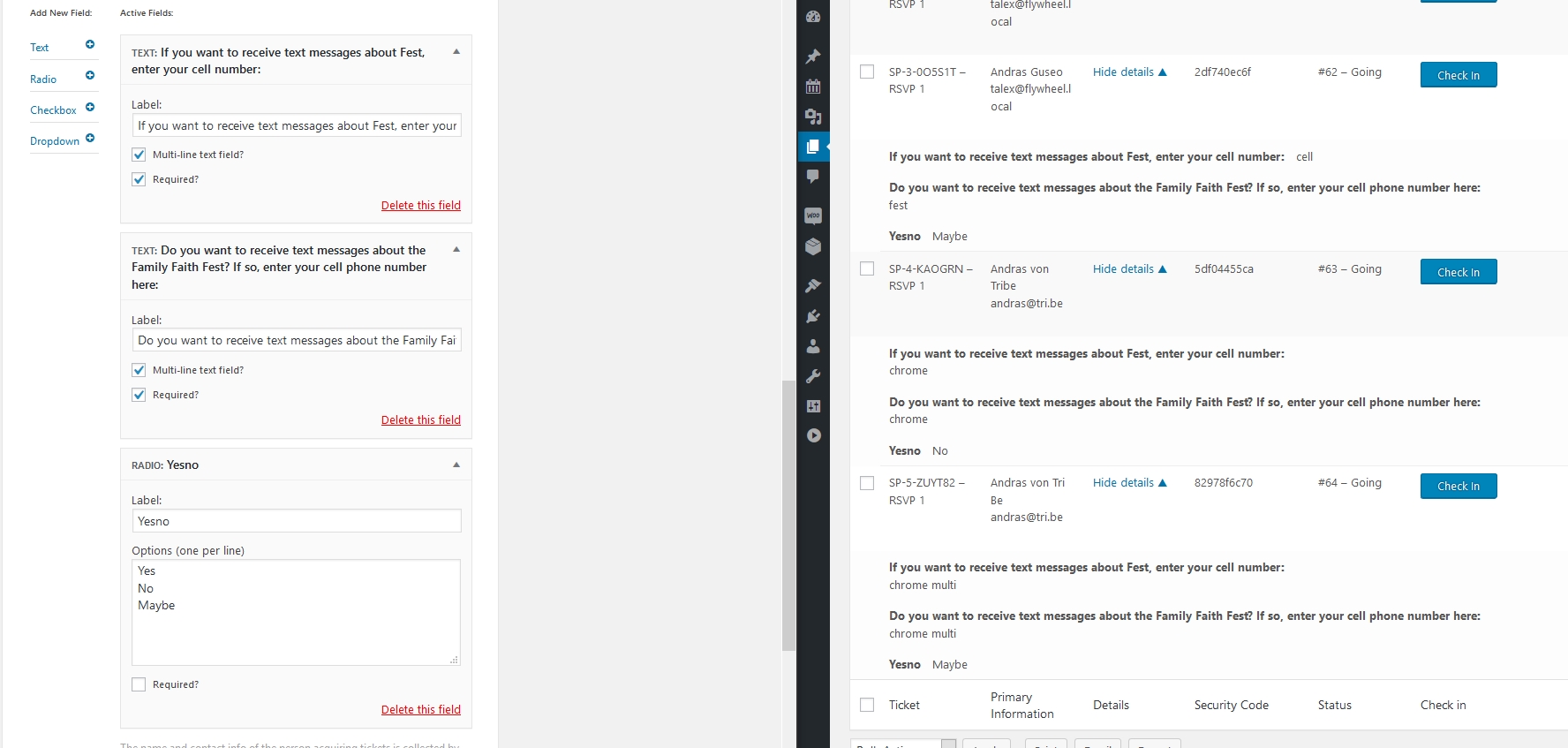
I tested all the long ones, even having two long ones on the same in put field and every submission got properly recorded. Even when using multi-line and / or required.
Here’s a screenshot of my last setup and results: https://dl.dropbox.com/s/7us81ose1i46urp/shot_181003_214348.jpg
Is there anything that stands out or is much different from your setup?
Not quite sure what could be the issue here. Might be – though I find it unlikely – that one of the other plugins are interfering. You can find that out by running a conflict test.
Best is if you have a staging / test site where you can play around without affecting your live site.
The other option would be setting up a site from zero, first adding the ticketing plugins, test if it works and add the other plugins and theme one-by-one while testing the functionality after every step.
If you decide to troubleshoot this further, then let me know what you find. Or you can use your workaround of shorter labels.
Cheers,
AndrasOctober 3, 2018 at 12:20 pm in reply to: Script that triggers and listens for event named resize hijacking global setting #1636648KeymasterThanks for sharing that, James! Much appreciated!
A.
KeymasterHi Jose,
I checked with my colleague and she has approved your submission on September 28. Please check your emails. If you don’t find it in your inbox, please also check in your spam / junk folder.
Let me know if you find it.
Cheers,
AndrasKeymasterHi Keelin,
That is great to hear! I’m happy this got solved.
Yes, when you create a ticket and use WooCommerce, then a parallel WooCommerce product is created. That helps with stock management and pricing and all.
Since this is resolved I am going to close this ticket, but if you need anything else related to this topic or another please create a new ticket and we’ll be happy to help.
Cheers,
AndrasPS: We’d be grateful if you would give us feedback on your satisfaction with support. Just click on one of the classy looking emojis below. 🙂 If you can spare a few words, that’s even better. Thanks!
PS2: If you like our plugins, and you didn’t yet do so 🙂 we would also be happy to receive a review in the wordpress.org repository. Much appreciated!
https://wordpress.org/support/view/plugin-reviews/the-events-calendar/
https://wordpress.org/support/view/plugin-reviews/event-tickets/KeymasterThis reply is private.
October 3, 2018 at 11:54 am in reply to: Add to cart is WAY down the page. Can I move it up? #1636614KeymasterAwesome, happy to hear!
Since this is marked resolved I am going to close this ticket, but if you need anything else related to this topic or another please create a new ticket and we’ll be happy to help.
Cheers,
AndrasPS: We’d be grateful if you would give us feedback on your satisfaction with support. Just click on one of the classy looking emojis below. 🙂 If you can spare a few words, that’s even better. Thanks!
PS2: If you like our plugins, and you didn’t yet do so 🙂 we would also be happy to receive a review in the wordpress.org repository. Much appreciated!
https://wordpress.org/support/view/plugin-reviews/the-events-calendar/
https://wordpress.org/support/view/plugin-reviews/event-tickets/KeymasterHi Anthony,
Thanks for reaching out!
No, unfortunately tags from Google cannot be imported with Event Aggregator at the moment, I’m sorry.
If you think that is something you would like as a feature I encourage you to visit our User Voice Page and either upvote an existing request or make a new request there.
Is there anything else I can help you with?
Cheers,
AndrasKeymaster@Matt, thanks a lot! You are awesome!
@al3xx, let us know if you need any further assistance!
Cheers,
AndrasKeymasterHi Sandy,
Thanks for getting in touch with us!
No, you don’t need Events Calendar Pro to be able to use Community Events.
Community Events will work just fine with The Events Calendar.
Pro will give you some extra functionality like recurring events, additional fields and so on.
Let me know if you have any more questions.
Cheers,
AndrasKeymasterCould you share with me what were the short and long labels you have used for the text field?
What info were you submitting in the fields?
I ran a quick test with RSVP, having a text field with less than 70, and one with more than 70 (89), and a radio button. And I got all the info.
Thanks,
AdnrasKeymasterHi Julien,
These are some great questions, thanks! Here we go:
Ability to generate multiple tickets for one purchase (ie one customer buys a package of 10 VIP tickets)
Yes, a user can buy multiple tickets at once. All tickets will be sent to the user who makes the purchase, so the purchaser will need to distribute the tickets.
Ability to generate QR Code for each ticket, with a ready to use mobile app to scan the QR code
Yes, each ticket will have a unique QR code with it. These can be scanned with any QR code scanner app or our very on app.
When a third-party QR code scanner is used, then the person scanning needs to be logged in to the website admin interface on the mobile device that is doing the scanning.
Ability to personalize the welcome email with the QR code for each ticket
There is some limited possibility to personalize the email. What would you imagine, can you give me an example?
Ability to personalize the welcome landing page when scanning the QR Code (OK / KO / Special Bonus)
No, there is no landing page when the QR code is scanned. The code is scanned by the guy at the door and he will see a “green or red” notification, whether the ticket scan was successful or not.
Let me know if you have any further questions.
Cheers,
AndrasKeymasterHi diocesan,
Thanks for reaching out!
I’m sorry to hear about this issue! And I’m really thankful for your thorough testing and sharing the results and the workaround with us.
I will test this as well to make sure I can recreate the issue and we’re facing a bug. If I can recreate this behavior I will open a bugticket so our developers can take a look at this. I will let you know.
Thanks again!
Andras
-
AuthorPosts