

Forum Replies Created
-
AuthorPosts
-
Andras
KeymasterEvent Aggregator hat ein separater Lizenz Schlüssel. Du kannst den in deinem Account unter License Keys finden.
https://theeventscalendar.com/my-account/license-keys/dass die Events auch in anderen Homepages angezeigt werden können.
Ich denke dass ist auch möglich mit TEC und WordPress. Du musst nur einen Import auf der andere Seite machen. Ich bin sicher dass das auch sehr ähnlich bei time.ly wirkt.
Das Bild für Kategorien ist eine gute idee. Wenn du das als ein Feature haben möchtest dann empfehle ich dir die Idee an unserem UserVoice Seite mitteilen.
http://tribe.uservoice.com/Andras
KeymasterHi Raymond,
Thanks for sharing the feed and the extra info. I’ll make sure our devs get it.
On Event Aggregator and iCal importer: you don’t need to uninstall or deactivate iCal importer. If you upgraded to 4.3, then it will appear as Legacy import in the menu. It will not conflict with EA, should work just as before.
So far the feedback on EA has been very positive from users.
Curious to hear your feedback on EA while we look at the iCal issue.
Also, let me know if you have any questions.
Cheers,
AndrasKeymasterHi Joseph,
Thanks for sharing the sysinfo. (The checkbox version came through as well without issue this time.)
Based on your sysinfo I see that you are using older and mismatching versions of our plugins. I recommend you to update them to the latest versions and check if the issue still exists. Let me know if that solves is.
Thanks and cheers,
AndrasOctober 20, 2016 at 8:56 am in reply to: "The ticket with ID XXXXXX has already been checked in." #1179849KeymasterThis reply is private.
KeymasterHey Cliff,
Thanks for the testing and sharing the details I will reach out to our devs to take a look into this. Please hang in there.
Cheers,
AndrasKeymasterTrés bien! 🙂 I’m super stoked to see it help and your site is one step closer to perfection!
As an extra tip, you can easily modify the code and add a dash ‘-‘ before each of the categories, in case you want to.
Since this is marked resolved I am going to close this ticket, but if you need anything else related to this topic or another please post a new topic in the forum and we will help you out.
Good luck with your project!
Cheers,
AndrasPS: If you like our plugin, and you didn’t yet do so 🙂 we would be happy to receive a review in the wordpress.org repository. Thanks!
https://wordpress.org/support/view/plugin-reviews/the-events-calendarPS2: We’d be also grateful if you would give us feedback on your satisfaction with support. Just click on one of the classy looking emojis below. 🙂 If you can spare a few words, that’s even better. Doublethanks!
October 20, 2016 at 8:44 am in reply to: The Events Calendar Filterbar – Override the "flattened_term_list" function #1179831KeymasterHey spraxoo,
I’m glad it helped! I am going to go ahead and close this ticket, but if you need help on this or something else, don’t hesitate to open a new topic.
Good luck with your project!
Cheers,
AndrasPS: If you like our plugin, and you didn’t yet do so 🙂 we would be happy to receive a review in the wordpress.org repository. Thanks!
https://wordpress.org/support/view/plugin-reviews/the-events-calendarPS2: We’d be also grateful if you would give us feedback on your satisfaction with support. Just click on one of the classy looking emojis below. 🙂 If you can spare a few words, that’s even better. Doublethanks!
October 20, 2016 at 8:42 am in reply to: Creating Home Page 'list' view vs Events Page 'list' view #1179830KeymasterHey Lucy,
Thanks for sharing your solution here, much appreciated!
Allow me to recommend a simplification:
<!-- Main Events Content - Home Page -->

<?php if ( is_front_page() ) {

php tribe_get_template_part( 'list/content' );

}

// Main Events Content - Custom Page

else {

// Duplicated contents of tribe-events/list/ to customize

} ?>
Not much of a difference, but performance wise a bit better to have if … else … than if … if …
Since this is marked resolved I am going to close this ticket, but if you need anything else related to this topic or another please post a new topic in the forum and we will help you out.
Good luck with your project!
Cheers,
AndrasPS: If you like our plugin, and you didn’t yet do so 🙂 we would be happy to receive a review in the wordpress.org repository. Thanks!
https://wordpress.org/support/view/plugin-reviews/the-events-calendarPS2: We’d be also grateful if you would give us feedback on your satisfaction with support. Just click on one of the classy looking emojis below. 🙂 If you can spare a few words, that’s even better. Doublethanks!
KeymasterHi Mark,
I’m happy to hear it worked! And thanks for the suggestions. We have some plans to expand the options with the new shortcodes, we also feel that there are lots of possibilities there. I’ll forward your ideas to the team.
Since you marked it resolved I am going to close this ticket, but if you need anything else related to this topic or another please post a new topic in the forum and we will help you out.
Cheers,
AndrasPS: If you like our plugin, and you didn’t yet do so 🙂 we would be happy to receive a review in the wordpress.org repository. Thanks!
https://wordpress.org/support/view/plugin-reviews/the-events-calendarPS2: We’d be also grateful if you would give us feedback on your satisfaction with support. Just click on one of the classy looking emojis below. 🙂 If you can spare a few words, that’s even better. Doublethanks!
October 19, 2016 at 9:13 am in reply to: Creating Home Page 'list' view vs Events Page 'list' view #1179107KeymasterHi Lucy,
Achieving that would require customization work, which we are limited in supporting and currently our hands are full.
What you can try is overriding the existing templates, like tribe-events/list.php and adding a conditionals like ‘if ( is_home() )’ to change the behavior based on where the view is embedded.
If you need some expert help I can share with you this list of awesome people of the community who could help you out with this:
https://theeventscalendar.com/knowledgebase/find-a-customizer/
I hope this helps to get you started.
Cheers,
AndrasKeymasterOne more thing, could you please share the links / IDs of the events / pages that are causing the issue? This will allow us to test it and prepare a better fix if needed.
Thanks,
AndrasKeymasterHey Mark,
Thanks for going Pro and welcome to the forums!
I’m sorry you are having this issue. I did some local testing and it seems it’s coming from your theme.
If you paste the following snippet into your child theme’s style.css file, that should solve it and will give you the intended functionality and look:
#tribe_events_filters_wrapper {

z-index: 9999 !important;

}
Let me know if this helps.Cheers,
AndrasKeymasterHi ericmeadows,
Thanks for using our plugins and for reaching out!
I’m sorry about this issue with the EA import removing the organizers.
To be able to support you, could you please share your system information with me in a private reply?
Here’s a handy guide how you can do that:
https://theeventscalendar.com/knowledgebase/sharing-sys-info/If you can, please share it with both methods (ticking the box and pasting in a private reply), as the ticking the box is a new addition not without its glitches. 🙂
Thanks and cheers,
AndrasKeymasterHello Raymond,
Thanks for using our plugins and welcome to the forums! I’m really sorry you are having this duplicating issue with iCal importer. Let me help you out here.
We are aware of this issue and already have a bug ticket on file for this. I will add your thread to it to give it more push and hopefully a fix will be on the way soon.
To help us in fixing, could you please share the feed that is causing you the issue? Thanks!
Until a fix arrives I would like to draw your attention to Event Aggregator which just launched with The Events Calendar 4.3. I see you didn’t update yet, it is highly recommended. 🙂
Since you have a license for iCal importer you also received a license for Event Aggregator. You can find the license key in your theeventscalendar.com account under My Account > License Keys or clicking here.
Event Aggregator is a new importing plugin which has been developed from the ground up to give a more stable performance and less issues. Give it a test drive, maybe that will be the fix for your issue.
You can read more about EA here:
https://theeventscalendar.com/product/event-aggregator/Let me know if this helps or if you have any more questions.
Cheers,
AndrasKeymasterHi Jerry Lee,
I’m sorry this issue is taking so long to resolve. I understand your frustration about the plugin not working as expected.
Modern Tribe works as a distributed team meaning that our people are sitting in different places around the world. I am for example sitting in Europe, while most of the time is in the US. Unfortunately we don’t yet have anybody from Australia.
As for our support, for premium license holders we provide dedicated support in our premium forums. We have a long queue of support questions and we take it on a first come first served bases, as we believe this is a fair way, and we are paying a lot of attention to provide an answer to a support question or reply within 24 hours, or even faster if possible. It is rarely that we go beyond that.
Our whole team is working really hard to produce high quality plugins and before each release every plugin goes through thorough testing. Still, some bugs make it through, which our community helps us discover, test and sometimes solve, and we are really grateful for that.
As for your issue with the order emails not containing the collected attendee information, I’m afraid that is not a feature at the moment. The collected attendee information appears only:
1. in the ticket email that is sent to the buyer
2. on the back-end when checking the attendees for an event.
To get to this latter, go to the list of your events in the admin, hover over the name of the event and click on Attendees.
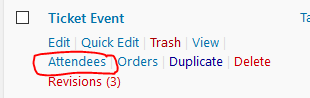
This will take you to a list like this:
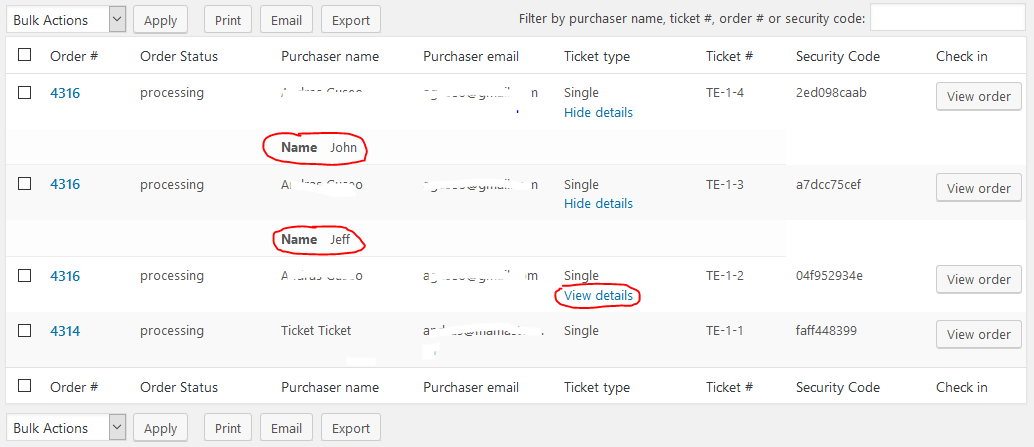
It most probably would be possible to get the attendee info in the order email with some customization work.
I will look around if we have a snippet / hack already for this, please give me some time. I’ll check with the team and I’ll get back to you as soon as I can.
Thanks for understanding and cheers,
Andras -
AuthorPosts