
Home › Forums › Ticket Products › Event Tickets Plus › Ticket Attendees Info – Not Received
- This topic has 14 replies, 4 voices, and was last updated 9 years, 11 months ago by
Ronald Burton Adams.
-
AuthorPosts
-
October 13, 2016 at 12:04 am #1175781
Ronald Burton Adams
ParticipantHello,
We have an issue regarding the attendees information that we haven’t got via email notification for the recent event ticket purchase on our Site. We have checked on the backend but we only got the information of 1 attendee who also made the ticket payment. We cannot trace any information from the backend either regarding the other 2 attendees information she input during her purchase. You can check on our event page here http://treeguildwa.asn.au/event/arbor-retreat-2016/ that there are individual forms on each of the attendees – so were expecting that this information should have been included in the email notification – but unfortunately, the only detail indicated on the notification we got was the number of the attendees – no information included.
Hope to hear from you very soon. Thanks.
October 13, 2016 at 8:51 am #1175951Andras
KeymasterHello again Jerry Lee,
Thanks for reaching out! I’m sorry you are experiencing this issue with the attendee information. Let me help you with that.
If I understand correctly, than a user bought 3 tickets, but you only received 1 attendee information.
In this case what could have happened is, the user went on the event page, added one ticket with attendee info, and added it to the cart.
Then on the cart page the user changed her / his mind and increased the ticket number to 3. However on the cart page the attendee information fields do not appear, thus s/he couldn’t have entered the info.
That is a glitch we know about. What you can do to prevent this is to disable changing the ticket numbers on the cart page, so users would only be able to add tickets from the event page.
I hope this sheds some light on the case. Let me know if this helps.
Cheers,
AndrasOctober 14, 2016 at 8:45 am #1176572ParticipantHi Andras,
Thank you very very much for this detailed information. I do hope this glitch get fix though.
By the way, can you please provide me details on how or where I can disable changing the ticket numbers on the cart page? I can’t seem to find it on the settings. Thank you so much in advance.
October 17, 2016 at 2:35 am #1177598KeymasterHi Jerry Lee,
A setting for that doesn’t exist. Fortunately a snippet does. 🙂
Paste this in your child theme’s functions.php file and see the magic happen. 🙂
https://gist.github.com/cliffordp/66bf05df61ee269c60ff20d6f39e2cab#file-functions-php
Let me know if that solves it for you.
Cheers,
AndrasOctober 17, 2016 at 11:15 am #1177799ParticipantHi Andras,
Thank you for your response. But I think you forgot to add the attachment or code for the snippet.
I will wait for your feedback.Thank you so much in advance.October 18, 2016 at 7:04 am #1178265KeymasterHi Jerry Lee,
Ooops, apologies, indeed I left it out. I’m really sorry.
Here’s the link to the snippet:
Let me know.
Cheers,
Andras
October 18, 2016 at 10:37 am #1178538ParticipantHi Andras,
Thank you so much for your response and for the snippet. I appreciate your help.
Thanks.
October 18, 2016 at 10:45 am #1178542ParticipantBy the way Andras,
It did work, again thank you very very much. Appreciate all your help.
October 18, 2016 at 10:30 pm #1178884ParticipantHi Andras,
Thank you for your help yesterday on the snippet.
But unfortunately, we still have a big issue for not getting any email for the attendees information.
The only email we got is this: http://prntscr.com/cw3rtn (closeup view – http://prntscr.com/cw3ryy ; http://prntscr.com/cw3s2b)We set the form fields as required that’s why we are expecting to get the information of the attendees after the purchase – but all we got is the payment receipt.
And upon checking the backend – this is all that is in there: http://prntscr.com/cw3sk9Here is our where our event ticket is set – http://treeguildwa.asn.au/event/arbor-retreat-2016/
It’s absolutely getting frustrating encountering issues every now and then plus the issue with the timezone where we had to stay up very late to check and wait for support response with 50% chance of getting the issue fixed for the next day. We are hoping the support system could at least have some team that could answer our queries during our timezone – at least to lessen the frustration. Anyway, we are hoping that this will be the last issue we will encounter and that this will get fixed really really really soon. thanks.
October 19, 2016 at 7:26 am #1179046KeymasterHi Jerry Lee,
I’m sorry this issue is taking so long to resolve. I understand your frustration about the plugin not working as expected.
Modern Tribe works as a distributed team meaning that our people are sitting in different places around the world. I am for example sitting in Europe, while most of the time is in the US. Unfortunately we don’t yet have anybody from Australia.
As for our support, for premium license holders we provide dedicated support in our premium forums. We have a long queue of support questions and we take it on a first come first served bases, as we believe this is a fair way, and we are paying a lot of attention to provide an answer to a support question or reply within 24 hours, or even faster if possible. It is rarely that we go beyond that.
Our whole team is working really hard to produce high quality plugins and before each release every plugin goes through thorough testing. Still, some bugs make it through, which our community helps us discover, test and sometimes solve, and we are really grateful for that.
As for your issue with the order emails not containing the collected attendee information, I’m afraid that is not a feature at the moment. The collected attendee information appears only:
1. in the ticket email that is sent to the buyer
2. on the back-end when checking the attendees for an event.
To get to this latter, go to the list of your events in the admin, hover over the name of the event and click on Attendees.
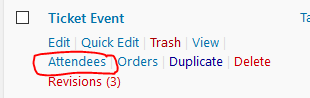
This will take you to a list like this:
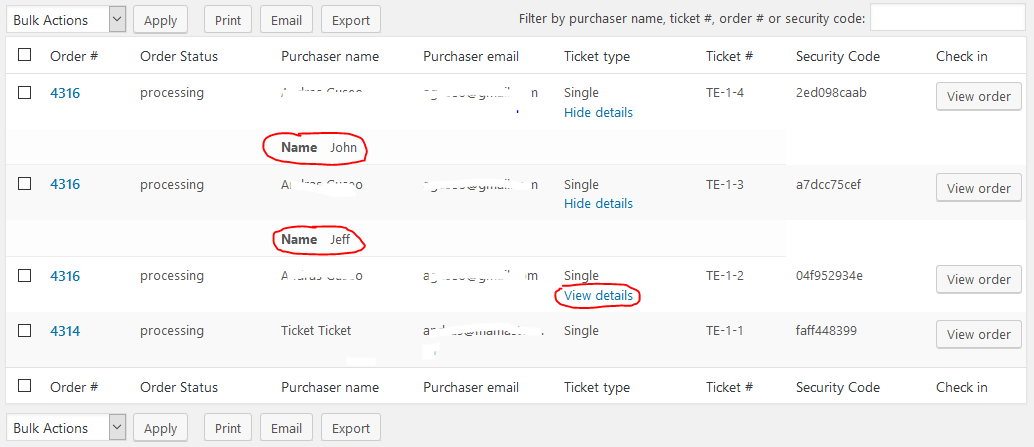
It most probably would be possible to get the attendee info in the order email with some customization work.
I will look around if we have a snippet / hack already for this, please give me some time. I’ll check with the team and I’ll get back to you as soon as I can.
Thanks for understanding and cheers,
AndrasOctober 19, 2016 at 10:35 am #1179255ParticipantHi Andras,
Thank you so much for getting back to me and for giving me more details about the support system. I appreciate your time and effort. I hope the company can get few from Australia soon.
Sad to hear that the feature for order emails containing the collected attendee information is not available at the moment. A snippet/hack will absolutely be a great help. Hope you can find one. Thank you so much in advance.
With regards to the guide you gave me, I had an employee do a test on our tickets now and this is what we are getting on the backend:
Woocommerce > Orders > http://prntscr.com/cwc73e > When clicking on the Order number > http://prntscr.com/cwc7wi
Events > Event Name – Attendees (http://prntscr.com/cwc3o0) > http://prntscr.com/cwc915
Unfortunately, you will see from here that the attendees information is the same for the 2 ticket attendees that I had our employee test purchase. It seems that it’s taking the information ONLY from the Billing details of the person who did the Purchase. Attendees information should have been taken from the FORM right? The name of the attendees Karen used during her test was her name as the attendee #1 and she used TEST as the name for the attendee #2 form. Can you please help us retrieve those information correctly, please. We absolutely need to get the name of the attendees of those clients who did an actual purchase of our event ticket.I will wait for your feedback today regarding this. Thank you.
October 19, 2016 at 8:37 pm #1179644ParticipantHello,
Further to my request above I would like to clarify one issue that I do not understand.
Event tickets provides a facility for tickets to be purchased by one person with multiple
tickets being purchased. So, the purchaser can select the number of tickets and complete the form(s) for each person.Now, we supposedly have captured that information from the form, but we do not have access to it. WHERE IS IT? Why would it not be captured and if it is WHY DO WE NOT HAVE ACCESS TO IT!
It would appear that the only entity that receives all of this information is the purchaser(s) email.So, what I do not understand is why…Event Tickets does not allow for all of this information to be captured on the “backend”, and allow us to access and obtain that information to use for our internal registration purposes (we need all of the information internally to complete our database for attendees at each event). I Cannot see the point of having a ticketing system that does not give us all the information supplied by the ticket purchasers.
Also, as a suggestion a quick fix could be that a facility could be provided for us to place an additional email address as a second receiver of the information – the same information that the ticket purchaser receives.
Please note that we love Event Tickets, it works fine for the purchaser, but if we do not receive or have access to the same info as the purchaser – it is not going to work for us.
Cheers
Jerry Lee JonesOctober 20, 2016 at 1:10 pm #1180085KeymasterHey Jerry Lee,
Thanks for all the details you shared with me. I understand how frustrating the issue of not being able to find / see attendee information is and that it impacts your business. I just want to assure you that I will try to do everything I can to help you solve this issue with the attendee information. So hang in there, we’ll get this straightened out.
I will be referring to this screenshot:
In the Purchaser column you will always see the name and email that is filled on the checkout form’s billing name / email.
When you hover over a sold ticket in the attendees list, then you will see View Details. If you click on that, the ticket will open up and you will see the attendee details for that ticket.

Please check and let me know if that works.
I also see in your system info that you are using outdated versions of our plugins. An update to the latest versions is highly recommended because a whole bunch of bugs have been squashed since and we only support the latest versions.
Thanks and cheers,
AndrasNovember 11, 2016 at 8:35 am #1190932Support Droid
KeymasterHey there! This thread has been pretty quiet for the last three weeks, so we’re going to go ahead and close it to avoid confusion with other topics. If you’re still looking for help with this, please do open a new thread, reference this one and we’d be more than happy to continue the conversation over there.
Thanks so much!
The Events Calendar Support Team -
AuthorPosts
- The topic ‘Ticket Attendees Info – Not Received’ is closed to new replies.