

Forum Replies Created
-
AuthorPosts
-
October 27, 2016 at 3:46 pm in reply to: Custom list with data from events, venue and organizer cusom post types #1184116
Andras
KeymasterHi Emil,
Thanks for reaching out! That is a very good question.
I guess you could use some of our functions like tribe_get_start_date, tribe_get_start_time, tribe_get_end_date, tribe_get_end_time.
You can find a pretty decent list of the functions here:
https://theeventscalendar.com/functions/
Does this help?
Cheers,
AndrasOctober 27, 2016 at 3:41 pm in reply to: Will the PRO version of the plugin accomplish filter/search features? #1184114KeymasterHello Colten,
Thanks for reaching out to us! Let me help you with your questions.
Check out our demo site here, I’ll be referring to this in my answers.
show a search feature
That is absolutely possible even with the free core The Events Calendar plugin. There is a search bar like this appearing at the top of the calendar:

a filter feature to narrow down events
For this functionality you will need our Filter Bar extension which will allow you to set up different filters the way you like it. It looks like this on our demo site:

is there a widget option that would allow me to show 5 featured events
As per se Events cannot be set as featured or not featured. However, you could create a category called “Featured Event”. And then use the Event List widget, which will allow you to filter the events by category. Note, this requires the Events Calendar Pro plugin. See this screenshot:
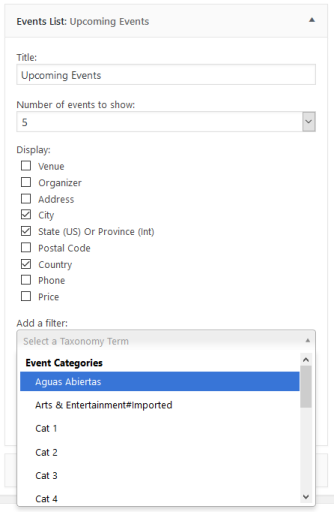
Let me know if this answers all your questions or if you would like to know anything else.
Cheers,
AndrasKeymasterHello Jacob,
Thanks for going Pro and welcome to the forums! I’m sorry about this issue you are having. Let me try to help you out with this one.
Are you also getting the errors is you deactivate all plugins and leave only the Modern Tribe ones active? Would be best to run a full test for conflicts based on this: https://theeventscalendar.com/knowledgebase/testing-for-conflicts/
Also, can you point me to the single event page where that is happening? Is it a single event or an instance of a recurring event?
Thanks and cheers,
AndrasKeymasterHello Kam,
Thanks for reaching out and I’m sorry about this issue with the seemingly double tickets. Let me help you with this one.
It looks like you are collecting attendee data with the tickets. When there is no ‘View Details’ it means no attendee data has been entered. If you have it set to required, then the only way this can happen is if someone puts one ticket in the cart (attendee data included) and then on the cart page increases the number of tickets. On the cart page the attendee meta is not collected.
One and the currently recommended way to go around this is to disable the quantity selector on the cart page.
We have a snippet for that ready for WooCommerce, however I see you are using EDD. I’m not quite sure how to do it with EDD. Here’s the snippet though, it might help you get started.
https://gist.github.com/cliffordp/66bf05df61ee269c60ff20d6f39e2cab#file-functions-php
I hope this helps! Let me know if you have any other questions.
Cheers,
Andrasps: I see in your sysinfo that you are using mismatching versions of The Events Calendar & Events Calendar Pro and Event Tickets & Event Tickets Plus. It is highly recommended to use same versions of all, as mismatching version can produce unwanted glitches and bugs. If you get a chance, please update all your Modern Tribe plugins to the latest versions. Thanks!
KeymasterHey Robert,
Thanks for going Pro and welcome to the forums! Nico is busy with other things at the moment so I will be helping you out with this. I hope that’s ok. 🙂
Could you point me to that thread / snippet which you are referring to? I might be able to tweak that for you.
Thanks and cheers,
AndrasKeymasterHi Marc,
Thanks for clarifying that.
Yes, it looks like that it doesn’t influence the ajax calls made in the month view.
Our hands are full at the moment, give me some time and I’ll get in touch with the original snippet author if he can cook something up quickly. I ask for a bit of patience.
Thanks and cheers,
AndrasKeymasterHello Evan,
The article I provided is titled “Altering or removing titles on calendar views” and the snippet at the end of the post does exactly that. Tested and verified.
If you paste that snippet into your child theme’s functions.php file and alter line 13 to ‘%1$s’ then you will get the result you are looking for.
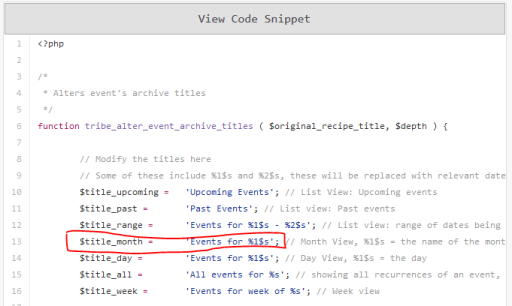
Check and let me know if this solves it for you.
Cheers,
AndrasOctober 27, 2016 at 1:57 pm in reply to: Issue with FB Events after Aggregator showed up in WP #1184042KeymasterHello Christos,
Thanks for getting back to us on that.
I was running several tests with our newest versions and the legacy Facebook importer. So far I haven’t been able to reproduce your issue. Importing worked pretty much fine, here are my findings:
I had the EA licence key entered.
The facebook tab loads extremely slow.
Importing goes really slow. (4m30s until page reload starts)
Everything is imported / updated, not only the first.Reloading the page goes slow (basically loading the Facebook tab again, last time 30 seconds with a fatal error, see next).
I only received one (fatal) error message after importing that said: “Fatal error: Maximum execution time of 300 seconds exceeded in …\wp-includes\wp-db.php on line 1868.
I see that you have some 200+ Facebook organizations / pages where you are importing from.One conclusion is that the slowness and the fatal error is due to the large number of Facebook resources that need to be imported.
The fatal error you can control, if you set your server to allow longer execution times. If you don’t know how to do that, or cannot do it yourself, then get in touch with your hosting provider.
The other option would be reducing the number of Facebook resources. I saw a lot of messages saying “XYZ does not have any Facebook events”
If you can, then please try to run an import with all other plugins deactivated, basically only leave the Modern Tribe ones active. If it works fine like that, then it indicates some incompatibility / collision with another plugin.
If you happen to try my above suggestions, please let me know the results.
I will still run a test with an older TEC version, I do ask for a bit more patience on your side.
Thanks and cheers,
AndrasOctober 26, 2016 at 3:52 pm in reply to: iCal Importer imports ical recurring all on the same date #1183458KeymasterThis reply is private.
October 26, 2016 at 3:23 pm in reply to: Event tickets Pro possibility to order optional product like books, gadgets etc #1183446KeymasterCześć Krzysztof,
Thanks for reaching out again with your questions. Let me try to help you out with that.
You have more options to order optional products, depends on how you want to execute it. If you want to have it directly on the event page with the ticket, then the easiest option would be setting up different tickets (Ticket only, Ticket + book, Ticket + gadget, Ticket + book + gadget etc.). If you have a lot of options, then this can be cumbersome.
You can try to sell tickets not from the Event page, but rather from the WooCommerce product page. Here’s a guide on how you could do that:
Once you have this in place, then a plugin like WooCommerce Product Add-ons or the YITH WooCommerce Product Add-ons could help you achieve what you want with the books and gadgets. These are not free plugins, so would require some investment from your side.
Add to cart:
You should be able to translate this with the .po file. This knowledgebase article should help you in this:
Let me know if you have any other questions.
Cheers,
AndrasKeymasterThis reply is private.
KeymasterA workaround for the moment, if you are using Excel, is the following:
- When exporting the CSV, then save the file.
- Open Excel with a blank spreadsheet
- Go to the Data menu (whatever it is called now) and choose Get External Data > From Text (https://cloudup.com/c8yfu1xTig8)
- In the Import Text File dialog choose the saved CSV
- On the first screen of the import wizard choose UTF-8 as the File origin. (It’s close to the end of the list. https://cloudup.com/cO0BAMupvHX)
- Finish the other two steps of the wizard (the delimiter is usually comma (,) )
Let me know if this solves it for ya.
Thanks and cheers,
AndrasKeymasterHello Brian,
Thanks for reaching out with your question!
I have experienced this with some other plugins. Please give me some time to test this and check with the team, and I’ll get back to you asap.
Meanwhile, please be so kind and share your sysinfo with me. (https://theeventscalendar.com/knowledgebase/sharing-sys-info/)
Thanks and cheers,
AndrasOctober 26, 2016 at 2:28 pm in reply to: Where do I print out ticket purchaser information? #1183417KeymasterHello Christopher,
Thanks for using our plugins and welcome to the forums! Let me help you with your question.
First you can check in your admin who purchased tickets for an event this way:
- Go to your events
- Hover over the event you need. You will see ‘Attendees’ appearing among the links. Click on that. (https://cloudup.com/cZaF_vIgL2Z)
- You’ll see all the purchases. If you hover over a purchase you will see ‘View details’ among the links. (https://cloudup.com/cqC0LaP-2xo) If you click on that you will see the submitted values of the Attendee meta fields
There is a print button at the top of the list but that will not print the attendee meta. However, there is also an Email button there and you can email the list to yourself. (https://cloudup.com/cZAOPR6ic0I) The email will already contain the ticket purchases including the attendee meta in a nicely formatted table. (https://cloudup.com/cwFUT_v7efn)
I hope this helps! Let me know if this works for you.
Cheers,
AndrasKeymasterHello Evan,
Thanks for going Pro and welcome to the forums!
I believe this knowledgebase article will give you the solution. 🙂
https://theeventscalendar.com/knowledgebase/altering-or-removing-titles-on-calendar-views/
Let me know if you need anything else.
Cheers,
Andras -
AuthorPosts