

Forum Replies Created
-
AuthorPosts
-
November 4, 2016 at 2:34 pm in reply to: After Last update, filter bar will no longer appear in vertical position #1187940
Andras
KeymasterHello Todd,
Thanks for reaching out! I’m sorry about this issue. This bug has been discovered and reported first time only recently. We already have a bug ticket on this with highest priority, so a fix should be along soon.
Meanwhile the temporary fix is to paste the following into your theme’s style.css file:
.tribe-events-filters-vertical {

float: left;

width: 25%;

}
I hope this helps until the fix comes out. Let me know.Cheers,
AndrasKeymasterHello Shay,
Thanks for reaching out again with this issue. We have tested it and it looks like a bug.
We already have a bug ticket on file for this, so a fix should be coming along soon.
Thanks for testing and re-testing this, that is great help.
I am going to close this ticket to new replies, but the issue is still open and we will update this ticket once we release a fix.
If you have any new questions or issues please create a new ticket and reference this one.
Thanks and cheers,
AndrasKeymasterHello Fernando,
Thanks for using our plugins and welcome to the forums!
I am able to answer some questions to help you get started on a customization, but for the most part that is beyond the support we can provide.
This article should help you get started, it contains the info how to add the phone number on the backend. Based on this it should be easy to also include other data. You will need to find out the field name / reference for company name in WooCommerce. It should be something like _billing_company, but that’s just a guess.
To also include the extra data in the export, please look at this thread:
This should get you started.
Let me know if there’s anything else I can help you with.
Cheers,
AndrasNovember 4, 2016 at 1:37 pm in reply to: No Ticket in Cart. Can the cart page return to Schedule page? #1187912KeymasterFriendly note, I see that not all of you Events Calendar plugins are fully up to date.
Update all of them to the latest version as mismatching versions can cause unwanted glitches.
Cheers,
AndrasNovember 4, 2016 at 1:33 pm in reply to: No Ticket in Cart. Can the cart page return to Schedule page? #1187909KeymasterHello Tracie,
Thanks for using our plugins and welcome to the forums!
Great question there! Although that part is handled by the WooCommerce plugin and not The Events Calendar. 🙂
Nonetheless, check out these articles, which should help you do the customization:
https://www.lockedowndesign.com/change-return-to-shop-link-in-woocommerce/
https://www.skyverge.com/blog/change-woocommerce-return-to-shop-button/
I hope that solves it for you. Let me know.
Cheers,
AndrasNovember 4, 2016 at 1:27 pm in reply to: Getting an error at the top of my wordpress plugin page with event pro error #1187908KeymasterHey Camomi,
Thanks for going Pro and welcome to the forums! Sorry about your issue, let me help you with this.
The source of the issue is that The Events Calendar plugin uses the page http://domain.com/events for displaying your main calendar. It looks like that you also have a page called Events or at least a page that uses the same slug / permalink. This causes a conflict.
There are 2 ways to solve this:
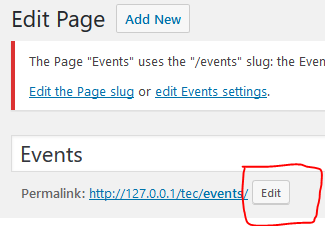
1. Change the link of the page. For this click on the Edit the page slug link in that error message. This will take you to that page which has the events slug / permalink. Next to the permalink click on the Edit button and change it to something else than Events.
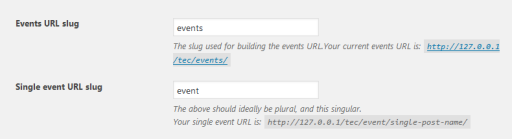
2. Change the link of the main calendar page. For this click on the edit Event settings link, which will then take you the the settings page of The Events Calendar, to the section of Events URL slug. Change this slug to something else (e.g. calendar, classes or whatever fits your page / offering). I also suggest to change the Single event URL slug for consistency.
I hope this helps and clarifies. Let me know if you managed to solve it.
Cheers,
AndrasNovember 4, 2016 at 12:21 pm in reply to: Displaying my events in a emailer via RSS or other #1187893KeymasterHello Yoni,
I’m happy to hear that the feed works now.
I’m sorry, until now there was no mention about the description, this is new information for me.
Unfortunately we don’t have a solution ready for excluding the description. This would require customization work, which we are limited in supporting based on our support policy. I will ask around the team if anyone has a solution for this, but I cannot guarantee anything within any timeframe.
You can check this article, which might help you in further customizing your RSS feed.
In case you need professional help with the customization, then you can get in touch with these fine developers who should be able to help you out:
https://theeventscalendar.com/knowledgebase/find-a-customizer/
I’m sorry if this is disappointing news and I hope this can get you started on this.
Let me know if I can help you with anything else.
Cheers,
AndrasKeymasterHello Neil,
My colleague took a look and it looks like this is a bug on our servers.
I filed an internal bug ticket for this now, I believe it is going to be above normal priority, but I cannot confirm or commit anything at this moment.
I’m really sorry about this. I hope the fix will make it to one of the next maintenance releases. I will set this thread as a pending fix and will update it as soon as I have more information or a fix is released, so you will get informed.
For the time being the only workaround is doing the update manually. Potentially to use the legacy Facebook importer plugin.
Let me know if I can help with anything else.
Cheers,
AndrasNovember 4, 2016 at 11:49 am in reply to: Calendars not importing from Google Calendars as scheduled #1187871KeymasterThis reply is private.
November 4, 2016 at 9:18 am in reply to: iCal Imported everything an hour early Starting on November 6th (Daylight Saving #1187743KeymasterOne more thing, simply changing your timezone will not change event times. Please check what happens if you import the events if you set it to the other timezone setting.
Thanks,
Andras
November 4, 2016 at 9:17 am in reply to: iCal Imported everything an hour early Starting on November 6th (Daylight Saving #1187739KeymasterHello again,
Thanks for sharing the thread. Please give me some time to look into this.
If you import the data again, then the events should be updated. You shouldn’t get duplicates.
Cheers,
AndrasNovember 4, 2016 at 9:07 am in reply to: Changing order of tickets and replacing the price range for events #1187731KeymasterHi Judy,
We looked into this and I’m afraid I don’t have good news.
To make it work the way you would like it to would require lots of customization work, which we are very limited in supporting. It would take a good deal of time and testing. Also there is no way to modify this with a snippet. So you would have to dig into plugin code directly and change a bunch of stuff, which then would be overwritten on each update.
I can share with you a list of developers who might be able to help you out with this or come up with a workaround. They are well-known in our community:
https://theeventscalendar.com/knowledgebase/find-a-customizer/
I’m sorry I cannot provide a solution for this.
Please let me know if I can help you with anything else.
Cheers,
AndrasKeymasterHi Liam,
Happy to see that some issues are already solved. Let’s keep going so we kill this beast. 🙂
As I see only the image is left.
When I import your CSV file, then I map the Img_url column to be the Event Featured Image, and that does the trick:
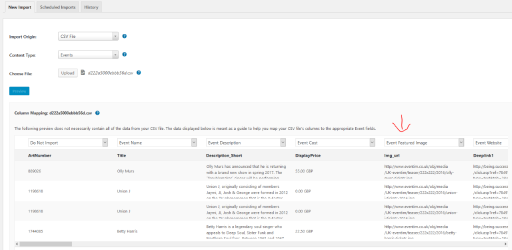
Result:

If you have a specific Meetup feed, then please share with me so I can test that.
Cheers,
AndrasKeymasterHi Judy,
Just wanted to let you know that a colleague is going to look at the issue later today. I’ll be in touch as soon as we have something. This will most probably be early next week. Please hang tight.
Cheers,
AndrasKeymasterHi Cliff,
I checked the bugticket, there is a developer assigned to the issue, but there is no release date yet set for the fix. It is still on high priority (not highest) so I would expect the next MR or the one after that.
I’m sorry I cannot give you any better news at the time. Thanks for your patience and understanding!
Cheers,
Andras -
AuthorPosts