

Forum Replies Created
-
AuthorPosts
-
November 3, 2016 at 4:06 pm in reply to: Calendars not importing from Google Calendars as scheduled #1187432
Andras
KeymasterThis reply is private.
KeymasterThis reply is private.
November 3, 2016 at 3:54 pm in reply to: 'google is not defined' console error and site hangup upon loading any events pg #1187426KeymasterHi Cary,
Thanks for doing the testing. I’m sorry to hear the issue came back. It’s weird that it didn’t disappear in the second run.
So in the second run you again switched to twentysixteen and deactivated everything, if I understand correctly. Did you test after you also deactivated our plugins? Basically running only WordPress. If not please check that as well: twentysixteen and no plugins.
If all is good, then activate first only The Events Calendar and browse around a bit to see if the error comes back. This will help us determine whether TEC already causes the issue, or maybe there is something in your WP settings or install or server or something else that can cause this.
Then activate the Pro…
Please try to mark down what exactly you were doing when the error appears. Which page you were on, where you were clicking.
Could you also share with me on which page you are experiencing this? Thanks!
Cheers,
AndrasNovember 3, 2016 at 3:37 pm in reply to: Displaying my events in a emailer via RSS or other #1187416KeymasterHey Yoni,
Sorry to hear that.
Are you maybe using a security plugin where a setting could disable rss feeds?
Did you also add the first snippet to the functions.php file? That is also needed to include the events in the feed.
In order to be able to help you further I will need to ask you to share your system information with me based on this guide: https://theeventscalendar.com/knowledgebase/sharing-sys-info/
Thanks and cheers,
AndrasKeymasterHey Rick,
Thanks for submitting the feed. Yeah, most reports on this issue are using office365.
The ticket is on highest priority, it already has a developer assigned to it and is targeted for the next maintenance release. If all goes according to plan, it should come in about 3 weeks or so. Hang in there. 🙂
Cheers,
AndrasNovember 3, 2016 at 3:24 pm in reply to: `tribe_events_ticket_is_on_sale` returning wrong result #1187400KeymasterHi Lee,
Unfortunately I cannot give you any good news yet on the ticket, I’m sorry.
There are 2 workarounds that I can suggest.
1. Set the cutoff date 7 hours earlier. (I’m sure you thought of that.)
2. You can take the ticket end date and convert it to UTC time.
Would any of these help?
Andras
KeymasterHi Brian,
Since this is 1) not really an issue, I mean the data is encoded in UTF8 in the database and that is what you get as an export, 2) not specifically The Events Calendar related (other plugins suffer from the same issue), I believe we are not going to release a fix for this. This is rather a limitation of sort of Microsoft Excel.
We are using the export just the same way as you are. And we utilize one of the 4 the workarounds.
Once again, the workarounds are:
- Excel > Get external data
- Excel > New Query
- Re-save in Notepad with ANSI encoding (you can also use Notepad++ > Encoding > Convert to ANSI)
- Open with Google Sheets
- I believe Libre Office or some other free office suite is also using utf8, so this would be a similar alternative like Google Sheets
I hope this clarifies.
Cheers,
AndrasNovember 3, 2016 at 2:27 pm in reply to: Issue with FB Events after Aggregator showed up in WP #1187345KeymasterHi Christos,
We’ve been trying to recreate the issue you had without success so far. We simply cannot recreate the exact same setup for different reasons (we don’t have access to the same server, server settings, plugins, plugin settings etc.).
I believe if you do a copy-paste of your current website under a subdomain / test domain / in a different folder, that would give us a safe playground to test and check what the problem could be without affecting your live site and business. This might help us in finding a fix for the issue at hand.
Also it can come with the benefit that if the test site doesn’t show any issues with EA importing your Facebook events, you could simply start pointing your domain to that installation and your problem is solved.
It is up to you if you are willing to help out with this. And of course no hard feelings if not. 🙂
Let me know.
On the other thread I see it has been closed after it was waiting for a reply from you. If you would like to get that resolved I would recommend to open a new thread and reference that previous one starting with your answer to the last question. Hope this helps.
Cheers,
AndrasKeymasterThis reply is private.
November 3, 2016 at 8:48 am in reply to: Changing order of tickets and replacing the price range for events #1187035KeymasterHey Judy,
I will check this and will get back to you soon with more info. Thanks for hanging in there.
Cheers,
AndrasKeymasterHey Judy,
Thanks for checking for conflicts and reporting the result.
I’ve been trying to reproduce the issue locally, but it’s pretty difficult as I don’t have access to the
I will see internally if there is something we can do about the compatibility with Sensei. I’m not yet sure where the issue comes from. Meanwhile what you can do is contact the Sensei authors as well to take a look into it.
Please give me some time until we look into this. Might take a couple of days, so hang in there. Thanks for your patience!
Cheers,
AndrasNovember 3, 2016 at 8:24 am in reply to: Event Creation is missing Fusion builder in Avada theme #1187018KeymasterThanks for getting back to me on that, Rob!
I am going to close this ticket, but if you need anything else related to this topic or another please post a new topic in the forum and we will help you out.
Good luck with your project!
Cheers,
AndrasKeymasterHello liamrabbitt,
Glad to hear that helped.
Regarding date:
I tested the test file you send, and with that all went good for me. Which column are you setting up as start date, CF_eventdate?
Regarding import loop:
Is it still looping or did it stop? Do you see any strange result?
Regarding image:
Do I understand correctly you would like to import from that link? What are the steps you are taking to import? Where would you like to import the image?
Waiting for your answers.
Thanks and cheers,
AndrasKeymasterHello Noah,
Thanks for going Pro and welcome to the forums!
Wow! Such a cool question! It really shows how varied our calendar is being used which makes us proud!
I’m sorry to say though that there is no easy one-click solution for that at the moment.
What you can do is:
- set up an event recurring every 3rd Thursday
- check and exclude (with rule(s)) manually those ones which are not good
- add manually (with rule(s)) when it is the 2nd Thursday
I checked the calendar and in 2017 there are only 2 occasions like that, in September and in December. (Need to look for the months that start on a Friday, right? 😉 ) In 2018 it is only one month, June.
The setup for 2017 would be something like this:
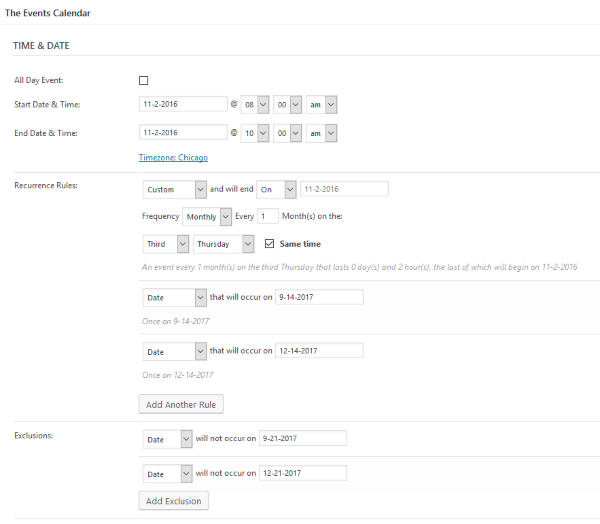
I hope this helps. Let me know if there’s anything else.
Cheers,
AndrasNovember 2, 2016 at 3:57 pm in reply to: Calendars not importing from Google Calendars as scheduled #1186656KeymasterHello Paul,
Thanks for reaching out! I’m sorry about your issues with the importer. Let me try to help you solve this.
I would like to ask you to share 2 things with me, so I can give you better support.
1. A screenshot of your Event Aggregator System Status, which you can find at the bottom of Events > Help and it looks like this: https://cloudup.com/ctzs46Y7M7t
2. The link to the feed(s) which you are trying to import.
Looking forward to your reply.
Cheers,
Andras -
AuthorPosts