
Home › Forums › Calendar Products › Events Calendar PRO › Getting an error at the top of my wordpress plugin page with event pro error
- This topic has 5 replies, 4 voices, and was last updated 9 years, 10 months ago by
Steve Rosenfield.
-
AuthorPosts
-
November 3, 2016 at 2:46 pm #1187363
Steve Rosenfield
ParticipantHow do I go about fixing this issue? I’m not able to add test to my page and have it show up on my events page above my calendar. Help please.
Thank you very much
November 4, 2016 at 1:27 pm #1187908Andras
KeymasterHey Camomi,
Thanks for going Pro and welcome to the forums! Sorry about your issue, let me help you with this.
The source of the issue is that The Events Calendar plugin uses the page http://domain.com/events for displaying your main calendar. It looks like that you also have a page called Events or at least a page that uses the same slug / permalink. This causes a conflict.
There are 2 ways to solve this:
1. Change the link of the page. For this click on the Edit the page slug link in that error message. This will take you to that page which has the events slug / permalink. Next to the permalink click on the Edit button and change it to something else than Events.
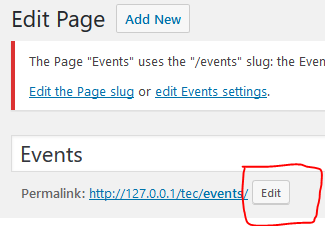
2. Change the link of the main calendar page. For this click on the edit Event settings link, which will then take you the the settings page of The Events Calendar, to the section of Events URL slug. Change this slug to something else (e.g. calendar, classes or whatever fits your page / offering). I also suggest to change the Single event URL slug for consistency.
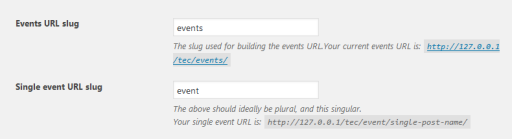
I hope this helps and clarifies. Let me know if you managed to solve it.
Cheers,
AndrasNovember 9, 2016 at 1:33 pm #1189940ParticipantThank you for that info. That fixed the error at the top of the page but how do I go about adding content to the page? I want to add some text and images before the calendar comes up. How is that possible?
November 10, 2016 at 2:22 am #1190189KeymasterHi Camomi,
That is not possible with the built in calendar page. For that you will need to set up a separate page, put there your content and one of the handy shortcodes we have included as of version 4.3.
If you want your page to be under the URL / slug “events”, then I recommend to change the slug setting under Events > Settings to something else. Then you will be able to use the page.
And here’s a guide on the shortcodes:
https://theeventscalendar.com/knowledgebase/embedding-calendar-views-tribe_events-shortcode/
This should get you started. Let me know how it goes.
Cheers,
AndrasDecember 2, 2016 at 8:35 am #1200875Support Droid
KeymasterHey there! This thread has been pretty quiet for the last three weeks, so we’re going to go ahead and close it to avoid confusion with other topics. If you’re still looking for help with this, please do open a new thread, reference this one and we’d be more than happy to continue the conversation over there.
Thanks so much!
The Events Calendar Support Team -
AuthorPosts
- The topic ‘Getting an error at the top of my wordpress plugin page with event pro error’ is closed to new replies.