

Forum Replies Created
-
AuthorPosts
-
December 12, 2016 at 1:52 pm in reply to: Search Results show date created not date of event #1204906
Andras
KeymasterHello Marian,
Thanks for using our plugins and for reaching out with your questions! Let me help you with that.
For most of your questions you will need to do a bit of customization of your theme files.We are quite limited in supporting customization (not to even mention customization of your theme files), let me still give you some tips on how you could achieve the desired result.
I see you are already using a child theme, that’s a good start.
You will need to customize / adjust the template for the search results. There should be a file called search.php in your parent theme folder. Check if that looks like the one that produces the results, or maybe it calls another template.
The theme twenty seventeen calls for a template like this:
get_template_part( 'template-parts/post/content', 'excerpt' );
So in this case you need to find the file twentyseventeen/template-parts/post/content-excerpt.php and create an override for that in the child theme.Once you identify the file you should be able to see how the images are handled and you can change that setting.
In order to add the event start date to the search results you will need to add this line to the appropriate place:
For removing the post date from events, you will again either need to add a conditional when the post dates are echoed (so that posts still show it), or totally remove it. You can even combine, like if blog post, then post date; elseif tribe_events, then event start date.I can try to answer some more questions, but there is little else beyond the above. Let me know if that helps.
Cheers,
AndrasKeymasterHi Mike,
First you need to narrow it down to which are the plugins that are conflicting with each other. Once you have that, you contact the plugin developers and check if they can give an advice or help with a fix.
Alternatively, you can try to look for an alternative plugin to replace the conflicting one. Or one plugin that could potentially replace more.
Or rethink which plugins you really need and remove (deactivate or even delete) the ones not needed.
If you think you found a plugin that is conflicting with The Events Calendar (or its addons), then deactivate all plugins and leave only 1) the calendar ones and 2) the one causing the issue, to re-check if it is really that one. Then let us know and we’ll see what can be done about it.
I hope this helps.
Please also share your system information with me, so I can check if there’s anything standing out.
Cheers,
AndrasKeymasterHello Jaap,
Thanks for checking that.
I see that your site is password protected. Do you get the same without password protection?
If yes, then I would kindly like to ask you to set up a new staging site and see if you still get the same error on a new install.
I’ll be here waiting for the results!
Thanks and cheers,
AndrasKeymasterHello Joseph,
Thanks for getting back to me with the results of all that testing.
I also did some more investigation and discovered a javascript error on the page which is the result of a bug. As a result, if a site uses https, some glitches appear.
We are already working on fixing the issue with high priority. The fix should come still sometime before Christmas if all goes according to plan.
Until then there are some workarounds:
- Make sure the under General > Settings > Site URL is also https
If this doesn’t solve it, then:
- This plugin might help https://wordpress.org/plugins/ssl-insecure-content-fixer/
And finally if that also doesn’t work, then:
- Downgrade all the plugins to 4.3.2
I’m sorry about this. Please hang in there, the fix is on the way.
Let me know which workaround does the trick for you.
Cheers,
Andras
KeymasterHi Ben,
Hope you had a great weekend!
Where do you exactly want the remaining ticket numbers to show up?
The show up by default on the single event page where you can choose how many tickets you want to purchase. Do you want to show it anywhere else? A screenshot would also help.
Thanks for clarifying
Cheers,
Andras
December 9, 2016 at 2:58 pm in reply to: Changing location of custom fields within Single Event Page #1204224KeymasterHi Shaun,
Thanks for hanging in there.
I managed to get some help on this. You can use this snippet to move the Additional fields section to the front of the box.
/* Tribe, re-arrange event additional fields */

function tribe_re_arrange_additional_fields ( ) {

  $meta = Tribe__Events__Pro__Main::instance()->single_event_meta;

  remove_action( 'tribe_events_single_event_meta_primary_section_end', array( $meta, 'additional_fields' ) );

  add_action( 'tribe_events_single_event_meta_primary_section_start', array( $meta, 'additional_fields' ) );

}

add_action ( 'init', 'tribe_re_arrange_additional_fields');
Another option you have is making a template override for this file:
wp-content\plugins\the-events-calendar\src\views\modules\meta.php
and add this line to where you want the section to appear.
tribe_get_template_part( 'pro/modules/meta/additional-fields', null, array( 'fields' => tribe_get_custom_fields(), ) );
(If your theme has already an override, then you will need to override that in a child theme.And you will then need to remove it from the original position. You can do that with the first snippet, just remove this line from it:
add_action( 'tribe_events_single_event_meta_primary_section_start', array( $meta, 'additional_fields' ) );
Let me know if this solves it for you.
Cheers,
AndrasKeymasterThis reply is private.
December 9, 2016 at 2:41 pm in reply to: Community Events Submission Form and Community Tickets #1204206KeymasterHi Richard,
I’m stoked to hear you managed to work it out! Great find and good job on that!
Since this is marked resolved I am going to close this ticket, but if you need anything else related to this topic or another please post a new topic in the forum and we will help you out.
Cheers,
AndrasPS: If you like our plugin, and you didn’t yet do so 🙂 we would be happy to receive a review in the wordpress.org repository. Thanks!
https://wordpress.org/support/view/plugin-reviews/the-events-calendarPS2: We’d be also grateful if you would give us feedback on your satisfaction with support. Just click on one of the classy looking emojis below. 🙂 If you can spare a few words, that’s even better. Doublethanks!
December 9, 2016 at 2:19 pm in reply to: Disable Map on List View but keep for Event Detail? #1204190KeymasterHey David,
Super happy to hear that solved it!
Since this is resolved I am going to close this ticket, but if you need anything else related to this topic or another please post a new topic in the forum and we will help you out.
Good luck with your project!
Cheers,
AndrasPS: If you like our plugin, and you didn’t yet do so 🙂 we would be happy to receive a review in the wordpress.org repository. Thanks!
https://wordpress.org/support/view/plugin-reviews/the-events-calendarPS2: We’d be also grateful if you would give us feedback on your satisfaction with support. Just click on one of the classy looking emojis below. 🙂 If you can spare a few words, that’s even better. Doublethanks!
December 9, 2016 at 2:15 pm in reply to: Events lasting more than one month in 'Upcoming Events' month view #1204189KeymasterHi Ciaran,
I’m afraid I don’t have good news. This is something that cannot be done very easily. It would require major customization work, which we are limited in supporting.
If you need some professional help in solving that, then I have a list of developers from the community who might be able to help you out with that.
https://theeventscalendar.com/knowledgebase/find-a-customizer/
Another idea that came to my mind, is hiding the recurring event from search, if that is an issue. I did a quick search and found this plugin which might help you.
Or something similar.
Does this get you closer to the solution?
Cheers,
AndrasKeymasterBummer. Sorry to hear that.
Did you try the recommendations in that article?
A.
December 9, 2016 at 1:50 pm in reply to: December 2017 displays incorrectly as December 1969 #1204163KeymasterHi Alton,
Thanks for going Pro and welcome to the forums! I’m really sorry you are having issues with our plugins. Let me try to help you with solving these so you can have a well running website with accurate information on it.
I tried setting up a similar row of events in January (26-29, 20-30 and 28-31). I set these up as all day events lasting through the set number of days. Checking on list view with a default theme produced a correct order for me, please check this screenshot:
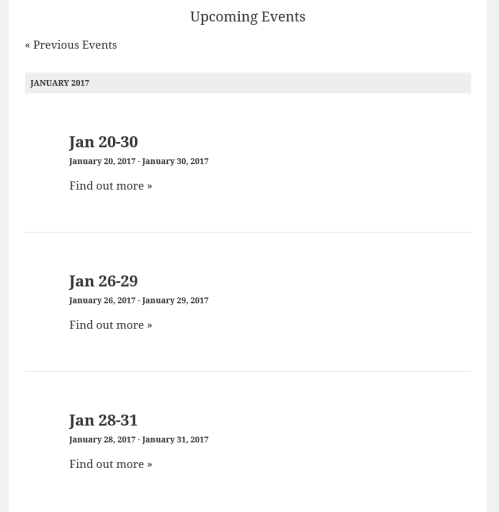
As a first step I would like to ask you to check if you still have the issue with a default theme like twentysixteen. This can help us eliminate any conflicts that can come from the theme you are using.
If the issue still exists, then please run a test for conflicting plugins based on this guide: https://theeventscalendar.com/knowledgebase/testing-for-conflicts/
This should help us get started with all three issues.
Looking at your issue #2 and #3 I suspect there is a custom code somewhere (a plugin, the theme or in functions.php) which changes how the events are put in order: end date vs. start date.
Maybe there is a setting for that in the theme, you might want to check for that too.
Let me know the results and we can take it further from there.
Cheers,
AndrasDecember 9, 2016 at 7:33 am in reply to: Is there a way to find and delete double entries/attendees? #1203832KeymasterLet me know how it works out, and possibly share the link for the test site so I can check.
Cheers,
AndrasKeymasterHi Mike,
Thanks for clarifying that. I was testing it on Windows in FireFox (50.0.2) and Chrome (54.0.2840.99) and there I have another issue. When you click on a day, then the page jumps to the top but the events for that day are not shown. Also the content for the sliders are somehow hidden. Here’s a screenshot from Firefox.
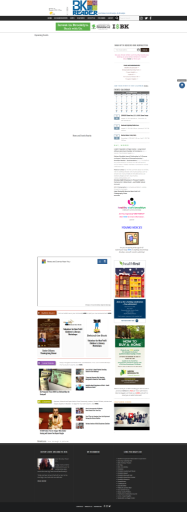
You might want to investigate this as well.
I also tested in Safari, where the page loads properly and where I can see your issue.
As a first I would like to ask you to test this with a default them like twentysixteen, set up the same widget, and check if the issue is still there.
Also what would be helpful in finding the source of the issue is running a full test for conflicts based on this guides. https://theeventscalendar.com/knowledgebase/testing-for-conflicts/
Please let me know what you find out. I’ll be waiting for your answer.
Thanks and cheers,
AndrasDecember 9, 2016 at 7:03 am in reply to: Rates are rounded in 'payment options' tab for community events users #1203798KeymasterHey Chris,
Thanks for the clarification and the explanation. I’ll bring up this rounding issue on the next team meeting.
The ability to charge this as part of the fee or not is also hidden if I don’t have split payments enabled
I’m not quite sure what you mean by this. Adding a flat fee and / or a percentage is possible without split payments. Check the screenshot below. All these options are there without split payments.
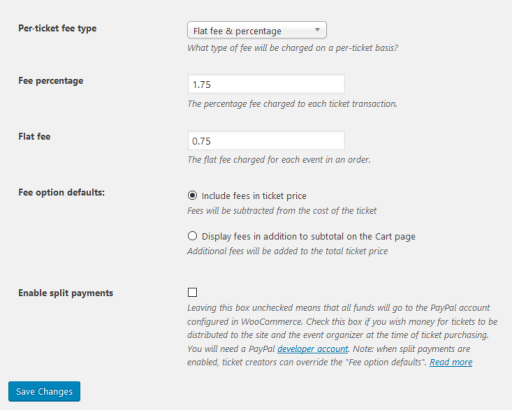
If this is not what you are referring to, could you please clarify?
It should be the sellers choice to whether they absorb fees or not, not a global setting.
Also to clarify, by the seller you mean the person running the website, or the person posting a community event through the front-end?
Would you rather like to have this option as a per event option and not a global one? If it would be done per event, then either 1) the one submitting could choose, but highly likely they would never choose absorbing fees; 2) the one who runs the site would need to edit every event after submission to change / set this setting.
This is an interesting topic. Looking forward to your feedback on this.
Cheers,
Andras -
AuthorPosts