
Home › Forums › Calendar Products › Events Calendar PRO › December 2017 displays incorrectly as December 1969
- This topic has 10 replies, 4 voices, and was last updated 9 years, 9 months ago by
Linn.
-
AuthorPosts
-
December 8, 2016 at 12:45 pm #1203429
Linn
Participanthttps://www.kayakbaja.com/wordpress/dates/
Our events for December 2017, display as December 1969 instead of 2017 and the listed dates are 31-31 instead of the correct dates put in the events in the back end.
Also, 2 dates are out of order because they use the last day instead of the first day. The dates out of order are Jan 20-30, 2017 and April 12-23, 2017.
For the individual months, if a date starts in one month and finishes in the next month, it shows up in the month of the ending date instead of the month of the starting date.
December 9, 2016 at 1:50 pm #1204163Andras
KeymasterHi Alton,
Thanks for going Pro and welcome to the forums! I’m really sorry you are having issues with our plugins. Let me try to help you with solving these so you can have a well running website with accurate information on it.
I tried setting up a similar row of events in January (26-29, 20-30 and 28-31). I set these up as all day events lasting through the set number of days. Checking on list view with a default theme produced a correct order for me, please check this screenshot:
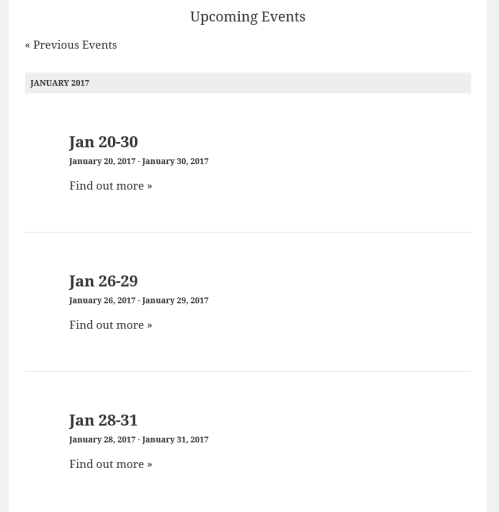
As a first step I would like to ask you to check if you still have the issue with a default theme like twentysixteen. This can help us eliminate any conflicts that can come from the theme you are using.
If the issue still exists, then please run a test for conflicting plugins based on this guide: https://theeventscalendar.com/knowledgebase/testing-for-conflicts/
This should help us get started with all three issues.
Looking at your issue #2 and #3 I suspect there is a custom code somewhere (a plugin, the theme or in functions.php) which changes how the events are put in order: end date vs. start date.
Maybe there is a setting for that in the theme, you might want to check for that too.
Let me know the results and we can take it further from there.
Cheers,
AndrasDecember 12, 2016 at 6:13 am #1204663ParticipantHi Alton,
We have tried to troubleshoot the Date Display issue (year 1969 instead of 2017) by following your tips above. We activated the Twenty Sixteen theme as well as disabled all plugins, unfortunately, we are still experiencing the same bugs. Where do we go from here to resolve this?
December 13, 2016 at 1:22 pm #1205502KeymasterThanks for checking that!
Curious issue. Please give me some time while I dig around a bit. I might need to pull in some extra power.
Thanks for hanging in there.
Andras
December 13, 2016 at 1:37 pm #1205517KeymasterCouple questions here that might help sort this out:
The events that are misbehaving, were they imported from somewhere or where they created? If imported, then what was the source? Could you share that?
When you create a new event in or after December 2017, does that date also change to 1969?
How are the lists with the bad dates generated? By shortcode? Which plugin / which shortcode?
Could you send me some screenshot of your timezone settings:
- Settings > General > Timezone (https://cloudup.com/cJoNqtRqvnZ)
- Events > Settings > General tab > Timezone Settings (https://cloudup.com/ckqyVVaYH9Z)
Will be waiting for your feedback.
Cheers,
AndrasDecember 13, 2016 at 1:40 pm #1205520ParticipantThanks, Andras! We really appreciate you finding a solution for us as soon as possible. We are really anxious to launch our new website since we had hoped to do it back in November and now it’s mid-December. This seems to be one of the last problems to conquer. Please let us know what you find out as soon as you can and if you need any other access into our site.
December 13, 2016 at 2:17 pm #1205543KeymasterHello again,
So I did some more digging as this issue made me real curious.
I see that you are using a plugin called The Events Calendar Shortcode, and – highly likely – you are using that to display the list of events. That plugin is not developed by us and we don’t give support for that.
I tested that plugin on a local install and I could recreate the event order issue with it. I also looked at your events on the default The Events Calendar list view and all seemed in order. See this screenshot. Also, the test event in December 2017 shows the right dates. (Here.)
You can check all this on your site as well, here’s the link to the list view:
I strongly suspect that the shortcodes plugin is ordering the events in a different manner and that is why you get the result that you get. I would suggest to get in touch with the developers of that plugin to help you fix that issue. I would also bring the date issue (2017-1969) to their attention as they might have something to do with it as well.
This is about as much as I can do in this case. I will leave this open in case you have any more questions or need more advice in this matter.
If you encounter any other issues or bugs, I would kindly like to ask you to open a new thread to keep things clear here in the forums. Thanks!
Cheers,
AndrasJust did a tiny bit more digging. 🙂 You can change the order with adding an extra parameter to the shortcode: key=’start date’. E.g.:
[ecs-list-events cat='festival' key='start date']That will surely fix it.
Regarding the date issue I would contact the plugin developers.
December 15, 2016 at 3:56 pm #1206833ParticipantThank you, Andras! The out of order date problem was fixed with your suggestion to add this to the short code: key=’start date’, so thanks so much for that advise!!
We took off Dec of 2017 dates which were displaying as Dec 1969 since we suspect it has something to do with repeating the month of Dec.BUT not sure why? So at the end of this month when the Dec 2016 trip dates/events expire, we’ll create the Dec 2017 list of trips/events and hope that they don’t display as Dec 1969 again.
We are unable to get help from the person who customized the short code unfortunately. We really like the format he created compared to the list view in your version because you can read the months and dates so much easier. Is there any chance the modern tribe developers could create something like we have now and that you would offer support and updates for because I don’t know if it’s going to cause more problems down the line? We would be willing to pay for this service. It might be something other businesses would also like to incorporate in to their websites.
Thanks again for helping us! We’re so pleased to have our website finally up and functioning and our calendar of dates is an important part of it! https://www.kayakbaja.com/dates/
December 16, 2016 at 8:33 am #1207075KeymasterHello Alton,
I’m super happy to hear that your list issue is fixed! It is a mighty fine looking site you have there!
It’s a pity that your (ex-)developer cannot be reached, such a shame.
Unfortunately we don’t take on customization requests like that. We do client work, but the budget for those projects usually starts around 20k. Sorry.
However, I can share with you a list of developers from the community who could help you out with this.
https://theeventscalendar.com/knowledgebase/find-a-customizer/
I believe a list view like that could be done with template override. Here’s some documentation for that as well, just in case:
https://theeventscalendar.com/knowledgebase/themers-guide/
https://theeventscalendar.com/knowledgebase/template-overview/I hope this helps! Is there anything else I can support you with regarding this topic?
Cheers,
AndrasJanuary 7, 2017 at 8:35 am #1214716Support Droid
KeymasterHey there! This thread has been pretty quiet for the last three weeks, so we’re going to go ahead and close it to avoid confusion with other topics. If you’re still looking for help with this, please do open a new thread, reference this one and we’d be more than happy to continue the conversation over there.
Thanks so much!
The Events Calendar Support Team -
AuthorPosts
- The topic ‘December 2017 displays incorrectly as December 1969’ is closed to new replies.