

Forum Replies Created
-
AuthorPosts
-
Andras
KeymasterHi Ben,
No worries. Gimme some time to look into that, maybe pull in some extra muscle. I’ll let you know soon what can be done.
Cheers,
AndrasKeymasterHello Eric,
I would be very happy to hear back from you whether the new MR has fixed you issue.
Thanks,
AndrasKeymasterHello Lisa,
Thank you for reaching out, being honest voicing your concerns. I’m truly sorry you are experiencing issues with our plugins. I understand that waiting for a fix can be quite nerving and I’m sorry to hear the loss of faith in our plugins.
I can assure you that we put a lot of effort into developing quality plugins and before each release, whether it be a main release or a maintenance one, all of them go through thorough testing to get as smooth a user experience and possible. Nonetheless, due to the multitude of different environments – servers, setups, plugin combinations and so on – it is impossible to test them in all different combinations and to publish a plugin without any glitches and bugs, no matter how hard we try. This is why we also need to rely on our customers like yourself who report bugs and glitches, and with the help of them we can better our products and give users a better experience.
Yes, there are bugs and all of them do get the appropriate attention. This said I checked the ticket for this bug and it is set to be fixed in our next maintenance release. If all goes according to plan, this should still happen before Christmas this year. I ask for a bit of patience on your and your clients behalf and I do hope we will soon be able to restore the lost faith.
Did you manage to take a look in the my earlier proposition on a plugin that empties the shopping cart after a set period of time?
Again, I’m really sorry this is taking so long to solve. I just want to let you know your voice is being heard and your patience is much appreciated.
Thanks,
AndrasKeymasterHey Jason,
Since this is a different issue I kindly ask you to open a new thread for this. This will help us to keep things clean and to ensure that both your issues get the deserved attention. Meanwhile I’ll try to look into the issue.
Just copy paste your post into a new thread and reference this one. You can mention that you posted this to me before and I’m looking into it.
Thanks and cheers,
AndrasKeymasterHi Erikk,
Can you please do an update and get back to me if the issue is solved?
Thanks,
AndrasKeymasterHi Detlex,
Just an extra note if your language files get automatically updated and overwritten every once in a while, then you can put this filter in your functions.php file to stop that.
add_filter( 'auto_update_translation', '__return_false' );
Cheers,
AndrasDecember 8, 2016 at 2:48 pm in reply to: Translation: PO and MO files are getting overwritten every day #1203554KeymasterGrüss dich Reinhard,
Thanks for reaching out!
I checked your other thread, we are aware of that issue, it was flagged to us not long ago. There is already a ticket to get that string fixed / separated.
Until then to disable automatic updates for translations, paste this into your functions.php file:
add_filter( 'auto_update_translation', '__return_false' );
You can find more info about this here:
https://codex.wordpress.org/Configuring_Automatic_Background_Updates
Also they recommend that the best place to put these filters is in a must-use plugin.
Let me know if this helps.
Cheers,
AndrasKeymasterHi Joseph,
Thanks for using our plugins and I’m really sorry about this issue with the recurring events. I’m happy to help you with this.
To be able to help you I would like to ask for a couple things.
- Can you send me a screenshot of the settings of a recurring event that doesn’t show up?
- Do you see the event page of the recurring event on the front? Can you send me a direct link to a recurring event?
- Does it help if you change the setting Events > Settings > General > Recurring event instances?
- Can you confirm that you also checked with a default theme like twentysixteen and you still had the issue?
Looking forward to solving this with you!
Cheers,
AndrasDecember 8, 2016 at 2:08 pm in reply to: Disable Map on List View but keep for Event Detail? #1203518KeymasterHello David,
Thanks for going Pro and for reaching out to us! Let me try to help you with this.
By default the map doesn’t load in the list view for the events, only on the single event pages.
I didn’t find a list view on your site, so I couldn’t check. You would need to check your theme folder whether it has template overrides for our plugins and check those.
If you are talking about the gigantic map on the top map view, and you want to get rid of that, then I rather recommend you to use the list view, as it is almost the same, except for the map at the top.
Does this help? Let me know.
Cheers,
AndrasDecember 8, 2016 at 1:58 pm in reply to: Formatting (links, bold, italic, underline, text color) do not import. #1203507KeymasterWelcome to the forum Thomas!
Thanks for reaching out with your issue.
I believe they should be imported.
Could you please share with me a link to the feed you are having trouble with. I would like to test is and see if we can figure out something.
Thanks and cheers,
AndrasDecember 8, 2016 at 1:50 pm in reply to: Community Events Submission Form and Community Tickets #1203484KeymasterHey Richard,
Thanks for using our plugins and welcome to the forums! I’m sorry about this issue with the ticket form. Let’s try to get to the bottom of this.
Normally the ticket section should be visible at the end of the submission form. Here’s a screenshot with the theme twentysixteen.
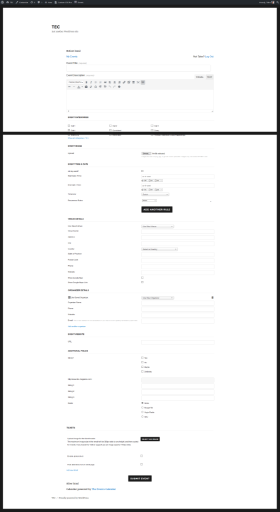
You can try the followings:
- Switch to a default theme like twentysixteen and check if the ticket fields are there. This can help us find out if there is an issue with the theme you are using.
- Deactivate all plugins, except the Calendar ones and WooCommerce and check if the ticket fields are there. This is the first step to check and eliminate any plugin conflicts.
Unfortunately I wasn’t able to check it on your site b/c of the login.
Let me know the result of your checks.
Cheers,
AndrasDecember 8, 2016 at 9:30 am in reply to: Changing location of custom fields within Single Event Page #1203313KeymasterHi Shaun,
Thanks for reaching out with your question. Let me try to help you with that.
Most likely you will need to do a template override for the single-event.php file and restructure the contents of that file.
If you give me some more details on how that event is set up, I might be able to help you a bit more. Please send me a screenshot of the event admin page so I can see the details.
Also what will help is if you share your system information with me.
Looking forward to helping you solve this.
Cheers,
AndrasKeymasterHi Shaunmarie,
Thanks for using our plugins and welcome to the forums! Good question you have there, let me help you with that.
This knowledgebase article might be of help if you want to hide the QR code from emails.
https://theeventscalendar.com/knowledgebase/hide-qr-code-from-event-emails/
Let me know if this solves it for you.
Cheers,
AndrasDecember 8, 2016 at 9:14 am in reply to: Is there a way to find and delete double entries/attendees? #1203290KeymasterHi Jack,
I didn’t do thorough testing with the extra fields, so I cannot confirm it works well with those. I would suggest to test it out on a dev / staging site first, if you can, before the live one.
At the moment my hands are a bit full and we usually do not support customization like this, so I cannot promise you that I can take a look at it this week. I’ll try, but will take some time.
Cheers,
AndrasKeymasterHey Paula,
Thanks for checking that and letting me know the results. It’s a bummer for that plugin and I hope you find one that works well with The Events Calendar.
I am going to close this ticket, but if you need anything else related to this topic or another please post a new topic in the forum and we will be glad to help you out.
Cheers,
AndrasPS: If you like our plugin, and you didn’t yet do so 🙂 we would be happy to receive a review in the wordpress.org repository. Thanks!
https://wordpress.org/support/view/plugin-reviews/the-events-calendar -
AuthorPosts