

Forum Replies Created
-
AuthorPosts
-
December 8, 2016 at 2:29 am in reply to: Issue with CSV importing due to complex event description #1203037
Andras
KeymasterThis reply is private.
KeymasterThanks for sharing those! I’ll add it to the bugticket so our team can check.
I’ll get back to you as soon as I have something. Thanks for your patience!
Cheers,
AndrasKeymasterHey jaapstronks,
Thanks for getting back to me with that info. This is indeed weird.
This could happen if the server time is somewhere in the future, so it sees all events as passed events.
Could you check your time setting under Settings > General > Timezone what it shows? Here’s a screenshot of what I mean.
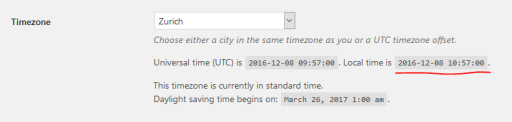
Also try to check with your provider. Meanwhile I’ll check with the team if anyone has any idea.
Thanks and cheers,
AndrasKeymasterHallo Aikaterini,
Hey, Thanks for using our plugins and welcome to the forums! Let me help you with your question.
What you can do is simply rename the plugin translation files to have the same “de_DE_formal” ending.
If you want to keep these translations also after plugin updates, then I suggest you place them in the wp-content\languages\plugins\ folder.
Let me know if this helps.
Cheers,
AndrasKeymasterHello nnyorker,
Your patience is much appreciated.
It looks like Event Aggregator is unable to import events from a Facebook Group when the Group has a vanity URL. Try to replace the vanity URL with the Group ID in place of the name. For example:
https://www.facebook.com/groups/641915655895310
In case you still have issues, then I please go through this knowledgebase article, which might help you find the root of the issue:
https://theeventscalendar.com/knowledgebase/facebook-api-errors/
Let me know where you get.
Cheers,
AndrasDecember 7, 2016 at 2:18 pm in reply to: Is there a way to find and delete double entries/attendees? #1202897KeymasterHey Jack,
Good news, some team members checked it and said it’s good enough a hack to share. 🙂
So here is the file, which is an override. Place it in wp-content\themes\[your-theme]\tribe-events\tickets\rsvp.php and you should see the radio buttons. Note, that I didn’t take into account the additional meta fields that can be set up. Only the basic RSVP name / email / (not) going stuff.
Also note that this is an unsupported and unofficial template override.
Check it out and let me know how it works.
Cheers,
AndrasKeymasterThis reply is private.
December 7, 2016 at 8:03 am in reply to: Aggregator Issues – Sync Schedule – Import In Progress Stuck #1202633KeymasterHello Philip,
Thanks for using our plugins and welcome to the forums!
I’m really sorry about the issues you are having with importing from Facebook. We do have several similar reports and your #1 and #2 points seem to be confirmed bugs. I’ll add this thread to the internal bugtickets as well, to give it more push. A fix will be on the way soon.
We are also aware of the high number of comments appearing. We are totally aware and are working on a fix as well.
I’m sorry I cannot give you an immediate fix for these, but rest assured, we are working on resolving these issues. I ask for your kind patience until the fixes arrive.
Thanks and cheers,
AndrasKeymasterHello Paula,
Thanks for using our plugins and welcome to the forums! I’m sorry about this issue with the pricing in the cart. Let’s dig in.
Was this happening also earlier, or this started only after an update? I see you are using WP 4.7, so I’m wondering if it appeared with that.
Could you please run a test for conflicts? Please deactivate all plugins, except for the four Calendar ones and WooCommerce and check if the issue still exists or not. It would also be great if you could switch to a default theme, like twentysixteen while you are doing this, to eliminate all possible interference.
If the issue is not there like that, then running a full test is recommended. Here is a guide for that:
I’m looking forward to getting the results.
Cheers,
AndrasKeymasterHello s2ldesign,
Thanks for using our plugins and welcome to the forums! I’m sorry about this issue with the ics import and great that you have reached out with this.
The ics files that you are having an issue with, are they all coming from Trumba? Could you please share some more files, so we can investigate?
(It looks like the Trumba files are somehow different than other ics files, thus it gives an error.)
Thanks,
Andras
KeymasterHello Mike,
Thanks for reaching out and I’m sorry about the issue with the dates.
I checked your site and didn’t see anything unusual. Here’s a screenshot of the whole page:
Can you point out where the issue is or better, send me a screen shot as well?
Also, please share with me your system information to be able to provide you better support.
Thanks and cheers,
AndrasDecember 7, 2016 at 2:52 am in reply to: Issue with CSV importing due to complex event description #1202515KeymasterThis reply is private.
December 7, 2016 at 2:32 am in reply to: Edit Ticket button/Link does not work on a HTTPS website #1202508KeymasterThis reply is private.
KeymasterThis reply is private.
KeymasterHey Ben,
There is no direct function for that unfortunately.
You can check in this file, on line 61 an example on how we show the remaining stock on the single event page:
wp-content\plugins\event-tickets\src\views\tickets\rsvp.php
Does this help?
Cheers,
Andras -
AuthorPosts