Forum Replies Created
-
AuthorPosts
-
Andras
KeymasterRegarding the error messages…
We have released a new version of our plugins this week. After backing up your site please update the plugins and check if you are still getting the error messages.
Thanks!
A.
KeymasterHi escapees,
Thanks for reaching out to us!
Sorry to hear about your issue with the shared capacity. I’d be happy to take a look at this for you.
On the back-end when you look at the tickets what stock numbers do you see? Do you maybe see red exclamation marks next to them?
Did you by chance to any cancellations or refunds? (We have a nice guide for these.)
You might need to adjust the ticket stock of the WooCommerce product equivalent of the tickets. You can get to them if you click on the pencil icon next to the ticket to open it for editing, then open the ‘Advanced’ section, and you should see an ‘Edit WooCommerce product’ link at the bottom.
Let me know what you find.
Cheers,
AndrasKeymasterHello Marina,
Thanks for reaching out! I’d be happy to help you!
It looks like you haven’t installed and activated the Eventbrite Tickets plugin. You can download it from your account under Downloads.
Once activated head over to Events > Settings > Licenses tab and enter your Eventbrite Tickets license key into the Eventbrite Tickets field. (Event Aggregator is a slightly different service and requires a different key.)
Let me know if this helps.
Cheers,
AndrasKeymasterPlease note, Advanced Post Manager will only work if you have Events Calendar PRO as well. I just realized you probably don’t have that.
Let me know if the code snippet work for you.
A.
KeymasterThanks for your patience, while I was looking into this!
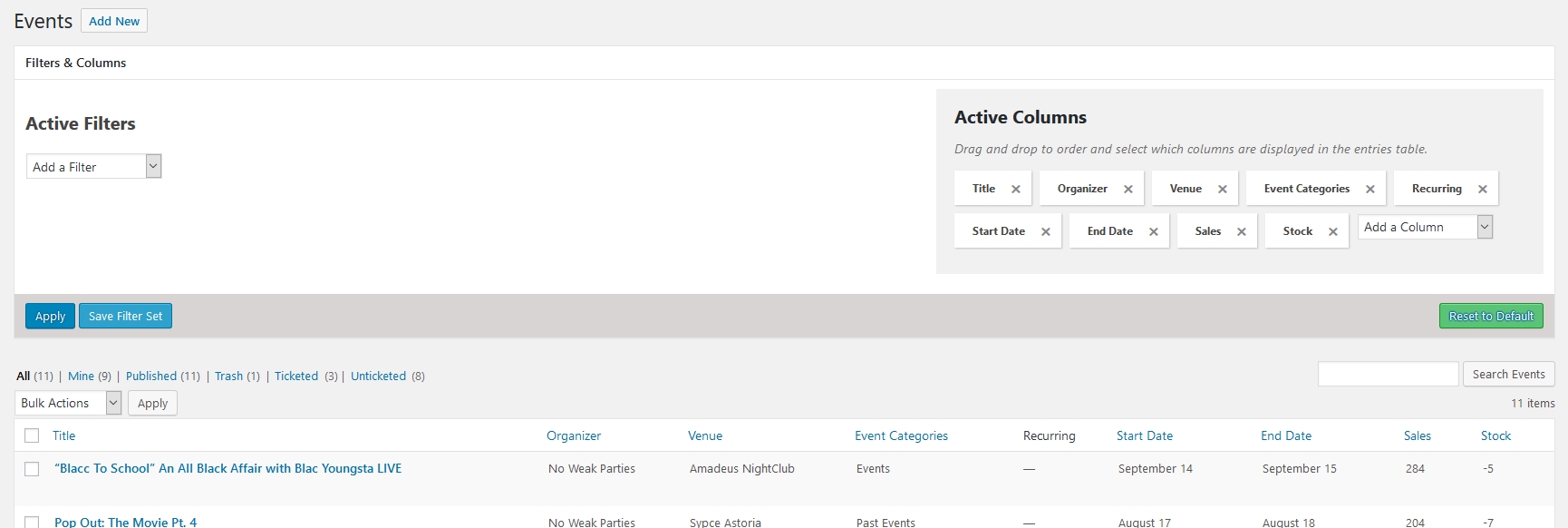
It looks like we got something. You have a lot of attendees it seems – which is fine – and the event list page takes long because it wants to count all those and show it to you in a column.
We are going to take a look at that, how this can be made faster. I already added your voice to the corresponding bugticket.
Until then there are 2 things you can do.
You can either try to add this line to your child theme’s functions.php file, which will remove some of the columns:
add_filter( 'tribe_tickets_supported_admin_columns', '__return_empty_array' );Or you can install our free Advanced Post Manager (APM) plugin and choose not to show the Attendees column. Screenshot: https://dl.dropbox.com/s/ri4njpjbkhxcmyx/shot_180913_120118.jpg
I just tested this latter and it worked like a charm.
Let me know if this help for now.
I am going to set the status of this ticket to “pending fix” and we will update it once the fix is released.
If you have any new questions or issues please create a new ticket and we’ll help you out.
Thanks and cheers,
AndrasKeymasterThis reply is private.
September 13, 2018 at 2:00 am in reply to: Problems with url translates – The Event Calendar & WMPL #1620440KeymasterThis reply is private.
KeymasterKirály!
That is great news, congratulations on finding that conflict! Good job!
Since this is resolved I am going to close this ticket, but if you need anything else related to this topic or another please create a new ticket and we’ll be happy to help.
Üdv,
AndrásPS: We’d be grateful if you would give us feedback on your satisfaction with support. Just click on one of the classy looking emojis below. 🙂 If you can spare a few words, that’s even better. Thanks!
PS2: If you like our plugins, and you didn’t yet do so 🙂 we would also be happy to receive a review in the wordpress.org repository. Much appreciated!
https://wordpress.org/support/view/plugin-reviews/the-events-calendar/
https://wordpress.org/support/view/plugin-reviews/event-tickets/KeymasterOh, that is awesome! Happy to hear to solution was that easy.
Since this is resolved I am going to close this ticket, but if you need anything else related to this topic or another please create a new ticket and we’ll be happy to help.
Cheers,
AndrasPS: We’d be grateful if you would give us feedback on your satisfaction with support. Just click on one of the classy looking emojis below. 🙂 If you can spare a few words, that’s even better. Thanks!
PS2: If you like our plugins, and you didn’t yet do so 🙂 we would also be happy to receive a review in the wordpress.org repository. Much appreciated!
https://wordpress.org/support/view/plugin-reviews/the-events-calendar/
https://wordpress.org/support/view/plugin-reviews/event-tickets/September 13, 2018 at 1:19 am in reply to: Please verify your API key is correctly entered on the settings page #1620412KeymasterThanks!
I looped in 2 developers on this and they are going to take a look as well.
One of them suggested it might be a server side config issue.
We’ll keep you posted!
Thanks for your patience!
Andras
KeymasterHello Kevin,
Thanks for reaching out!
Those are some excellent questions! I’d be happy to answer them for you.
1A. It is possible to manually create tickets in the back-end if you are using WooCommerce as the eCommerce provider together with Event Tickets and Event Tickets Plus.
If you are familiar with WooCommerce then you need to create a new WooCommerce order and add the number of tickets to the order. Fill out the email address at the billing details and you are done.
When the order is saved and email is sent to the email address you entered. Note, if you are offline, the email will not be sent.
1B. When you “sell” 4 tickets – even if for the same event – then 4 different tickets with different QR codes are created. The 4 tickets are sent in one email, as the email content. All 4 QR codes will be in that email.
Downloading a PDF version of the tickets is not a built-in feature of the plugin. However, we do have a free extension that can give you this feature.
2. Events do not automatically disappear from the website once they are over.
With some customization this can be amended. Either you can hide past events with CSS, or you can remove them or set them to draft once they are past.
Please note, while we are not able to provide customized solutions, we can help you get started and give you guidance if you decide you want to develop this feature. Alternatively we can direct you to some freelance developers who can help you out with customizations.
3. Yes, all data is stored. There is a built-in option to export the attendee list of an event. There is a default set of information that gets exported. If you would like to change that we can probably help you out with code snippets to make adjustments.
WooCommerce also has some built-in export functions, plus there are a number of WooCommerce add-ons that can give you advanced export features. However, that is already beyond our support.
Hope this answers your questions. Let me know if you have any more.
Cheers,
AndrasKeymasterHi businessinheels,
Thanks for getting in touch with us!
That is a very interesting case there. I’d be happy to help you out with this.
I would need to know what eCommerce platform you are using to sell tickets. Are you using WooCommerce or the build-in Tribe Commerce?
Please, also share your system information with me in a private reply.
Thanks,
AndrasKeymasterThanks!
If you need anything else related to this topic or another please create a new ticket and we’ll be happy to help.
Cheers,
AndrasPS: We’d be grateful if you would give us feedback on your satisfaction with support. Just click on one of the classy looking emojis below. 🙂 If you can spare a few words, that’s even better. Thanks!
PS2: If you like our plugins, and you didn’t yet do so 🙂 we would also be happy to receive a review in the wordpress.org repository. Much appreciated!
https://wordpress.org/support/view/plugin-reviews/the-events-calendar/
https://wordpress.org/support/view/plugin-reviews/event-tickets/Keymaster1. No, it does not. even if you are using split payments, you (the admin) are the one that has to set up their payment details (which is basically entering their PayPal account email).
With some customization this could be possible I suppose. Allow the organizers to edit their profiles and add a coupe of custom fields there, which are needed for the payment settling. Like account email, secret key, etc. whatever would be needed.
Thank you could grab this data when handling a payment.
2. Community Events allows any payment gateway that WooCommerce allows. (It was only split payments that was restricted to PayPal’s Adaptive Payments service.) So whatever you set up in WooCommerce, that will be available as a payment gateway option. It can be even more.
A.
KeymasterSzia,
“To begin using…” : I didn’t see WooCommerce in your plugin list, it looks like that’s still missing. Please check and let me know.
I created an account on the website, but it still doesn’t allow me to add an event to the calendar. Could you adjust my profile or provide me with a login, so that I can test creating an event so I can check what is happening?
Thanks!
Andras
-
AuthorPosts