

Forum Replies Created
-
AuthorPosts
-
Victor
MemberHi Sayuri!
Yes, the $login_url param is a string, so you should also return a string.
It will depend on where your login page is located, but here’s a sample code for you to try:
add_filter( 'tribe_tickets_ticket_login_url', 'custom_tribe_tickets_ticket_login_url' );
function custom_tribe_tickets_ticket_login_url ( $login_url ) {
   // return the permalink to post id = 2
   $login_url = get_permalink( 2 );
   return $login_url;
}
You can place that into your theme’s functions.php file.
Does it help?
Best,
VictorMemberHi Christoph,
Thanks for your patience and cooperation so far!
The next thing I would like to try here is creating a fresh test site — this will avoid any disruption to your live site and ensure that we’ve effectively got a “clean canvas” to work with.
- Please install a fresh copy of WordPress in a subdirectory (if you have a CPanel-type hosting account there will probably be a one-click install script to make this really easy)
- Don’t install anything except The Events Calendar and Events Calendar PRO
- Please also stick to a default theme — again, there’s no need to install anything else just yet!
- Create a few events so we have some test data to work with
- Can you replicate the same problem?
If you find you can replicate the problem under these conditions it would be awesome if you could stop and let us know so we can take a look while the site is still running under default conditions.
Thanks for your help while we work on this together!
Best,
VictorMemberHi Rufaro!
Thanks for your help and patience so far.
We have some other users reporting the same with their tickets capacity and we have already logged a report to further investigate this issue.
I will set this thread’s status to “Pending fix” and link it to the report. This way, we will notify you once a fix is released in one of our next maintenance releases of our plugins.
We apologize for the inconvenience and we appreciate your patience while we work on this.
Thanks,
VictorMemberHi Craig!
The attendees.php template file is located at /wp-content/plugins/event-tickets/src/admin-views/ You can debug tribe( ‘tickets.attendees’ )->attendees_table
I noticed that you are using WP Engine. Before doing the tests I mentioned, could you please see if you have Object cache activated on WP Engine? If so, please try deactivating it and see if any difference.
Thanks,
VictorMemberHi Scott!
Thanks for coming back with the sys info.
I don’t see anything that would indicate an error from it.
Could you please try creating a new page (it can be private) and embed the same widget in it to see if it shows in order?
If no difference, did you happen to notice a difference when deactivating all other plugins or switching to a default WordPress theme, like Twenty Seventeen? What happens if you try deactivating all plugins and switching to the Twenty Seventeen theme together? Do you notice a difference then?
If you see no difference in those conditions, then we’ll need to do some deeper troubleshooting.
Thanks,
VictorMemberHappy to be of help! 🙂
I’ll close this thread now, but feel free to open a new topic if anything comes up and we’ll be happy to help.
Cheers,
VictorMemberHi John!
Thanks for getting in touch with us and for testing for conflicts.
I’m not able to reproduce the same issue on my local installation, but my guess is there could be some caching problem involved.
Are using any cache plugin on your site? if so, try flushing/clearing the cache and see if any difference.
If no difference, then ask your hosting provider if there is some sort of object cache enabled for your site and ask them to disable it to see if any difference.
If none of the above works, try downgrading to event tickets 4.6.3.1 and see if any changes. We have a guide on how you can do that > https://theeventscalendar.com/knowledgebase/downgrading-plugin-past-version/
I’d suggest you setup a dev/staging site so you can test things out without disrupting the live site. I also highly encourage to make a full backup of your site, both database and files.
Let me know how that goes.
Thanks,
VictorMemberHi Sayuri!
Thanks for getting in touch with us! I’d be happy to help you with that 🙂
The tribe_tickets_ticket_login_url filter available provides an opportunity to modify the login URL used within frontend ticket forms.
You can find this in the Event Tickets code > https://github.com/moderntribe/event-tickets/blob/master/src/Tribe/Tickets.php#L1902
I hope that helps. Let me know if any follow up questions.
Best,
VictorMemberHi Martin!
Thanks for getting in touch with us!
There is no built-in option to achieve that. However, there is an option to limit the number of events to show per day in the month view. You can see this setting by navigating to your WP Admin > Events > Settings > Display tab > Month view events per day
Additionally, you might want to mark some events as featured events > https://theeventscalendar.com/knowledgebase/featured-events/
I hope that helps. Let me know if any follow up questions.
Best,
VictorMemberHi Karen!
Thanks for getting in touch with us!
Yes, by default the venue selection field should be available for anonymous users too.
Is there anything else I can help you with? Let me know about it.
Best,
VictorMemberHi Jeff!
Thanks for getting in touch with us!
Let me help you with this issue.
Could you please see if there are any console errors by inspecting the page? We have an article that explains how to do that here > https://theeventscalendar.com/knowledgebase/using-google-chrome-developer-tools/
Did you happen to notice a difference when deactivating all other plugins or switching to a default WordPress theme, like Twenty Seventeen? What happens if you try deactivating all plugins and switching to the Twenty Seventeen theme together? Do you notice a difference then?
If you see no difference in those conditions, then we’ll need to do some deeper troubleshooting
Let me know about it.
Thanks,
VictorMemberHi Louise!
We really appreciate you getting in touch with us about this topic.
I’m truly sorry to know about your frustration with our plugins.
We strive to constantly improve the quality of our products and the way we provide support for them, so feedback like yours really catches our attention and gives us an opportunity to correct things towards this goal.
I have gone ahead and extended your Events Calendar PRO license until the end of May so you have access to our Help Desk and we can continue to troubleshoot the issue you are having with your recurring events.
I’ve just reviewed your previous thread and I’d be happy to help you with the troubleshooting.
Could you please open a new topic for it and share the link to it here? I will make sure to prioritize it so we can hopefully find the source of the problem.
Let us know about it.
Thanks,
VictorApril 27, 2018 at 7:36 am in reply to: Error after Api Activation with Evenbrite Ticket Plugin #1517814MemberHi Doris!
Thanks for getting in touch with us!
I’d be happy to help you with this topic.
First, could you please share with us, in a private reply, a screenshot of the Eventbrite API settings for your site. The URL for that page should be something like:
yoursite.com/wp-admin/edit.php?post_type=tribe_events&page=tribe-common&tab=addonsThanks,
VictorMemberHi Mario!
There is no built-in option to achieve that. But it could be done with some custom coding.
This essentially is a custom development task and so is outside of our stated scope of support.
With that being said, we’d love to help point you in the right direction.
We do need to prioritize support requests from other customers at this time but I’ll certainly flag this with the team and – although we can’t make any promises – if we have time and space to come back and help, we’ll be happy to do so.
Please let us know if you’d like to go this route so that you can be added to this queue.
If you urgently need help with this, however, you may instead wish to consider working with a suitably skilled developer or designer who can offer the additional level of support you require.
Thanks!
VictorMemberHi Mario!
Thanks for getting in touch with us!
Are you referring to the Who’s attending list of attendees in the frontend of the event that is not showing up?
If so, that should still display even if the event has passed.
Could you please verify that the option to “Show attendees list on event page” is activated for the event? You can do this by navigating to the edit event page and click the ticket Settings button.
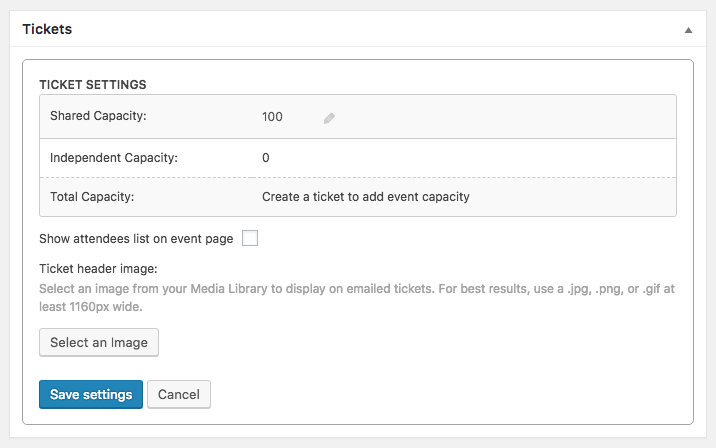
Let me know about that.
Thanks,
Victor -
AuthorPosts