

Forum Replies Created
-
AuthorPosts
-
Victor
MemberHi There!
Thanks for getting in touch with us!
I’ve just checked your site and I’m not really sure how you are achieving those registrations, but it does not seem like you are using our Event Tickets plugin.
If you use Event Tickets to allow event registration for your events, you can definitely register multiple attendees at the same time for an event.
Hope that helps. Let me know if any follow up questions.
Best,
VictorMemberHi There!
Thanks for getting in touch with us!
Let me help you with that issue. Having a closer inspection to your site, I can see the error is showing up in the console due to embedding the Google Maps Javascript API multiple times. This could be due to your theme or another plugin adding the API as well.
We have a guide on how to troubleshoot Google Maps issues > https://theeventscalendar.com/knowledgebase/troubleshooting-google-maps/. Under the Testing for Conflicts section, you will find a snippet I’d recommend you try and see if it resolves the issue.
Just in case, the snippet is the one below and you should paste it into your theme’s functions.php file:
As a reference, let me share the following guide about best practices when implementing custom code snippets > https://theeventscalendar.com/knowledgebase/implementing-custom-code-snippets/
Please try it out and let us know if it works for you.
Thanks,
VictorMemberHi Kristin,
Great to hear you could work it out and all is fixed now. Thanks for following up to let us know 🙂
I’ll close this thread now, but feel free to open a new topic if anything comes up and we’ll be happy to help.
Best,
VictorMemberHi Stephen,
You can learn more about how to customize our plugins in our Themer’s Guide > https://theeventscalendar.com/knowledgebase/themers-guide/
Also, we have a nice helper function to query events which is the tribe_get_events() function > https://theeventscalendar.com/knowledgebase/using-tribe_get_events/
Let me note that we are fairly limited in how much support we can give for custom development questions like that.
That said, we always like helping out and at least point users into the right direction as much possible.
If you need to create some customization around timezones I’d suggest you take a look at the Tribe__Events__Timezones class located at https://github.com/moderntribe/the-events-calendar/blob/master/src/Tribe/Timezones.php
I hope that helps. Let me know if any follow up questions.
Best,
VictorMemberYou’re welcome! Glad to know if worked out 🙂
I’ll close this thread now, but feel free to open a new topic if anything comes up and we’ll be happy to help.
Best,
VictorMemberHi Barbara,
Thanks for following up with this.
The debug.log file will only be created if there are errors. So, if you can’t find it it means there are no errors so far, which is good.
As to the search issue you mention, the search functionality in month view will only search for events in the current month. In your case, searching for “Messiah” in September 2018 does not match any September events.
In regards to the map view, your “Near” search functionality does not work because there is a problem with your Google Maps API. You can see the error coming from Google by inspecting the page. We have an article that explains how to do that here > https://theeventscalendar.com/knowledgebase/using-google-chrome-developer-tools/
As a reference, we have a pretty good article on how to troubleshoot this sort of problems with Google Maps API > https://theeventscalendar.com/knowledgebase/troubleshooting-google-maps/
I believe the error you are getting could be due to not having the appropriate APIs and services required for the maps to load. You need to enable Maps Javascript API and Geocoding API as you can see in the following screenshot:
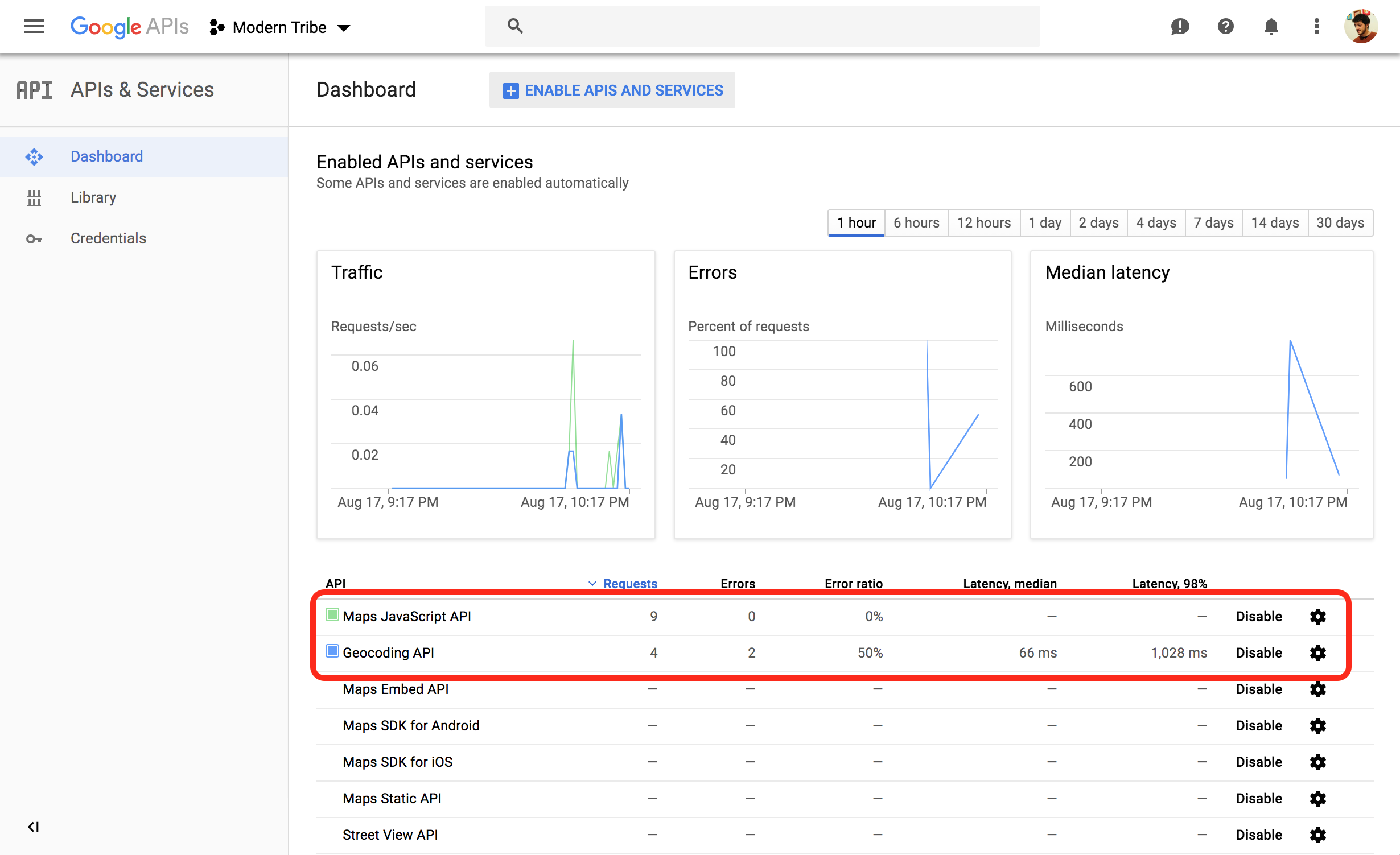
Please verify this and let us know if it works for you.
Thanks,
VictorMemberHi Harry,
Thanks for following up with this.
I’ve just made a few tests on my end replicating the same recurring settings as your screenshot but it seems to work fine.
What happens if you edit the event and save? Does it generate the missing events correctly?
Also, while editing the event, could you please see if there are any console errors by inspecting the page? We have an article that explains how to do that here > https://theeventscalendar.com/knowledgebase/using-google-chrome-developer-tools/
Please keep us posted about any error that may be logged into your debug.log file.
Additionally, if you experience the same issue, I’d recommend you try re-creating the same recurring event under default conditions (all other plugins deactivated and using a default theme).
Thanks,
VictorSeptember 5, 2018 at 11:55 am in reply to: Some Events from Google Calender are imported everytime. Lot's of Duplicates! #1614486MemberHi There,
Thanks for following up with this.
I have been able to import events from the calendar but I’m not able to reproduce the duplicated events.
There could be a conflict with your theme, another plugin or even some custom code, so to make sure we are not dealing with a conflict, please go through the steps outlined in our Testing for Conflicts guide and see if you can reproduce the same issue under default conditions.
Also, Could you please enable WP_DEBUG and WP_DEBUG_LOG ? This will create a debug.log file inside the /wp-content directory.
After that, try reproducing the issue a few times, so that in case there is an error, it will be saved into the debug.log file. Please share that log file with us so we can see if any problem from there.
I suggest to setup a dev/staging site so you can test things out without disrupting the live site.
Let us know how it goes.
Thanks,
VictorMemberHi Alexander!
Thanks for getting in touch with us!
We apologize for a bit of delay in getting back to you. We are dealing with a high volume of threads at the moment and we are slowly getting back to normal response times.
As you say, the thread you linked to is a bit old, so the CSS snippet may not work for you.
Try using the following instead and see if it works for you:
button#rsvp_form_toggle {

display: none;

}
Best,
VictorMemberHi Stephen!
Thanks for getting in touch with us!
We apologize for a bit of delay in getting back to you. We are dealing with a high volume of threads at the moment and we are slowly getting back to normal response times.
Unfortunately, that is not a built-in functionality of our plugins. You could probably achieve that with some custom coding. However, I anticipate that not being an easy task to accomplish.
I’m sorry I can’t be of much help here. Do let us know if you have follow up questions.
Best,
VictorMemberHi There!
I’m sorry to hear you are still experiencing those issues.
I’d be happy to help you troubleshoot the issue and hopefully find the source of the problem.
First, from your system information I can see that your WP_MEMORY_LIMIT is set to 128MB, which seems a little low since you have many plugins enabled. This could be causing the limit to be reached when navigating through some pages and thus throwing errors and preventing you or your users from navigating the site.
I recommend you try raising the memory limit for your WordPress installation and see if you still get the errors. You can learn how to do that here > https://codex.wordpress.org/Editing_wp-config.php#Increasing_memory_allocated_to_PHP
We always suggest to setup a dev/staging site so you can test things out and make all plugins, theme and WordPress core updates without disrupting the live site.
If you still get errors, please enable WP_DEBUG and WP_DEBUG_LOG. This will create a debug.log file inside the /wp-content directory.
After that, try reproducing the issue a few times, so that in case there is an error, it will be saved into the debug.log file. Please share that log file with us so we can see if any problem from there.
Please let us know how it goes.
Thanks,
VictorMemberHi Peggy,
Thanks for coming back with your system information. I have made your reply private.
I don’t see anything strange from the system information, but by what you describe, it seems there could be an error or conflict somehow.
Could you please share with us a screenshot of the venues list in the backend to see what you are currently seeing?
Did you happen to notice a difference when deactivating all other plugins or switching to a default WordPress theme, like Twenty Seventeen? What happens if you try deactivating all plugins and switching to the Twenty Seventeen theme together? Do you notice a difference then? Please verify this by testing for conflicts.
We always suggest to setup a dev/staging site so you can test things out without disrupting the live site.
Additionally, please enable WP_DEBUG and WP_DEBUG_LOG ? This will create a debug.log file inside the /wp-content directory.
After that, try reproducing the issue a few times, so that in case there is an error, it will be saved into the debug.log file. Please share that log file with us so we can see if any problem from there.
Thanks,
VictorSeptember 4, 2018 at 7:00 am in reply to: Some Events from Google Calender are imported everytime. Lot's of Duplicates! #1612944MemberThis reply is private.
MemberSure thing Charles. We’ll keep you posted.
Best,
VictorMemberHi Suzanne,
Thanks for following with this.
Event Tickets Plus does not support variable pricing options from Easy Digital Downloads. A workaround to this would be to create a separate ticket for each ticket/price option you have.
Also, you can share the capacity between various tickets when you create them. You can learn more about this in the following article > https://theeventscalendar.com/knowledgebase/making-tickets/
Additionally, remember you can also collect attendee information from those tickets > https://theeventscalendar.com/knowledgebase/collecting-attendee-information/
I hope that helps. Let me know if any follow up questions.
Best,
Victor -
AuthorPosts