

Forum Replies Created
-
AuthorPosts
-
Caroline
MemberHi there,
You’re very welcome–I hope that I was able to help you out here! 🙂 Since it looks like you’re all sorted now, I’m going to go ahead and close this thread out. Thanks again, and please don’t hesitate to follow up with a new thread if there’s anything else we can do to assist!
MemberHi Michael,
Thanks for taking the time to reach out–happy to provide some extra clarification here! Event Aggregator’s 10-site limit refers to the number of unique domains on which a single Event Aggregator license key can be activated. You can import events using Event Aggregator from as many unique sources as you’d like! There is no limit imposed on the number of sources that can be used for event imports.
When importing events using Event Aggregator, users do have the option of limiting the number of imports by certain criteria. However, the selection of available filters may vary depending on your import source. For more information, you can check out our Knowledgebase article on importing with Event Aggregator:
https://theeventscalendar.com/knowledgebase/import-from-feed-or-url/
I hope that helps to get you started! Thanks again, and let us know if you should have any other questions! 🙂
MemberHi Greg,
Thanks for taking the time to reach out! I’m afraid that we don’t offer a separate discount or partnership program for educational users at this time. That said, if you believe that your organization might qualify, we do encourage you to apply to our nonprofit partnership program! You’ll find all the details along with a link to our application at the following address:
https://theeventscalendar.com/knowledgebase/do-you-offer-discounts-for-nonprofit-organizations/
If you’re not sure whether your organization might meet our criteria for nonprofit program inclusion, you can use our standard email form to send us a message. (Please select the option “Help accessing my account” from the drop-down menu to display the full email form.) We’ll be glad to see what we can do to assist!
https://theeventscalendar.com/contact/
Thanks so much for your interest, and we hope to see you soon over in email! 🙂
MemberHi Kelly,
Thanks for taking the time to reach out! If you’re looking to import events from external sources to one of our calendar plugins (either The Events Calendar or Events Calendar PRO), you’ll want to have a look at our Event Aggregator plugin! This tool is built into The Events Calendar and includes free support for importing CSV files right out of the box. If you’d like to purchase an Event Aggregator license, you can add support for additional formats and automatic scheduled imports, as well. Our current list of supported import sources includes CSV, iCal/ICS, Google Calendar, Facebook, Meetup, and imports from other sites that use The Events Calendar.
If you’re interested in exploring the options available with our Event Aggregator tool, I’d suggest downloading our free The Events Calendar plugin and setting it up on a test environment. You can test the capabilities of our CSV import feature using just this plugin–our Knowledgebase article here will walk you through the process!
https://theeventscalendar.com/knowledgebase/importing-data-from-a-csv-file/
If you find that the CSV import meets your needs, then you should be all set from there! If you’d like to try some of the other options available with Event Aggregator, feel free to purchase a license and evaluate it for 30 days. Should you find it doesn’t quite meet your needs, you can request a full refund within 30 days of purchase from the following link:
https://theeventscalendar.com/knowledgebase/refund-policy/
I hope that helps to get you started here! Let me know if you should have any other questions or concerns. Cheers, and thanks again!
MemberHi Megan,
Thanks so much for your interest in our plugins! If you’re interested in importing events from your shop’s Facebook page to display on a site calendar, you’ll want to have a look at our Event Aggregator add-on for The Events Calendar or Events Calendar PRO. This tool adds powerful importing capabilities to our calendar offerings, allowing you to import events from sources such as Facebook, Google Calendar, Meetup, and more. 🙂
Once you’ve imported your desired events into your calendar plugin of choice, there are a number of ways that you can list these events on your homepage. Here are a few ideas:
- If your theme supports widgets in a sidebar or other widgetized areas, you can use our Event List Widget to display a small list of upcoming events next to your main content on any widgetized page. The Events Calendar comes with a basic implementation of this widget; Events Calendar PRO’s version adds a few extra features and some additional widgets for varying your event displays. You can read more about widget options for our plugins on our Knowledgebase here: https://theeventscalendar.com/knowledgebase/events-calendar-widgets/
- Using the tribe_events custom post type, you can write a custom loop for querying calendar events using WP_Query or tribe_get_events(). If you’re familiar with writing loops for other WordPress post types, you might like this approach for the flexibility it offers! This Knowledgebase article provides some more info on getting started with custom queries for event content: https://theeventscalendar.com/knowledgebase/custom-event-queries/
- Users of Events Calendar PRO can easily embed calendar views into any post, page, or custom post type by using the [tribe_events] shortcode. This shortcode supports the List View and includes plenty of attributes for filtering your events, so you can easily drop a list into any page that needs it. Check out this Knowledgebase article for more information: https://theeventscalendar.com/knowledgebase/embedding-calendar-views-tribe_events-shortcode/
I hope that helps to get you started here! Let me know if you should have any other questions or concerns after reviewing the above suggestions. Cheers, and thanks again!
MemberHi Steve,
Thanks so much for stopping by and checking out our plugins! Both the free version of The Events Calendar and Events Calendar PRO contain full support for viewing events by category, so you can assign homework events to specific groups and have your students view just the events that apply to their group. You can read more about event categories on our Knowledgebase here:
https://theeventscalendar.com/knowledgebase/event-categories/
And to give you an idea of how this looks in practice, here’s an example of a category view from our demo site, WP Shindig:
http://wpshindig.com/events/category/tech-events/
Let me know if you should have any other questions about how this feature might work for your intended setup! 🙂 Thanks again!
MemberHi Lora,
Thanks for getting in touch! We do have a Nonprofit Partnership Program that allows approved organizations to use Events Calendar PRO and Event Tickets Plus for free, though Community Events is not offered as part of this program. However, we do offer discounts on our other plugins for qualifying nonprofit organizations. You can read over our Nonprofit Program Knowledgebase page to get all the details. On that page you’ll find a link to our application form with further instructions.
I hope that helps to get you started here–let us know if you should have any other questions or concerns! Thanks again, and we look forward to hearing from you! 🙂
MemberHi Martin,
Thanks for taking the time to reach out! If you’d prefer to simply use the cost field for representing a range of event prices, you can use a hyphen to designate both ends of your pricing range in this field. For example, a range entered like this…
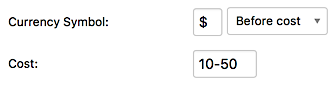
… will display like this on your event.

You can then add more details as needed in your event’s description. If you want more options, you might consider moving up to Events Calendar PRO–with PRO, you can use the Additional Fields feature to add specific fields for certain levels of pricing. More info on this feature can be found on our Knowledgebase here:
https://theeventscalendar.com/knowledgebase/pro-additional-fields/
I hope that helps to get you started here! Let me know if you should have any other questions or concerns. Thanks again! 🙂
MemberHi James,
Thanks so much for your purchase of Events Calendar PRO! 🙂 We’d be more than glad to see what we can do to get you moved on up to an Importer Bundle here. Would you mind taking a moment to reach out to us via email with your request? Simply click the below link and select the option “Help accessing my account” from the drop-down menu to display the full email form.
https://theeventscalendar.com/contact/
Thanks again, and we’ll see you over in email!
MemberHi Tirtha,
Thanks so much for taking the time to review our plugins! I’d be more than glad to answer these questions for you! 🙂
Can we send the ticket information embedded in email body with or without attaching the pdf version of the ticket?
By default, Event Tickets Plus embeds all ticket information into the body of the ticket email and does not include a PDF attachment. If you’d like to include an optional PDF ticket with your ticket emails, you can add this functionality using this free extension: https://theeventscalendar.com/extensions/view-print-download-pdf-tickets/
Is the searching and sorting of events based on venue, location, date, price and event type (example: theater/sports/party/concert) supported?
Absolutely! The Events Calendar includes support for searching forward from a certain date, and using Events Calendar PRO, you can perform location-based searches and view events by venue, as well. If you’d like to take it even further, Filter Bar adds support for complex filters for a variety of criteria. You can see a live demo that includes Events Calendar PRO and Filter Bar here on our WP Shindig demo site: http://wpshindig.com/events/
Is the searching and sorting of events based on multiple criteria supported? For example: user want to search a specific theater show in a specific city on a specific date.
Yes! This functionality is included with our Filter Bar plugin mentioned above–you’ll want to make sure to add this plugin to your setup if complex filtering is important to you.
Is it possible to add QR code on tickets?
QR codes are included by default with all tickets created using Event Tickets Plus. These scannable codes can be used to check in attendees at your events. If you’d like to add another type of QR code, you can achieve this by customizing the template used for ticket emails. Our Themer’s Guide contains more information on customizing our plugins to fit your needs! https://theeventscalendar.com/knowledgebase/themers-guide/
Can we add and show fields like director/artists/producers and support searing based on those fields? Custom fields added using free version not showing in the event.
You can add additional searchable fields to your events using the Additional Fields feature of Events Calendar PRO. If you’re using Filter Bar, these fields can also be added to the list of filters available for user searches. Additional Fields are not available with the free version of The Events Calendar. More information on Additional Fields can be found here: https://theeventscalendar.com/knowledgebase/pro-additional-fields/
Can we use the standard free SMS plugins to send SMS alert to user after purchasing the ticket or we need a specific SMS plugin to send SMS alert?
We haven’t tested any specific SMS plugins with our products, so we can’t provide any guarantees that a particular one will work for your needs. I’d suggest trying a few to see which one works best with your intended setup!
Is there any details view available to view and print the status of the sold and unsold tickets of multiple events together in one view? This would help us to send report on the current sale and manage the business.
Event Tickets Plus does not handle any payment processing or order management tasks on its own–instead, it passes these through an e-commerce platform of your choice, either WooCommerce or Easy Digital Downloads. For sales data and other reports relating to multiple events, your best bet will be to rely on what’s provided by your e-commerce plugin! You can read more about the options available for reports on the documentations for these plugins.
Is it possible to display events in multiple columns on the page? Free version supporting only one column view.
This example simply uses the default list view with a sidebar widget next to it–you can achieve this setup with either the free version of The Events Calendar or Events Calendar PRO! For more information on the widgets that are included with these plugins, you can refer to our Knowledgebase here: https://theeventscalendar.com/knowledgebase/events-calendar-widgets/
Google map is not showing properly with free version. Its showing blank or empty area.
Please check to ensure that your API key is entered properly and that there are no JavaScript errors on your site that may be related to Google Maps. Our Knowledgebase article here provides some more suggestions on troubleshooting Google Maps errors, or you can post in our WordPress.org support forum for further assistance! https://theeventscalendar.com/knowledgebase/google-maps-not-showing-up/
I want to use the event theme (https://wordpress.org/themes/event ) . Do you think that event is good enough to integrate event calendar and event ticket plugins?
While we haven’t tested this particular theme with our plugins, it doesn’t appear to have any built-in integrations for The Events Calendar or Event Tickets. If you’re interested in using this theme on your site, I’d suggest testing it with the free versions of our plugins first to ensure proper compatibility.
I hope that helps to get you started here! Thanks again, and let us know if you should have any other questions!
MemberHi Craig,
Thanks for taking the time to reach out! It sounds like our Community Events add-on might provide just the features you’re looking for in terms of fielding event submissions. This add-on allows users to submit their own events through a simplified form that’s accessible on the front end of your site, and site administrators (such as yourself) can edit and approve all submissions before they’re posted to your calendar. For a quick preview, you can register for an account and test the Community Events submission form on our WP Shindig demo site:
http://wpshindig.com/events/community/add
As far as submitted and published events are concerned, you can rest assured that all events will display using the same basic template, and using Community Events means that you’ll have the option of making changes to any single events that deviate from the standard before they’re published to your site. If you’re savvy with WordPress customizations, you can tweak our plugin templates even further to ensure that your events and your users’ are always displayed just the way you like them. Our Themer’s Guide has more information on customizing our plugin templates, if you’re interested:
https://theeventscalendar.com/knowledgebase/themers-guide/
I hope that helps to get you started here! Thanks again, and let us know if you should have any other questions! 🙂
MemberHi there,
Thanks for taking the time to reach out to us here! As developers of the Event Aggregator tool, we don’t enforce any particular limitations on the use of our plugin, though we do ask that users be mindful of restrictions that may be imposed by event organizers or other sources. Events that are imported from Facebook do automatically link back to the original event, which many organizers consider to be sufficient. If you’re unsure, it’s worth reaching out to your intended source to double-check that this type of usage is okay!
Does that help to address your concerns here? Let me know if you should have any other questions! 🙂 Thanks again!
MemberHi Jeni,
Thanks for following up with some more information here! Our Event Aggregator product is a separate offering from the Events Calendar PRO add-on, and Events Calendar PRO does not contain the event import features included as part of Event Aggregator. You can read more about the differences between these two products on the following product pages:
- Events Calendar PRO: https://theeventscalendar.com/product/wordpress-events-calendar-pro/
- Event Aggregator: https://theeventscalendar.com/product/event-aggregator/
If your agency has already established an account with premium licensing for your organization, we’d be glad to see if we can assist you with an account lookup. Would you mind taking a moment to reach out to us by email? Please use the following form to send us a message, and we’ll follow up to continue the conversation there!
https://theeventscalendar.com/contact/
Please select the option “Help accessing my account” from the drop-down menu to display the full email form.
I hope that helps to get you on your way here! 🙂 Thanks again, and let me know if you should have any other questions!
MemberHi Jeni,
Thanks so much for taking the time to reach out–we’re thrilled that you’re interested in hearing more about our products! As we’re a distributed company and do not maintain dedicated lines for phone sales or support, we typically answer sales-related inquiries here in our Pre-Sales Forum. That means that you’re in the right place to get your questions answered today! 🙂
If you’re using The Events Calendar to manage your calendar and events on your WordPress site, you can easily add on Facebook import capabilities with our Event Aggregator tool. This cloud-based service provides all that you’ll need to begin importing events from a variety of third-party sources, including Facebook, Google Calendar, iCal/ICS, and Meetup. All the functionality of Event Aggregator is built right in to The Events Calendar–to get started, simply activate a license key, and you’re on your way. You can learn more about Event Aggregator on its product page here:
https://theeventscalendar.com/product/event-aggregator/
If you should have any specific questions about this product or its features, I’d be more than glad to answer them for you. Let me know how I can be of service! 🙂 Cheers, and thanks again for stopping by!
MemberHi there,
Thanks for taking the time to reach out to us here! We’d be more than glad to troubleshoot this issue with you over on our WordPress.org support forum for The Events Calendar. Would you mind taking a moment to submit a new post with the details of your problem over there? One of our support team members will be on hand as soon as possible to assist! 🙂
http://wordpress.org/support/plugin/the-events-calendar
Thanks again, and we’ll see you there!
-
AuthorPosts