Forum Replies Created
-
AuthorPosts
-
May 22, 2018 at 7:14 am in reply to: See attendees as a group rather than individual tickets #1535969
Jennifer
KeymasterHi Bee,
Thanks for clarifying what you’re looking for here. Another option is to export the attendees list to a CSV file, from which you can sort the list in different ways (including the order ID). However, just to make sure we’re on the same page here, the attendees list should be grouped by the order by default (see screenshot). Will this work for you?
If not, I would definitely recommend posting a feature request over in our Feature Ideas Forum! This is what we use to gauge user interest in new features and help guide future development efforts. If you have any questions, please let me know.
Thanks,
Jennifer
KeymasterHi Harry,
You have the option to either pull the fee from the price that you set or to add it on top of the price that you set (see screenshot). With either method, you can specify the price as a percentage.
Let me know if you have any other questions!
Thanks,
Jennifer
KeymasterGreat! I think the third party option will be easier once you get things set up the way you need…it can definitely save you some time and manual labor!
Since this has been marked “resolved”, I’ll go ahead and close it out, but you can open up a new thread anytime if you have any other questions.
KeymasterHi Brian,
Just to clarify, each ticket type is an individual WooCommerce product. Every time you create a ticket, you are creating a new product. The code in the article will set the minimum to 1 for each ticket type on the event, but you can use the code there as a starting point for a more dynamic customization. It sounds like you would want to build on the Javascript there to check that the sum of the inputs is at least 6. You can allow tickets on an event to share capacity, so using this option, the overall capacity on the event will be reduced when any ticket that is set to share capacity is purchased.
Regarding calculating a discount at the cart, this might be possible – if you have something that’s working already for other WooCommerce products, then it may work for tickets as well.
If you do test it out and run into any issues or have any questions on how things work, please feel free to reach out to us! We do not provide support for customizations, but we are happy to answer questions and point you in the right direction if we can 🙂
Thanks,
Jennifer
KeymasterThis reply is private.
May 21, 2018 at 3:49 am in reply to: Google Maps Javascript is loaded when no Map is displayed #1535199KeymasterHi Carsten,
I’m glad you were able to get this removed…I am not sure if this is expected, but it seems like you are correct that it should not be loaded if you do not have maps enabled. I am checking with our developers on this and will let you know what I find.
Thanks,
Jennifer
KeymasterHello,
If you’re using the default events template (under Events > Settings > Display > Events template), then the header is called with get_header. If you have “Default Page Template” selected, the header will be called in your theme’s page template. You can take a look at our template in wp-content/plugins/the-events-calendar/src/views/default-template.php. I would also recommend taking a look at our themer’s guide and functions list, which are always great resources when making customizations to our plugins.
We are limited in the amount of support that we can provide for customizations, but if you get stuck or have any questions, please let me know – I’ll be happy to point you in the right direction!
KeymasterHi Jake,
Thanks for reaching out!
We do not have any plans at this time to integrate other mapping sources. Sorry for the bad news there! If you are interested in doing this yourself, this article is a good place to start. We are limited in the amount of support that we can provide for customizations, but if you get stuck or have any questions, please let me know – we always try to answer questions and point you in the right direction when we can!
We also have a list of recommended developers that you could contact if you would like to have the code done for you. If this is a feature that you would like to see added in the future, please do let us know over in our Feature Ideas Forum! This is what we use to gauge user interest in new features and help guide future development efforts.
I’m sorry I don’t have a better answer for you here, but please let me know if you have any questions!
Thanks,
Jennifer
May 21, 2018 at 3:33 am in reply to: When editing the time of the event the edit does not show in preview. #1535185KeymasterHello,
I tested this out on my end, but changing the event date/time is reflected in the preview for me. If this isn’t happening on your end, I would recommend making sure that you’re running the current versions of everything (which you can see on the Downloads page of your account). If so, then you can try running through these steps to see if there is anything else on your site conflicting with one of our plugins.
Please let me know if you have any questions!
KeymasterHi Aimee,
Thanks for checking out our plugins!
You are correct that Event Tickets Plus does not come with any gift certificate functionality built-in, but it does integrate with WooCommerce. Tickets are essentially WooCommerce simple products, so they typically work pretty well with WooCommerce extensions.
Depending on exactly how you need things to work, you might be able to get away with using WooCommerce coupons to create discount codes that you can use as gift certificates, but otherwise I would recommend taking a look at YITH WooCommerce Gift Cards (free), Smart Coupons, or WooCommerce Gift Certificates Pro. I haven’t tested these out myself, so you would definitely need to do so to make sure that you can get things integrated and working the way you need to.
We do offer full refunds within 30 days of purchase, so if you’d like to do some testing with Event Tickets Plus and some of these options, feel free to do so! Please let me know if you have any additional questions.
Thanks,
Jennifer
KeymasterHi Harry,
Thanks for checking out our plugins!
Event Tickets Plus will let you sell tickets from the backend of the site, and adding Community Events + Community Tickets will let users create events and sell tickets to them from the front end. You can indeed charge fees – this article has some more info on how this works.
We do offer full refunds within 30 days of purchase, so if you’d like to take anything for a test run, feel free to do so! Please let me know if you have any additional questions.
Thanks,
Jennifer
KeymasterHi Brian,
Thanks for checking out our plugins!
For early bird discounts, you can either create a separate early bird ticket (which can share stock with other tickets on an event) or change the price manually when you want to do so.
Unfortunately group discounts are not currently supported out-of-the-box, but since tickets are essentially WooCommerce simple products, they typically work well with WooCommerce extensions.
If you wanted to create a new ticket for groups, then you could do a customization to set a minimum number for that ticket…I would recommend taking a look at this article as a starting point.
We do offer full refunds within 30 days of purchase, so if you’d like to take Event Tickets Plus for a test run, feel free to do so! Please let me know if you have any additional questions.
Thanks,
Jennifer
KeymasterHi Patrick,
One way you might be able to do this is with the shortcodes that come with Events Calendar Pro, which let you specify a date from which events should show, including dates in the past. Otherwise, I am not familiar enough with Elementor to offer any other suggestions (also please note that we are not able to provide technical support here in the Pre-Sales forum), and integrations are outside the scope of support that we are able to provide (even in our premium forums).
We do offer full refunds within 30 days of purchase, so if you’d like to take Events Calendar Pro for a test run, feel free to do so! Please let me know if you have any additional questions.
Thanks,
Jennifer
KeymasterHi Shah,
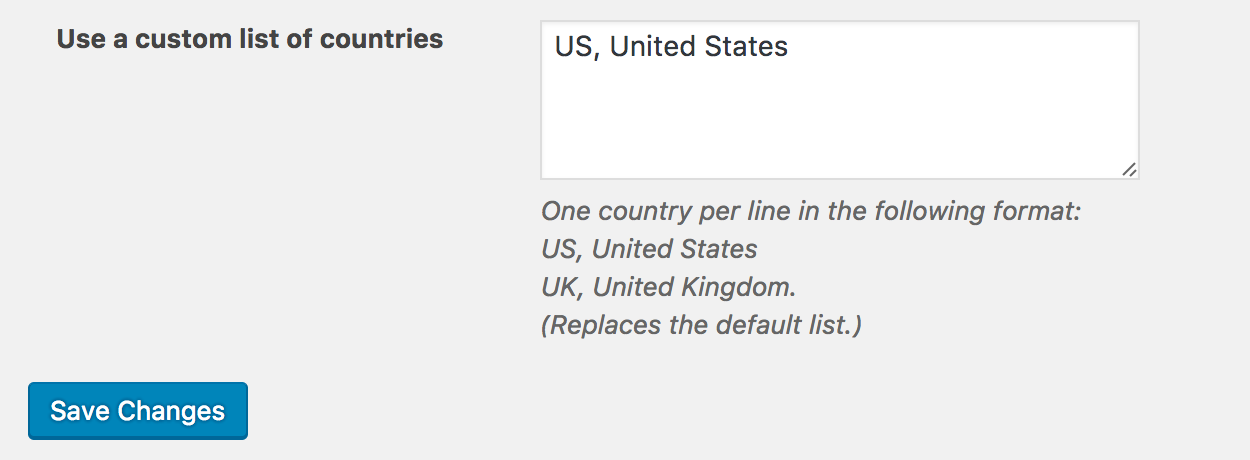
You can use a custom list of countries by going to Events > Settings > Default Content (see screenshot). Can you give this a try and let me know if this works for you?
Thanks,
Jennifer
KeymasterHi Scott,
Thanks for checking out our plugins!
Event Tickets Plus does let you integrate with WooCommerce to sell tickets on your site. Tickets are essentially WooCommerce simple products, so users can purchase both tickets and t-shirts in the same checkout process. If you want t-shirt to be linked to tickets, you would need a third-party WooCommerce extension. I would recommend doing some testing on a staging site to make sure you can get things working the way you need if you decide to go this route.
However, there are a couple of things to note. ET+ does come with custom fields that you can add to tickets, which allow you to collect additional information from each attendee. You do have the option to set these fields to “required”. These are included in the attendee export, but there is not an out-of-the-box way to print a copy of just the fields. As far as integrating with a digital signature application, this is also not something that would happen out-of-the-box…you would need to do a customization to get these integrated.
Downloads would fall into the same boat…you can add links to the ticket email or to a user’s page on your site via a template override.
We do offer full refunds within 30 days of purchase, so if you’d like to take Event Tickets Plus for a test run, feel free to do so! Please let me know if you have any additional questions.
Thanks,
Jennifer
-
AuthorPosts