Forum Replies Created
-
AuthorPosts
-
October 27, 2017 at 10:27 pm in reply to: Import complete! No events were imported or updated #1370561
Jennifer
KeymasterHello,
Thanks for reaching out! It sounds like you may have found a similar thread with an answer to your question?
For more info on CSV imports, I would recommend taking a look at this article, which has some step-by-step instructions on importing a CSV file, as well as this one, which has some additional information on how CSV imports work plus some example files.
If you have any other questions, please don’t hesitate to ask!
Thanks,
Jennifer
KeymasterHi Michael,
Thanks for reaching out! I’d be happy to help you with this, but first will you please post this question in our Events Calendar PRO forum? We use the Pre-Sales forum to answer questions about the features of our premium plugins for those interested in purchasing them.
If you have not purchased one of our premium plugins, you can post in our community forum on wordpress.org, which we review weekly to check for bug reports. If you need more in-depth support, you will need to purchase a license.
Our knowledgebase is a great place to start looking for answers. If you want to change the way the plugins work, our themer’s guide has some great info on making customizations. You can also search our premium forums to see if another user has posted about a similar issue. If you’re having trouble with plugin functionality, the best place to start is by testing for a conflict.
Thanks,
Jennifer
October 27, 2017 at 10:19 pm in reply to: PHP Warning: current() expects parameter 1 to be array, boolean given #1370557KeymasterHi Hassan,
I’m sorry to hear you’re running into this issue as well, but the good news is that the fix has been developed and is pending review before being released – this means it should be out soon! I linked this thread to our internal ticket, so as soon as it is released, you’ll be notified here.
I’m sorry about any inconvenience this is causing in the meantime, but thank you for your patience as we work on getting this resolved. If you have any questions, please let me know.
Thanks,
Jennifer
KeymasterHi Mary,
With Community Events, users are only able to edit the events that they have created themselves. To be able to edit events that come in through Event Aggregator, they would need to have accounts that let them access the back end of your site.
If this is a feature you would like to see added in the future, please do let us know over in our Feature Ideas Forum. This is what we use to gauge user interest in new features and help guide future development efforts.
I’m sorry I don’t have a better answer for you here, but please let me know if you have any questions!
Thanks,
Jennifer
KeymasterHi Mark,
Thanks for checking out our plugins!
Our plugins do not currently support creating multiple pages out of a single event, but you could add tabs in the description section of a single event page. A plugin like Tabs will let you create tabs and display them with shortcodes, which you can add to an event page. Many of our users use Advanced Custom Fields, so using it in conjunction with our plugins is indeed possible!
If you want to break up the default event information onto several pages/tabs, you could do so with a customization or with the [tribe_event_inline] shortcode that comes with Events Calendar Pro.
We do offer full refunds within 30 days of purchase, so feel free to take Pro for a test run! I’d also recommend installing our free The Events Calendar plugin in a test site to try it out. Events Calendar Pro does add additional features like the shortcodes I mentioned, but the general layout of the single event page is the same in both plugins. We also have a live demo on wpshindig.com.
Please let me know if you have any other questions!
Thanks,
Jennifer
KeymasterHi Jérôme,
Thanks for reaching out!
You can do a customization like this by following these instructions to copy the template for the photo view into your child theme, where you can then edit it. The template for photo view can be found at wp-content/plugins/events-calendar-pro/src/views/pro/photo/content.php. For the individual events that appear in photo view, take a look at the single-event.php template in that same folder, and for the navigation, nav.php.
Please note that we are limited in the amount of support that we can provide for customizations, but if you get stuck or have any questions, please do let me know and I’ll be happy to point you in the right direction!
Thanks,
Jennifer
October 27, 2017 at 5:39 pm in reply to: Single Event template remove meta modules for specific category (webinars) #1370503KeymasterHi Carina,
Sure thing! Take a look at tribe_event_in_category(). Using this, your if statement would look something like:
if ( tribe_event_in_category( 'cat-slug', $event_id ) ) {

	//do this

}
You can replace “cat-slug” with the slug for your category. Let me know if that helps!
Thanks,
Jennifer
KeymasterHi Andrei,
Thanks for reaching out!
It sounds like you’re looking to add different venues to individual dates within a series of recurring events? Unfortunately the only way to do this currently would be to break the individual events from the series, making them stand-alone events, and then change the venue on each of them. We are working on building out the capability to edit an event in a series individually, but I don’t have a timeline I can give you right now as to when this will be released. We do have an open feature request for this, so I would definitely recommend casting your vote for it! This helps us gauge user interest in new features and guide future development efforts, and it will also help you stay in the loop as we make progress on this feature.
For the time being, it would require a customization to be able to set different venues for individual dates within a series. If you’d like to give this a shot, our themer’s guide is the place to start. We also have a list of recommended developers if you’d like to get help with the code.
I’m sorry I don’t have a more straightforward solution for you, but I hope this helps! Please let me know if you have any questions.
Thanks,
Jennifer
October 27, 2017 at 5:13 pm in reply to: Eventbrite Registration Not Displaying On Event Page #1370496KeymasterHi Lee,
Thanks for reaching out! If you have tickets associated with your event on eventbrite.com, they should come in automatically when you import the event. Could you please send me a link to the event in Eventbrite, as well as a screenshot of the Eventbrite Information and Associated Tickets sections of the event edit screen for this event?
Thanks,
Jennifer
KeymasterHi Grace,
Thanks for reaching out!
It looks like you might have entered your Event Tickets Plus key into the Event Aggregator box under Events > Settings > Licenses. Can you double check that the key is entered under the Event Tickets Plus box? This box only appears once Event Tickets Plus has been installed and activated, so it is actually quite common for users to enter the key into the Event Aggregator box by accident.
Let me know if that helps!
Thanks,
Jennifer
October 27, 2017 at 4:58 pm in reply to: How do the old HIDE and IGNORE events get deleted? #1370492KeymasterFor ignored events, I believe you will need to delete them manually. There are some cleanup plugins you could try, such as Bulk Delete for example, but you would really need to test them out to see if they are able to get to the ignored events. However, something like that or a plugin like Post Expirator should work for the other events on your site.
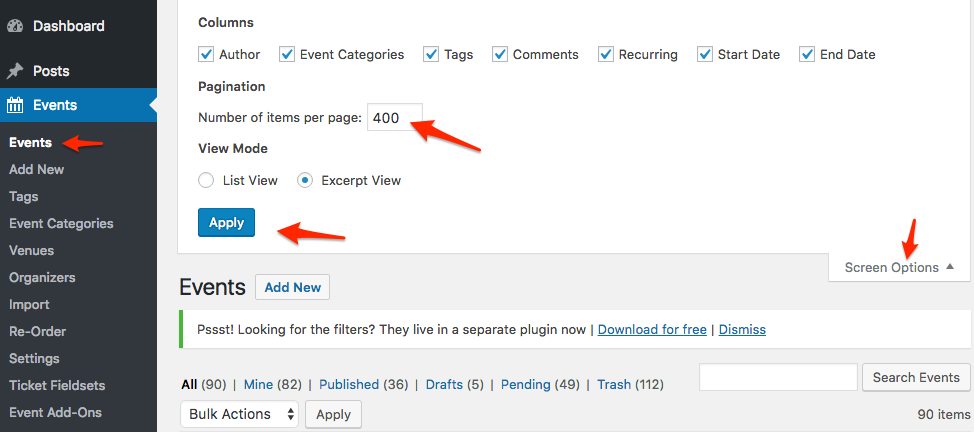
A trick to quickly delete ignored events in bulk is to increase the number of posts displayed on the page, select all, and delete.
If this is a feature that you would like to see implemented in future releases, please do let us know over in our Feature Ideas Forum. This is what we use to gauge user interest in new features and help guide future development efforts. I’m sorry I don’t have an automated solution here for you, but I hope this helps!
KeymasterHi Dominik,
You can find the setting to require users to be logged in under Events > Settings > Tickets > Login requirements, and the ability for users to change their RSVP response is on the event itself, just above the tickets section (see screenshot). Users will only see it if they are logged in.
Let me know if you have any other questions!
Jennifer
October 27, 2017 at 4:43 pm in reply to: Edit event not showing, events not listing under dropdown #1370490KeymasterHi John,
Thanks for sending the screenshots! This is a bit odd. Did this happen after an update?
Can you try reinstalling The Events Calendar and Events Calendar Pro by following these instructions? This should not affect your existing events, but it is always a good idea to do a full backup beforehand just in case.
Let me know if that helps!
Thanks,
Jennifer
KeymasterUnfortunately you would have to add the tickets to the events individually. I wish I had a better answer for you, but at the moment, tickets are not really supported by recurring events.
However, this is one of our most highly-requested features, and we are currently working on supporting it for future releases!
KeymasterHello,
Thanks for reaching out! I’m glad to hear you were able to get this figured out!
I’ll go ahead and close out this thread, but please feel free to open up a new one if you have any other questions.
Thanks,
Jennifer
-
AuthorPosts