

Forum Replies Created
-
AuthorPosts
-
Jaime Marchwinski
KeymasterHi Greg,
Okay, good to know.
As a first troubleshooting step, could you please provide us with your updated complete system information in a private reply using the instructions found in the following link?
https://theeventscalendar.com/knowledgebase/sharing-sys-info/
In the meantime, I’d recommend running through our testing for conflicts procedure to see if that can shed light on any conflict that may be present.
Let me know how that goes!
Thanks,
Jaime
KeymasterHi Chantel,
Glad to see that we have found the root of the issue.
Please also note that support for theme conflicts is limited as stated in our support policy.
However, I’d love to try to point you in the right direction.
As a first step, I’d recommend taking a look at your stylesheets and page templates and see if altering these settings helps you to achieve the results that you are looking for:
https://theeventscalendar.com/knowledgebase/stylesheets-and-page-templates/
You may also want to reach out to your theme developers to see if they have any solutions for this issue.
Let me know how that goes!
Thanks,
Jaime
May 31, 2018 at 11:04 am in reply to: Issue with WP Google Maps plugin and Events Calendar Google Maps Integration #1543190KeymasterHi Badi,
Thanks so much for reaching out!
As a first troubleshooting step, could you please provide us with your complete system information in a private reply using the instructions found in the following link?
https://theeventscalendar.com/knowledgebase/sharing-sys-info/
Let me know if you have any other questions in the meantime!
Thanks,
Jaime
KeymasterHi Fabien,
Thanks so much for reaching out!
As a first troubleshooting step, could you please provide us with your complete system information in a private reply using the instructions found in the following link?
https://theeventscalendar.com/knowledgebase/sharing-sys-info/
Let me know if you have any other questions in the meantime!
Thanks,
Jaime
KeymasterThanks so much for reaching out!
Just to let you know, we are limited by our Support Policy in how much we can help with customizations, but I will try to point you in the right direction.
I’d recommend starting off by taking a look at our Themer’s Guide, which can show you which templates can be edited and copied in order to achieve the results that you are looking for.
You may also be interested in our list of available functions:
https://theeventscalendar.com/functions/
If this functionality is a requirement for your intended project, I’d suggest that a third-party developer would be the best way to make this feature happen on a short timeline. ? We maintain a list of developers who work with our plugins on our Knowledgebase here:
https://theeventscalendar.com/knowledgebase/find-a-customizer/
Let me know if you have any other questions on this topic!
Thanks,
Jaime
KeymasterHi Jacob,
Thanks for creating that video. Are there other past events, or is that the only one? In other words, are there past events within other categories?
If not, perhaps you can set up a test event within another category so that you can test if the functionality is working.
As far as changing the “Past Events” wording, you can use the snippet provided in the following tutorial to help you do that:
https://theeventscalendar.com/knowledgebase/change-the-wording-of-any-bit-of-text-or-string/
The string that you’ll want to change is “Past %s”
Let me know how that goes!
Thanks,
Jaime
KeymasterGlad we could help, you are welcome back in our support forums any time!
Since you marked this thread as Resolved, I am going to close this thread.
Have a great week!
May 31, 2018 at 10:39 am in reply to: https://theeventscalendar.com/product/community-tickets/ #1543167KeymasterThanks so much for reaching out and for your interest in our products!
With Community Events and Community Tickets, you can create events on the front-end of your site and create tickets for those events on the front-end as well.
Note that Community Tickets requires Community Events, Event Tickets, Event Tickets Plus, and WooCommerce to be installed and activated on the same site.
To answer your questions:
- Events are created on the front-end of the site and can be edited and managed on the back-end of the site.
- We cannot make any guarantees about plugin compatibility, however we have a great 30-day full refund policy, so if things really don’t work out the way you’d hoped, you can get a full refund.
- The submission form for your events is on one page, and events are listed on multiple pages.
Let me know if you have any other questions on this topic!
Thanks,
Jaime
May 31, 2018 at 10:34 am in reply to: Start Ticket Reservations with "1" and/or have RSVP info exposed? #1543160KeymasterHi Mark,
Thanks so much for reaching out!
You can change the minimum quantity value using the following snippet from WooCommerce:
https://docs.woocommerce.com/document/adjust-the-quantity-input-values/
Let me know if that helps!
Thanks,
Jaime
KeymasterHi Val,
Thanks so much for reaching out!
As a first troubleshooting step, could you please provide us with your complete system information in a private reply using the instructions found in the following link?
https://theeventscalendar.com/knowledgebase/sharing-sys-info/
In the meantime, can you check that all of your licenses are in the correct slots, under Events Settings < Licenses. Either way, can you click Save Changes there.
Let me know if that helps!
Thanks,
Jaime
KeymasterThanks so much for reaching out!
As a first troubleshooting step, could you please provide us with your complete system information in a private reply using the instructions found in the following link?
https://theeventscalendar.com/knowledgebase/sharing-sys-info/Let me know if you have any other questions in the meantime!
Thanks,
JaimeKeymasterHi Tim,
Thanks so much for reaching out!
You can try adding the following CSS snippet to your WordPress Customizer or theme’s stylesheet in order to wrap the website text:
#tribe-events-content a {

  word-wrap: break-word;

}
Let me know if that helps!
Thanks,
JaimeKeymasterHi Greg,
Here is the image again:
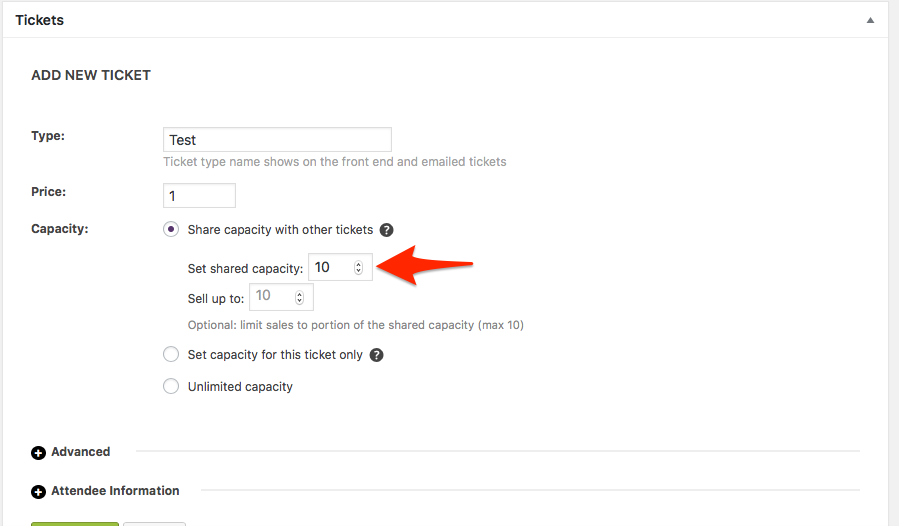
As a next step, I’d recommend running through our testing for conflicts procedure to see if that can shed light on any conflict that may be present.
Also, can you please enable WP_DEBUG and WP_DEBUG_LOG and share any debug messages you see?
Let me know if you have any other questions in the meantime!
Thanks,
Jaime
KeymasterGlad we could help, you are welcome back in our support forums any time!
Since you marked this thread as Resolved, I am going to close this thread.
Have a great week!
KeymasterHi Thorn,
Unfortunately there is no form validation other than marking a field as Required.
If you’d like to try your hand at this customization, I’d recommend starting off by taking a look at our Themer’s Guide, which can show you which templates can be edited and copied in order to achieve the results that you are looking for.
If this functionality is a requirement for your intended project, I’d suggest that a third-party developer would be the best way to make this feature happen on a short timeline. ? We maintain a list of developers who work with our plugins on our Knowledgebase here:
https://theeventscalendar.com/knowledgebase/find-a-customizer/
You can also add this idea to our Feature Requests, as we tend to implement ideas based on customer feedback, so your input is greatly appreciated:
https://tribe.uservoice.com/forums/195723-feature-ideas
Let me know if you have any other questions on this topic!
Thanks,
Jaime
-
AuthorPosts