
Home › Forums › Ticket Products › Event Tickets Plus › Can't update ticket capacity
- This topic has 9 replies, 3 voices, and was last updated 8 years, 4 months ago by
Support Droid.
-
AuthorPosts
-
May 14, 2018 at 2:52 pm #1530162
Greg Perham
ParticipantOn production:
https://www.dropbox.com/s/1ju6jtncmtiaa2m/Tickets.mp4?dl=0On localhost: “Please select a value that is no more than 5.” (image attached)
May 15, 2018 at 6:29 am #1530658Jaime Marchwinski
KeymasterHi Greg,
Thanks for reaching out again!
I’m assisting you with this issue on another thread, so I’m going to go ahead and close out this duplicate thread.
See you over there!
Thanks,
Jaime
May 24, 2018 at 6:14 am #1537871KeymasterHi Greg,
I just wanted to re-open this topic and check in to see if this issue was still occurring.
When looking back at your screenshot, I noticed that one of your Shared Capacity options was missing, as in the following screenshot:

Are you looking to create a shared capacity ticket, or an individual capacity?
Let me know if you’d like to continue troubleshooting this issue!
Thanks,
Jaime
May 25, 2018 at 2:21 pm #1539140ParticipantWhat do you mean, the “Shared Capacity options was missing?”
May 29, 2018 at 5:29 am #1540682KeymasterHi Greg,
If you compare our two screenshots, you will see that the option to “Set shared capacity” is missing from yours.
Perhaps this is where the root of the issue is. Are you still seeing this occur on your tickets?
Let me know!
Thanks,
Jaime
May 30, 2018 at 8:23 pm #1542515ParticipantYour image is tiny and does not link to a larger version, so it’s very difficult to compare. Yes, the issue persists, as it will not allow me to increase the quantity.
May 31, 2018 at 5:28 am #1542727KeymasterHi Greg,
Here is the image again:
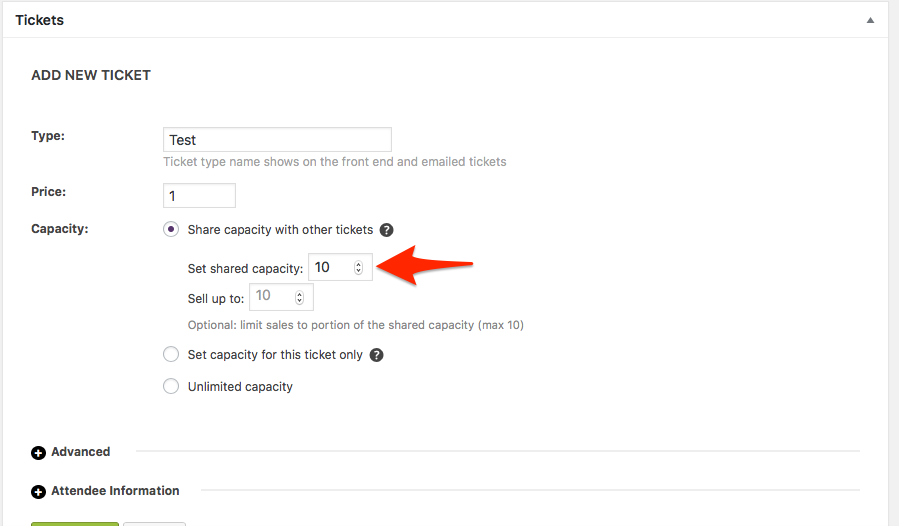
As a next step, I’d recommend running through our testing for conflicts procedure to see if that can shed light on any conflict that may be present.
Also, can you please enable WP_DEBUG and WP_DEBUG_LOG and share any debug messages you see?
Let me know if you have any other questions in the meantime!
Thanks,
Jaime
May 31, 2018 at 12:18 pm #1543292ParticipantYes, “Set shared capacity” does not appear. There is nothing in the error log.
June 1, 2018 at 3:56 am #1543712KeymasterHi Greg,
Okay, good to know.
As a first troubleshooting step, could you please provide us with your updated complete system information in a private reply using the instructions found in the following link?
https://theeventscalendar.com/knowledgebase/sharing-sys-info/
In the meantime, I’d recommend running through our testing for conflicts procedure to see if that can shed light on any conflict that may be present.
Let me know how that goes!
Thanks,
Jaime
June 23, 2018 at 9:35 am #1559949KeymasterHey there! This thread has been pretty quiet for the last three weeks, so we’re going to go ahead and close it to avoid confusion with other topics. If you’re still looking for help with this, please do open a new thread, reference this one and we’d be more than happy to continue the conversation over there.
Thanks so much!
The Events Calendar Support Team -
AuthorPosts
- The topic ‘Can't update ticket capacity’ is closed to new replies.