

Forum Replies Created
-
AuthorPosts
-
April 9, 2016 at 11:16 am in reply to: Event Tickets Plus – Autocompleting PayPal orders via Woocommerce #1100487
Hunter
ModeratorHey Paul,
Sorry to hear about the order not being completed automatically. We are currently working on improving how the plugin handles ticket stock, orders, etc. For the time being, try adding the snippet from this Woo docs article to the bottom of your theme’s functions.php file and let me know if it helps.
Thanks for the patience and understanding while we work towards perfection and enjoy the remainder of your weekend!
April 9, 2016 at 11:09 am in reply to: How can we remove the events search on category archives? #1100483ModeratorHey Josh,
Sorry to hear about the troubles and thanks for providing the screenshots. Can you confirm you’ve reviewed our Testing for conflicts guide? Additionally, can you provide your System Information as a private reply?
Our Themer’s Guide is a useful resource for creating custom templates, so I usually like sharing that with our wonderful customers 🙂
Enjoy the remainder of your weekend and thanks for choosing PRO!
April 9, 2016 at 10:47 am in reply to: Community Events broken after recent update 4.1.1 update #1100480ModeratorHi and sorry to hear about the recent troubles,
I do see you’ve checked “Yes” for both reverting back to the default WP theme and deactivating all other plugins, but can you please confirm this? Additionally, please send over your System Information as a private reply.
Another recommendation would be to review our Community Events New User Primer as it provides insight to the process of making sure the plugin is setup properly.
Thanks for reaching out and enjoy the remainder of your weekend!
April 9, 2016 at 10:43 am in reply to: X Theme/Tribe Events Calendar Conflict – Will not display Events Home Page #1100479ModeratorHello,
Sorry to hear about the troubles. Would you mind opening a new topic under the proper forum channel? This is our Pre-Sales channel and we try to keep it relative to just that. Thanks for understanding and I’ll keep an eye out in the appropriate forums. Enjoy the rest of your weekend!
ModeratorHello,
Sorry to hear about the slow page load times… they’re never fun!
Would you mind sharing your System Information as a private reply? Additionally, can you confirm if the slow load times still occur after following our Testing for conflicts guide?
Enjoy the rest of your weekend and thanks for choosing PRO!
ModeratorHello Kenneth,
Sorry to hear about the site breaking.
1) Do you have The Events Calendar (free version) installed and activated while attempting to install and activate Events Calendar Pro (paid version)?
2) Can you send over your System Information as a private reply?
Thanks for reaching out and I look forward to getting this resolved with you. Enjoy the remainder of your weekend.
ModeratorHello and welcome to the forums 🙂
Sorry to hear about your troubles. I’d be happy to help figure this out!
First off, can you confirm if the issue still occurs when reviewing our Testing for conflicts? I just want to make sure we’re not dealing with a theme and/or plugin conflict. Let me know and we’ll go from there. Thanks for choosing PRO and have a good rest of your weekend!
ModeratorHello Monica,
Thanks for the input. Would you mind opening a new thread regarding your issue? Having separate topics helps expedite the process all around. Thanks and I’ll keep an eye out for your thread. Have a good one!
ModeratorHey Patrick,
I spoke with a few other team members and we’ve decided to include this forum thread with a newly logged ticket regarding Eventbrite connection issues. I wish I had a quick fix for you but unfortunately do not. Hang tight and keep an eye on you wp-admin and theeventscalendar.com/blog for update information.
Thanks for working with me and being so patient while we work through this and enjoy the remainder of your weekend.
ModeratorHey David,
Welcome to the forums and thank you for choosing PRO!
Once you add the mini Events Calendar to your widget, you should see the option to set the amount of events to display (see screenshot below).
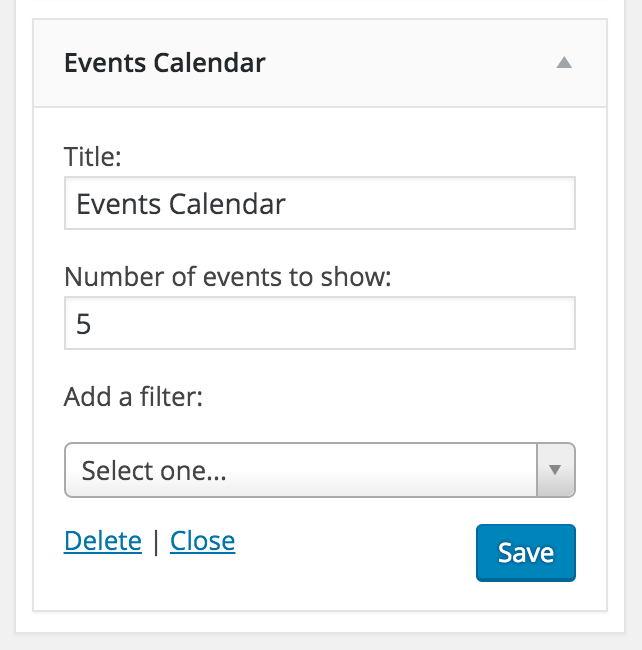
Let me know if this helps and thank you again for choosing PRO 🙂
ModeratorHi and welcome back,
Can you please confirm if the issue still occurs after following our Testing for conflicts guide?
Let me know and we’ll take it from there. Have a good day!
ModeratorWelcome back,
Glad to hear you’ve narrowed down the source of conflict. We don’t have a built-in feature that allows setting a character limit, but take a look at this article: http://kaspars.net/blog/wordpress/limit-number-words-characters-in-wordpress-editor
Try adding the provided script and CSS to the Community Events Template and change var editor_char_limit = 50; to 1000.
You’ll need to do a template override as outlined in our Themer’s Guide. Let me know if this gets you started in the right direction 🙂
ModeratorAdditionally, I noticed you said you tested for conflicts, but I’m unable to replicate the issue and we don’t have any logged bugs of users reporting similar issues – so I just want to confirm you’ve tried all the steps whilst using the default theme and with only our plugins activated.
Thanks!
ModeratorHello,
I see a few plugins activated – can you please try after following our Testing for conflicts guide to see if we’re working with a potential theme/plugin conflict?
Let me know and we’ll go from there. Have a great rest of your day 🙂
ModeratorHello Edwin and thanks for reaching out 🙂
I’d be happy to answer your questions.
1. You will need a Facebook account to use the Facebook Importer. You don’t have to have access to the venue/promoter’s Facebook account to import events from said venue/promoter’s Facebook feed of events. You do need a Facebook account – so a dummy account would theoretically work.
2. It really depends on if the venue/promoter has marked the events “Adult in nature.” We do offer a 30-day money back guarantee, so if you purchased the plugin and was unfortunately unable to import the events, we would be happy to refund your purchase in full.
Let me know if I’ve answered your questions with enough clarity and thank you again for contacting us via our Pre-Sales channel. Have a great rest of your week!
-
AuthorPosts