

Forum Replies Created
-
AuthorPosts
-
Hunter
ModeratorHey David,
Sorry for any confusion. There is a plugin in the WP repository that may achieve what you describe. Another idea I have would be to visit our UserVoice Feature Ideas and add your shortcode ideas there. I definitely think it’s a good idea and can see others thinking along the same lines.
Again, sorry for the communication breakdown on my end and let me know if this helps in any way. Take care!
ModeratorHey Todd,
Before I get to troubleshooting, can you please send over your System Information as a private reply?
Thanks and I look forward to getting this resolved. Have a good day!
ModeratorHey Matt,
Welcome back!
We’ve actually got a logged bug with the issue you described that our developers are hard at work fixing. I’ve attached this thread for them to reference. Keep your eyes peeled to your wp-admin and theeventscalendar.com/blog for maintenance release info.
Sorry I don’t have a solution for you right now, but rest assured it is on it’s way! Enjoy your upcoming weekend 🙂
ModeratorHello and welcome back,
I noticed you said “Yes” to both reverting back to the default theme and deactivating all other plugins besides ours, but can you please confirm this? Typically, this type of behavior is from a missing
meaning a link somewhere in your event or event template has no ending tag. This is pure speculation, but it’s my first hunch.Let me know if the problem still occurs after reviewing the Testing for conflicts and we’ll go from there. Enjoy your upcoming weekend!
ModeratorHi Eddie,
Sorry to hear about the troubles. Can you please reply back privately with the .csv file you’re having troubles importing and I’ll see if I can reproduce the issue? Also include your System Information in the private reply.
Thanks for reaching out and enjoy your day 🙂
ModeratorHi and welcome to the forums!
Thanks so much for choosing PRO 🙂
We don’t have a built-in feature to disable the preview mentioned, but you can achieve those types of customizations by doing template overrides as explained in our Themer’s Guide. Look under Week View and you’ll see the files you need to override.
Let me know if this helps and best of luck with the customizations. Thanks again for choosing PRO!
April 13, 2016 at 2:14 pm in reply to: Customize edit screen and change order of the fields #1102150ModeratorHi and thanks for the post 🙂
First off welcome to the forums and thank you for choosing PRO! I’d be glad to help point you in the right direction.
My first recommendation is to review our Themer’s Guide. We provide information on how to override templates (which is what you’re after).
If you need any more assistance, please don’t hesitate to ask. Please note that we are limited on the amount of customizations we can provide, but will always give you our best effort.
Thanks again for choosing PRO and good luck with the customizations!
ModeratorHello and thanks for the kind words and informative post,
You’re in luck! We have exactly what you’ve described on our radar. Even better, I’ll add this thread to the logged feature report for the developers to reference while working towards a production-worthy version including collapsable filters after selection.
Thank you again for everything and keep your eyes peeled to your wp-admin and theeventscalendar.com/blog for feature release info. Have a great upcoming weekend!
ModeratorHi Antoine,
Thanks for posting. Forgive me, but I’m a little confused by your question. If you’re trying to hide event attendees from displaying on the front end, you can do so on the edit event page (see screenshot below)
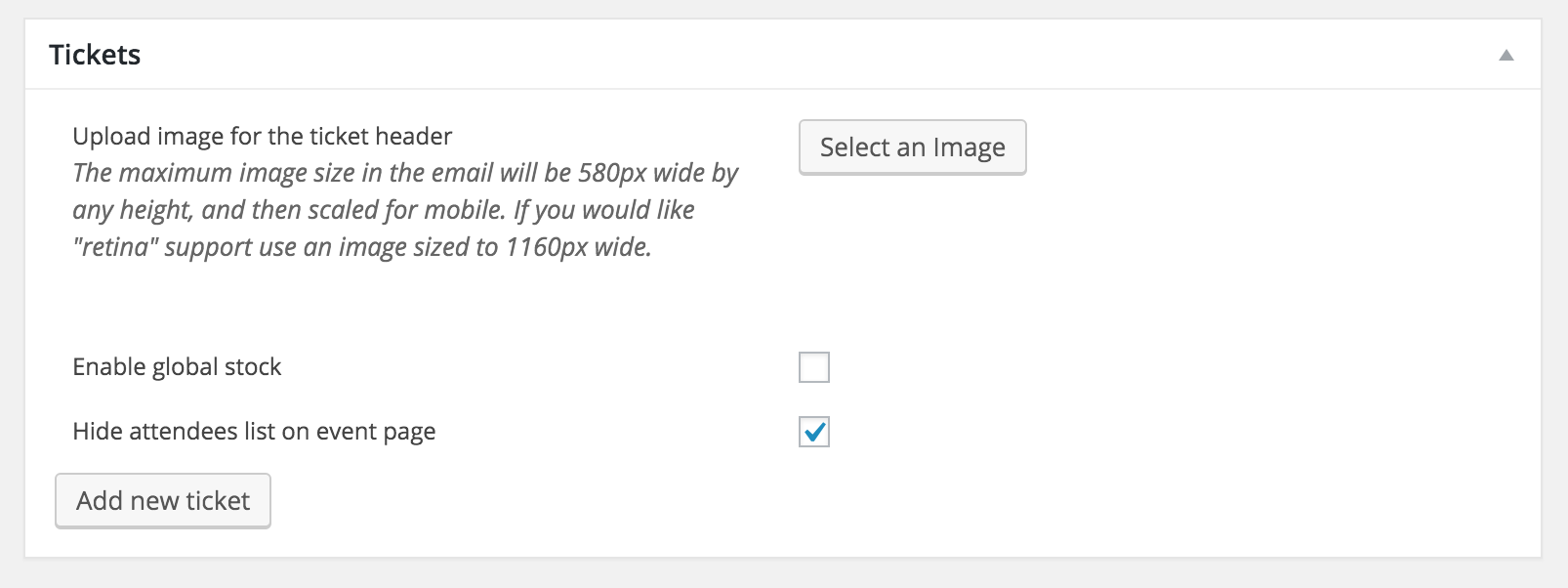
If I’ve misunderstood you, please try rephrasing the question. If you need to edit any files, you can learn how to do that with our Themer’s Guide. Please let me know if this helps. If you’re still experiencing troubles, review our Testing for conflicts guide.
@Remco – would you mind creating a new topic? It will help expedite your question 🙂Thanks to the both of you and have a good day!
ModeratorHello Sean,
Thanks for posting and welcome back.
I wish I could provide more assistance but theme conflicts extend beyond the scope we’re able to provide. You may want to try right-clicking your mouse when on the page giving you troubles and open “Inspect”. From there, you can start to identify errors and make necessary changes.
I do apologize I can’t be of more help and wish you the best of luck. Enjoy your upcoming weekend and thanks for choosing PRO!
ModeratorHi and welcome back,
You shouldn’t lose anything by simply reverting to the default WP theme. I would recommend backing up just in case as you’ve lost customizations in the past.
Let me know if you discover anything new. Thanks for the update and screenshot too! Have a good day 🙂
April 13, 2016 at 10:14 am in reply to: Avada theme default-template.php accidently deleted #1102043ModeratorHi and welcome back,
I’m still a little confused, admittedly. I’ll try my best still! You can download the current and previous versions of both the free and PRO versions. If you need something not included in our plugins (custom Avada templates), you’ll need to download whichever version of Avada desired from Themeforest.
Does this answer your question? Let me know!
ModeratorHey Patrick,
While I can’t exchange the licenses, we do offer refunds. To get started, visit this page and we’d be happy to refund your purchase. Let me know if you have any further questions 🙂
April 13, 2016 at 9:48 am in reply to: Facebook Import Says Events Previously Imported But They Aren't There #1102021ModeratorHey Jamie,
Welcome to the forums and sorry to hear about the troubles! Also – I spent a great amount of time in Idaho… beautiful state (and your site is looking nice too!)
Anywho – can you please confirm you’ve reviewed our Testing for conflicts to ensure you’re not experiencing a potential theme/plugin conflict. If you haven’t already, check out our Facebook Events KB section and see if there is anything in there that might point you in the right direction.
If you’re still having troubles, let me know and I’ll do some more investigating. As of right now, we don’t have any logged bugs of users reporting similar issues, but that can change. Again, thanks for posting to the forums and enjoy your day!
April 12, 2016 at 6:15 pm in reply to: bullets being removed from Events Calendar list page descriptions #1101695ModeratorHello,
Have you reverted back to the default WP theme and deactivated all other plugins than ours as outlined in our Testing for conflicts guide?
Thanks for choosing PRO and have a good day 🙂
-
AuthorPosts