

Forum Replies Created
-
AuthorPosts
-
Hunter
ModeratorHi and thanks for posting,
We don’t currently offer an “update” feature as you describe, but I can definitely see the merit in it. With that said, our UserVoice Feature Ideas is the perfect place to request that feature if it hasn’t been already.
You may be able to achieve what you describe with GravityForms or a similar plugin. Best of luck with the customizations and thanks for choosing PRO!
April 14, 2016 at 9:37 pm in reply to: List Widget format off if another calendar not on page #1102865ModeratorHi Laura,
Welcome to the forums and thanks for choosing PRO!
Sorry to hear about the troubles… let’s see if I can be of assistance. The first step in this situation is usually reviewing our Testing for conflicts just to rule out you’re not working with a theme and/or plugin conflict.
Reply back with your findings and we’ll take it from there! Again, thanks for choosing us as your events calendar and enjoy your upcoming weekend!
April 14, 2016 at 9:29 pm in reply to: Recurring Events – Showing/Hiding selected Recurrences #1102858ModeratorHi Mark,
Welcome back 🙂
Do all events show up in search results after reviewing our Testing for conflicts guide?
I just hid all recurring events from displaying on the front end on my test site, but was still able to locate events other than the first in the series.
Let me know and we’ll take it from there. Enjoy your upcoming weekend!
ModeratorHello and welcome to the forums!
Sorry to hear about the widget display issue. I wish I was able to provide more support, but theme conflicts/customizations extend beyond the scope we’re able to provide :-/
With that said, the best I can offer is to visit your site and open “Inspect” by right-clicking on your mouse. Once you have that open, you can identify CSS classes and begin to make changes.
We’ve also got a great deal of users using the Divi theme, so there should be a decent amount of support searchable via our forums and the search engine of your preference.
Again, I apologize I can’t be of more assistance and best of luck with the customizations 🙂
ModeratorHello and welcome to the forums!
Sorry to see you here on these circumstances. Before I get to testing, would you please review our Testing for conflicts guide to make sure you’re not working with a theme and/or plugin conflict?
Let me know what you find after following the aforementioned guy and we’ll go from there. Have a great weekend 🙂
April 14, 2016 at 8:43 pm in reply to: Calendar view showing events in random order, rather than by ti #1102834ModeratorHello Gentlemen 🙂
To Benjamin – Cory is spot on. I can’t guarantee you’re experiencing the same conflict he is, but you may want to review our Testing for conflicts to see if you can track down the source of conflict.
Let me know if this helps and we’ll go from there. Cory, thanks for stepping in and helping us out! Enjoy the weekend to the both you 🙂
ModeratorHey Dennis,
Welcome back and sorry to hear about the troubles. I would recommend reaching out through our Contact page and provide any more information you have about the rogue license key. You can also link to this forum thread for reference and we’d be glad to help out.
Let me know if this helps and thanks for choosing PRO!
ModeratorHi and welcome back,
I don’t have a snippet that provides that functionality, but you may want to review our Themer’s Guide as it could potentially help get you started on the customizations you describe.
Another idea would be to visit our UserVoice Feature Ideas and submit it there if it hasn’t already been.
Thanks for choosing PRO and enjoy your upcoming weekend 🙂
ModeratorHi and welcome back,
Our Themer’s Guide goes into detail on how to go about customizing templates. If you need any more help, please let me know and I’ll do my best. Please note that these types of customizations extend beyond the scope we’re able to provide.
Thanks for choosing PRO and enjoy your weekend!
ModeratorHi and thanks for the csv file and system information. Can you please confirm you’ve reviewed our Testing for conflicts guide? Additionally, please review this CSV Importer: Fields and example files KB article and make sure you’re following the proper instructions.
If all else fails and you’re still experiencing issues, please respond back with the step-by-step process you’re doing when encountering the issue. Thanks again for sending over that info and I look forward to getting this resolved. Take care!
April 14, 2016 at 12:47 pm in reply to: Customize edit screen and change order of the fields #1102696ModeratorHello and welcome back,
We are unfortunately unable to assist in-depth with these types of customizations, but if you open up edit-event.php found in the-events-calendar-community-events/src/views/community, you’ll see where we call in each section of info to the submit event form (see screenshot below). Simply copy the contents of edit-event.php and paste them into a new file with the same title (edit-event.php) in your theme folder where tribe overrides are stored (your-theme/tribe-events/community).
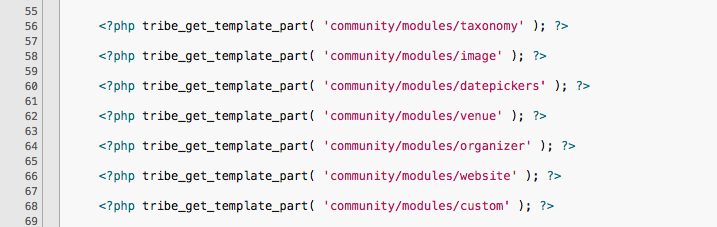
I wish we could provide more help but that’s about as definitive as I can be for now. Best of luck with the customizations 🙂
April 14, 2016 at 12:32 pm in reply to: bullets being removed from Events Calendar list page descriptions #1102673ModeratorHi and welcome back,
After some testing and communication with fellow support team members, we came up with a solution to allow bullet points to display in the event excerpt. I’ve brought this thread to our developers attention to reference. Thanks for bringing this to our attention and hang tight for maintenance release info.
add_filter( 'wp_trim_words', 'tribe_preserve_html_in_excerpt', 10, 4 );function tribe_preserve_html_in_excerpt( $text, $num_words, $more, $original_text ) {
remove_filter( 'wp_trim_words', 'tribe_preserve_html_in_excerpt', 10 );
$excerpt = force_balance_tags( html_entity_decode( wp_trim_words( htmlentities( $original_text ) ) ) );
add_filter( 'wp_trim_words', 'tribe_preserve_html_in_excerpt', 10, 4 );
return $excerpt;
}
ModeratorYou can hide that box via CSS by adding the following snippet to your theme’s style.css file. Let me know if it does the trick! You can also visit our UserVoice Feature Ideas and add this as a feature request if it hasn’t been already.
.tribe-tickets-attendees-list-optout {

display: none;

}
April 14, 2016 at 11:23 am in reply to: Avada theme default-template.php accidently deleted #1102636ModeratorThanks for the update. I’ll close this thread out but feel free to open a new one if you’ve got any more questions. Best of luck with everything 🙂
ModeratorHey Keith,
I was trying to convey that we unfortunately don’t have an automatic import feature for groups yet, so I apologize if I didn’t do just that. So to answer your question clearly, we do not currently offer the ability to automatically import FB group events.
Let me know if that clears it up and if you have any follow up questions. Thanks for the response and enjoy the day.
-
AuthorPosts