

Forum Replies Created
-
AuthorPosts
-
April 29, 2016 at 10:00 am in reply to: Recurring events: Link to first event in list view displays last event of series #1108893
Hunter
ModeratorHey Robin,
Thanks for the response and in-depth information. It’s amazing how a 4 year old topic can still provide insight! I’m glad to hear the issue has been resolved and please feel free to create a new thread should anything else come up. Have a happy Friday!
ModeratorHi A,
I truly do apologize for not catching this around, but at this time, RSVP/tickets for a recurring event are for the whole series, not for each event individually.
We are currently hard at work on adding the ability to create individual tickets for each event in a recurring series, so hang tight if possible and keep an eye on your wp-admin and theeventscalendar.com/blog for feature release information.
Again, I apologize I didn’t realize what you were trying to accomplish the first time around and feel free to follow up with any questions or comments you may have. Happy Friday 🙂
ModeratorGlad to hear you’ve got it temporarily addressed! I’ll close this thread out but please feel free to open a new thread should you have any more questions or concerns.
April 29, 2016 at 9:30 am in reply to: Facebook tab not loading import button at bottom of page #1108821ModeratorStuart,
Thanks for sharing that email with me. I apologize we don’t have anything immediately to remedy this timeout issue. I want to assure you that we are hard at work and once we’ve got a solution, you’ll see information on an upcoming maintenance release.
Have a good Friday and thanks for working through the steps with me to get to the bottom of it!
ModeratorWelcome back,
We have a Knowledgebase article that assists you in adjusting the Tickets Plus form position to your liking. Let me know if this is what you’re looking for 🙂
ModeratorHi and sorry to hear about the troubles.
We’d be happy to update your license! Simply visit our Contact page and complete the form. Feel free to link to this thread and also include a copy of your receipt in the email.
Thanks for being patient while we work to resolve the issue and have a great upcoming weekend!
ModeratorHey Dan,
Welcome back to the forums 🙂
I would love to be able to help you in this situation, but it appears it’s a question more geared towards WooCommerce rather than Event Tickets Plus. You may want to read up on this article about Template Structure and Overriding Templates.
I wish I was able to provide more assistance and best of luck with the customizations!
ModeratorHi Melissa,
I’m glad to hear the times are displaying as desired. We are aware of the strange behavior when using city/state timezones and I’m in the middle of testing for a concrete bug report to hand over to the developers. Once I do that, I’ll link this thread to the logged bug report.
I apologize it took so long to narrow down the source of conflict! Thanks for your patience and stay tuned to your wp-admin and theeventscalendar.com/blog for maintenance release info. Have a good upcoming weekend!
ModeratorHello and thanks for the update.
At this time, Eventbrite’s API doesn’t allow us to access private events, so the answer to your question is unfortunately no.
If you don’t mind, go ahead and mark this thread as “Resolved” and I’ll close this thread out as it appears to be addressed. Should anything new come up, please feel free to open a new thread. Have a great upcoming weekend!
ModeratorThanks for letting me know your progress 🙂
I’l close this thread out but feel free to open a new one if you have any more questions or concerns. Enjoy the weekend!
April 28, 2016 at 11:25 am in reply to: Facebook tab not loading import button at bottom of page #1108369ModeratorHey Stuart,
I just spent a few more minutes researching and came across a logged “feature” which we have planned in an upcoming release which will improve how the plugin handles large amounts of events. I’ve linked this thread to the ticket for the developers to reference during development.
With that said, you may want to try breaking up the list of Facebook page IDs you have entered under Events > Import > Facebook Import Settings until we can come up with a more viable solution.
Thanks again for the patience and stay tuned to your wp-admin and theeventscalendar.com/blog for feature release info.
ModeratorHey Ron,
Thanks for getting back to me. I grabbed the list of Facebook page ID’s you provided and entered them under Events > Import > Facebook Import Settings. I then navigated to Events > Import > Facebook tab and after a minute or two of waiting, I was able navigate to the bottom and see “XOCigarLounge” events load properly (see screenshot below).
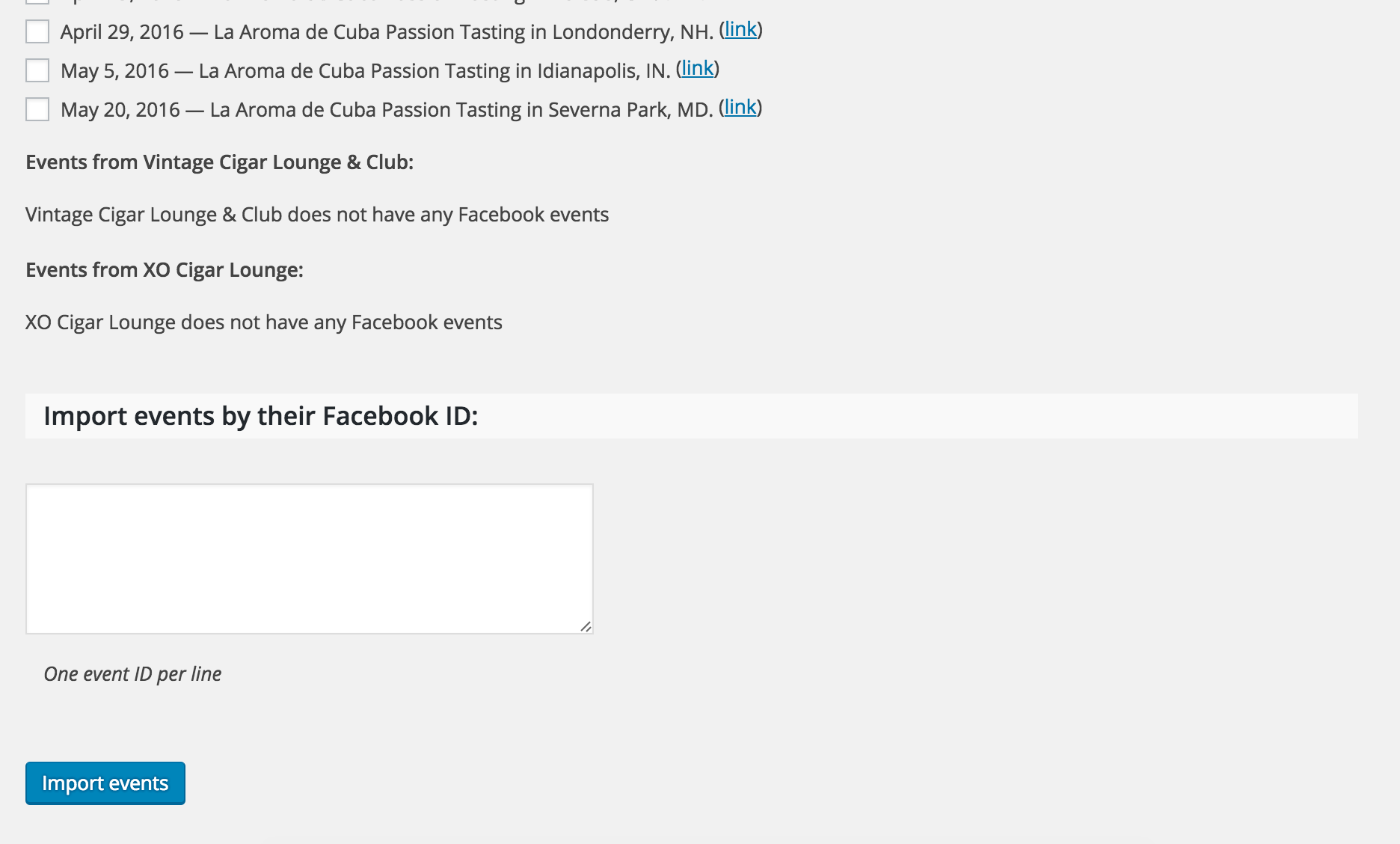
I’ve brought this topic to the attention of my fellow developers and after doing some more research, I’ve found a “feature” ticket that we have logged which aims to address the issue you’re experiencing. I’ve attached this thread to that feature ticket for the developers to reference during development and testing.
In the mean time, you may want to try and break up the list of Facebook page ID’s you’re attempting to import which should hopefully alleviate the load issues you’re experiencing.
Thanks for working with me and being patient in your communication and stay tuned to your wp-admin and theeventscalendar.com for feature release information. Take care and enjoy the upcoming weekend!
April 28, 2016 at 10:42 am in reply to: Facebook tab not loading import button at bottom of page #1108347ModeratorHey Stuart,
I just added 57 different Facebook IDs under Events > Import > Facebook Import Settings and the button loaded for me.
Are you able to contact your hosting company to see if they possibly have a timeout limit? I’m not really sure what it could be at this point as I’m unable to replicate the issue and we don’t have any logged bugs of users reporting similar issues.
With that said, I’m afraid there’s not much more troubleshooting or assistance I can provide, but I will keep my eye out in the support forums and bug reports to see if there is any similar issues out there which I’m unable to replicate due to unforeseen reasons.
Good luck finding the source of conflict and thanks for understanding the position we’re in. Have a good upcoming weekend 🙂
ModeratorHi and welcome back,
I truly do sympathize with the tediousness of troubleshooting as outlined in our Testing for conflicts guide, but it is always the first step we need to take to eliminate the chance that you’re working with a theme and/or plugin conflict. Once you’ve done that, we are more than happy to continue troubleshooting to see if there is indeed a bug in play.
Thanks for understanding and I look forward to resolving this with you 🙂
ModeratorOne last thing – there are a few errors after inputting the list of FB pages you’re attempting to import events from:
Events from LWinery are not importing because Facebook has returned an error, “Unsupported get request.” That error is usually due to an age or country restriction in that Facebook Page’s settings, please see our Facebook API Errors article for options to resolve this.
Can you try removing those FB pages giving errors and see if the problem still occurs?
-
AuthorPosts