
Home › Forums › Calendar Products › Events Calendar PRO › Recurring Events Rules Not Working (URGENT)
- This topic has 11 replies, 2 voices, and was last updated 10 years, 5 months ago by
Hunter.
-
AuthorPosts
-
April 20, 2016 at 8:23 am #1104862
Melissa Doyle
ParticipantHi I have created a “Testing EC Event” event that occurs May 6-22, every Thurs, Fri, Sat, and Sun.
Sunday it starts at a different time though 2pm, instead of 7pm. However, EC is not picking up this time change and still displays the time at 7pm.What am I doing wrong? I attached screenshots. You can see that the 8th and the 15th are displaying 7pm still.
Please advise asap. I have a meeting with the client tomorrow.
April 20, 2016 at 8:32 pm #1105174ModeratorHi Melissa,
Welcome back. Please review our PRO Recurring Events Knowledgebase article just to double-check you’ve got your recurrence rules set up properly. If you’re still having troubles, reply back and I’ll try and replicate the issue on my test environment. As always, make sure you review our Testing for conflicts to ensure you’re not experiencing a theme and/or plugin conflict.
Let me know how it goes and thanks for choosing PRO 🙂
April 21, 2016 at 12:03 pm #1105567ParticipantThis reply is private.
April 22, 2016 at 8:29 am #1105920ModeratorHi and welcome back!
I was able to successfully set up the series of recurring events with the following recurrence rules. Please see screenshot below:
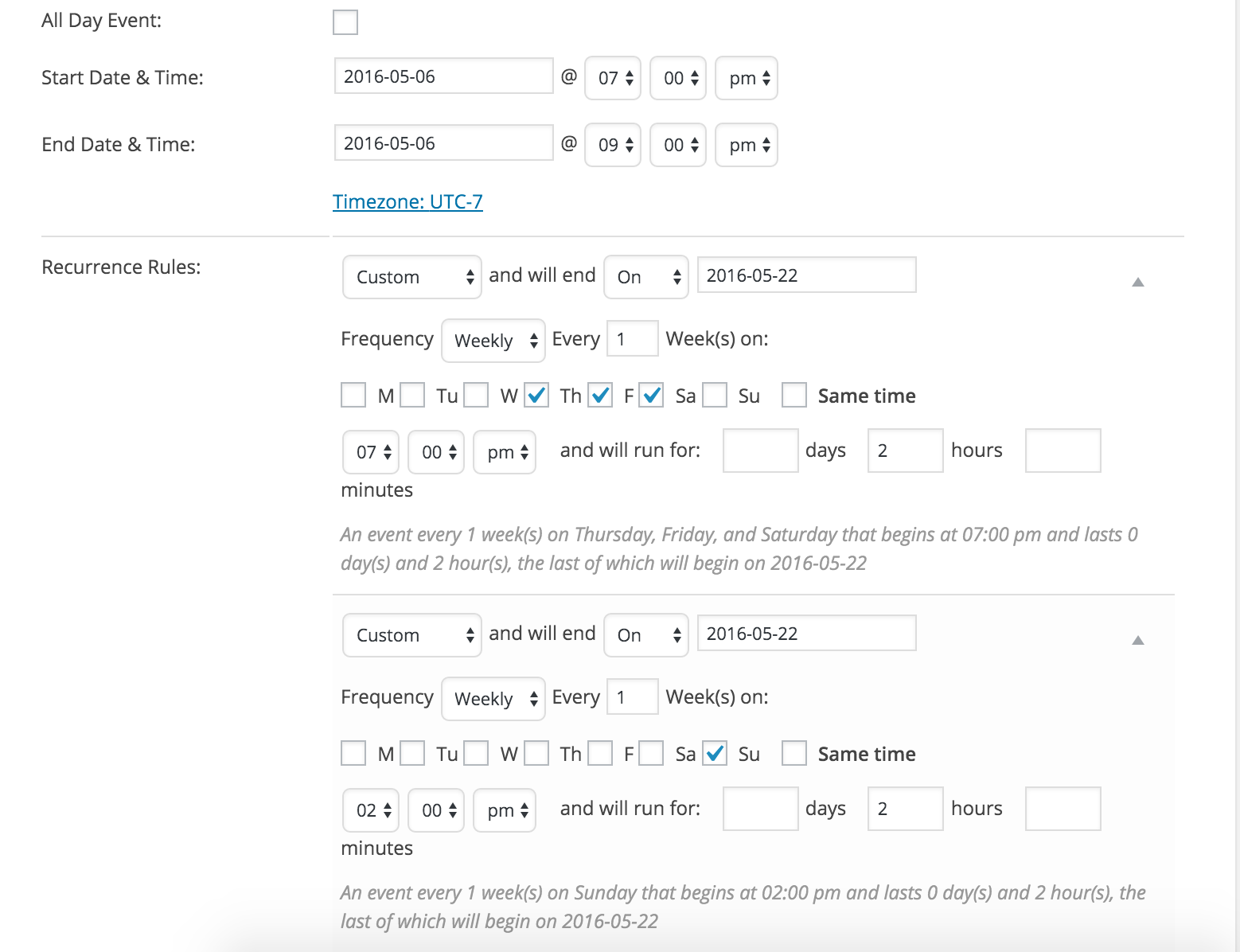
You may want to double-check what you have for your sitewide timezone settings found under your WP Settings > General. Next, you want to check your timezone settings founder under your Events > Settings > General.
Let me know if this helps and happy Earth Day!
April 22, 2016 at 8:54 am #1105927ParticipantThis reply is private.
April 25, 2016 at 6:23 pm #1106923ModeratorHello and welcome back,
What do you have set for your WP Settings > General and Events > Settings > General? Also, can you set up a new set of recurring events with the exact rules I have and let me know if you’re able to get the times working properly?
Thanks for working with me and I look forward to hearing back.
April 26, 2016 at 6:08 am #1107043ParticipantThis reply is private.
April 26, 2016 at 6:28 pm #1107480ModeratorHey Melissa,
Welcome back. After more investigating, I think it’s best you set your WordPress Timezone setting under Settings > General to UTC-5. I just created another set of recurring events with the rules I posted above and the times are displaying properly for me. Let me know if that helps.
April 27, 2016 at 5:52 am #1107635ParticipantThis reply is private.
April 27, 2016 at 10:22 am #1107795ModeratorHi Melissa,
Can you please create a new event following these exact instructions? Please do the settings first, then create the event.
1) Set your WordPress timezone settings to UTC-5.
2) Set your Timezone settings under Events > Settings > General to “Use the sitewide timezone everywhere” for the Timezone mode setting.
3) Create a new recurring event with the exact rules seen in the screenshot I provided on April 22nd.
Let me know if the event times work properly. If you still have troubles, would it be possible to get a copy of you database? Keep me updated with your progress.
April 27, 2016 at 11:26 am #1107822ParticipantThis reply is private.
April 28, 2016 at 3:32 pm #1108519ModeratorHi Melissa,
I’m glad to hear the times are displaying as desired. We are aware of the strange behavior when using city/state timezones and I’m in the middle of testing for a concrete bug report to hand over to the developers. Once I do that, I’ll link this thread to the logged bug report.
I apologize it took so long to narrow down the source of conflict! Thanks for your patience and stay tuned to your wp-admin and theeventscalendar.com/blog for maintenance release info. Have a good upcoming weekend!
-
AuthorPosts
- The topic ‘Recurring Events Rules Not Working (URGENT)’ is closed to new replies.