

Forum Replies Created
-
AuthorPosts
-
Hunter
ModeratorHello and welcome back,
I wish I had a better answer, but I’m not really sure as to why the fieldsets aren’t working properly for you. I did some more testing and was able to update my fieldset as desired. Additionally, I still haven’t seen any similar logged bug reports pop up :-/
The way I was able to update my ticket fieldset was by visiting Events > Ticket Fieldsets and made my changes there. When I went to add/edit an event, the changes were reflected in the ticket fieldsets as desired.
To help better address your second question, can you send over a screenshot of what you currently have for the checkbox fieldset which relates to the T & C page?
Again, I wish I could help figure out why the fieldsets aren’t updating properly, but at this point I’m not sure there’s much more I can do without being able to reproduce the issue.
I hope this helps and please respond back with your screenshot. Take care and have a good Monday.
Cheers!ModeratorHey Ruud,
Thanks for the response and patience while I got back to you. I confirmed the pagination is not working properly on the venue pages, so I’ve gone ahead and logged a bug so we can get this resolved. Stay tuned to your wp-admin and theeventscalendar.com/blog for maintenance release info and thanks again for your patience.
Take care!
ModeratorSorry for the misunderstanding,
We don’t have that feature available at this time, but it is something worth adding to our UserVoice Feature Ideas if it hasn’t been submitted already.
I hope this helps and have a good week.
Cheers!ModeratorWelcome back,
Can you update to the latest versions (4.2.1) and let me know if the issue still occurs? We had a fix for a known bug that could have been causing the problem you’re experiencing. If you’d still like to proceed with a refund, visit our Refunds page and we’d be happy to get you taken care of.
Thank you for the patience on the matter and have a good rest of your day.
Cheers!June 27, 2016 at 12:10 pm in reply to: Can you change the url associated with our License key #1132526ModeratorSorry for the delayed response,
You can go ahead and do it – it really shouldn’t cause any problems. If you’d like, do a backup prior to switching the ‘License URL’ just in case.
Again, thank you for your patience while I responded and have a good week!
ModeratorThanks for keeping me updated with your progress and I’m glad to hear everything is working out! Feel free to open a new thread if you have any more questions or concerns. Have a great weekend.
Cheers!
ModeratorNo worries! Glad to hear you’ve at least narrowed down the source of conflict. I’ll close this thread out but feel free to open a new one if anything else comes up. Take care and have a great weekend!
ModeratorWelcome back,
Thanks for providing that info 🙂
Unfortunately the first step here is going to require running through the Testing for conflicts guide. We aren’t typically able to troubleshoot server problems for customers per forum rules. I wish I had a better answer but we can’t investigate until that has been done.
One last idea I can think of would be you’re dealing with a caching conflict from WP Super Cache (if it’s not your theme causing the conflict). These two articles might help:
With that said, I’ll close the thread out and if/when you’re ready to troubleshoot this more thoroughly, feel free to open a new thread and we’d be happy to help. Take care and enjoy you weekend.
Cheers!
ModeratorHi Paula,
Welcome back. I can assure you this is not a widespread problem and is more than likely related to your theme and/or another plugin you’re currently using. You can see a number of different sites using our plugins and check them out on your IOS device to confirm what I’m saying.
I know it’s not the ideal situation to have to deactivate all other plugins and revert back to the default WP theme, but it’s always the first step. Thanks for understanding and have a good day.
Cheers!
ModeratorThis reply is private.
ModeratorGlad to hear you’re on the right track! To get to your calendar view, you can select the ‘View as’ dropdown and select calendar (see first screenshot below) or you can enable and set the default view to ‘Calendar’ by visiting Events > Settings > Display (see second screenshot below).
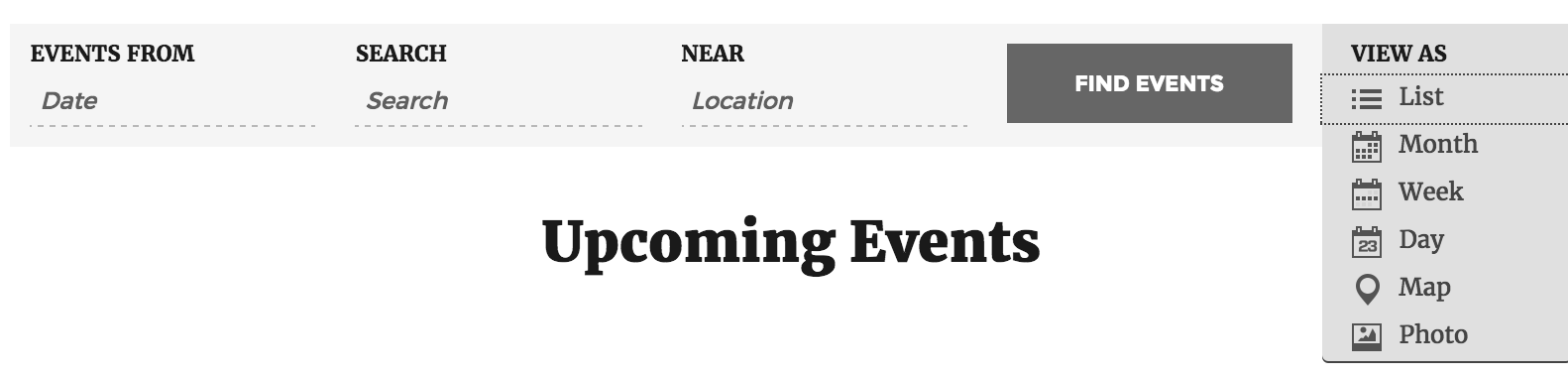

Let me know if this helps.
Cheers!ModeratorWelcome back,
Thank you for sending that information over. I attempted to visit the link provided but the connection timed out :-/
Can you please confirm the issue still occurs when reviewing our Testing for conflicts guide?
Reason I ask is because we don’t have any logged bugs of users reporting similar issues and I’m unable to replicate it, so I just like to confirm it’s not a theme and/or plugin conflict.
Please keep me updated and have a good day.
Cheers!ModeratorHi Nalini 🙂
Thanks for reaching out! We are unfortunately unable to provide support through our Pre-Sales forum channel, but we’re more than happy to help on The Events Calendar WordPress.org support forums!
If you hold a PRO license, simply log into your account to get assistance through the PRO forums.
My apologies we can’t be of more assistance here and have a great rest of your day!
ModeratorHey Carleen,
Welcome to our premium support forums! Sorry to hear you’re not able to get the fieldset feature working as needed. Would you mind sending over a link to an event giving you troubles and also include your System Information as a private reply. I’ll take a look and get back to you with my feedback.
Again, welcome to the forums and thank you for choosing us for your event & ticketing needs.
Cheers!ModeratorHello,
We are unfortunately unable to provide support through our Pre-Sales forum channel, but you can head over to The Events Calendar WordPress.org support forums for assistance and answers.
If you have a PRO license, you can log into your account and get assistance through the PRO forums.
Thanks for understanding and good luck resolving your issue. Have a good day!
-
AuthorPosts