

Forum Replies Created
-
AuthorPosts
-
Hunter
ModeratorHi and welcome back 🙂
Sorry to hear about the issue. If you jump to step #7 on our ‘Configuring Eventbrite Tickets’ Knowledgebase article, it states you’ll need to copy the App Key and Client Secret (provided by Eventbrite after creating your key) and paste them into their corresponding fields on your WordPress site under Events > Settings > APIs.
Please let me know if this helps get everything working properly. Thank you for reaching out and have a great Thursday.
Cheers!ModeratorHey Earle,
Welcome back. I just did a quick check on the status of your licenses and it appears your PRO purchase was recently refunded (7/26/16). This is the reason you’re getting the expired license notification.
In regards to the Filter Bar plugin: it does have a valid license and is currently installed/activated on http://abe.508.myftpupload.com/. If you need to change which URL the Filter Bar plugin is running on, this article explains how to do just that.
Let me know if I’ve answered your questions and have a good rest of your day.
Cheers!July 27, 2016 at 2:44 pm in reply to: Hiding events archive breadcrumps & Upcoming>category name on category page ? #1144865ModeratorHey Thomas,
Thank you for keeping me updated and I’m glad to hear you got the issue resolved! Feel free to open a new thread if you come across anything else. Have a good upcoming weekend!
Cheers 🙂
ModeratorHey Eduardo,
Yea I’m definitely stumped as to why this issue is occurring. If you open ‘Inspect’ and look at the error console, you’ll see it’s having trouble calling admin-ajax.php. Can you try checking/unchecking the ‘Use Javascript to control date filtering’ option under Events > Settings > General? (see screenshot below)

You could disable Ajax all together by adding this snippet to your theme’s functions.php file, though this could cause other concerns.
As previously mentioned, this conflict might be something you need to hire a developer to address due to our Forum Guidelines.
Thanks for understanding and take care.
Cheers!ModeratorHey Antonios,
Thank you for reaching out! I admittedly get confused easy by all of this, so no worries! In order for Event Tickets Plus to work properly, you do need to have Event Tickets installed and activated on your site. You are also correct that The Events Calendar (free version) is also required, though Events Calendar PRO (paid version) is not required.
I hope I’ve cleared the air on the matter and let me know if you have any more questions.
Cheers!ModeratorHey Earle,
Thank you for reaching out. Does the plugin still have trouble updating with the default WP theme active and deactivating all other plugins other than ours? Please refer to our Testing for conflicts guide and reply back with what you find out.
Another useful piece of material that could come in handy is our ‘Finding and inputting your license key‘.
Keep me updated and have a great day.
Cheers!ModeratorHey Jason,
Welcome to the forums and thank you for choosing PRO! I visited the link provided but an events calendar displayed as normal rather than a white screen. If you’re still having troubles, try setting ‘WP_DEBUG’ to ‘true’ on your wp.config.php file and reply back with any errors displaying at the top of your main events page (on your custom theme, not the default theme). You can also view errors in your browser console by right-clicking your mouse and open ‘Inspect’ when viewing the blank events page.
One handy resource I always like to recommend our new users read through is the New User Primer. It’s filled with all kinds of useful information and ways to troubleshoot basic problems.
With that said, I do want to point out that theme conflicts are outside the scope we’re able to cover, but let me know the status of your issue and we’ll go from there. Thanks again and have a good week.
Cheers!
July 26, 2016 at 7:09 pm in reply to: Site Crash With Event Calendar Tickets 4.2.3 and Event Ticket Plus 4.2.3 #1144459ModeratorHello and welcome to the forums 🙂
Can you provide any more information as to what series of events leads the site to crash? If you haven’t already, I recommend taking a look at our ‘New User Primer: Event Tickets & Event Tickets Plus‘ article. Also, I see you checked ‘Yes’ to reverting back to the default WP theme and deactivating all other plugins than ours, but can you please confirm this?
Have you tried deactivating and deleting both Event Tickets and Event Tickets Plus, then reinstalling them manually? Please make sure you have the default WP theme active and all other plugins deactivated when attempting this. Also, make sure to do a backup though this process shouldn’t jeopardize your saved event data.
Thank you for choosing Event Tickets Plus and have a wonderful day.
Cheers!July 26, 2016 at 7:00 pm in reply to: Hiding events archive breadcrumps & Upcoming>category name on category page ? #1144458ModeratorHello and welcome back 🙂
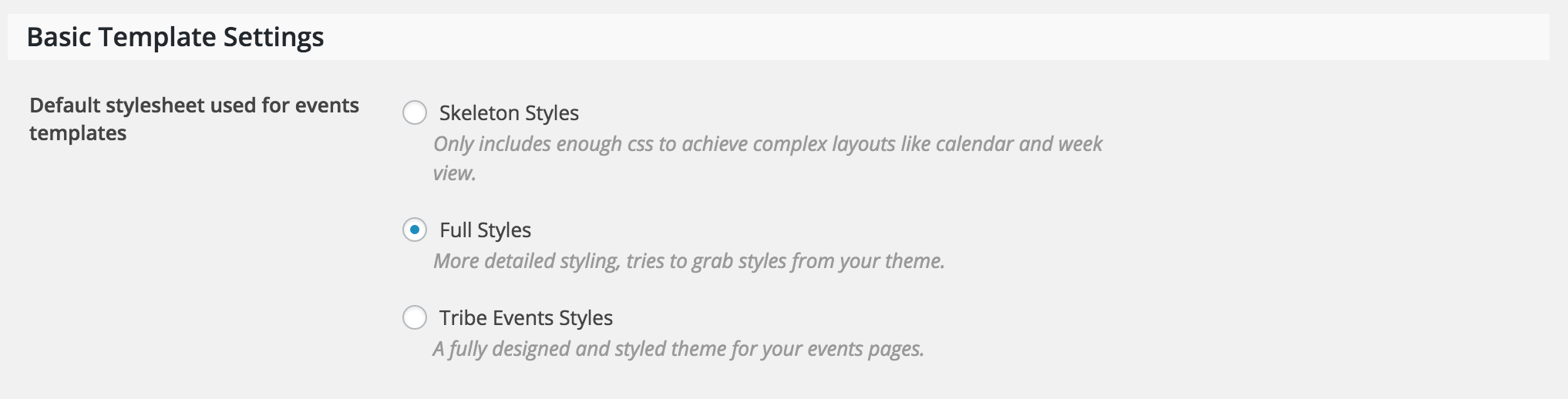
The first thing I’d try is visiting Events > Settings > Display and try different options under ‘Basic Template Settings‘ (see screenshot below)
If none of those options produce desirable results, you can always try “hiding” what you don’t want displayed via CSS. This YouTube Video has saved me on numerous occasions.
If you’d rather completely remove the code, the best approach would be a template override as explained in our Themer’s Guide. If you need help locating any specific files, let me know and I’d be glad to help.
I hope one of these solutions does the trick for you and best of luck with the customizations. Take care and enjoy your day.
Cheers!ModeratorWelcome back,
Thank you for sharing that info with me. Can you temporarily revert back to the default WP theme and deactivate all other plugins, then try updating our plugins to the latest versions as explained in our Testing for conflicts guide? The issues you’re experiencing are most likely related to outdated versions.
Let me know how it goes and have a great evening.
Cheers!ModeratorHey Eduardo,
I just noticed you’re running an outdated version of PRO on http://whapens1.whapens.com/. Can you update to the latest version and let me know once that’s done and I’d be happy to take another quick look? I also attempted to visit the testing site but it was unreachable.
Unfortunately, this level of support is beginning to extend beyond what we’re able to cover due to the inability to reproduce the issue and no logged bug reports of confirmed bugs similar to what you’re experiencing. With that said, you may need to start look into hiring a developer who can further troubleshoot the problem. We’ve got a list of customizers that can help out.
Reply back with a working link if possible and like I said, I’d be happy to take another look. Have a great day and thanks for the patience and understanding on the matter!
ModeratorHey Andreas,
I truly apologize for not catching this earlier, but it appears you don’t have Event Tickets installed and activated on your website. This is required to run Event Tickets Plus, which is installed on your website.
If you refer to the ‘New User Primer’ articles in one of my previous replies, each provides step-by-step instructions on how to install/activate the plugins, what their requirements are, and common issues with simple remedies.
For example, if you’re faced with a notice similar to:
To begin using The Events Calendar: Community Events Tickets, please install the latest versions of The Events Calendar, Community Events, Event Tickets, and Event Tickets Plus.
It usually means you don’t have one or more plugins installed that are required for other plugins to work (let me know if this makes sense). Please install and active Event Tickets (free download) from the WordPress.org repository and let me know what the results are.
In regards to the Filter Bar not working properly, I did another check on your site and it looks like it’s working for me! Let me know if that issue has been resolved.
I appreciate your patience while we’ve troubleshooted these issues and please rest assured we’ll do everything in our power to get everything squared away. Take care and have a good Tuesday 🙂
July 26, 2016 at 12:41 pm in reply to: "Upcoming Events Events" in Events page browser title #1144347ModeratorHey Joelle,
I’ve been doing this for almost a year and am always finding new articles and resources, so don’t feel too bad about it! If anything else comes up, feel free to reach out. Have a great rest of your week and thanks for everything!
Cheers 🙂
ModeratorHey Melissa 🙂
You got it! Pat yourself on the back and demand a raise! I’ll close this thread out but if you need any more help, feel free to reach out.
Take care and have a great week.
Cheers!ModeratorHello and welcome back 🙂
It looks like you just need to update to the latest version of PRO (4.2.3) to match the latest version of the free version (also 4.2.3). You might need to do the updates manually. As always, we recommend doing a backup prior to updating to ensure you don’t lose any data, though simply updating our plugin shouldn’t delete anything.
Let me know how it goes and if you have any more questions.
Cheers! -
AuthorPosts