

Forum Replies Created
-
AuthorPosts
-
Hunter
ModeratorHey Daniel,
Thank you for posting. That doesn’t sound like typical behavior, so let’s see if we can narrow down the source of conflict. I see you checked ‘Yes’ to reverting back to the default theme and deactivating all other plugins other than ours, but can please confirm this? And would you also send over your System Information as a private reply?
Thanks again and have a good Monday.
Cheers!ModeratorHey Alexander,
We appreciate you choosing PRO and welcome to the premium forums! I just did a quick test of the snippet from our ‘Add Next/Previous links to empty months’ Knowledgebase article on my version of Divi (2.7.5) and it worked fine for me. (see screenshot below)

Try adding the following code to the bottom of your theme’s functions.php file and visit your month view to see if it works properly. Let me know how it goes and thanks again for choosing PRO!
/**

 * Allows visitors to page forward/backwards in any direction within month view

 * an "infinite" number of times (ie, outwith the populated range of months).

 */
if ( class_exists( 'Tribe__Events__Main' ) ) {
class ContinualMonthViewPagination {
public function __construct() {
add_filter( 'tribe_events_the_next_month_link', array( $this, 'next_month' ) );
add_filter( 'tribe_events_the_previous_month_link', array( $this, 'previous_month' ) );
}public function next_month() {
$url = tribe_get_next_month_link();
$text = tribe_get_next_month_text();
$date = Tribe__Events__Main::instance()->nextMonth( tribe_get_month_view_date() );
return '' . $text . ' <span>»</span>';
}public function previous_month() {
$url = tribe_get_previous_month_link();
$text = tribe_get_previous_month_text();
$date = Tribe__Events__Main::instance()->previousMonth( tribe_get_month_view_date() );
return '<span>«</span> ' . $text . ' ';
}
}new ContinualMonthViewPagination;
}
ModeratorWelcome back,
Thanks so much for setting up that test domain and sending over the link. Strange it’s happening in both instances! What errors display at the top of your page when you select a date from the datepicker after setting WP_DEBUG to ‘true’ on your wp.config.php file?
ModeratorThis reply is private.
ModeratorWelcome back and thanks for the update 🙂
Is the any way you could set up a temporary subdomain with only our plugins installed and the default WP theme active? I see some ajax errors being displayed and am wondering if it’s related to your installation of WordPress. Please note that Event Rocket is not a Modern Tribe plugin, so please leave that out of the equation for the testing site.
Let me know if that’s a possibility and if so, please send over a link if/when it’s up and running. Take care and have a good weekend!
July 22, 2016 at 2:28 pm in reply to: "Upcoming Events Events" in Events page browser title #1143214ModeratorGlad to hear we’re on the right track 🙂
The first snippet on this article should finally do the trick. Let me know if you have any specific questions and I’d be happy to answer. Have a great weekend and thanks for the patience while we figure this out!
ModeratorHi Marylu!
Welcome to the forums 🙂
It looks like you might be experiencing a theme and/or plugin conflict. Would you mind running through our Testing for conflicts guide to see if we can narrow down the source? Let me know what you find and have a great Friday.
Cheers!
ModeratorHey Eduardo,
Welcome back 🙂
I took a look at your site but it looks like you might be experiencing a theme and/or plugin conflict. I see you checked ‘Yes’ to both deactivating all other plugins and reverting back to the default WP theme as explained in our Testing for conflicts guide, but can you please confirm this?
To answer the following question, please visit Events > Settings > General and scroll down to Map Settings. You can change the distance to whatever you’d like. (see screenshot below)
One more thing: If I search, for example, “events in New York”, Metlife Stadium isn’t just in NY, is in East Rutherford, that it’s very close. I want the search result shows events near New York. Is there any option for that?
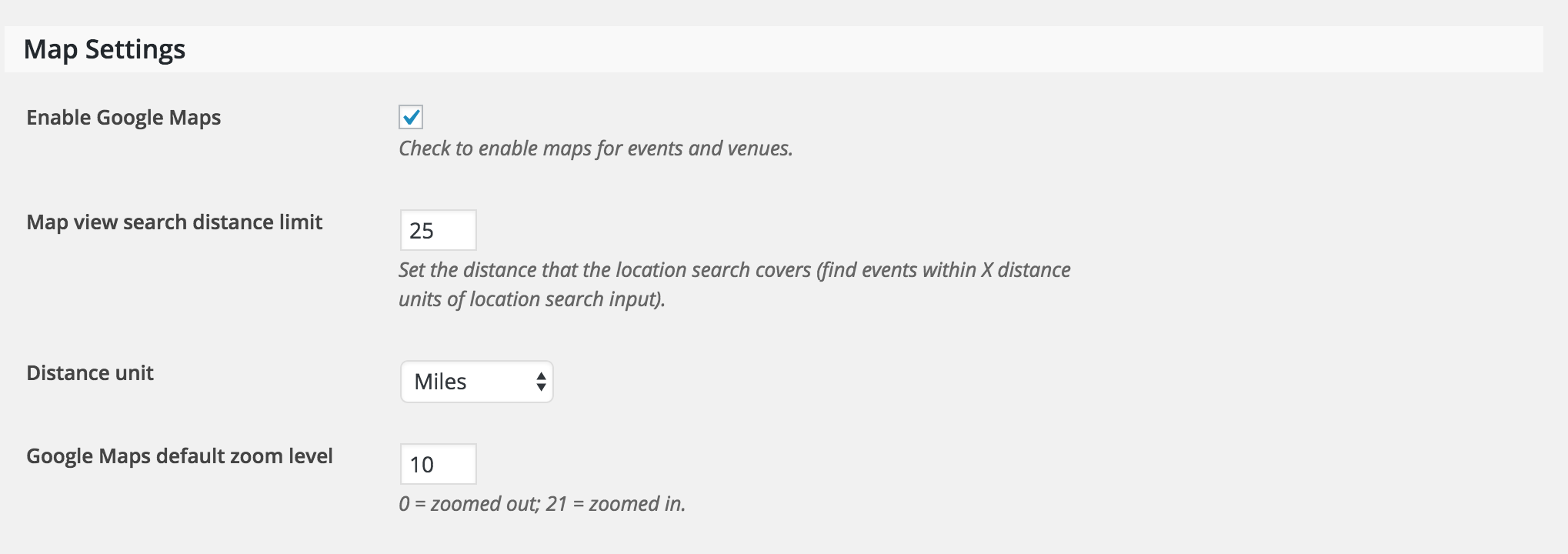
Let me know how it goes and have a good Thursday.
Cheers!ModeratorWelcome back,
Don’t feel silly! There are tons of features and settings, so it’s easy to miss them. I’ll close this thread out but please let me know if you have any more questions or concerns.
Have a good weekend!
July 21, 2016 at 2:32 pm in reply to: "Upcoming Events Events" in Events page browser title #1142719ModeratorHey Joelle,
If you wouldn’t mind, check out the snippet near the bottom of the ‘Altering or removing titles on calendar views‘ article and let me know if it helps. I just tested it on my local environment and was able to alter the browser title as desired.
Keep me posted and have a good Thursday.
Cheers!ModeratorHey Will,
Glad to hear you you got the issue resolved. Thanks for letting me know and feel free to create a new thread if anything else pops up. Take care and enjoy the upcoming weekend!
ModeratorHi and welcome back,
Thank you for sending over the results from your testing. Can you send over your System Information as a private reply? I just tried reproducing the issue on my local environment using the default WP theme, The Events Calendar, Events Calendar PRO, and the Filter Bar plugin active but did not experience the same behavior.
Thanks again and have a good Wednesday.
Cheers!ModeratorWelcome back 🙂
Thank you for sharing your System Information with me. Can you be a bit more specific as to which problems are still occurring? If you are still having trouble updating, you can try downloading the plugins in .zip format, extracting them, and uploading manually as explained here.
Keep me posted and thanks again.
Cheers!ModeratorHello 🙂
My apologies for not responding earlier, I was conversing with a few other team members. If you edit one of those recurring events, is there a notice at the top of the screen informing you that the instances are still being generated?
Let me know and we’ll continue investigating. Take care and sorry again for not responding sooner!
ModeratorWelcome back!
The vertical pipe is outdated code, so it did serve a purpose at one time. I’m glad you’ve got it hidden for the time being and please keep an eye on the maintenance notes for an improvement in an upcoming release.
I’ll close this thread out but please feel free to open a new thread if anything else comes up. Enjoy your upcoming weekend!
-
AuthorPosts