
Home › Forums › Calendar Products › Events Calendar PRO › Serching by location
- This topic has 16 replies, 3 voices, and was last updated 10 years, 2 months ago by
Hunter.
-
AuthorPosts
-
July 21, 2016 at 10:57 am #1142595
Eduardo
ParticipantHi!
I’m creating http://www.whapens.com. It will be a massive event searcher. I have found that i can’t search by location. I wanna select the day and the location and then the plugin show me all the events of that day from that city, but it doesn’t work, you can try it. Do I have anything wrong in mi web?
One more thing: If I search, for example, “events in New York”, Metlife Stadium isn’t just in NY, is in East Rutherford, that it’s very close. I want the search result shows events near New York. Is there any option for that?
Thanks 🙂
July 21, 2016 at 2:43 pm #1142725ModeratorHey Eduardo,
Welcome back 🙂
I took a look at your site but it looks like you might be experiencing a theme and/or plugin conflict. I see you checked ‘Yes’ to both deactivating all other plugins and reverting back to the default WP theme as explained in our Testing for conflicts guide, but can you please confirm this?
To answer the following question, please visit Events > Settings > General and scroll down to Map Settings. You can change the distance to whatever you’d like. (see screenshot below)
One more thing: If I search, for example, “events in New York”, Metlife Stadium isn’t just in NY, is in East Rutherford, that it’s very close. I want the search result shows events near New York. Is there any option for that?
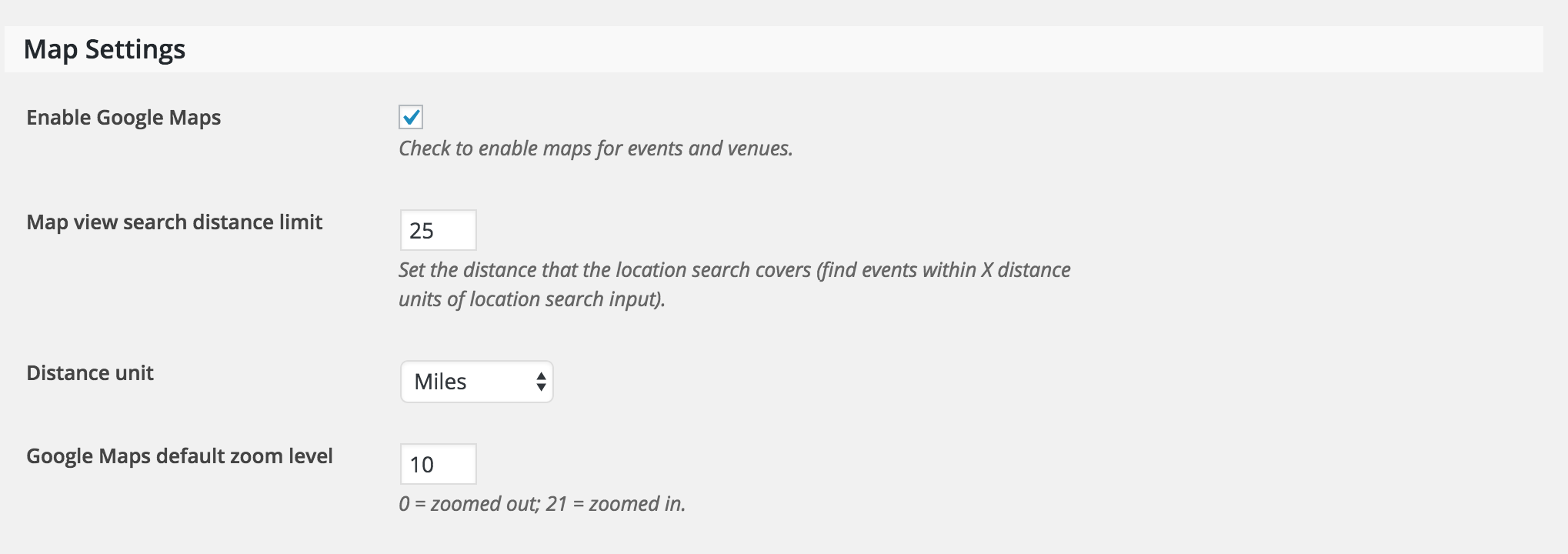
Let me know how it goes and have a good Thursday.
Cheers!July 22, 2016 at 12:04 pm #1143119ParticipantHi mate!
Thanks for your help. ¡You made my day with the map tip!
I checked again without plugins and with the Twenty Fifteen theme. Problem still persists. I’ll leave that theme for the moment. Any idea?
Thx 🙂
July 22, 2016 at 12:06 pm #1143120ParticipantThis reply is private.
July 22, 2016 at 3:41 pm #1143255ModeratorWelcome back and thanks for the update 🙂
Is the any way you could set up a temporary subdomain with only our plugins installed and the default WP theme active? I see some ajax errors being displayed and am wondering if it’s related to your installation of WordPress. Please note that Event Rocket is not a Modern Tribe plugin, so please leave that out of the equation for the testing site.
Let me know if that’s a possibility and if so, please send over a link if/when it’s up and running. Take care and have a good weekend!
July 23, 2016 at 4:49 am #1143311ParticipantHello Hunter,
I created a subdomain, just with the default theme and the Events Calendar and Events Calendar Pro plugins:
http://whapens1.whapens.com/?post_type=tribe_events
But it still doesn’t work with location search. I don’t know what to do :S
July 23, 2016 at 4:49 am #1143312ParticipantThis reply is private.
July 25, 2016 at 10:55 am #1143722ModeratorWelcome back,
Thanks so much for setting up that test domain and sending over the link. Strange it’s happening in both instances! What errors display at the top of your page when you select a date from the datepicker after setting WP_DEBUG to ‘true’ on your wp.config.php file?
July 25, 2016 at 11:42 am #1143768ParticipantThis is what appears in WordPress admin:
Notice: Tribe__Events__Main::getOption is deprecated since version 4.0! Use Tribe__Settings_Manager::get_option instead. in /home/whapensc/public_html/wp-includes/functions.php on line 3658
And nothing happens in the website when I pic a date in the website. Still I can’t search by location :S
Thanks for your help
July 26, 2016 at 2:26 pm #1144393ModeratorHey Eduardo,
I just noticed you’re running an outdated version of PRO on http://whapens1.whapens.com/. Can you update to the latest version and let me know once that’s done and I’d be happy to take another quick look? I also attempted to visit the testing site but it was unreachable.
Unfortunately, this level of support is beginning to extend beyond what we’re able to cover due to the inability to reproduce the issue and no logged bug reports of confirmed bugs similar to what you’re experiencing. With that said, you may need to start look into hiring a developer who can further troubleshoot the problem. We’ve got a list of customizers that can help out.
Reply back with a working link if possible and like I said, I’d be happy to take another look. Have a great day and thanks for the patience and understanding on the matter!
July 26, 2016 at 3:04 pm #1144405ParticipantHello Hunter,
Sorry, I deleted the subdomain. I have created it again, with the 4.2.3 version of the Pro plugin.
http://whapens1.whapens.com/?post_type=tribe_events
There are no events in this subdomain, but the problem still remains. If I search by name, it works. If I write something in the location box, it doesn’t. I don’t know what’s the problem, it’s very frustrating. It’s just the last version of WordPress with the 2 plugins (normal and Pro versions)…
July 26, 2016 at 10:26 pm #1144494ParticipantThis girl had the same problem a year ago. It seems she’s running the normal plugin now:
https://wordpress.org/support/topic/location-search-doesnt-work-at-all
July 27, 2016 at 12:06 am #1144506ParticipantEdit!
I have found this thread:
” jQuery was loading after your scripts in the header. I change the loading location and that seemed to fix the issue. Thanks”
So now I have to learn how to try that 😀
July 27, 2016 at 2:24 pm #1144862ModeratorHey Eduardo,
Yea I’m definitely stumped as to why this issue is occurring. If you open ‘Inspect’ and look at the error console, you’ll see it’s having trouble calling admin-ajax.php. Can you try checking/unchecking the ‘Use Javascript to control date filtering’ option under Events > Settings > General? (see screenshot below)

You could disable Ajax all together by adding this snippet to your theme’s functions.php file, though this could cause other concerns.
As previously mentioned, this conflict might be something you need to hire a developer to address due to our Forum Guidelines.
Thanks for understanding and take care.
Cheers!July 28, 2016 at 7:48 am #1145098ParticipantI don’t know what I did but IT WORKS!!! It [expletive] works!!! I’m so happy… thanks a lot for your help. I tried a lot of combinations and now It works. I checked and unchecked a lot of options, saving and watching the results.
For now I have unchecked the ‘Use Javascript to control date filtering’. I don’t know it that could affect anything but it seems everything is OK.
You can close this thread. Thanks a lot for your help and patience 😀
-
AuthorPosts
- The topic ‘Serching by location’ is closed to new replies.