

Forum Replies Created
-
AuthorPosts
-
Hunter
ModeratorThank you for the update and I’m glad to hear everything has been resolved. Please feel free to create a new thread if you have any more questions or concerns. Have a great weekend!
ModeratorWelcome back,
I’m glad to hear you’ve got the issue resolved! Regarding your second request, while that is not a default feature at this time, I can see the value in having the distance feature included in the main Search bar. With that said, the best way to go about getting that included in an upcoming feature release would be to visit our UserVoice Feature Ideas and submit it if it hasn’t been already.
If it’s something you absolutely have to have, we’ve got a list of customizers that could get that going for you.
I’ll close this thread out for the time being, but please don’t hesitate to open a new thread if you come across anymore questions or concerns. I would also appreciate if you rated this support thread based on your experience 🙂
Have a good weekend and thanks again for everything.
Cheers!ModeratorThank you for the confirmation!
Would you be able to share a copy of the .csv file you’re having issues with as a private reply? I’d be happy to try and replicate the issue to see if it’s on our end or yours. Either way, we’ll get it figured out 🙂
I look forward to your response and have an excellent weekend.
Cheers!ModeratorHi Pascha,
Thanks for sending over the screenshot. Are the events that aren’t importing properly set to ‘Private’ on Eventbrite? If so, this could be the reason they’re not importing. And the post you’re referring to is over 3 years old, so let’s try and stay away from that as it’s more than likely irrelevant at this point.
From my experiences setting up this plugin on multiple occasions, I don’t remember any ‘User Key’ you’re referring to. You simply have to ensure you have a valid license for our Eventbrite plugin (which you do) and it’s entered under your WordPress Events > Settings > Licenses. Then set up an Eventbrite account. Visit your Eventbrite Account Settings > App Management, create a New App, follow steps 4-6 from this article, copy/paste the App Key and Client Secret into the appropriate fields on your WP site under Events > Settings > APIs.
You need to be doing all this testing on the default WP theme and with no other plugins active other than ours to ensure you’re not experiencing a theme/plugin conflict. One other useful piece of knowledge is our ‘New User Primer: Eventbrite Tickets’ article. If you’re still experiencing the issue, you might need to look into hiring a developer to help out. We have a reputable list of customizers you can check out.
I know this isn’t the ideal situation, but seeing I’m unable to replicate the issue and we don’t have any logged bugs similar to what you’re experiencing, it’s more than likely a conflict in your dev environment which we’re not able to support per Forum Rules.
Thank you for understanding and keep me updated with your findings. Have a great weekend.
Cheers!ModeratorWelcome back,
I just attempted to import the events you shared in your previous comment and was able to successfully import them.
Make sure when attempting to import a single event, this one for example: https://www.facebook.com/events/308212756186878, that you take the Facebook event ID (which is 308212756186878) and enter that into the ‘Import events by their Facebook ID:’ box found under Events > Import > Facebook. (see screenshot below)
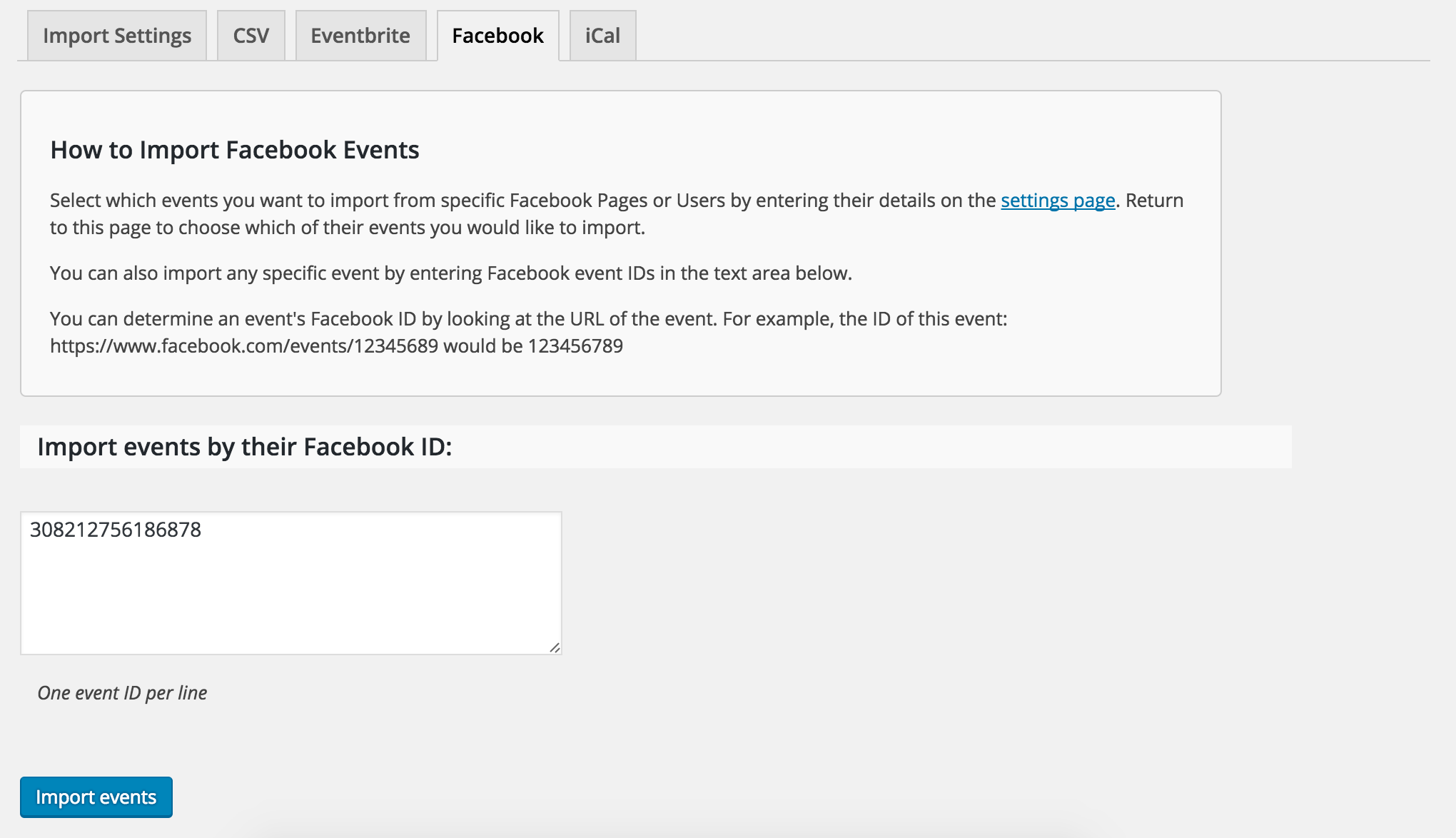
For more clarification, our ‘New User Primer: Facebook Events’ article is a great resource to refer when getting hung up in these instances. Let me know if this answer helps and have a great weekend!
ModeratorHey Robin,
Thank you for the update. So I think I’ve got a good idea of what’s going on. You can disregard my previous comment regarding ‘options found under Events > Settings > General.’ These options are only available with the PRO calendar plugin.
I took a look at your System Information (thank you for sharing that in the initial thread creation) and noticed you’re running an outdated version of Community Events. If you’re able, can you update to the latest version (4.2.3)? This may have something to do with the events not being saved properly. And not to flip-flop on my previous statement, but the expired license could have also been a contributing factor to the “missing” events.
To see if the “missing” events are stored in your database, you’ll need to access your MySQL database. If you’re on shared hosting such as GoDaddy or HostGator, you can access your database via your cPanel. Look for ‘phpMyAdmin’ which should take you to your databases. (see screenshot below)
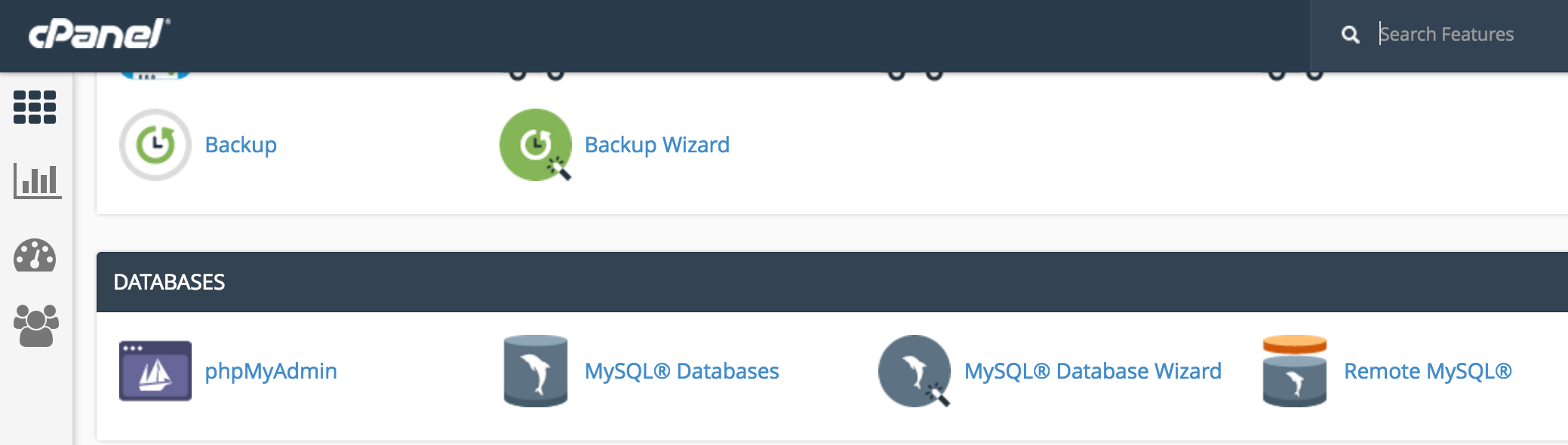
From there, enter your ‘wp_posts’ table. The events ‘post_type’ are stored as ‘tribe_events’. You can then check to see if the missing events are hopefully saved in your database.
Let me know what you discover and we’ll take things from there. Have a good weekend.
Cheers!ModeratorHey Simon,
Thank you for getting back to me. Do those errors still occur when you have every other plugin other than ours deactivated and you’ve reverted back to the default theme as outlined in our Testing for conflicts guide? Reason I ask is because the errors displayed look like they’re coming from the Exec-PHP plugin rather than any of our plugins.
Try testing again but please refer to the Testing for conflicts guide before doing so and let me know the results. Thanks again and have a good weekend!
ModeratorHi and welcome back,
I did a quick check of our logged bug reports and don’t see anything resembling what you’ve described. Before I get to testing, would you mind confirming the issue still occurs after reviewing our Testing for conflicts guide?
Thank you for reaching out and have a wonderful Friday!
Cheers 🙂ModeratorHey Ashleigh,
Welcome back and thank you for posting! Would you mind reviewing our Testing for conflicts guide to see if the issue still occurs?
Let me know how it goes and we’ll continue troubleshooting from there. Have a great Friday and thanks for choosing PRO!
Cheers 🙂
ModeratorHey Amanda,
I took a quick look and did my best to solve the problem, but we’re limited on what we’re able to support and this unfortunately extends beyond our Forum Guidelines. When viewing the ‘Month’ view, the opacity for dates that have passed and the next month’s dates are turned down to 0.5, so that might have something to do with it.
It looks like you’re using The Events Calendar Category Colors, so I’d recommend contacting the authors to see if they have any insight on the matter. If you still can’t get it resolved, we have a list of customizers that might be able to help.
Thank you for understanding and best of luck. Have a great weekend!
Cheers!ModeratorWelcome back and sorry for the confusion. Can you send a screenshot of what you’re describing when you say:
“but this user key is something completely different.”
Also, does this issue still occur after reviewing our Testing for conflicts guide? We need to rule out the potential for a theme and/or plugin conflict, so let me know if you’re able to replicate the problem with the default theme and only our plugins active.
Thanks for the update,
Cheers!ModeratorHey Simon,
Thank you for reaching out. Do any errors display at the top of your screen when you set ‘WP_DEBUG’ to ‘true’ on your wp-config.php file? Please refer to our Testing for conflicts guide when doing so. If you see any errors, can you send them over? Can you also include your System Information as a private reply?
Thanks again and have a good day.
Cheers!ModeratorRobin,
I forgot to ask, can you reply back with what you have entered in the following options found under Events > Settings > General? (see screenshot below)
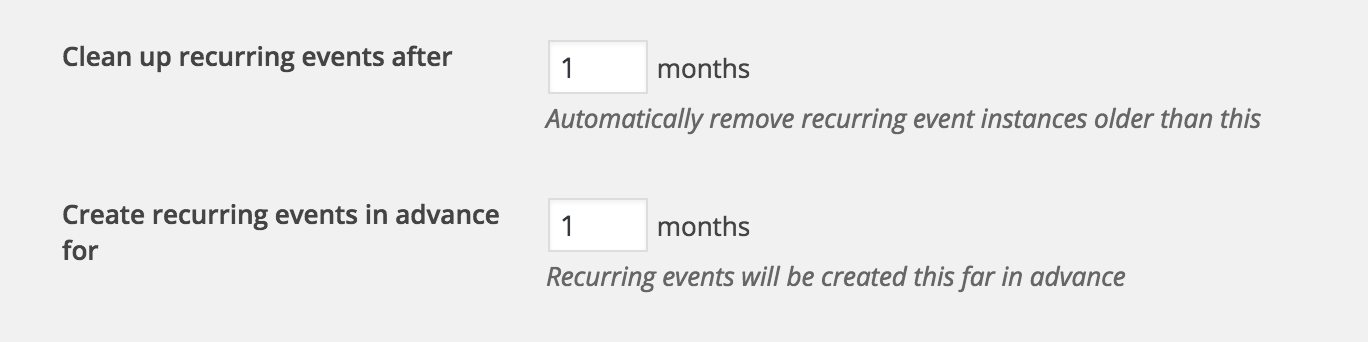
Thanks again!
ModeratorHey Robin,
Welcome back and thanks for reaching out! Sorry to hear about the missing events. Do you have the ability to check the database to see if the events are still stored there? Also, what type of events aren’t displaying (single events or recurring events)? The expired license doesn’t delete any data from your site, it simply requires renewal to receive updates.
Keep me posted and have a good Thursday.
Cheers!ModeratorHi and welcome back,
Can you try and reproduce the issue while reviewing our Testing for conflicts guide and report back with what you find out?
Thank you for reaching out and have a great Thursday!
-
AuthorPosts