Forum Replies Created
-
AuthorPosts
-
March 26, 2015 at 12:07 pm in reply to: How to show the filters on the side of the page – Show Filters? #951263
George
ParticipantHey Dmitry,
I personally do not 🙂 I only want you to buy what you think is necessary for your site. If you check out the full page for the Filter Bar add-on which I linked to above, and read through all the features and look at the screenshots, it does a lot more than just add one filter.
You can get extremely granular with your filtering, and even filter events by locations and distance if you have the PRO calendar add-on. And you can specify almost everything you want about the filtering behavior itself – this is shown, for example, in this screenshot → https://theeventscalendar.com/product/wordpress-events-filterbar/
If you don’t need this functionality, no need to buy it. If you just need some simple filtering, and not all the features in this add-on, then you can write some custom code to enable some more simple filtering on your own or hire a developer and not have to get this whole add-on.
Let me know if this information helps here, or if you have any other questions, comments, or concerns.
Cheers,
GeorgeParticipantHi Dan,
If the only customizations you’ve made are CSS customizations, then you do not need to remove them.
As for the permissions-resetting – yes, you should ensure that all the WordPress-related directories within Public_Html are set to 755 recursively, owned by the webserver, especially the /wp-content directory.
As for the issues only recently appearing, this is indeed a bit odd and I can understand why it would frustrate you. I can’t think of anything from the plugin itself that would lead to such an oddly-timed appearance of issues like this, so it could be something related to an operation performed by your server or something initiated by another plugin or your theme.
Finally, if all your customizations are custom CSS, then it is possible that updating things on your site could cause you to lose those changes. Your best bet is to backup everything, and more specifically, you can even just copy and paste code that you’ve written so far and then manually add it back where you lose it if you do, indeed, lose it after re-installing things.
Does the information here help?
— George
ParticipantGlad to hear it Joe! Thanks for the kind words 🙂
Best of luck with your site,
GeorgeMarch 26, 2015 at 11:56 am in reply to: Best plugin for events calendar & tickets & news site #951256ParticipantHi Norbert,
You can indeed create events of various categories with the Events Calendar, and sell tickets to any event.
For selling tickets, you can use any of our ticketing extensions with the WordPress eCommerce plugin of your choice → https://theeventscalendar.com/tickets/
As for integrating this with your own custom payments system, that’s something you’d unfortunately have to take the reins on by yourself, but it is definitely possible. For example, if you decide to sell tickets with WooCommerce and our Woo Ticketing extension, then you could research how to create payment gateways with WooCommerce and build out such a payment gateway – and if it works fine with WooCommerce, it should work fine with our ticketing extension.
Does this information help here?
Cheers!
GeorgeParticipantHey Dina,
This is unfortunately not a built-in feature of the plugin, though it is technically possible to create. If you were able to find an API of holidays that you wanted to show up in the calendar, you could hire a developer or piece together code on your own that pulls the events in from this API and adds them automatically to The Events Calendar calendar views.
Sorry if that’s a disappointment! Let us know if you have any other questions or concerns 🙂
Cheers,
GeorgeMarch 26, 2015 at 11:51 am in reply to: How to show the filters on the side of the page – Show Filters? #951250ParticipantHey Dmitry,
That specific functionality is powered by our Filter Bar add-on, which you can learn more about here → https://theeventscalendar.com/product/wordpress-events-filterbar/
Let us know if this helps!
– George
March 26, 2015 at 11:50 am in reply to: When we click "pages" in the WordPress dashboard, appears a blank page #951248ParticipantHey Rafa,
I’m really sorry for your problems here. I cannot recreate this issue and have not heard of it myself, so I’m curious, would be able to first see if any errors pop up on your site if you head to your site’s wp-config.php file and change this line of code:
define('WP_DEBUG', false);to this:
define('WP_DEBUG', true);That will display PHP errors on your site if any exist, which might help here.
If any errors pop up, copy and paste them into Gists at http://gist.github.com and share links to those Gists here.
If errors do not pop up, try leaving The Events Calendar active and then running through the steps listed here → https://theeventscalendar.com/knowledgebase/testing-for-conflicts/
It may be possible that another theme or plugin on your site has specific code that is causing a conflict when The Events Calendar is active.
Let us know what you find!
Thanks,
GeorgeParticipantHey Colin,
The specific details behind adding fields to “Organizers” are unfortunately a bit outside the scope of our support forums here, as it would require custom coding…
But we can definitely help you get started in the right direction 🙂
The first thing I could recommend is to read through a tutorial on enabling custom meta fields on taxonomies, like this tutorial → https://pippinsplugins.com/adding-custom-meta-fields-to-taxonomies/
As you can see, there’s some extensive custom coding needed to get this all working.
But once you get the basics down, retrieving data should be as simple as using functions like get_option() to call up the taxonomy meta.
I hope this helps!
Cheers,
GeorgeParticipantHey Ronald,
If you head to Settings > Permalinks in your admin area, and click “Save Changes” without actually making any changes does any of this behavior improve at all?
This little trick will cause the permalinks structure on your site to refresh, which may help here.
If not, I’d recommend running through the troubleshooting listed here → https://theeventscalendar.com/knowledgebase/testing-for-conflicts/
These steps will help us narrow down or rule out possible culprits for the problem here.
Let us know what you find!
Thanks,
GeorgeParticipantHey Carl,
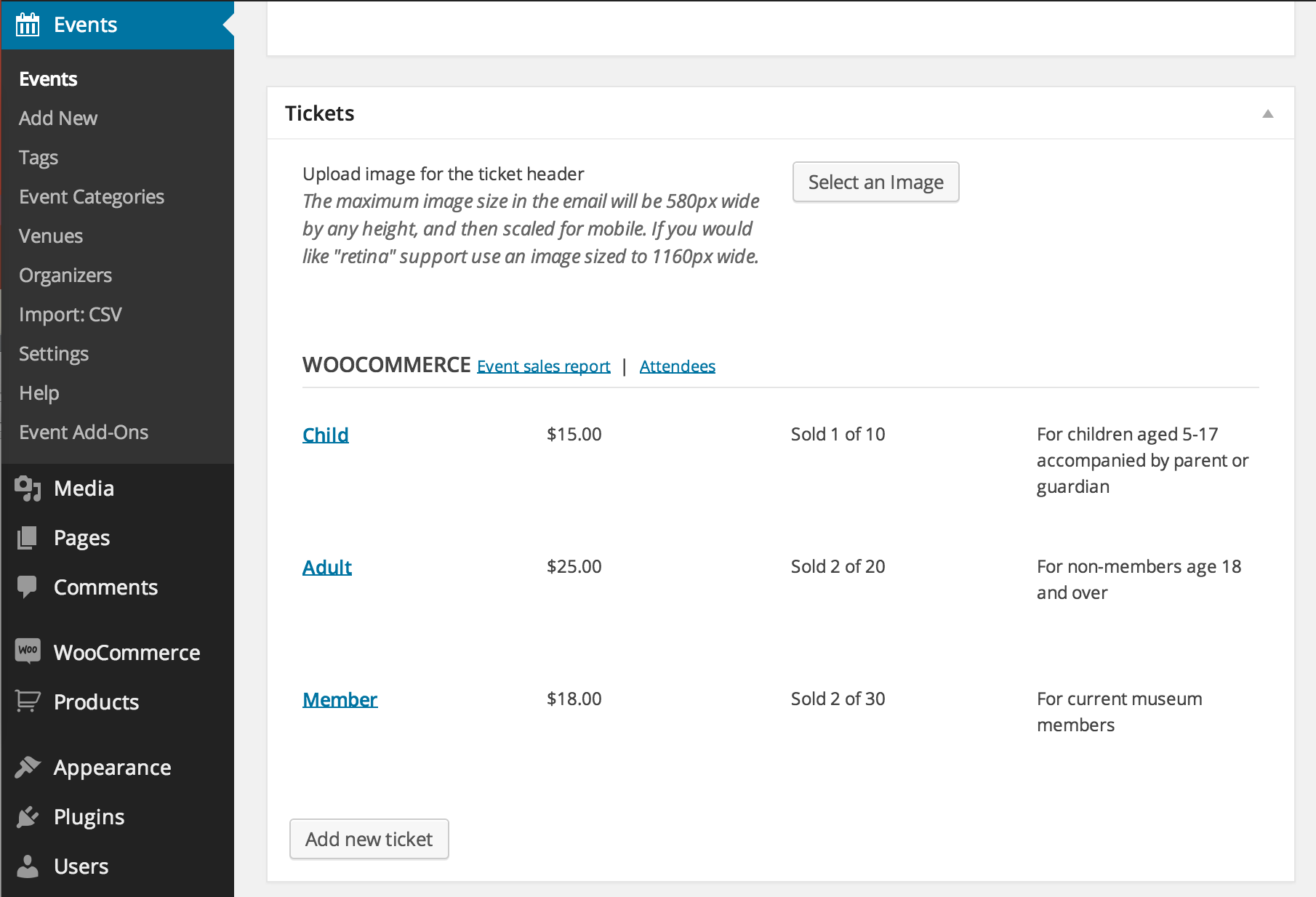
Thanks for clarifying what you mean here. To create different ticket levels, you do not do it in the way you’re currently trying to.
You do not create multiple tickets from within the WooCommerce admin. Simply go to an event, and in the “Tickets” section, create your tickets one-by-one there. They will be tracked as separate Products within WooCommerce.
This is an example of how the “Tickets” metabox should look in your admin for a specific event if you add multiple ticket values correctly → https://theeventscalendar.com/content/uploads/2013/02/woo-backend-sold.png
Let me know if this helps!
— George
March 26, 2015 at 11:33 am in reply to: Events calendar pro : tags and categories in photo view and translation #951241ParticipantHey Sven,
Thanks for clarifying what you mean there – subcategories will show up and work for filtering within our own Filter Bar add-on, but not without it.
Best of luck with your site!
Cheers,
GeorgeParticipantNo problem Peter, we’ll take a closer look and see what we can find. Stay tuned!
ParticipantHey Niall,
I’m glad my first bit of advice helped!
As for this being a known issue or not, it is not – and I cannot recreate this issue on my testing site at all.
If you’re interested in finding the source of the problem, would you be interested in running through all the steps outlined in this article here? → https://theeventscalendar.com/knowledgebase/testing-for-conflicts/
If you do those steps, what do you find?
Thanks!
GeorgeParticipantHey Dan,
We are indeed helping you here, and will continue to do so until we can hopefully get your site working correctly.
As for the login information, I removed both sets of information you posted as soon as I saw them here, and will not be logging into your site – nobody on the Tribe will. We cannot log into customer sites for security reasons.
There seems to be a few possible culprits for your issues here – first is that somehow either the widget() or widget_output() methods of the list widget class are being called with their third function argument set to ”. Other things I can think of here would be a permissions error on your server preventing access to the file, or a theme or plugin conflict.
Since you said you already testing your theme and plugins, I think first we should figure out if you’ve added custom code or changed any code anywhere at any time on your site? If so, please remove that custom code and see if things change at all.
If not, then next we should turn to server permissions to at least rule it out as a possibility here: ensure that your server’s permissions are set to 755 recursively, with all directories (or at least all WordPress-specific ones) owned by the web server.
If you’re not sure how to check for this and how to change it yourself, contact your web hosting support for help here, they should be able to ensure this very quickly.
Let us know if this helps at all!
Thanks,
GeorgeParticipantThanks Peter!
-
AuthorPosts