

Forum Replies Created
-
AuthorPosts
-
August 26, 2015 at 7:24 pm in reply to: Important display problem with prices on mobile & desktop (homepage price form) #999433
George
ParticipantHey Gael,
I’m glad your theme developer was able to provide a fix.
As for your next questions:
1. I cannot set price in EUROS and CHF depending of events. How to use different currencies?
Sorry, if you’re trying to use different currencies at the same time, so that one event can be Euros and one CHF, then unfortunately this is not possible because WooCommerce does not allow you to do this.
2. I cannot remove $ sign in featured event on homepage (event cost). I would display ticket currency instead, how to do it?
For this, head to Events > Settings > Display in your wp-admin. Look for the “Default currency symbol” option, which I took a screenshot of here for your reference:
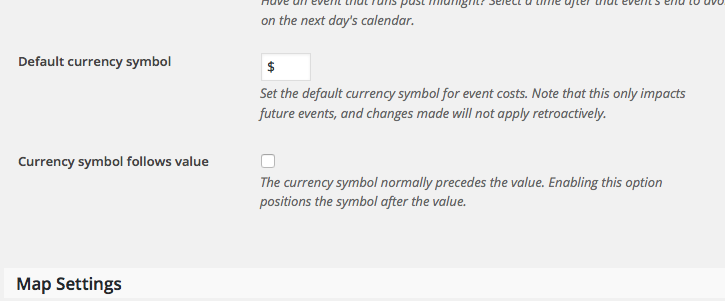
Change that symbol to what you’d like, and let me know if this helps!
Thank you,
GeorgeParticipantAwesome! Glad to have helped, Mathieu 🙂
Best of luck with your site!
GeorgeParticipantThanks for the information, Ruud.
I’m curious: does this link actually show up anywhere on your site? In other words, is there any place on your site itself where a user might click that link or something, and then encounter that 404 error?
Or does this link only show up in Google Webmaster Tools, and is not actually a link on the front-end of your site?
Next, can you try creating a brand new Recurring Event for testing? When you do this, does this new event also get that /all link generated for it?
Thank you for your patience here Ruud!
— George
Participant🙂 Best of luck with your site!
ParticipantAwesome! Glad to hear things worked out, Andreas.
If you’re ever interested in making custom template files again, you absolutely still can despite the code changes. Just be sure to read our guide for doing so here, for a refresher (we’ve updated some things in recent months) → https://theeventscalendar.com/knowledgebase/testing-for-conflicts/
Cheers,
GeorgeParticipantAwesome, glad to hear it Tyson. Your kind words are supremely appreciated 🙂
I wish you the best of luck with your site!
Cheers,
GeorgeParticipantGreat! Best of luck with your site Grant 🙂
ParticipantThanks for noting that here, @Adam! Just to be sure, you’re not the same user as @John just using a different account, right?
I’m really sorry that this problem exists at all, but fortunately this fix is very solid and will be included in the next public release. 🙂
Cheers!
GeorgeParticipantHey Luc,
Thanks for the information! Before proceeding however, I just want to be 100% clear about what you mean by this:
Tickets are only sent when selecting the ‘resend mail option’ “Tickets” in a booking.
1. Can you share a screenshot of this option?
2. What is a “booking”? Can you take a screenshot of one on your site admin so I can see what you’re referring to?
Just want to better understand things here! If we can get the default tickets to send properly on your site, that is a much better solution than customizing code – which can still be done, of course! 🙂 But things should work correctly first before adding layers of customization.
Thank you!
GeorgeParticipantHey Tyson,
Adding an additional wp_enqueue_style() call is not related here. If the changes to style.css are not taking place, then your best alternative is to find the file /cache/all.css in your theme and add the code at the bottom of this file as well.
Apologies for these caching issues, I do not know their source or why they won’t even let you update a single file! Very weird.
Hopefully you have some better luck with /cache/all.css. If not, then I’d recommend contacting GoDaddy support to ask why your cache doesn’t seem to be clearing.
Thanks!
GeorgeParticipantHey Lindsey,
You should be able to add images above or below your calendar, regardless of Month View or not, without a developer. Head to Events > Settings > Display in your wp-admin, and scroll down to the “Advanced Template Settings” section at the very bottom.
There are two big text fields here where you can enter HTML. One for HTML to show before the events list or grid, one for HTML to show after the events list or grid.
So you can add images or ad banners or anything here, it should work well for you. If you need something more advanced than this, of course, then yes, hiring a developer would be the next best step.
Cheers!
GeorgeParticipantThanks Nicholas!
Hm, this is an odd issue. I’m curious – can you try adding the mini calendar widget via the actual little widget module itself, instead of the shortcode? I’m wondering if they behave any differently on your site…
Thank you!
GeorgeParticipantHey Shah,
This seems to be the core of your issue regarding the post-registration emails:
in other words we cannot see the WP password in our email directly.
That is something new in WordPress itself, not any of our plugins, so there’s unfortunately not anything I can do to help address that. Sorry to disappoint!
As for things looking weird in Windows, we do indeed test in Windows and if there is a very bad issue with display it is most likely the result of theme issues.
— George
ParticipantHey Francesco,
You deleted one plugin. All those steps tell you to do is to deactivate – not delete – the other plugins on your site. This is very easy to do – go to the “Plugins” page on your site, and for every plugin that is not The Events Calendar, Events Calendar Pro, or Tribe Filter Bar, just click “Deactivate”.
Then after each one, check on your issues and see if the behavior changes at all.
It’s a simple process that takes a few minutes at most – what specific thing here made you upset? You do not have to write code or anything here, just deactivate some plugins and see if that affects the behavior of the problem at all.
ParticipantThanks David! Sorry about the username/password policy on our end of things, it’s just a strict security and legal policy that, while a bit of a pain to work with sometimes, is much safer.
Keep us posted on things!
— George
-
AuthorPosts