
Home › Forums › Ticket Products › Event Tickets Plus › Important display problem with prices on mobile & desktop (homepage price form)
- This topic has 12 replies, 2 voices, and was last updated 11 years, 1 month ago by
George.
-
AuthorPosts
-
August 25, 2015 at 12:28 am #998676
Gael
ParticipantHello,
I have a display problem with prices on homepage with trive-events-tickets form: prices are unreadable on iPhone. It is not really better on Safari and Chrome (desktop), but it works on Firefox only.
Desktop problem: http://www.funkybrunch.ch/wp-content/uploads/1.png
Mobile problem: http://www.funkybrunch.ch/wp-content/uploads/2.pngCould you fix it?
Thanks in advance.
Kind regards.August 25, 2015 at 6:28 am #998727ParticipantSorry Gael, this layout problem stems from your theme and your custom site design itself. The ticket form is an HTML table element, and to fix this layout you will need to write CSS to handle the table on mobile views.
We don’t offer support for customizations or theme design things here, so you’ll have to take the reins on this, BUT I’ve gone ahead and written some CSS anyways to hopefully get you started in the right direction 🙂
You’ll want to use CSS3 media queries to make some CSS that will only affect tables in a smaller viewport size. Here’s a bunch of CSS I wrote quickly that, on smaller screens, will break up the table layout a bit. Try copying and pasting this into the bottom of your theme’s style.css file:
@media (max-width: 545px) {.home-featured-event #tribe-events-content div.cart td,
.home-featured-event #tribe-events-content form.cart td {
display: inline-block;
float: left;
}.home-featured-event #tribe-events-content div.cart td:first-of-type,
.home-featured-event #tribe-events-content form.cart td:first-of-type {
width: 30%;
border: none;
}.home-featured-event #tribe-events-content div.cart td:nth-of-type(2),
.home-featured-event #tribe-events-content form.cart td:nth-of-type(2) {
border:none;
width: 40%;
}.home-featured-event #tribe-events-content div.cart td:nth-of-type(3),
.home-featured-event #tribe-events-content form.cart td:nth-of-type(3) {
width: 30%;
border: none;
}.home-featured-event #tribe-events-content div.cart td:last-of-type,
.home-featured-event #tribe-events-content form.cart td:last-of-type {
width: 100%;
border-top: none;
}.home-featured-event #tribe-events-content div.cart tr:first-of-type,
.home-featured-event #tribe-events-content form.cart tr:first-of-type {
border-top: 1px solid #ddd;
}}
Then decrease your browser size to less than 545px and check out the display of the table there.
We cannot offer more customization support on this issue – but this should hopefully get you off to a great start! Look how things look on your site in smaller viewport sizes after adding this CSS:
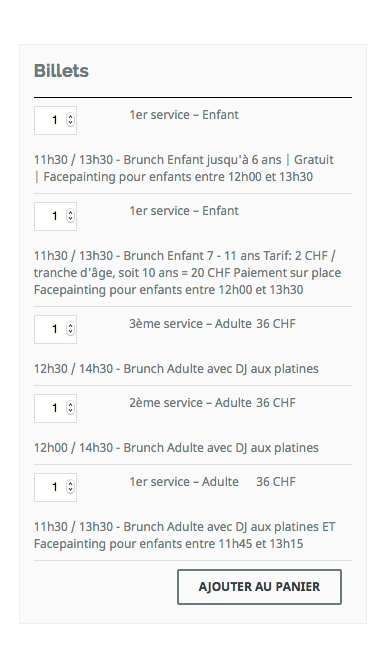
You can refine things from here, add more media queries for even smaller device-specific tweaks, adjust the widths of things and add more style rules, etc.
I hope this helps!
— George
August 25, 2015 at 8:01 am #998797ParticipantThanks a lot for the code you sent me, it fixed the problem on small screens. However, a problem remains on big screens, on Safari and Chrome browsers (but it does not appear on Firefox). The price (36 CHF – swiss francs) on the screenshot as link below, does not display properly. Could you help?
August 25, 2015 at 5:36 pm #999008ParticipantHey Gael,
You should be able to target that column of table information with this CSS selector:
.home-featured-event #tribe-events-content div.cart td:nth-of-type(3),

.home-featured-event #tribe-events-content form.cart td:nth-of-type(3)
So, something like this should work in theory to create a minimum width which might help. Something like this:
.home-featured-event #tribe-events-content div.cart td:nth-of-type(3),

.home-featured-event #tribe-events-content form.cart td:nth-of-type(3) {

    min-width: 10% !important;

}
I hope that helps!
Cheers,
GeorgeAugust 26, 2015 at 4:31 am #999085ParticipantThanks for reply, unfortunately, I’m still struggling with this problem.
Yesterday, when I added CSS code you sent me, it worked fine on mobile, as described. Today, it is not working anymore and the display is even worst. Therefore, the indication you sent today does not fixed anything.
I’m a bit disappointed with this price display issue. Could you definitely fix it?
Link: http://www.funkybrunch.ch/V2/
Thanks in advance.
Kind regards.August 26, 2015 at 6:37 am #999098ParticipantNotification:
Tokopress gave me a good fix and now, everything is fine with pricing display. However I still have problems with Events Calendar and WooCommerce Tickets:
1. I cannot set price in EUROS and CHF depending of events. How to use different currencies?
2. I cannot remove $ sign in featured event on homepage (event cost). I would display ticket currency instead, how to do it?Could you help?
Thanks in advance.
Kind regards.August 26, 2015 at 7:24 pm #999433ParticipantHey Gael,
I’m glad your theme developer was able to provide a fix.
As for your next questions:
1. I cannot set price in EUROS and CHF depending of events. How to use different currencies?
Sorry, if you’re trying to use different currencies at the same time, so that one event can be Euros and one CHF, then unfortunately this is not possible because WooCommerce does not allow you to do this.
2. I cannot remove $ sign in featured event on homepage (event cost). I would display ticket currency instead, how to do it?
For this, head to Events > Settings > Display in your wp-admin. Look for the “Default currency symbol” option, which I took a screenshot of here for your reference:
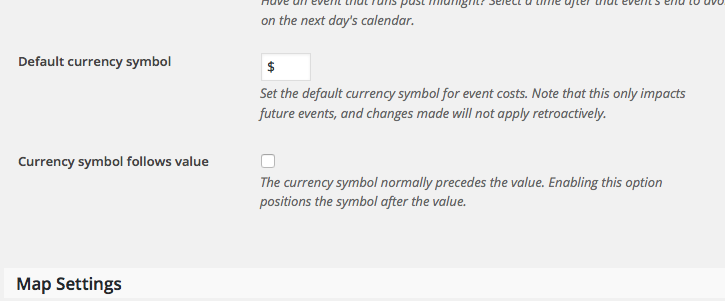
Change that symbol to what you’d like, and let me know if this helps!
Thank you,
GeorgeAugust 26, 2015 at 11:56 pm #999462ParticipantI knew this feature and set CHF instead of $, but nothing changed.
I really don’t know what to do with this. I checked all options, tried a long time to fix it but it is stuck on $ currency (only on homepage featured event cost line, prices in Woocommerce forms are well in CHF).Thanks for your help.
August 27, 2015 at 11:13 am #999655ParticipantHey Gael,
How specifically are you listing that featured event on your homepage? If you have custom code doing this, copy and paste it all into a Gist at http://gist.github.com and share a link to that Gist. There might be something with the way you’re doing this that is interfering here…
Thank you for your patience,
GeorgeAugust 29, 2015 at 2:46 pm #1000240ParticipantThanks, Tokopress found how to fix this issue.
Now, my client wish to add following details in confirmation e-mail (link below, modifications in red). How can I do it?
http://www.funkybrunch.com/wp-content/uploads/2015/08/1.png
Thanks in advance.
Kind regards.August 31, 2015 at 4:04 pm #1000730ParticipantHey Gael,
We unfortunately cannot help with customizations here, so all the details there are things you’ll have to ultimately make yourself.
If you are using WooCommerce there, then an example snippet for adding basic info like the Event title and such is here:
add_filter( 'woocommerce_cart_item_name', 'example_testing', 10, 3 );
function example_testing( $title, $values, $cart_item_key ) {
$ticket_meta = get_post_meta( $values['product_id'] );
$event_id = absint( $ticket_meta['_tribe_wooticket_for_event'][0] );if ( $event_id ) {
$title = sprintf( '%s for %s', $title, get_permalink( $event_id ), get_the_title( $event_id ) );
}return $title;
}
For customizations specific to The Events Calendar, we have a Themer’s Guide here that should be helpful → https://theeventscalendar.com/knowledgebase/themers-guide/
Cheers!
GeorgeSeptember 1, 2015 at 5:58 am #1000834ParticipantThanks for your help.
Please, could you tell me if there is a way to see listings of people registered to an event in front end?
Thanks in advance.
Kind regards.September 2, 2015 at 2:36 pm #1001470ParticipantHey Gael,
Yes there is a way to do this, though it would again require custom code. I’ve shared a ton of custom code here and unfortunately cannot continue doing so in this thread, but in general you can get the set of attendees registered to an event by calling the function Tribe__Events__Tickets__Tickets::get_event_attendees( $event_id )
So, something like this oughtta work:
$attendees = Tribe__Events__Tickets__Tickets::get_event_attendees( $event_id );foreach ( $attendees as $attendee ) {
// display info as you wish...
}
I will close up this thread for now – best of luck with your site, and be sure to keep good backups of all custom code you write! 🙂
Cheers,
George -
AuthorPosts


- The topic ‘Important display problem with prices on mobile & desktop (homepage price form)’ is closed to new replies.