

Forum Replies Created
-
AuthorPosts
-
August 31, 2015 at 3:52 pm in reply to: Editing organizer details in front-end (community)? #1000721
George
ParticipantThanks for the kind words Jeff – sorry again about this feature! I will indeed close up this thread for now, but post a new thread any time if you have further questions, comments, concerns – and especially if you do end up beating us to the punch for this feature 😉
Best of luck with your site in the meantime!
Cheers,
GeorgeParticipantThanks for elaborating on this Justin!
I’m sorry that we weren’t able to come up with a simple solution here for shutting off the scroll features of the map via JavaScript.
If you haven’t already seen it, however, we have a very handy “Themer’s Guide” that shows how to use The Events Calendar’s templating system. It’s a pretty nice templating system and you may find it easier here to just use that system to replace the maps provided by The Events Calendar itself, and add your own HTML and JavaScript for the map to sort of replicate the page you shared in your most recent reply.
Here’s a link to that Themer’s Guide if you’re interested → https://theeventscalendar.com/knowledgebase/themers-guide/
Just some thoughts. I’m glad that our plugins have been useful in other cases, and appreciate your kind words about them. Really sorry that the Map View is giving you trouble though 🙁
Let me know if you have any final thoughts on this matter or if there’s anything else I can help with Justin!
Sincerely,
GeorgeAugust 31, 2015 at 3:44 pm in reply to: On Category List / Month Views, Clicking 'Next Month' Doesn't Work #1000714ParticipantHey Thomas,
Thanks for your feedback here, and for your patience over the weekend 🙂
It unfortunately does sound like there is a conflict here, coming from one of two places: either your customizations, or just your theme itself.
I’m interested in what you said here:
I even deleted and replaced the template files in my theme’s folder just in case any other pieces changed on the last plugin update, but that didn’t seem to fix it either.
I think we should try something similar to this for testing purposes. Basically, get all your custom template files and your custom tribe-events folder in your theme, and make a good backup of these – one that you can definitely restore the files from.
Once these are all backed up, delete them from your site. Just wholly remove the tribe-events folder in your theme…
Then, check out your site and see how things go.
If nothing is improved, then leave your theme as-is but head to its functions.php file.
Make yet another backup of this file, the version of it with all of your tribe-related custom functions. Back up this file, and then once it’s backed up, remove all tribe-related code from it.
Then check out your site again and see how things go.
If problems still persist in this state, then it is your theme itself that is the problem and not your customizations.
If things work fine after doing these steps, however, then we can at least narrow the problem down to either your functions.php tweaks or your custom template files.
Thank you for your patience with this issue so far! Let me know how the above steps go, and just to mention it one more time, make a backup of all custom templates and your customized functions.php file before doing any of these steps! 🙂 That way you can play around with removing things and testing individual chunks of code on your site without worrying about losing any custom code that you’ve written so far.
Thanks Thomas!
— George
August 31, 2015 at 3:35 pm in reply to: No image options, sign in issues, and pending review #1000701ParticipantHey Daniel,
I’m sorry that you feel boggled here! I still am a bit boggled, too, so before getting too far afield I just wanted to make sure I understand what you’re looking for here…
Okay, so the Community Events /add/ page, on the front-end of your site, indeed does not allow media submission and such. This front-end page can be configured to allow anonymous submissions, i.e. anyone on the Internet. If this is not allowed, then only people who are logged-in can use this form to submit events.
What is your goal here? Do you want anyone to be able to submit from the front-end? Or do you only want people who have accounts on your site to be able to post there?
Now, as for the edit-screen on the back-end of your site, i.e. the view in your second screenshot in your most recent reply.
If you log in as your full-on Administrator account, and go to “Add a New Event” in the admin back-end of your site, do you then see the Media buttons and “Featured Image” box and such? This is not your “author” account, nor your “subscriber” account, but your full-on “admin” account.
Let me know!
Thank you for your patience both over the weekend and just in general with this thread – I apologize if my questions seem like obvious things to ask, but I just want to make sure I fully grasp these two basic things:
• How you want things to be on your site.
• How things currently are on your site.Then we can hopefully proceed well with making sure those things are the same 🙂
Thank you Daniel!
— George
ParticipantSounds good Nicholas. I appreciate your patience here over the weekend, and while I’m not the best programmer myself, I hopefully can recommend something useful here: the mighty tax_query query parameter for WP_Querys everywhere.
Essentially, tax_query lets you specify taxonomy-related sub-queries within the “main” query on a WordPress page. Pretty neat. It’ll be useful here because it includes a “NOT_IN” operator, which as its implies basically says “return everything, but exclude if NOT_IN this category”.
Something along the lines of this, for example:
add_action( 'pre_get_posts', 'nicholas_example_pre_get_posts' );
function nicholas_example_pre_get_posts( $query ) {
if ( is_admin() ) {
return $query;
}// Other rules here to check for what page you're on...just return $query early on pages where you don't want this to run, like in the admin as seen above.
// For example, to return $query on Events Category archive pages (so that nothing is excluded):
if ( $query->is_tax( 'tribe_events_cat' ) ) {
return $query;
}// If the code has made it this far along without hitting a "return $query", then we can add the tax_query:
$exclude_cat_query = array(
array(
'taxonomy' => 'tribe_events_cat',
'field' => 'slug',
'terms' => array( 'highlights' ),
'operator' => 'NOT IN'
)
);$query->set( 'tax_query', $exclude_cat_query );
return $query;
}
This code will add a tax_query which excludes the Event Category called “highlights” from all pages except Events Category archive pages…
I hope this is a good starting point. Please definitely give the following things a read, or at least the “backend programmy” person you rope in for this 🙂
• more on pre_get_posts() → https://codex.wordpress.org/Plugin_API/Action_Reference/pre_get_posts
• more on WP_Query which includes tax_query → https://codex.wordpress.org/Class_Reference/WP_Query#Taxonomy_Parameters
• another similar example I found out in the wild → http://wordpress.stackexchange.com/a/35263Best of luck with this Nicholas! Let me know if there’s anything else I can help with or if you have any other questions here.
Cheers,
GeorgeParticipantHey Folks,
I’m really sorry that you’ve all been stricken with this issue!
On my local testing site, things still work well for me regardless of the time zone I set, and I cannot recreate a “bug” here. That would normally lead me to suspect that there’s a plugin or theme conflict here, but those are usually pretty unique, so the fact that there are 3 of you all reporting this behavior undermines that theory…
So, for all three of you (@Cynthia, @jskk123, @inkmouse2), can you please each share your “system information”, which you can learn to do here → https://theeventscalendar.com/knowledgebase/sharing-sys-info/ ?
I’m sorry for how slow this thread’s been moving – thank you for your patience over the weekend! – but with all of your system information, we can look for patterns and also get some more accurate site profiles and try to recreate things more accurately from that.
In closing, for now – do any of you have multiple sites with The Events Calendar? If so, then do you have this same issue on both sites? If not, then what is different about the sites? You can even share System Information for both sites, if you’d like, just be sure to label them “Site that Works” and “Site that doesn’t work” or something 🙂
Thanks all for your patience. We obviously take our time and date-related functionality quite seriously and will work diligently with you in this thread to see what’s going on. I eagerly await your replies and will continue trying to recreate your reported bugs here on my own testing sites.
Thank you!
GeorgeParticipantHey Antonio,
Thanks for the information here – and for your patience over the weekend! 🙂
I looked through your system information and there is not anything there that stands out as being “problematic”. However, I’ve also continued to try and recreate this issue and I can never get it to happen! 🙁
So it seems that from here, the best step is to test for any possible theme or plugin code conflicts. We have an article here that describes how to do this → https://theeventscalendar.com/knowledgebase/testing-for-conflicts/
I’d recommend doing those steps when you’re able to – pay careful attention to the behavior of your problems after each plugin and theme deactivation, and see if anything improves.
These steps will be immensely helpful here – let us know what you find!
— George
August 31, 2015 at 2:49 pm in reply to: Recurring events not showing unless end year is more than a year past start date #1000676ParticipantHey Adam,
I’m very, very sorry about how long it’s been since I last posted here. I wanted to let you know that I’ve gotten some insight from other folks on the team, and while we have not reproduced your exact issues, we do have some further action steps you can take if you’d like to keep investigating things here.
If so, here they are:
1. Do you have a recurring event that is actually on your site right now? If so, can you share a link to it?
2. Regardless of whether an event exists already for step #1, can you create an additional test recurring event, and share a link to this one? You can have this event not start until, say, October or something, just so that users don’t see it.
3. After creating this event, can you then take a screenshot of the recurrence pattern you configured for the event in your event editor? You can take a screenshot and then upload the image to a site like imgur.com and share a link to that, or Dropbox or Flickr or anything similar.
4. It seems you also have a local test site – can you set up The Events Calendar and Events Calendar Pro on this local site (no license key required!) and try to recreate your problems here? i.e. make some test recurring events, and see if the same issues arise.
5. If the same issues do arise, take a screenshot of your local event’s recurrence pattern information and share a link to that screenshot here like you did for step #3.
Let us know what you think Adam! And what you find by doing these steps 🙂
Thank you,
GeorgeParticipantHey Ruud,
Thanks for verifying that that was the source of these errors…
Fortunately, these are not actual “errors” on your site, i.e. is nothing is actually broken. The reporting of those errors in Google Webmaster Tools serves a mainly diagnostic purpose, just so that for other links that are genuinely broken you are aware of them…
But this /all/ link itself worked fine for me on your site, leading to an event – as long as it also works in generating the /all/ events page for a recurring event, then there shouldn’t be a problem here.
Does this information help? Essentially, if you get an error for this within Google Webmaster Tools, then it is a bit annoying unfortunately, but there is no actual problem.
Let me know what you think!
ParticipantHey Anthony,
Thanks for reporting back on this (and for your patience over the weekend! 🙂 )
How exactly did you export that iCal file? We may not be able to help much, here, if this is a third-party exporter like exporting directly from Google Calendar or Outlook or something. Let me know!
Thanks,
GeorgeAugust 31, 2015 at 2:19 pm in reply to: Events Calendar Widget next and previous month links not working #1000641ParticipantHey @windhill,
No worries! Thanks for clarifying. So, you mean the calendar in this screenshot?:
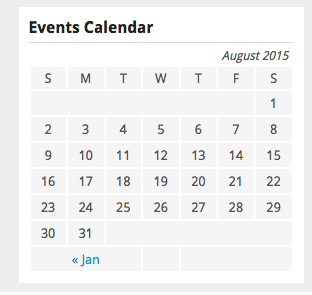
If so, that is not a calendar generated by The Events Calendar, that’s another widget either from WordPress core itself or from another plugin. We unfortunately do not offer support for either category of things, only for our own code – sorry for the confusion here and if this is frustrating! I will not close this thread though – please let us know if there’s anything we can help with or you have any other questions.
Thank you,
GeorgeParticipantHey Chris,
Thanks for verifying that – I asked about the specifics there because, based on what you’re trying to do, I’d actually recommend not messing with PHP at all here. In fact, you should just outright remove any and all custom PHP you have written for this customization so far. Make a backup of your customizations first, of course, then remove them all.
The reason is because we can do this with CSS and that is much simpler. The basic plan is to first just remove background-colors on items in that category, as noted in this thread already, and then to use CSS’s “pointer-events” rule to totally disable the links there, so that it can’t be clicked by the user. We’ll also use CSS to keep the cursor the “default” cursor, instead of the “pointer” cursor that normally appears over links or something clickable.
So, in essence, we’ll just be using CSS to sort-of “fake” the un-clickability of the link, while also genuinely making it un-clickable 🙂
To do this, once you’ve cleared up that PHP you’ve tried thus far, just go to the very, very bottom of your theme’s style.css file, and add CSS like the following:
#tribe-events-content div.tribe-events-category-board-mtg.hentry.vevent h3.entry-title a,

#tribe-events-content div.tribe-events-category-board-mtg.hentry.vevent h3.entry-title a:hover {

    cursor: default !important;

    pointer-events: none !important;

}
.tribe-events-calendar .tribe-events-category-mtg {
background: none !important;
}
Now, your site seems to have a ton of custom CSS related to The Events Calendar. There are many CSS rules and so if the code I shared above doesn’t work for you, then I’d recommend just playing around with the selectors a bit.
Most importantly, perhaps, is to update the selectors to reflect the Category name you want. So, if these off days are categorized “Holiday” in reality, then instead of div.tribe-events-category-board-mtg.hentry.vevent use div.tribe-events-category-holiday.hentry.vevent and so on.
I hope this helps!
— George
ParticipantHi Ravery,
We do not offer support for custom code here, so this may not be something we can fully troubleshoot – however, I’m curious, how are you generating the /en/ version of your events post?
If it is with a third-party translation plugin, then we unfortunately do not know how that plugin goes about generating the /en/ version of the events post, and your best option here would be to contact that translation plugin’s support teams for more information on doing this.
Thanks,
GeorgeParticipantHey Steffen,
Sorry you’ve been having trouble here. The extent of the trouble is caused by what you wrote here:
I guess that this calendar is preinstalled by the theme of kriesi.at “incarnation”.
You must delete their theme-included version of The Events Calendar, and only use the official version of The Events Calendar from http://wordpress.org/plugins/the-events-calendar
If you cannot remove The Events Calendar from that theme by yourself, your best option is to contact the folks at Kriesi theme support for help on how to do it.
I’m sorry that you have to do this! But once you do it, things should load fine without the fatal errors 🙂
Cheers,
GeorgeParticipantHey Lance,
Sorry you’re having these issues on your site. I checked out the link you provided and the icons there are indeed missing. This is usually because the font-face files used to generate the icons are not being loaded on the page…weird…
I unfortunately don’t have much advice here, Lance – there’s nothing within our Venue-related code, or in fact just any of our code, that would actively prevent a specific stylesheet from loading on a site. So if the stylesheet is missing here on the Venues pages, I’d recommend reaching out to ShareDaddy’s support team for assistance and/or your theme developer.
One thing to note is that if ShareDaddy has the option of adding these icons selectively to post types, make sure you explicitly add the Tribe Venues post type to that set of “allowed” post types – the post type name is ‘tribe_venues’ in the code.
I’m sorry to disappoint, Lance! This is an odd issue and it seems that its roots are with ShareDaddy itself and/or your theme or something.
Keep us posted on things! I will try to look for more evidence of how our code could cause this, but for now have been unable to find anything related to it and so wanted to update you here 🙂
Thanks,
George -
AuthorPosts