
Home › Forums › Calendar Products › Community Events › No image options, sign in issues, and pending review
- This topic has 9 replies, 3 voices, and was last updated 11 years, 1 month ago by
Support Droid.
-
AuthorPosts
-
August 27, 2015 at 1:50 pm #999724
Daniel
ParticipantHi, so I’m running Community events on the PRO version of Events Calendar on artsBHAM.com. Right now I’m having three issues:
1) I have to add users on the back end right now, because everyone who visits our /events/community/add page to register gets an error message (with no explanation) when they try to create a login.
2) Many of my community members who are trying to add events don’t have an upload image option, but some seem to have one. All users for community submissions have the same permissions on our end.

3) I have the default status for submitted events set to “published,” but everything submitted by community users goes to “pending.” Even their button says submit for review.
I can set up an admin user for you if you need to get in the WP admin to take a look. I can’t revert to TwentyFourteen/Fifteen, nor can I deactivate every plugin safely right now (but they’re all listed below on the sys info).
Dan
August 28, 2015 at 6:54 am #999851George
ParticipantHey Dan,
Sorry to hear about these issues on your site, I’ll address them one at a time here and hopefully we can begin making sense of what’s going on here – as follows:
I have to add users on the back end right now, because everyone who visits our /events/community/add page to register gets an error message (with no explanation) when they try to create a login.
1. Can you share what the exact error message is? I know you wrote “(with no explanation)”, so perhaps you mean that there isn’t even a message that displays at all – in either case, can you just share some more details about exactly what the user is met with when they attempt to sign up?
Many of my community members who are trying to add events don’t have an upload image option, but some seem to have one. All users for community submissions have the same permissions on our end
2. Just to be clear here, by “upload image option” do you mean the Featured Image metabox in the edit page for events? It’s the one that is essentially the same as the Featured Image box in the edit pages for normal Posts on your site, for reference.
If so, then I’m curious – for anyone who reports not having the Featured Image uploader, can you ask them to check out the “Screen Options” tab in the top-right corner of their edit-event pages? There should be a checkbox there for “Featured Images” – see if anything improves for them if they check this checkbox to ensure that the Featured Image box appears. Here’s a screenshot of this “Screen Options” drawer after you click the tab, for reference → https://cloudup.com/cFbvEYdFPNV
I have the default status for submitted events set to “published,” but everything submitted by community users goes to “pending.” Even their button says submit for review.
3. What user level are the users you’ve manually created on your site? Are they “Subscribers”, for example? “Contributors”? “Editors”?
Thank you in advance for all this information. I’m also grateful for your willingness to create a user account for us to log into your site and take a look at things first-hand. While I agree that this can be quite a time-saver, we unfortunately cannot log into customer sites for any reason.
Let us know what you think about items 1, 2 and 3 here – some of these questions may seem simple but their answers can reveal or rule out some important things.
Thanks!
GeorgeAugust 28, 2015 at 1:18 pm #1000084ParticipantThanks George.
The error message is gone. I changed my Captcha settings to not include registration, and that’s done.
Questions 2 and 3 have me boggled. I have all registrants for Community Events set to “subscriber” by default. I have a test user account I can log into that’s also “subscriber,” so I can see what they see. But my test account shows me a long form event submission, with “submit” at the bottom. As you can see on the image, this user who emailed me about the issue is seeing what an “author” would see–looks like a regular post or page add. How is this possible? I can only see it that way if I change my test account to “author,” but I checked and she’s still a subscriber.
August 28, 2015 at 1:29 pm #1000093ParticipantOk, so I logged out my test account, and something tells me that to get back to the normal event submission pages, I have to use the community URL (artsbham.com/events/community/add) and I get this:
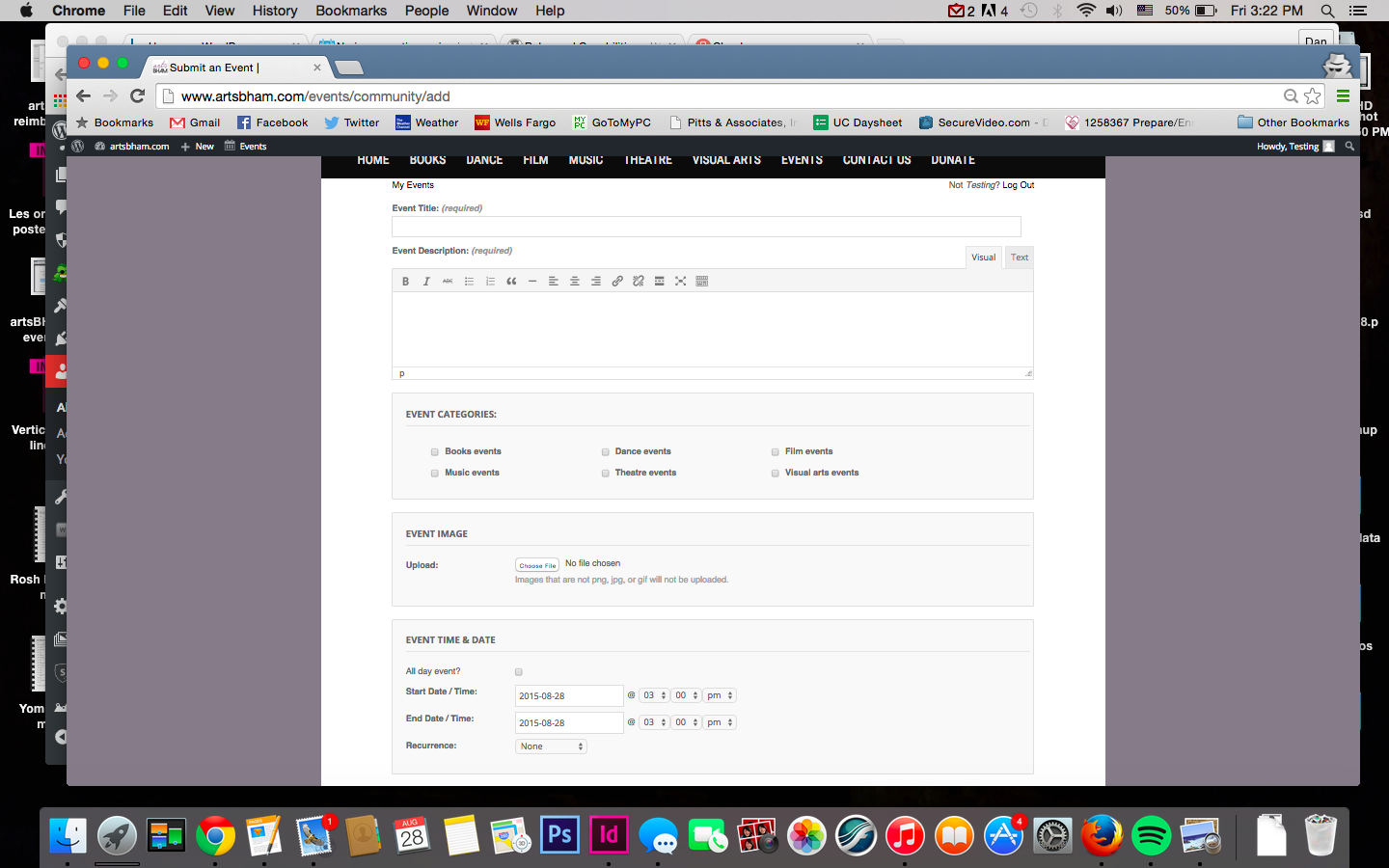
If I just try and log back in immediately, it’s into the overall site (artsbham/wp-login) and I get this:
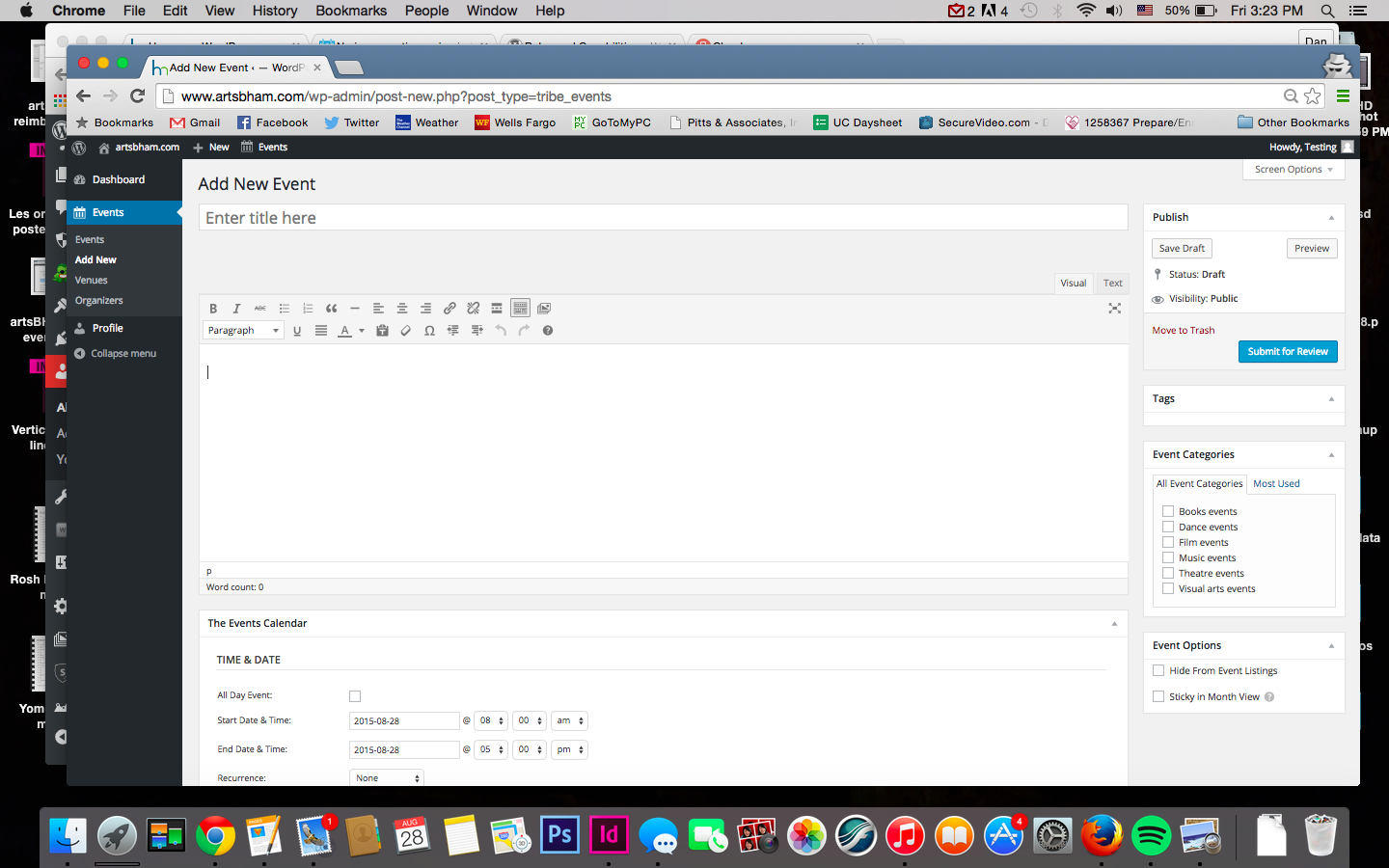
Am I right on this? Notice that there’s no “add media” or upload image button in the second one, even though it’s the same user doing an event add. There’s also no checkbox in screen options for featured image.
So I tell all my community events people to only login via events/community/add?
August 31, 2015 at 3:35 pm #1000701ParticipantHey Daniel,
I’m sorry that you feel boggled here! I still am a bit boggled, too, so before getting too far afield I just wanted to make sure I understand what you’re looking for here…
Okay, so the Community Events /add/ page, on the front-end of your site, indeed does not allow media submission and such. This front-end page can be configured to allow anonymous submissions, i.e. anyone on the Internet. If this is not allowed, then only people who are logged-in can use this form to submit events.
What is your goal here? Do you want anyone to be able to submit from the front-end? Or do you only want people who have accounts on your site to be able to post there?
Now, as for the edit-screen on the back-end of your site, i.e. the view in your second screenshot in your most recent reply.
If you log in as your full-on Administrator account, and go to “Add a New Event” in the admin back-end of your site, do you then see the Media buttons and “Featured Image” box and such? This is not your “author” account, nor your “subscriber” account, but your full-on “admin” account.
Let me know!
Thank you for your patience both over the weekend and just in general with this thread – I apologize if my questions seem like obvious things to ask, but I just want to make sure I fully grasp these two basic things:
• How you want things to be on your site.
• How things currently are on your site.Then we can hopefully proceed well with making sure those things are the same 🙂
Thank you Daniel!
— George
September 1, 2015 at 1:48 pm #1001019ParticipantThanks for taking the time here George.
What is your goal here? Do you want anyone to be able to submit from the front-end? Or do you only want people who have accounts on your site to be able to post there?
We only want users who are registered as either subscribers or contributors to post events (since those roles can’t access other dashboard functions).If you log in as your full-on Administrator account, and go to “Add a New Event” in the admin back-end of your site, do you then see the Media buttons and “Featured Image” box and such?
When I log in with an admin user account through my artsbham.com/wp-admin page, I can add an event and include pictures with the “add media” button above my text editor. When I log in with my “test” subscriber user account, I have no “add media” button (nor featured image, nor upload image).What I’m confused about is this:
Using my “test” subscriber/contributor (doesn’t matter which role) account…
I’ll log into artsbham.com/events/community/add, and there’s the “upload image” button as in the first pic above.
Then I’ll log out, and the URL in the nav bar shows “http://www.artsbham.com/wp-login.php?loggedout=true.” If I log back in, or even leave the page to check the weather and navigate back to it, I’m at a page that looks like the second pic above, with no options for images anymore.This is, I believe, where our community folks are getting into a problem. Upon navigating back to the site, they’re greeted with a completely different event posting format (the 2nd pic), which has no media posting ability (unless they’re schooled in html).
Clear as mud, I think?
Thanks!
DanSeptember 2, 2015 at 2:43 pm #1001475ParticipantHey Dan,
Thanks for elaborating on things and being patient with us (and polite, too! 🙂 ). Each thing is much appreciated.
At core here, I think most of your issues can be solved by using the “Access Control” features of Community Events. Head to Events > Settings > Community Events in your wp-admin and look for these access control options which look like this:
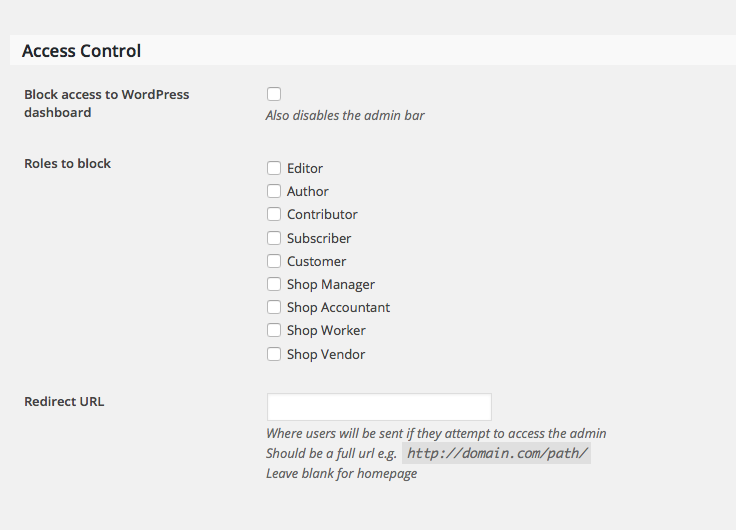
Check the “Block access to dashboard” option, and block the roles “Subscriber” and “Contributor” (and anything else you’d like).
This should keep them on the front-end submission form where I believe you want them to remain – let me know if my assumption is accurate here and if what I recommended above helps at all!
Cheers,
GeorgeSeptember 2, 2015 at 7:44 pm #1001523ParticipantWell George, it seems like maybe the problem is a lack of understanding on my part. For some reason, on the admin bar that subscribers get, the “events” dropdown has the option to just “add event.” That takes the user to the post-like screen without any image options.
But if they choose “community events: add event” they get the right screen. The issue is making sure all of our front-end users are adding community events.
Out of curiosity, is there a way to completely remove that “add event” option from the events dropdown menu on the admin bar? I don’t have to block them if they choose the right things!
September 3, 2015 at 3:15 pm #1001832ParticipantHey Daniel,
You should be able to hide that link by adding CSS like the following to the bottom of your theme’s style.css file:
#wp-admin-bar-tribe-events-add-event {

    display: none !important;

}
I hope that helps!
September 18, 2015 at 7:05 am #1006399KeymasterThis topic has not been active for quite some time and will now be closed.
If you still need assistance please simply open a new topic (linking to this one if necessary)
and one of the team will be only too happy to help. -
AuthorPosts
- The topic ‘No image options, sign in issues, and pending review’ is closed to new replies.