

Forum Replies Created
-
AuthorPosts
-
George
ParticipantHey @smpcherrypoint,
Thank you for the information and for the revelation that this is a Core WordPress problem.
That leaves us with little options, unfortunately, though that ticket is slated for release in WordPress 4.3.1 so hopefully it will arrive soon!
On your end of things, is there anything you do that helps get around this stuff? e.g. if you have scheduled posts but remove the “scheduling” and just save them as “Drafts” or something?
Just curious – thank you for your patience and for sharing your information here!
— George
September 2, 2015 at 1:44 pm in reply to: Events Calendar Widget next and previous month links not working #1001428ParticipantHey @windhill,
No worries! Glad to have helped clarify that there. As for the styling weirdness, this is unfortunately arising mostly from your theme. To fix those styles, you’ll have to write custom CSS at the bottom of your theme’s style.css file to override styles from your theme. We don’t officially support customizations here, so you’ll have to take the reins on this mostly, but here’s a quick example to hopefully get you started:
.tribe-mini-calendar-event .list-info h2.entry-title,

.tribe-mini-calendar-event .list-info h2.entry-title a {

    letter-spacing: 0;

    line-height: 1.4;

}
This CSS will undo the tight letter spacing of the widget Titles and will set their line-height a bit lower than they currently are.
For further help with customizing that CSS, you should definitely check out a free tool like Firebug if you use FireFox, or the Developer Tools for either Safari or Chrome, and use their “Inspector” tools to find the HTML elements and classnames for them that you’d need to write your custom styles.
I hope this information helps!
Cheers,
GeorgeParticipantHey Farhad,
I’m sorry that you’re disappointed at the lack of 100% compatibility – it indeed is a slow process and WMPL does a whole lot of “funky”, non-traditional things that we have to take into account if we want to improve compatibility.
Every one of our plugins is 100% standards-compliant with the WordPress methods for translation, so any translation plugin that follows the norms should work fine with it. Unfortunately, I do not have an ETA on when this will extend to include WPML itself, too.
So if that uncertainty is something you can not afford with your project, then moving to another events platform is indeed a rational choice. I’m sorry that it’s caused by lack of support in our plugin for WMPL 🙁
Let me know if you have any other questions or concerns here.
Sincerely,
GeorgeSeptember 2, 2015 at 1:32 pm in reply to: Sort filter "start date" in dashboard is not working #1001420ParticipantHey Julia,
Thanks for clarifying the behavior here. I unfortunately cannot recreate this and this behavior seems indicative, perhaps, of some deeper issues on your site.
This is in line with the findings in your other thread, which you and are are handling here → https://theeventscalendar.com/support/forums/topic/event-series-do-not-show-the-right-time/
I think that for now we should put this admin start-date issue on hold, and focus on getting your site back loading as mentioned in that other thread.
In that other thread, I also recommended running through these troubleshooting steps once your site is back online → https://theeventscalendar.com/knowledgebase/testing-for-conflicts/
If possible, then you can “Kill two birds with one stone” and check on the issues from both threads while doing these troubleshooting steps.
Do you agree with this approach? Let me know what you think!
— George
ParticipantHey Gerry,
Unfortunately, to troubleshoot the code yourself you’d have to…well, troubleshoot the code yourself. What I mean by this is to basically just open up a console in your browser, and look for JavaScript errors that are reported there. Then, work through each JavaScript error one by one. If you’re not familiar with using a browser console, it’s fortunately quite simple – check out a free tool like Firebug if you use FireFox, or the Developer Tools for either Safari or Chrome to get started there.
The only other thing I can think of would be to use different WordPress plugins for this, if at all possible. For example, the famous “Ad Code Manager” plugin is very well-written and used on WordPress.com VIP’s platform. → https://wordpress.org/plugins/ad-code-manager/
I’m sorry that there’s not much more to be done from our end of things Gerry 🙁
Best of luck with your site,
GeorgeParticipantHi Julia,
Thank you for the information! I looked through it and nothing is jumping out as problematic, at the moment.
However, I did try going back to your site and was met with an empty white screen there. I could not get the link you provided to load 🙁
This seems to indicate that there are other issues on your site, so this may be a deeper problem than with recurring events alone.
Once you get your site back up and the events pages working, the only next step I can think of that would be useful here would be to run through our complete set of troubleshooting steps here: https://theeventscalendar.com/knowledgebase/testing-for-conflicts/
This is in regards to the /all/ link problems you noted.
As for your problem where the times are one hour ahead of schedule, your system information reports that your WordPress timezone setting is “Europe/Berlin”, as is your server timezone.
Is this accurate to you? If you adjust the timezone, do the times on the site update accordingly? And if so, is there a better timezone that works for you? Try out the “UTC” equivalents of timezones on your site instead of the “Named” timezones like “Berlin”. For example, try setting the timezone to “UTC+1” or something else equivalent to the timezone of your region.
I hope all this information helps!
— George
ParticipantIn the meantime, however, can you try one last thing? It may seem redundant, but is not:
First, put your site back in the site where a default theme like Twenty Twelve is active, and all plugins except for The Events Calendar and Events Calendar Pro are deactivated.
Once the site is in this state, then try again to create a new recurring event, just a test event for testing purposes.
Once its created, leave your site in this state if possible and share a link to the event you have created…
This will be a useful test and I thank you in advance for doing it, if you’re able to!
Thank you,
GeorgeParticipantThank you for testing this Antonio!
I’m sorry that this is taking so long to figure out, I just have been unable to recreate your problems. For me, the only recurring events that don’t show up in the /all/ view are ones that have already passed, so I don’t know why your upcoming events are being hidden.
I will reach out to our development team for some insight on this Antonio! Your issues are rather unique, which I’m sorry about since it is taking us some time to try and figure out the cause.
ParticipantThank you all for your patience with this!
I unfortunately don’t spot any patterns with your system information and am still unable to reproduce this on my testing site.
For anyone with a site which has these issues, can you run through our complete set of troubleshooting steps here? → https://theeventscalendar.com/knowledgebase/testing-for-conflicts/
These steps will help reveal whether or not there’s a plugin or theme conflict at play here.
Let us know if you can do these steps and, if so, what you notice. Does the behavior of these issues change at all anywhere along the way?
Thank you!
GeorgeParticipantHey @Tal,
How exactly are you going about implementing RTL on this site?
The code being displayed in the tooltips is JavaScript, and when I viewed the source of your site it seems that this JavaScript code, instead of running, is being converted into character entity code and so it just displays like text in the tooltip.
I’d recommend running through our complete set of troubleshooting steps here just to isolate and figure out what the cause of the problem is → https://theeventscalendar.com/knowledgebase/testing-for-conflicts/
The results of running through those steps should be quite useful. Let us know what you find if you’re able to run through them, and let us know more about how you’re implementing RTL on a code level – we can continue troubleshooting from there.
Thank you!
GeorgeSeptember 2, 2015 at 12:19 pm in reply to: Events dashboard columns are squished and hard to read after installing EC3.11.x #1001385ParticipantHey Tom,
The events admin columns are indeed a bit crowded to begin with, and then the addition of whatever Analytics-related plugin you have is adding its own columns there which is just making it too cramped.
I’m sorry you’ve dealt with this thus far – fortunately, you can head up to the “Screen Options” tab in the top-right of the admin page there, and click it, which will reveal a drawer of checkboxes corresponding to the columns.
Un-check any columns you don’t need to display there, and that should neaten up the column view substantially! 🙂
Let us know if this helps and if you have any other questions.
Thanks,
GeorgeParticipantHey @laughmasters,
These things are all indeed possible but are things that would require writing custom code on your site. We unfortunately cannot provide support for customizations here, though you can get started on implementing the changes you want by first reading our “Themer’s Guide” here → https://theeventscalendar.com/knowledgebase/themers-guide/
You can also just write custom CSS, which is often simpler, and you can use CSS in both the front-end of your site or in the admin – this should be particularly useful for, say, hiding the Website fields in the admin editor for events.
I wish you the best of luck with your customizations – be sure to keep good backups of all custom code on your site so that you don’t risk losing it in a plugin or WordPress Core update!
Cheers,
GeorgeSeptember 2, 2015 at 11:57 am in reply to: Next Month Not Loading and Filter Bar Icon Not Displaying Correctly #1001377ParticipantHey Susanne,
These issues unfortunately sound like the result of theme and/or plugin conflicts – I’d recommend two things to work through to try and see if such conflicts are indeed the cause here.
First, you should send us your “System Information”, which you can learn to do here → https://theeventscalendar.com/knowledgebase/sharing-sys-info/
Next, I’d recommend running through our complete set of troubleshooting steps here → https://theeventscalendar.com/knowledgebase/testing-for-conflicts/
The information from both steps here will be immensely helpful for troubleshooting and finding the cause of these problems.
Let us know what you find!
Thanks,
GeorgeParticipantHey Douglas,
While we have some fancy custom recurrence patterns that include specific “exclusions” in the next release, at present the only solution is unfortunately to use the “Break from Series” feature to, well, break that individual event out of the recurrence series.
Here’s a screenshot of the link to do this:
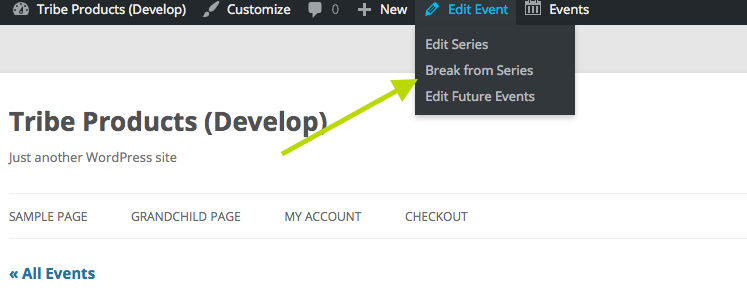
Once you do this, you can then adjust the dates of just that one specific event.
I hope this information helps – let me know if it does and/or if you have anything else I can help with 🙂
— George
ParticipantHey @laughmasters!
Yes, if you create a recurring event that recurs 8 times but sell tickets for it on just that first event, it should work fine for you.
The trick is to go that first event in the seares and “break it from the series” before you try adding tickets to it. To do this, you should be able to just head to the single event on the front-end of your site after you create it. Look in the “Edit Event” button in your admin toolbar, and if you hover over this you should see a link that says “break from series”, like in this screenshot:
Then you should be able to create tickets for just that first event without issue, while the 7 remaining events remain linked together in a “recurring event series”.
Does this all make sense? Let me know if you have any further questions or if there’s anything else I can help with!
Thanks,
George -
AuthorPosts