

Forum Replies Created
-
AuthorPosts
-
George
ParticipantHey @Blakemiller,
Sorry for the additional post here! But upon closer inspection I realized I made a mistake above – while what I shared above may indeed still be of help here, your main file change should ACTUALLY be this:
1. Create this file in your theme:
[your-theme]/tribe-events/pro/modules/meta/additional-fields.php
2. Use the contents of this Gist as the contents of that file → http://git.io/vBQGN
Sorry about the mixup on my end here 🙂
— George
ParticipantHey Blake,
Thanks for reaching out here! There are a few dimensions to this that are worth addressing – first, not to mince words, but just to be clear the cause of this problem is not quite a “bug”. What happened is that we doubled down on securing any variable output, using the functions provided by WordPress like esc_html() in many more places in the front-end and admin of The Events Calendar, which improves the security of the plugin pretty substantially.
The issue is that esc_html(), as the function name implies, escapes HTML, and so sometimes with links it will output the full link tag instead of just showing the URL. And so we have the issue on your site as shown in this screenshot:
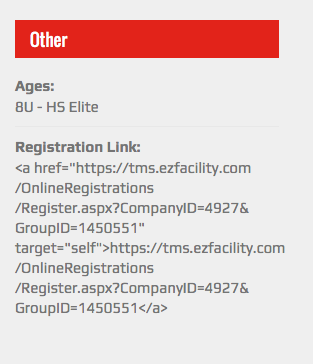
Next, fixing this isn’t quite a “Hack” either – to be clear, the recommended fix is to make a modified version of the plugin’s default template file. This is a totally healthy, stable, and stolid approach for fixing the over-aggressive escaping of esc_html(), and uses The Events Calendar’s powerful templating system.
Just as you might create Child Theme so that you can modify theme styles in a way that is NOT a “hack”, but a stable and good approach for customizing things, you can make a new folder inside your theme called /tribe-events where you can create custom calendar templates in a safe way [so that your customizations are not overwritten by plugin updates and the like].
For more information on this templating system, check out our Themer’s Guide here → https://theeventscalendar.com/knowledgebase/themers-guide/
Now, with everything above out of the way, here’s the actual way to get around this. The file you’ll want to create inside your theme should have the following file path:
[your-theme]/tribe-events/modules/meta/details.php
Once this empty file is made, find the original file in The Events Calendar’s plugin files:
the-events-calendar/src/views/modules/meta/details.php
Copy and paste ALL of the code from the original plugin file into the /tribe-events theme version of the file; then, scroll down in this theme version of the file until you see code like this near the bottom of the file:
<?php echo esc_html( $website ); ?>
Remove the esc_html() function call so that you just have this:
<?php echo $website; ?>
I hope that helps!
— George
—
P.S.
In fairness, I know how despite all that I wrote above, this can be seen as and experienced as an outright “bug” – we are aware of that and are hoping to fix this in the next release, though we’re still debating the exact right solution because we would like to preserve the extra layer of security provided by the escaping function. So The Events Calendar 4.0 will likely NOT require a custom theme file to get around this issue 🙂
ParticipantHey Kate,
If there a way to have one ‘parent’ calendar and several child calendars showing filtered results? And can I embed the calendar on numerous pages?
Unfortunately the answer to both questions here is “No” 🙁 I’m really sorry about that!
Let me know if I can help with anything else.
Cheers,
GeorgeParticipantHello,
Unfortunately we cannot address questions related to themes or other plugins; The Events Calendar itself nor any of its add-ons will handle the specific features you listed in your post, and since we do not make any themes your best course of action is to contact theme developers specifically about the features of their themes. Likewise with other plugins…
As for custom development, that could indeed be a great option here depending on your project needs. We have a list of some highly-rated customizers here, in case it’s helpful at all → http://m.tri.be/18k1
I sincerely wish you the best of luck with your project 🙂
Cheers!
GeorgeParticipantHey @Jake!
I’m wondering if there is an Action Hook I can use during the “Attendee Check-In” process so that I might be able to apply a membership to the user’s account at the time they attend the first workshop (the event that they are buying a ticket to)?
At this time there are two actions tied to the “Check in” process inside WooCommerce Tickets:
- When a user checks in, the action wootickets_checkin fires.
- If a user undoes their check-in, then the action wootickets_uncheckin fires.
In both actions, there is only one parameter: $attendee_id. This is the integer of the User ID of the user who performed the check-in or the “un-check-in”.
I hope this helps!
GeorgeParticipantHey @Edward,
Thanks for reaching out! We unfortunately are explicitly unable to help with step-by-step customizations. Check out the “Product Support” section on this page for more information on this and to see examples of what customer support we do provide outright → https://theeventscalendar.com/terms/
Now while what I shared above is true, it’s also true that I can still help out a little bit here and can hopefully point you in the right direction for anything outside the scope of these forums.
Let’s start with the first concern moving the event date/time above the title:
1. List event date and start time first (above event title).
You can do this by editing the Widget template files directly – we have a “themer’s guide” here that is a comprehensive overview of how to do stuff like this in a safe way, check out the themer’s guide here → https://theeventscalendar.com/knowledgebase/themers-guide/
—
2. Reduce the spacing between lines.
This could mean a number of different things, so your best bet would be to use a [free!] tool like Firebug if you use FireFox, or the Developer Tools for either Safari or Chrome. They have “Inspector” tools that let you zoom right over the elements whose spacing, coloring, et cetera you’d like to change; then, just write your custom CSS based on that and place the custom CSS code into the bottom of your theme’s style.css file. If any of this isn’t something you’re too familiar with, then Google that specific thing you’re not sure of and there are fortunately a mountain of great resources about CSS customizations online 🙂
I will also give an example below.
—
3. Change the font color of the event title.
Doing this will require the sort of CSS Customization that I mentioned above for Question #2 – you can change the event title colors by using CSS like the following in the bottom of your theme’s style.css file:
.tribe-mini-calendar-event h2.tribe-events-title,

.tribe-mini-calendar-event h2.tribe-events-title a {

    color: #cc9900 !important;

}
Now, #cc9900 is a sort-of rusty orange color, so just use a color that suits your needs and this should work well.
I’m sorry that we cannot help with customizations, @Edward! I hope the information here is helpful regardless and helps you get started with your own customizing and tweaking and such 🙂
Cheers!
GeorgeNovember 30, 2015 at 3:21 am in reply to: Switch to list view in event category not working #1032292ParticipantHey @Rocio!
I’m sorry to hear about these issues – can you share a link to where you get this error exactly?
On the URL you provided, I was not able to see this error; I also cannot recreate it on my local site.
Thank you!
GeorgeNovember 30, 2015 at 3:15 am in reply to: Events missing from backend, picture view not working #1032288ParticipantI’m sorry that you’re having these issues! It is true that others have reported similar sorts of things from time to time, but in most cases the problem indeed turns out to be a theme or plugin code conflict.
You mention that you tested for this to no avail, however; so for now, instead of recommending that conflict testing, can you share your “System Information” with us? Here’s how to do so → https://theeventscalendar.com/knowledgebase/sharing-sys-info/
Thank you!
GeorgeNovember 30, 2015 at 3:12 am in reply to: Google import added hundreds of past events to current month #1032286ParticipantI’m sorry to hear about this Joel! This is not behavior that I can reproduce:
For example November 27th 2015 showed 45 events even though they were all events that happened on Nov 27 of previous years.
To help us investigate these issues, can you do the following things:
1. Share your .ics file or URL with us so we can use it for testing?
2. Share your “System Information” with us? Here’s how to do that → https://theeventscalendar.com/knowledgebase/sharing-sys-info/
Cheers!
GeorgeParticipantHey Vendulka!
Thanks for reaching out here, I will address each of your questions in order:
– Setting the categories of events plus their colors and icons
Yes, you can set categories of events, but by default there is not a way to set colors or icons from inside the plugin or any admin screen; you would have to write custom CSS code to modify calendar colors or add icons and such. We are not able to help with that sort of customization, so you’d have to write that custom CSS yourself or hire another third-party developer to help.
– Setting up of information about special access event (handicap access, Braille, etc.)
Yes – if you mean that you want to be able to add literal blocks of text information that describe “handicap access, Braille, etc.”, then you can write the content in a number of ways for events.
– Setting Calendar Widget
I’m not quite sure what this means, but yes in general The Events Calendar and its add-ons provide a number of widgets. Check out this knowledgebase article for more information about these widgets → https://theeventscalendar.com/knowledgebase/events-calendar-widgets/
– Functional for WPMU?
Yes, The Events Calendar and its add-ons should work fine on WordPress Multisite installations. It’s recommended to do individual sub-site activations of the plugins.
I hope this all helps!
Sincerely,
GeorgeParticipantHey Shanon,
Thanks for reaching out and for your interest in our plugins! While the answer to your last question above about whether ticket sales can be tagged/categorized is “yes”, unfortunately the answers to your other questions are not so good 🙁 For example, this is more or less your central question:
However, our concern is whether the plugin have the capability to allow for subscription based training or lessons where students can sign up for training based on our programme duration.
Neither Community Tickets nor any combination of our current lineup of plugins will enable subscription-based payments and member management. I’m sorry to disappoint!
And as for a quote for customizations and such, we are not available for customization work in that way. We cannot be hired for this sort of work at all, but we do have a list of highly-rated customizers available here if you’re interested → http://m.tri.be/18k1
—
Finally, just to be clear, your first sentence seemed to indicate that you believe this to be an email conversation – however, please note that these are public forums and is a forum conversation! 😀 Just wanted to make sure that was clear in case you felt comfortable to share personal information as if we were over email or something; we are not, we’re here on our main public support forums.
Cheers!
GeorgeParticipantHey @Marcelo,
Can you share a screenshot of the specific thing you are trying to hide? Is it text that says “All Day” for example? Or do you mean that you do not want “All Day” events to be visible at all on the front-end?
I’m sorry that I don’t fully understand what you want – you can share screenshots here by uploading the screenshot to Imgur.com, Flickr.com, CloudUp.com, or any similar image-hosting site; then just share the links to those images here and I’ll take a look.
—
Also, if you share a screenshot link, could you share the link to it on your site so I can then check out your site directly?
Thank you!
GeorgeNovember 30, 2015 at 2:53 am in reply to: Custom price field, need to move it's location in sidebar #1032275ParticipantHey Karen!
Is there a way for me to add this custom “Early-Bird Pricing” item right below the standard Cost item in the sidebar, where it makes most sense, not in its own “OTHER” subsection?
There is a way to do this, but not without some code customization. The process for making these sorts of code changes is described in full here → https://theeventscalendar.com/knowledgebase/themers-guide/
Once you’re familiar with the general ideas there, we can proceed with the customization. There are two parts: first is to hide the original “other” custom fields section. Next is to add those fields back where desired.
To hide the original fields, you’d need to add code like the following to your theme’s functions.php file:
if ( class_exists( 'Tribe__Events__Pro__Single_Event_Meta' ) ) {add_action( 'init', 'tribe_1031870' );
function tribe_1031870() {
remove_action( 'tribe_events_single_event_meta_primary_section_end', array( Tribe__Events__Pro__Main::instance()->single_event_meta, 'additional_fields' ) );
}
}
Once that’s in place and the default field placement is gone, you can add the field wherever else you want. You will need to take the reins on this and any other code customization, but in general you can just find the template file that suits you best [based on the Themer’s Guide I shared above!] and then place code like the following where you’d like the custom field values to appear:
tribe_get_template_part( 'pro/modules/meta/additional-fields', null, array(

    'fields' => tribe_get_custom_fields(),

) );
Best of luck with your custom coding!
George
ParticipantAwesome – glad to hear this snippet helped. Be sure to backup any custom code like this, or bookmark this thread for future reference or something like that (just so that it’s easy to replace the code in the event that, if you auto-update your theme, this code gets overwritten).
Cheers!
GeorgeParticipantSounds good @Jodi! 🙂 Best of luck with your project.
-
AuthorPosts