

Forum Replies Created
-
AuthorPosts
-
George
ParticipantHey @Lawrence,
Thank you for your patience with my delayed response over the Thanksgiving holiday here in the US – I took a look at your site now and, in the upcoming events widget section, the actual HTML for the widget container itself is not even showing up which is odd. It could indicate a few different deeper issues, but before jumping to conclusions, can you first share your “System Information” with us as directed here → https://theeventscalendar.com/knowledgebase/sharing-sys-info/
Next, do any errors pop up on your site if you head to your site’s wp-config.php file and change this line of code:
define('WP_DEBUG', false);
to this:
define('WP_DEBUG', true);
That will display PHP errors if any exist, which might be quite useful here.
Thank you!
GeorgeParticipantAwesome! Thanks for posting the update and for your patience with our delayed response over the Thanksgiving holiday in the US 🙂
Best of luck with your site,
GeorgeNovember 29, 2015 at 3:26 pm in reply to: change color of list widget(theevents calendar pro) #1032221ParticipantHey @Koro,
You can implement custom CSS on your site by directly adding the code to the bottom of your theme’s style.css file.
If you’re not familiar with editing that file, then you can do it a number of ways. First is to just go to Appearance > Editor in your wp-admin, and then edit the file through there. You can also use something like FTP instead; if you’re not familiar with FTP, there are plenty of YouTube videos and such on how to do it, so just find a tutorial that works well for you and you should be set. It’s an easy process! 😀
Best of luck with your customizations,
GeorgeParticipantHey Hugues,
Apologies for the delayed reply here over the Thanksgiving holiday here in the US – thank you for your patience!
Does anything improve if you go to Settings > Permalinks in your admin area, and just click “Save Changes” without actually making any changes? This may seem like an odd thing to do but is a little “trick” within WordPress to get the permalinks across your site to refresh, which might help.
If this is does not help, then can you first share your “System Information” with us as directed here? → https://theeventscalendar.com/knowledgebase/sharing-sys-info/ And then also clarify what your site’s Permalinks settings are? e.g. “/%postname%/” or “Default”, etc.
Thanks,
GeorgeParticipantHey Caín,
I insist, could you give us specific data to optimize the querys?
There is unfortunately not much more information about the queries to share here – the queries themselves are visible in the code, and we admit that they are in need of improvement, but other than these two facts there is simply not much more information that I could share about the queries themselves 🙁
The only tip I can think of might be to head to Events > Settings > General in your wp-admin and look for the two options there related to “recurring event cleanup”. There is an option for the number of months ahead to clean up, and a number of behinds in the past to clean up. Here’s a screenshot of both options for reference:
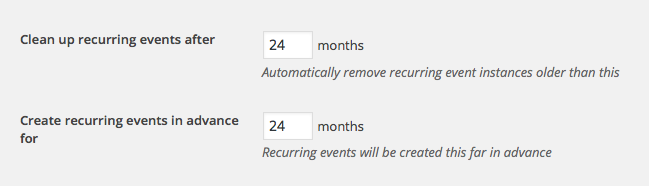
Keeping these numbers as low as possible will help with performance – as you can see, the default is 24 months, but if you can use four months for example, that would help with performance in a general sense.
Can your [sic] assure me the 4.0 release of The Events Calendar plugin will optimize querys?
I can assure you that there will be performance improvements in 4.0 of The Events Calendar – I can not assure that the improvements in 4.0 alone will resolve all of the issues with your site.
I appreciate your patience with this support thread while I was out for the Thanksgiving holiday! Thank you Caín.
Best of luck with your site,
GeorgeParticipantHey @Alyssa,
Thanks for reaching out!
I have some good and bad news here.
The bad news is that I unfortunately do not know why this is happening – I can’t quite recreate this exact issue on my local testing site. Your theme’s own wp_title() filters might be the problem here.
However, the good news is that you can just override this manually – it will only affect the title on The Events Calendar pages too!
To override this, you would add code like the following to your theme’s functions.php file:
add_filter( 'tribe_events_title_tag', 'tribe_1029772', 10, 3 );function tribe_1029772( $new_title, $the_title, $sep ) {
return 'Upcoming Events | Torpedo Factory Art Center';
}
If you want to get more detailed with that, you can combine the above code snippet with the Conditional tags listed here, for example → https://gist.github.com/jo-snips/2415009
So, for example, if you want the title to be “Upcoming Events This Month” on month view, but “Upcoming Events This Week” on week view, something like this should work well:
add_filter( 'tribe_events_title_tag', 'tribe_1029772', 10, 3 );function tribe_1029772( $new_title, $the_title, $sep ) {
if ( tribe_is_month() && ! is_tax() ) {
$new_title = 'Upcoming Events This Month | Torpedo Factory Art Center';
}if ( tribe_is_week() && !is_tax() ) {
$new_title = 'Upcoming Events This Week | Torpedo Factory Art Center';
}return $new_title;
}
I hope this helps!
Cheers,
GeorgeParticipantHey @Jasraj,
Thank you for testing this! The behavior is odd and I cannot replicate it on my own site 🙁 What you mentioned here is indeed an important thing worth investigating:
i am wondering if this is a theme issue, server issue (hostgator) or a memory limit issue.
I don’t think the server or memory limit would effect this, but a theme or plugin code conflict could definitely cause this.
To investigate that, I would recommend doing the steps outlined here → https://theeventscalendar.com/knowledgebase/themers-guide/
After each step, I would recommend doing a test paypal purchase. This may sound tedious but should be much faster to work through than it sounds, and the results of this testing would be invaluable!
Let me know what you think, and if you do those steps, what you find by doing them.
Thank you,
GeorgeParticipantHey Lawrie!
I went to http://thecarshowcollective.co.uk/events and found a blank white screen; same with just http://thecarshowcollective.co.uk/ itself.
Therefore it seems like there are unfortunately some deeper issues on your site here, which then could of course affect the “Upcoming Events” display itself.
So just to be clear, if you do nothing but deactivate The Events Calendar, Events Calendar Pro, and Filter Bar, does this “blank white screen” go away and your site works fine?
Thanks,
GeorgeParticipantHey @John!
This is a bit of a red flag:
I also don’t have anything on the HELP page – it is blank. So I can’t add my system info.
Can you clarify these details about your site in the absence of that System Info?:
- What version of The Events Calendar are you running on your site?
- What version of Events Calendar Pro are you running on your site?
- What version of The Events Calendar: WooCommerce Tickets are you running on your site?
- What version of WordPress are you running?
—
Now, regarding the specific issue with sidebar display, I’m wondering if you can head to Events > Settings > Display in your wp-admin; there will be an option there called “Events template”. I would recommend trying out literally every single template option here; save the changes and check on these sidebar issues after each option change.
Does any template help here?
Thank you!
GeorgeParticipantHey @Christoph,
Thanks for reporting this! There unfortunately may not be much we can do if this truly a problem contained within the Types plugin – but to help us investigate this a bit, can you first share your “System Information” with us? Here’s how → https://theeventscalendar.com/knowledgebase/sharing-sys-info/
Also, what your site’s Permalinks settings?
Thanks,
GeorgeNovember 23, 2015 at 11:12 am in reply to: Personalized Taxonomy not available for Community events? #1029774ParticipantHey @Cristina,
There is unfortunately no support for custom taxonomies like you mention at this time 🙁 Implementing support would require much custom code, unfortunately, which we are not able to help with.
I’m sorry to disappoint!
Best of luck with your site,
GeorgeParticipantHey @Lindsay,
Like you hinted at, this would unfortunately require some code customization. To get a basic sense of what’s required for modifying the default templates, I’d recommend first getting familiar with our “Themer’s Guide” here → https://theeventscalendar.com/knowledgebase/themers-guide/
That lays out the basic principles for modifying The Events Calendar’s templates.
With those principles in mind, you could then use tribe_get_events() under the month view to get the next event based on parameters you define. To get familiar with tribe_get_events(), you can check out this article here → https://theeventscalendar.com/knowledgebase/using-tribe_get_events/
I hope these resources help!
Cheers,
GeorgeParticipantHey Rupert,
This is an interesting project – unfortunately is a custom coding project, which we can not help with 🙁
As one last quick note before closing this thread, you mention using a custom field to store the credit score – and so to address your question about how to “call the attended events out with the associated score”, it seems like using WP_Query and/or pre_get_posts to display events based on the value of that custom field should do the trick just fine.
Best of luck with your custom coding!
Cheers,
GeorgeParticipantHey @Lindsay,
This is technically possible but is unfortunately a code customization project which we cannot help with.
One alternative that might help is an unofficial plugin that was made by a community member – it’s called “The Events Calendar Category Colors”, and is available here: https://wordpress.org/plugins/the-events-calendar-category-colors/
That is not an official plugin and so we cannot provide any support for – but it might help! Many people love it, and it’s made by one of our most beloved community members, Andy Fragen 🙂
Check it out and let us know if it helps!
Cheers,
GeorgeParticipantHey @Rich,
Sorry you’re having issues here!
I checked out your link, and all of the events are showing up it seems. It just seems like the display is sort-of broken, which unfortunately may be a theme issue.
I see several JavaScript errors on the page. First, let’s try to clear these up before we get into theme testing.
Can you first deactivate every plugin on your site one at a time, and check on the events page after EACH deactivation?
The only plugins you should not deactivate in this testing are The Events Calendar and Events Calendar Pro of course – but for every single other plugin, deactivate it; then check on the issue. If the issues persist on your events page, go back and deactivate the next plugin, and repeat the process.
If after deactivating one plugin, your Events page suddenly isn’t so broken, let us know!
Thanks,
George -
AuthorPosts